
What is an electronic signature? Definition, types, and how it works in 2026

Quick answer: An electronic signature is any electronic sound, symbol, or process attached to a record and executed by a person with the intent to sign it. In the United States, it carries the same legal standing as a handwritten signature under federal and state law once intent to sign and consent to do business electronically are established; in the European Union, that same equivalence applies specifically to the qualified tier under the eIDAS framework. Think of it as a notarized handshake that happens over a network instead of across a table: the technology changes, but the job (proving who agreed to what, and when) stays the same.
TL;DR
- An electronic signature is any sound, symbol, or process tied to a record and executed with the intent to sign; it is not defined by how it looks.
- In the US, the ESIGN Act and the Uniform Electronic Transactions Act give it the same legal weight as a wet-ink signature.
- The EU’s eIDAS framework splits electronic signatures into three tiers: simple (SES), advanced (AES), and qualified (QES), each with a different verification bar.
- A digital signature is not a synonym for an electronic signature; it is one cryptographically secured way of implementing one.
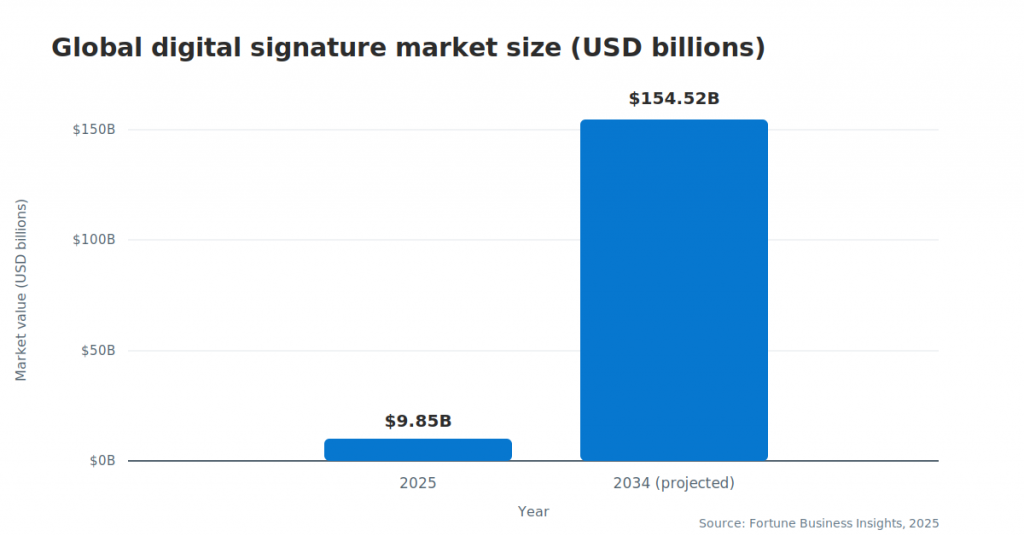
- The global digital signature market is projected to grow from $9.85 billion in 2025 to $154.52 billion by 2034, a signal of how fast paper-based signing is being replaced.
- SignNow customers report saving up to 6 hours per employee per week after moving signature workflows off paper.
- The ESIGN Act excludes some document types outright, including wills and codicils, family-law matters, and court orders and pleadings, which generally still require a different process.
What legally qualifies as an electronic signature
An electronic signature legally qualifies when it shows clear intent to sign, is tied to a consenting signer, and is preserved as a retrievable part of the signed record. Under 15 U.S.C. 7001, the federal ESIGN Act, a signature, contract, or other record cannot be denied legal effect solely because it is in electronic form. The Uniform Electronic Transactions Act, adopted by nearly every US state, applies the same principle at the state level. Together, they set four practical requirements:
- Intent to sign. The signer must take an affirmative action, typing a name, drawing a mark, or clicking to accept, that shows they meant to sign.
- Consent to do business electronically. The signer must have agreed, or reasonably be understood to have agreed, to transact electronically rather than on paper.
- Attribution. The signature must be reasonably traceable to the person who executed it, through email verification, authentication, or another identifying step.
- Record retention. The signed document must be stored in a form that can be accurately reproduced later, for the signer and for any party who needs to reference it.
None of these requirements says anything about how the mark looks. A typed name, a drawn signature, or a checkbox can all qualify, provided the four elements above are met. The same four elements do not apply uniformly everywhere: AIIM notes that requirements vary by geography and use case, and recommends a reliable, often multifactor, authentication process for remote signers in higher-risk scenarios. As adoption climbs toward a projected $154.52 billion global market by 2034, this legal flexibility is one reason electronic signatures have replaced paper across sales, HR, and legal workflows.
Requirements can vary by country. For a closer look at what qualifies where a business operates, SignNow’s legality guidance by country breaks down the standard jurisdiction by jurisdiction.
How does an electronic signature work
An electronic signature works by capturing a signer’s action, typing, drawing, uploading, or clicking to accept, alongside authentication and audit data that together prove who signed, when, and under what conditions. In a typical signing platform, the process runs through six steps:
- Upload or create the document. The sender adds a PDF, Word file, or template to the platform.
- Add the signer and assign a role. The sender enters the signer’s email address and, for multi-party documents, sets a customizable signing order so recipients sign in sequence.
- Place signature and data fields. The sender drags signature, date, and text fields onto the document at the exact spots that need to be filled.
- The signer opens the document and authenticates. Depending on the plan and document sensitivity, this can mean simply opening an emailed link or completing a stronger identity check.
- The signer creates their mark. Using the My signature style panel, the signer types, draws, or uploads an image of their signature and confirms it.
- The platform generates an audit trail and stores the record. Every action, including who opened the document, when, and from what IP address, is logged and attached to the completed file.
That last step is worth unpacking, because it is what actually makes a signature defensible later. An audit trail is essentially a receipt: it records the signer’s full name, email address, IP address, and a timestamp for every action taken, from opening the document to confirming the final signature. If a signed contract is ever disputed, this record, not the visual appearance of the signature, is what a court or auditor examines. SignNow builds this workflow around a few consistent entry points: add and prepare document, set up and send eSignature invite, and maintain a SignNow audit trail alongside a document history log so senders can track status after the invite goes out.

Types of electronic signatures: SES, AES, and QES
Electronic signatures fall into three tiers under the EU’s eIDAS framework: simple, advanced, and qualified, each requiring a different level of identity verification. The table below summarizes the distinctions.
| Type | Verification level | Typical use |
| Wet-ink signature | Physical presence, no digital verification | Documents where electronic signing is not accepted |
| Simple electronic signature (SES) | Basic; relies on signer intent (typed name, click-to-accept) | Everyday business documents: NDAs, internal approvals, sales orders |
| Advanced electronic signature (AES) | Uniquely linked to the signer, capable of identifying them, and created under their sole control | Contracts requiring stronger assurance: vendor agreements, HR onboarding |
| Qualified electronic signature (QES) | Issued via a qualified certificate from a licensed trust service provider | High-stakes or regulated transactions require the strongest legal presumption |
The eIDAS Regulation (EU) No 910/2014 defines these three tiers explicitly, and a QES carries the same legal presumption as a handwritten signature across the EU. US federal and state law (the ESIGN Act and UETA) does not use this three-tier structure by name; it accepts electronic signatures broadly as long as the intent, consent, attribution, and retention requirements described earlier are met. That difference matters for any business signing documents across both regions. SignNow includes eIDAS SES on every plan, with QES available as an add-on limited to the Site License plan for organizations that need the highest EU assurance level.
Electronic signature vs. digital signature
An electronic signature is a broad legal category; a digital signature is one specific, cryptographically secured way of implementing it. The two terms get used interchangeably in casual conversation, but they describe different things.
| Feature | Electronic signature | Digital signature |
| Underlying technology | Any electronic sound, symbol, or process | Public-key infrastructure (PKI) and cryptographic hashing |
| Identity verification | Intent and consent-based (email link, click, typed name) | Certificate-based, tied to a verified digital identity |
| Typical legal basis | ESIGN Act, UETA, eIDAS SES/AES | Often paired with eIDAS QES or industry-specific standards |
A digital signature uses a private cryptographic key to create a unique, tamper-evident seal on a document; any later change to the file invalidates the signature. An electronic signature, by contrast, can be as simple as a typed name backed by an audit trail. SignNow security and compliance applies PKI along with TLS 1.2/1.3 encryption in transit and AES-256 encryption at rest, so the underlying document data is protected regardless of which signature type a workflow uses.
Key features to look for in electronic signature software
The features that matter most are the ones that create a verifiable, repeatable signing process: authentication, audit trails, flexible signing order, and reusable templates.
- Audit trail. A detailed log of every signer’s action, name, email, IP address, and timestamp, which becomes part of the completed document’s record.
- Two-factor signer authentication. An added verification step, such as a text message or phone call, for documents that need stronger identity assurance.
- Custom signing order. Control over the sequence in which multiple signers receive and complete a document, useful for approval chains.
- Bulk send. The ability to send the same document to many recipients at once, available on SignNow’s Business Premium plan and above.
- Reusable templates. Saved document layouts with fields already placed, so recurring paperwork does not need to be rebuilt each time.
- Mobile apps with offline signing. The ability to sign or send documents from a phone or tablet, including in low-connectivity conditions.
Who uses electronic signatures?
Electronic signatures are used across nearly every document-heavy function, sales, HR, legal, healthcare, real estate, and construction, wherever a signature previously meant printing, mailing, or scanning a page.
In healthcare, a fast shift to remote intake made the difference concrete. “When COVID-19 occurred, we converted to 100% teletherapy within a week. Now I am doing that intake contract work via SignNow, and it has simplified the workflow,” said Mark Dombeck, Ph.D.
In legal and HR settings, compliance is often the deciding factor. Dan Rotelli, CEO of BIS, a legal services provider, explained the choice this way: “We felt most comfortable investing with SignNow given their SOC 2 certification and strict focus on ESIGN and UETA act compliance. Deploying SignNow across all functions of our growing organization and within critical Office 365 environments has simplified our entire workflow.”
Brian Fitzgibbons, COO of Optica Ventures LLC, put it plainly: “The interface is simple and easy-to-use for our team; more importantly, it is just as easy for our customers. I have used a number of platforms over the years, none compare to the efficiency of SignNow. SignNow now drives our onboarding for new employees, non-disclosure agreements, and more.”
Beyond these examples, SignNow lists construction, financial services, government, insurance, nonprofit, real estate, and education among its supported SignNow industry solutions, each with workflows built around that sector’s paperwork, from lease agreements to donation forms.
Benefits of electronic signatures
The measurable benefits of electronic signatures are faster turnaround, fewer abandoned documents, and lower administrative overhead compared with printing, mailing, or scanning paperwork.
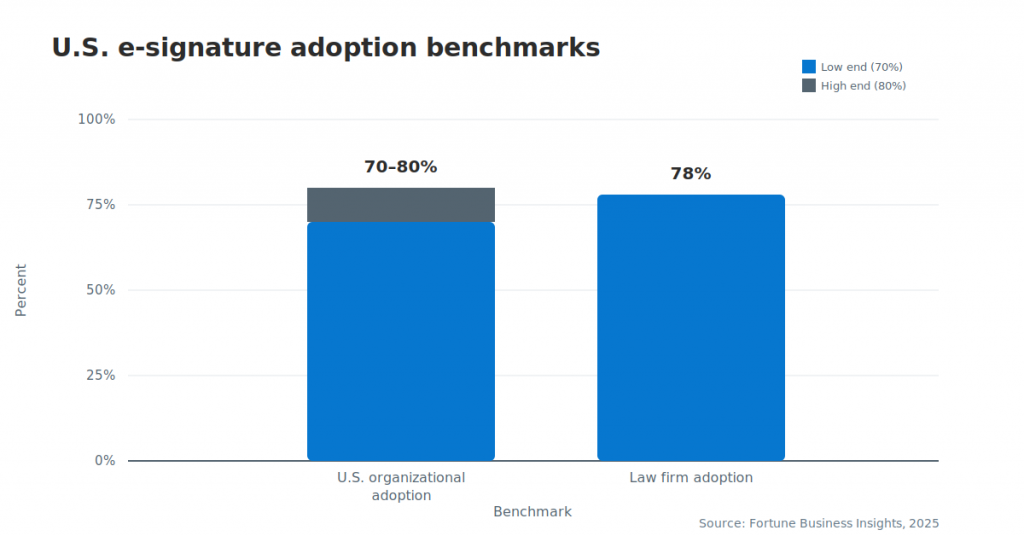
- Broad organizational adoption. Between 70% and 80% of US e-signature adoption among US organizations reflects how mainstream the technology has become.
- Strong adoption in regulated fields. 78% of US law firms report using e-signature software, a sector historically cautious about digital tools.
- Time saved per employee. SignNow customers report saving up to 6 hours per employee per week by moving signature workflows off paper.
- Improved deal-closing rates. SignNow reports an average 8% improvement in deal-closing rates among customers who adopt the platform.
Disclaimer: The information contained in this blog post is provided for general informational purposes only and does not constitute formal legal advice.
Final thoughts
Electronic signatures have become the standard way to approve agreements, onboard employees, close deals, and manage paperwork without printing or scanning documents. Understanding what makes an electronic signature legally valid—and choosing software that supports secure authentication, compliance, and complete audit records—is essential for creating documents that are both efficient and trustworthy.
SignNow brings every part of that process together in one platform. You can create your signature by typing, drawing, or uploading an image, prepare documents for one or multiple signers, automate signing workflows, and maintain detailed audit trails that support compliance with ESIGN, UETA, eIDAS, and other industry requirements. Whether you’re signing a single agreement or managing high-volume document workflows, SignNow helps you complete the process securely from any device.
Start using SignNow today to create legally binding electronic signatures, streamline document approvals, and simplify every stage of your digital signing workflow.
Glossary
- Audit trail. A detailed record of every action taken on a document, including signer names, email addresses, IP addresses, and timestamps, is generated automatically as part of the signing process.
- eIDAS. The European Union regulation (No 910/2014) that defines electronic identification and trust services, including the three-tier SES/AES/QES structure for electronic signatures.
- ESIGN Act. The Electronic Signatures in Global and National Commerce Act (15 U.S.C. 7001), the US federal law giving electronic signatures and records the same legal standing as their paper equivalents.
- Qualified electronic signature (QES). The highest eIDAS tier, issued through a qualified certificate from a licensed trust service provider, carrying the same legal presumption as a handwritten signature in the EU.
- UETA. The Uniform Electronic Transactions Act, a model law adopted by nearly every US state establishing that a record or signature cannot be denied legal effect solely because it is electronic.
FAQ
1. What is considered an electronic signature?
Any electronic sound, symbol, or process attached to a record and executed with the intent to sign qualifies, including a typed name, a drawn mark, an uploaded image, or a click-to-accept action, as long as it meets the intent, consent, attribution, and retention requirements described above.
2. Is an electronic signature the same as a digital signature?
No. An electronic signature is a broad legal category; a digital signature is a specific, cryptographically secured method (using PKI) for implementing one. All digital signatures are electronic signatures, but not all electronic signatures use digital-signature technology. Learn more in or latest blog about electronic signature vs. digital signature.
3. Is an electronic signature legally binding in the US?
Yes, under the ESIGN Act and UETA, provided the signer showed intent to sign, consented to sign electronically, can be reasonably identified, and the record is retained in reproducible form. A small set of documents, including wills and certain court filings, are generally excluded depending on jurisdiction.
4. How do I create an electronic signature?
Most platforms let a signer type their name in a stylized font, draw a signature with a mouse, finger, or stylus, or upload a scanned image. In SignNow, this happens through creating a signature in SignNow using the “My signature” panel in the document editor.
5. What makes an electronic signature valid?
Validity depends on four elements: intent to sign, consent to do business electronically, a signature reasonably attributable to the signer, and a record that can be accurately retained and reproduced. Appearance is not one of the requirements.
6. Are electronic signatures accepted internationally?
Broadly, yes, though the specific standard varies by country. The US relies on the ESIGN Act and UETA, the EU uses the tiered eIDAS framework, and many other countries have their own laws that recognize electronic signatures with varying verification requirements.
Sources
- What legally qualifies as an electronic signature
- How does an electronic signature work
- Types of electronic signatures: SES, AES, and QES
- Electronic signature vs. digital signature
- Key features to look for in electronic signature software
- Who uses electronic signatures?
- Benefits of electronic signatures
- Final thoughts
