
Need to sign a document without printing? Wondering how to create an electronic signature online without software downloads and other inconveniences? Luckily, there are signature makers available online, and many of them are free, though very basic. For simple, one-off tasks, a basic signature maker might suffice. But for business documents, it’s smarter to use an eSignature platform like SignNow that lets you sign, send, track, and store everything in one secure place
TL;DR: How to create an electronic signature online:
- Primary action: “create electronic signature online”
- Main methods: draw, type, upload
- Best free-use case: one-off personal documents
- Best business-use case: signing workflows with tracking, templates, and audit trails
- Recommended tool type: eSignature platform instead of a basic signature generator
Digital signature landscape: report data
The adoption of digital signature technology is accelerating rapidly. According to the report by Fortune Business Insights, in 2025, the global digital signature market was valued at USD 9.85 billion, and it is projected to grow from USD 13.70 billion in 2026 to an impressive USD 154.52 billion by 2034, reflecting a compound annual growth rate (CAGR) of 35.40% during this period. North America led the market in 2025, accounting for 38.00% of the global share.
eSignature adoption across regions and industries
The numbers below show which industries are seeing the biggest value from eSignatures today. There’s no doubt that eSignatures have become a practical, everyday tool for faster paperwork, smoother approvals, and better customer and employee experiences across many sectors.
| Industry | Statistic | What it suggests |
| Real estate | 79% of realtors use eSignature, making it the most-used technology | Real estate is one of the clearest high-adoption sectors for eSignatures. |
| Banking, financial services, and insurance | The sector held a significant share of the digital signature market in 2025. | Strong ROI case for onboarding, lending, account opening, insurance claims, and wealth-management paperwork. |
| Healthcare & life sciences | Healthcare is expected to be the fastest-growing end-use sector for digital signatures during 2026–2034. | Healthcare adoption is accelerating, especially for consent, clinical-trial documentation, and regulated workflows. |
| Healthcare consent workflows | The healthcare eConsent market is estimated at $547.91M in 2025, growing to $912.59M by 2030 at a 10.74% CAGR. | A useful proxy for eSignature use in patient consent and clinical research workflows. |
| Government / public sector | The government segment is projected to grow at a significant CAGR, driven by paperless governance, electronic approvals, certificates, licenses, and interdepartmental communications. | North America accounted for 38.0% of the global digital signature market in 2025, according to one estimate; another estimates 32.3%. |
| Cross-industry / global | The global digital signature market is valued at $9.85B in 2025 and projected to reach $154.52B by 2034, a 35.4% CAGR. | North America remains the largest regional market, but estimates vary by methodology. |
| Cross-industry / regional | The business segment accounted for the largest share of digital signature end use in 2025. | Confirms rapid expansion across industries, though this is market revenue, not adoption rate. |
| Cross-industry / business use | The business segment dominated digital signature end use in 2025. | eSignatures are now mainly an operational workflow tool, not just a signing utility. |
As the data shows, the eSignatures market is evolving, and adoption of this technology is a necessity, not an option. We’ve covered the value of eSignature for business in one of our previous blogs; see it for more details.
Methods to create an electronic signature online
Tools for creating electronic signatures offer three common ways:
- Draw your signature online
Use your mouse, trackpad, finger, or stylus to write your signature directly on the screen. This option works well when you want something that closely resembles your handwritten signature. - Type your name and choose a signature style
This is typically the fastest method. Simply enter your name, pick a font style, and save it as your signature. It’s ideal for quick forms and routine approvals. - Upload an image of your handwritten signature
If you already have a clean image of your signature, you can upload it and reuse it across documents. This ensures a consistent, professional look.
While these methods help you create an electronic signature online, signing documents often requires more. You also need a secure way to place it on documents, save a record, route the file to the next signer, and, if the workflow requires it, notarize the document.
Step-by-step: How to create an electronic signature online with SignNow
If your goal is not just to create a signature but to sign and manage documents efficiently, SignNow simplifies the process.
Your quick guide on electronic signature creation:
- Open SignNow in your browser and log in using your email credentials.
- While on the dashboard, go to My Account near your profile picture.
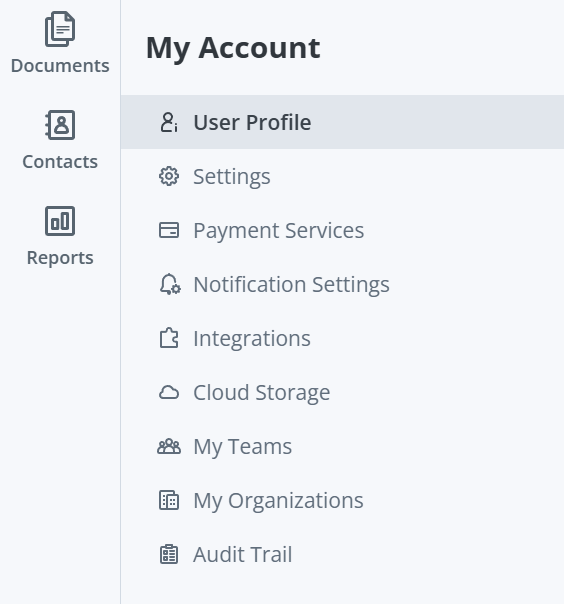
3. In the My account sidebar menu, select User Profile to open the user profile settings.
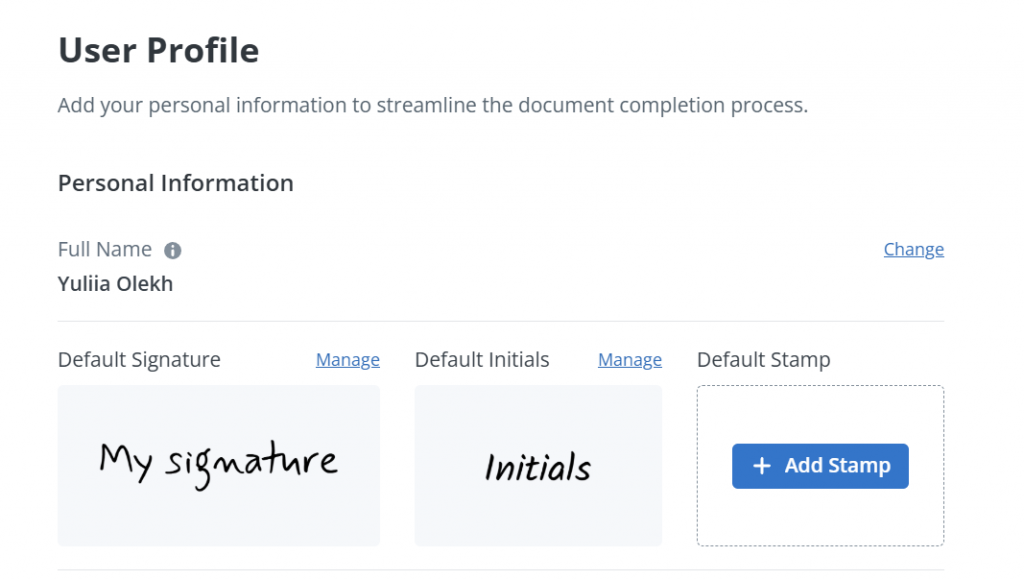
4. Click Manage near your Default Signature to create your signature
Select the method that works best for you:
- Draw your signature online
- Type your name and choose a signature style
- Upload an image of your signature
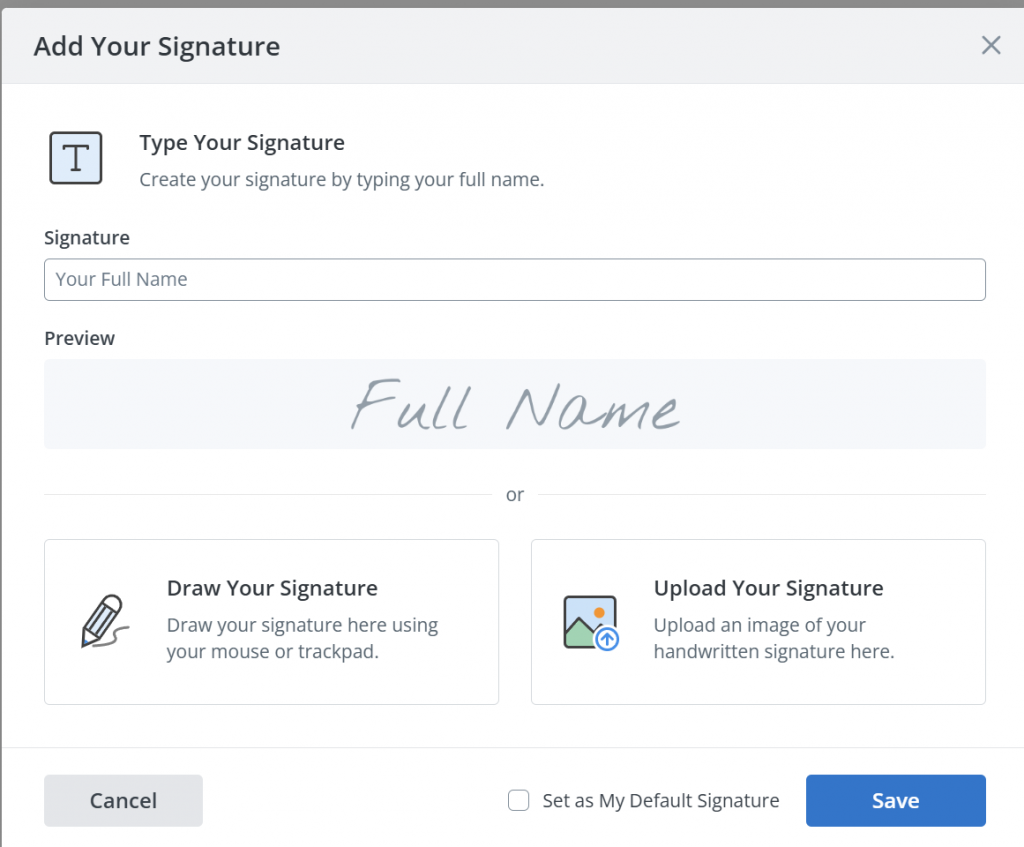
5. If you choose to type your signature, choose the style for it:
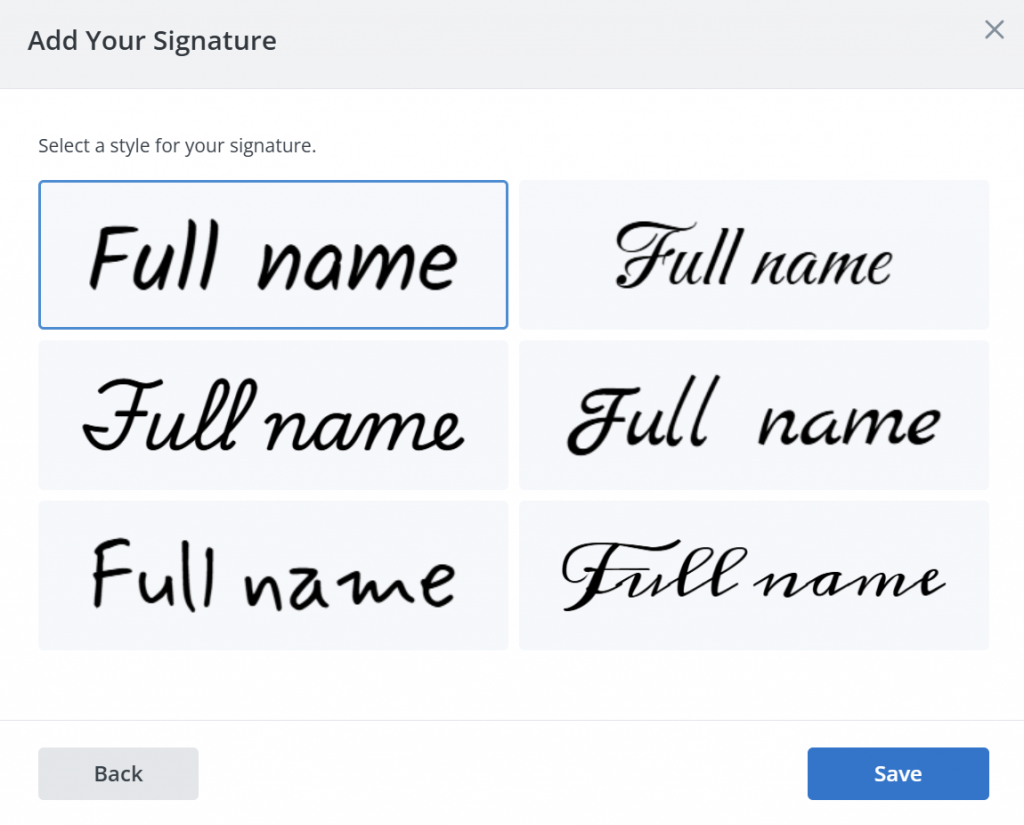
6. Click Save to retain the created signature. This will be your default one for signing documents online.
If you decide to change the appearance of your signature, just repeat this simple process.
What’s the difference between an electronic signature and a digital signature?
While people often use these terms interchangeably, they’re not exactly the same:
- An electronic signature is data in electronic form that is attached to or logically associated with other data in electronic form, and that is used by the signatory to sign, where the signatory is a natural person.
- Digital signature is more technical, using cryptographic methods to verify the signer’s identity and detect changes to signed data.
In most cases, people searching for “create digital signature online” are looking for a practical eSignature workflow, not a cryptography lesson. For everyday business forms, contracts, and approvals, an electronic signature platform like SignNow is the better fit.
Is an electronic signature created online legally valid?
Disclaimer: This article is for informational purposes only and should not be considered legal advice. For advice about your specific situation, consult a qualified attorney.
In the U.S., electronic signatures are recognized under the Electronic Signatures in Global and National Commerce Act (ESIGN), which gives them legal effect in interstate and foreign commerce. At the state level, the Uniform Electronic Transactions Act (UETA) also supports electronic records and signatures when parties agree to transact electronically.
However, legality depends on factors like intent to sign, consent to do business electronically, proper record retention, and the ability to show what happened during the signing process. For high-stakes documents, features like audit trails, timestamps, authentication, and tamper-evident records are crucial.
When a free eSignature generator is enough (and when you need more)
It’s a fair question: if you can create an electronic signature online for free, why would anyone pay for an eSignature tool?
The answer is simple. Free tools are great for quick, personal tasks. Paid platforms are built for everything that happens after the signature.
If you just need to sign one document, a tool functioning as a free eSignature generator may be all you need. Maybe you want to sign a one-off PDF, add your signature to a personal form, or quickly fill out and send back a simple file. In those cases, a basic tool can do the job fast, and you can find many of them easily on the web.
Features that businesses value in eSignature platforms.
Once you need to send a document to someone else, follow up on its status, make sure the right person signs first, or keep a record of the completed file, free tools can start to feel limited. That’s where a full eSignature platform makes more sense.
When we say “a full eSignature platform”, we mean the solution enabling you to send documents for signature, track whether they were opened or completed, set signer order, reuse templates, collect information through fillable fields, and keep an audit trail for your records. Teams also need options to collaborate on documents and connect signing workflows to the tools they already use, including CRM, HR, and finance systems.
Why businesses use SignNow instead of a basic signature maker
Logically summarizing all the above, we see that businesses often outgrow simple signature tools because they need more than just a downloadable signature image. That’s when platforms tailored for scalable workflow needs come into play.
SignNow supports the full workflow with features like templates, shared documents for team collaboration, signer authentication, multi-step routing, reminders, notifications, reporting, and integrations with platforms like Salesforce, NetSuite, and Microsoft 365. With transparent pricing, scalability, and 24/7 support, SignNow is ideal for teams that need documents signed fast without losing visibility or control.
Conclusion
For business documents, an eSignature platform like SignNow is the smarter choice, allowing you to sign contracts online, send, track, and store them in one secure workspace.
With SignNow, you can create a legally binding electronic signature in under a minute by simply drawing it, typing your name, or uploading an image of your handwritten signature. Once your signature is ready, you can place it on any PDF, contract, form, or approval workflow from virtually any device.
Try SignNow today and streamline your business needs beyond just creating eSignatures.
FAQ
How secure is it to create an electronic signature online?
Creating an electronic signature online is secure when using a trusted eSignature platform like SignNow. Features such as encryption, audit trails, and signer authentication ensure your documents and signatures are protected. Always choose platforms that comply with legal standards like ESIGN and UETA for added peace of mind.
Is an electronic signature the same as a digital signature?
Not exactly. An electronic signature is a broad term for signing electronically, while a digital signature refers to a more technical method that uses cryptographic technology to help verify identity and detect document changes. In everyday business use, most people searching for this topic are looking for an eSignature workflow rather than a technical digital certificate setup.
What industries benefit most from creating electronic signatures online?
Industries like real estate, healthcare, and finance see significant benefits from creating electronic signatures online. These sectors rely on eSignatures for faster approvals, secure document handling, and compliance with strict regulations. Platforms like SignNow simplify these processes, making them more efficient and scalable.
Can I save my signature and reuse it later?
Yes, for example, using SignNow, you can save a created signature and use it again on future documents. This is especially useful if you sign forms or agreements regularly and want a faster, more consistent process. A reusable signature can save time compared with redrawing or reuploading it every time.
What types of documents are best suited for eSignature workflows?
eSignature workflows are especially useful for business documents that need to be prepared, signed, shared, tracked, and stored in an organized way. That includes forms, contracts, approvals, and other files that may involve multiple people or repeat use. The more often a document process repeats, the more valuable templates and workflow tools become.
Sources:
- National Association of REALTORS® — REALTOR® Technology Survey
- Grand View Research — Digital Signature Market Size, Share & Trends Analysis Report
- Fortune Business Insights — Digital Signature Market Size, Share & Industry Analysis
- European Commission eIDAS Dashboard — eSignature FAQ
- NIST — Computer Security Resource Center
- TL;DR: How to create an electronic signature online:
- Digital signature landscape: report data
- Methods to create an electronic signature online
- Step-by-step: How to create an electronic signature online with SignNow
- What’s the difference between an electronic signature and a digital signature?
- Is an electronic signature created online legally valid?
- When a free eSignature generator is enough (and when you need more)
- Why businesses use SignNow instead of a basic signature maker
- Conclusion
- FAQ
- Sources:
