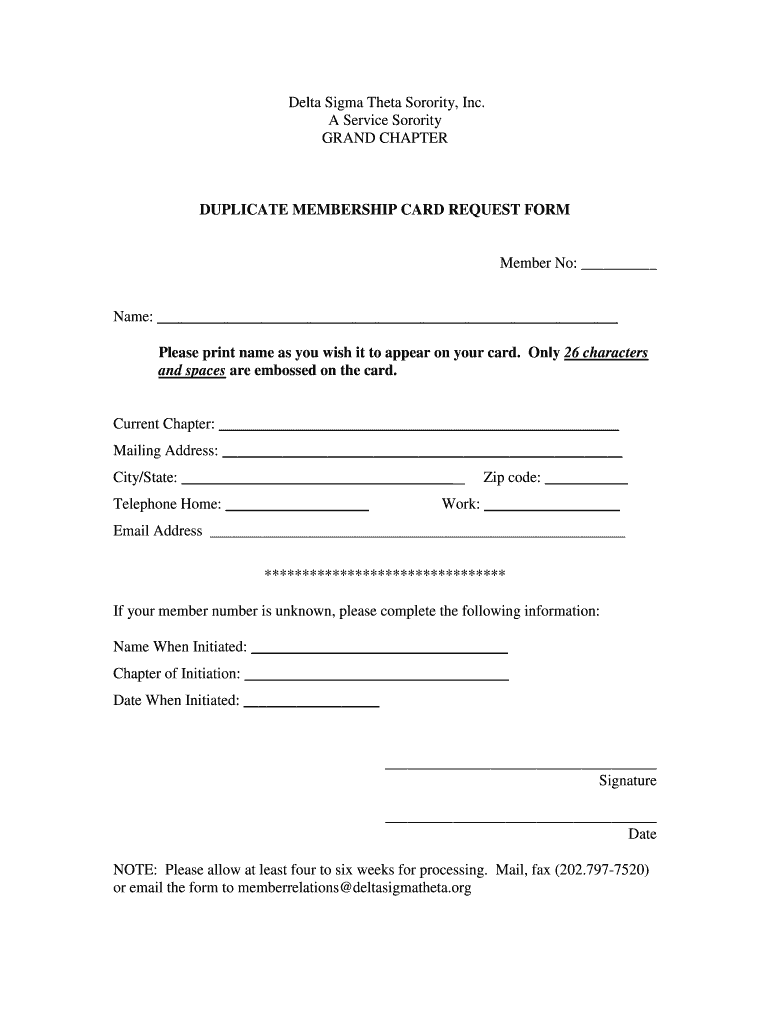
Delta Theta Sigma Form


What is the Delta Sigma Theta Membership Card?
The Delta Sigma Theta membership card serves as an official identification for members of the Delta Sigma Theta Sorority, Inc. This card symbolizes the commitment and connection to the sorority's values, mission, and sisterhood. It is often required for participation in sorority events, meetings, and activities. The membership card includes essential information, such as the member's name, membership number, and the date of initiation, ensuring that all members can be easily recognized within the organization.
How to Obtain the Delta Sigma Theta Membership Card
To obtain a Delta Sigma Theta membership card, individuals must first complete the membership application process. This typically involves submitting a Delta Sigma Theta membership form, which may require personal information, academic credentials, and references. Once the application is approved, new members will receive their membership card during an initiation ceremony or through the mail. It is important to ensure that all details on the card are accurate, as this document is vital for maintaining active membership status.
Steps to Complete the Delta Sigma Theta Membership Form
Completing the Delta Sigma Theta membership form involves several key steps to ensure accuracy and compliance with the sorority's requirements:
- Gather Required Information: Collect personal details, including your full name, address, phone number, and email address.
- Provide Academic Credentials: Include information about your educational background, such as schools attended and degrees earned.
- List References: Identify individuals who can vouch for your character and commitment to the sorority's values.
- Review and Sign: Carefully review the completed form for any errors before signing it to affirm your commitment.
- Submit the Form: Follow the submission guidelines provided by the sorority, ensuring that you meet any deadlines.
Legal Use of the Delta Sigma Theta Membership Card
The Delta Sigma Theta membership card is a legally recognized document within the context of the sorority. It serves as proof of membership and can be used to access various benefits, including participation in events and voting in sorority matters. Members should ensure that their card is kept secure and updated, as it may be required for verification purposes during official functions. The card's legal standing is reinforced by adherence to the sorority's bylaws and regulations.
Key Elements of the Delta Sigma Theta Membership Card
The Delta Sigma Theta membership card includes several key elements that validate its authenticity and significance:
- Member's Name: Clearly displayed to identify the individual.
- Membership Number: A unique identifier assigned to each member.
- Date of Initiation: Indicates when the member officially joined the sorority.
- Sorority Seal: Features the official emblem of Delta Sigma Theta, ensuring the card's legitimacy.
- Expiration Date: Some cards may include a renewal date, indicating when membership needs to be verified or renewed.
Digital vs. Paper Version of the Delta Sigma Theta Membership Card
Members of Delta Sigma Theta may receive either a digital or paper version of their membership card. The digital card can be accessed through the sorority's official app or website, providing convenience and easy access. In contrast, the paper version is a traditional format that some members may prefer for its tangible nature. Both versions are equally valid, but members should ensure they understand how to use and present each type when required for verification or participation in sorority activities.
Quick guide on how to complete duplicate membership card form delta sigma theta sorority inc dstiac
Discover how to effortlessly navigate the Delta Theta Sigma completion with this clear guide
Submitting and finalizing documents online is becoming more prevalent and the preferred option for many users. It offers several advantages over traditional paper forms, including convenience, time savings, enhanced precision, and security.
With tools like airSlate SignNow, you can locate, modify, sign, and streamline your Delta Theta Sigma without getting stuck in endless printing and scanning. Follow this concise guide to get started and manage your document effectively.
Utilize these steps to obtain and complete Delta Theta Sigma
- Begin by clicking the Get Form button to access your form in our editor.
- Pay attention to the green label on the left that indicates mandatory fields so you don’t miss any.
- Take advantage of our advanced features to annotate, modify, sign, secure, and enhance your form.
- Secure your document or convert it into an interactive form using the tools on the right panel.
- Review the form and check for any errors or inconsistencies.
- Select DONE to complete your editing.
- Rename your document or leave it as is.
- Choose the storage option you prefer to save your form, send it via USPS, or click the Download Now button to retrieve your document.
If Delta Theta Sigma isn’t what you were seeking, you can explore our extensive library of pre-imported templates that you can complete with minimal effort. Visit our platform today!
Create this form in 5 minutes or less
Create this form in 5 minutes!
How to create an eSignature for the duplicate membership card form delta sigma theta sorority inc dstiac
How to create an electronic signature for the Duplicate Membership Card Form Delta Sigma Theta Sorority Inc Dstiac online
How to create an eSignature for your Duplicate Membership Card Form Delta Sigma Theta Sorority Inc Dstiac in Google Chrome
How to generate an electronic signature for putting it on the Duplicate Membership Card Form Delta Sigma Theta Sorority Inc Dstiac in Gmail
How to generate an eSignature for the Duplicate Membership Card Form Delta Sigma Theta Sorority Inc Dstiac right from your smart phone
How to make an eSignature for the Duplicate Membership Card Form Delta Sigma Theta Sorority Inc Dstiac on iOS devices
How to generate an electronic signature for the Duplicate Membership Card Form Delta Sigma Theta Sorority Inc Dstiac on Android devices
People also ask
-
What is Delta Theta Sigma in the context of airSlate SignNow?
Delta Theta Sigma refers to a specific program or feature within airSlate SignNow that enhances the eSigning experience. It allows users to streamline document workflows, ensuring that contracts and agreements are signed quickly and efficiently. With Delta Theta Sigma, businesses can manage their signing processes more effectively.
-
How much does Delta Theta Sigma cost with airSlate SignNow?
The pricing for Delta Theta Sigma features within airSlate SignNow is competitive and designed to meet the needs of various businesses. Users can choose from different subscription plans that cater to both small teams and larger enterprises. For specific pricing details, it's best to visit the airSlate SignNow website or contact their sales team.
-
What features does Delta Theta Sigma offer?
Delta Theta Sigma includes a range of features aimed at simplifying the eSigning process. Key functionalities include customizable templates, real-time notifications, and advanced security measures to protect sensitive documents. Users can also take advantage of seamless integration with other tools, enhancing overall productivity.
-
What are the benefits of using Delta Theta Sigma for eSigning?
Using Delta Theta Sigma with airSlate SignNow provides numerous benefits, including increased efficiency and reduced turnaround times for document signing. The platform's user-friendly interface allows businesses to manage their signing processes without extensive training. Additionally, Delta Theta Sigma ensures compliance and security for all signed documents.
-
Can Delta Theta Sigma integrate with other software?
Yes, Delta Theta Sigma is designed to integrate seamlessly with various software applications, enhancing its functionality. Users can connect airSlate SignNow with popular tools such as CRM systems, project management software, and cloud storage services. This integration capability allows for a more streamlined workflow across different platforms.
-
Is Delta Theta Sigma suitable for businesses of all sizes?
Absolutely! Delta Theta Sigma within airSlate SignNow is tailored to serve businesses of all sizes, from startups to large corporations. The flexibility of the platform means that it can easily adapt to the needs of different industries and workflows, making it a versatile choice for any organization.
-
How secure is the Delta Theta Sigma eSigning process?
The Delta Theta Sigma eSigning process prioritizes security, employing advanced encryption and authentication measures to protect user data. airSlate SignNow complies with industry standards to ensure that all documents signed through the platform are secure and legally binding. This commitment to security gives users peace of mind when handling sensitive transactions.
Get more for Delta Theta Sigma
- Allegiance reimbursement form
- Usace safety inspection checklist form
- Fmla leave tracker form
- Hbuhsd physical form
- Performance management feedback form for colleagues or co workers
- Using sage 50 accounting pdf download form
- Form 1040 sp u s individual income tax return spanish version 624654294
- Fillable rental agreement template form
Find out other Delta Theta Sigma
- How To Sign Wyoming Orthodontists Document
- Help Me With Sign Alabama Courts Form
- Help Me With Sign Virginia Police PPT
- How To Sign Colorado Courts Document
- Can I eSign Alabama Banking PPT
- How Can I eSign California Banking PDF
- How To eSign Hawaii Banking PDF
- How Can I eSign Hawaii Banking Document
- How Do I eSign Hawaii Banking Document
- How Do I eSign Hawaii Banking Document
- Help Me With eSign Hawaii Banking Document
- How To eSign Hawaii Banking Document
- Can I eSign Hawaii Banking Presentation
- Can I Sign Iowa Courts Form
- Help Me With eSign Montana Banking Form
- Can I Sign Kentucky Courts Document
- How To eSign New York Banking Word
- Can I eSign South Dakota Banking PPT
- How Can I eSign South Dakota Banking PPT
- How Do I eSign Alaska Car Dealer Form