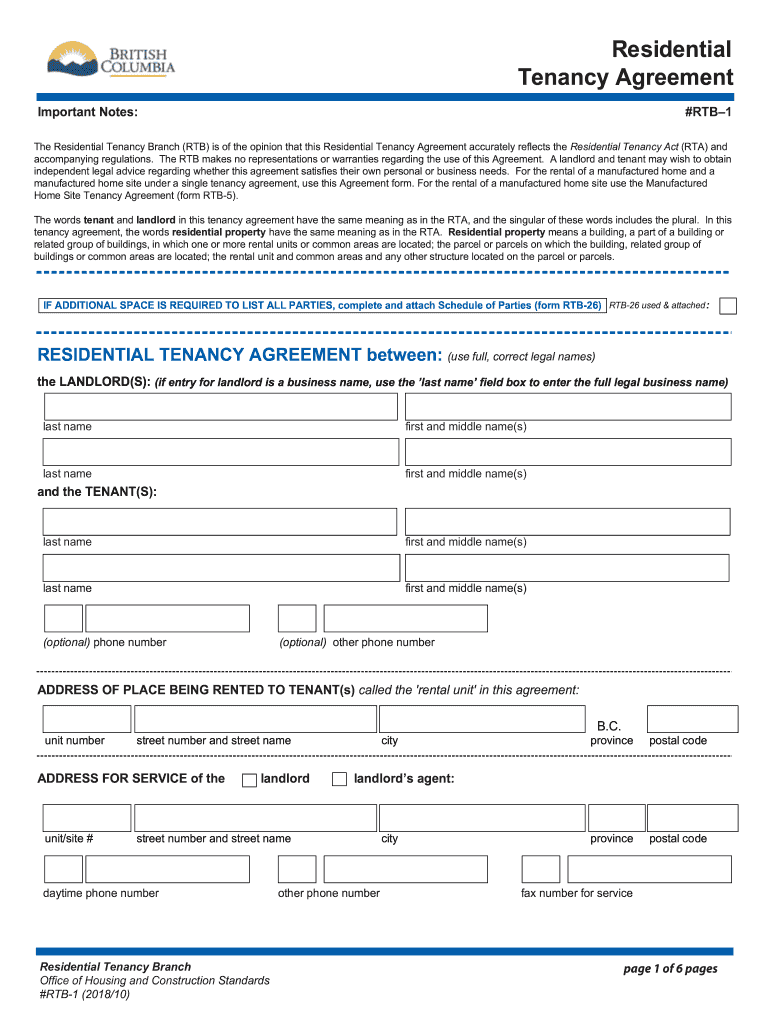
Residential Tenancy Agreement Bc 2018


What is the Residential Tenancy Agreement Bc
The Residential Tenancy Agreement BC is a legally binding contract between a landlord and a tenant in British Columbia, Canada. This agreement outlines the rights and responsibilities of both parties regarding the rental of a residential property. It includes essential details such as the rental amount, payment due dates, and terms of tenancy. Understanding this agreement is crucial for both landlords and tenants to ensure compliance with local laws and to protect their interests.
Key elements of the Residential Tenancy Agreement Bc
Several key elements are essential in a Residential Tenancy Agreement BC to ensure its validity and effectiveness. These include:
- Names of the parties: The full names of both the landlord and tenant must be included.
- Property address: The specific address of the rental property should be clearly stated.
- Rent amount: The agreed-upon rent amount and payment frequency must be specified.
- Duration of tenancy: The start date and, if applicable, the end date of the tenancy should be outlined.
- Security deposit: Information regarding the security deposit, including the amount and conditions for its return, should be included.
Steps to complete the Residential Tenancy Agreement Bc
Completing the Residential Tenancy Agreement BC involves several straightforward steps:
- Gather necessary information: Collect all relevant details about the rental property and the parties involved.
- Use a reliable template: Obtain a standardized form or template that complies with BC regulations.
- Fill in the details: Accurately complete all sections of the agreement, ensuring all required information is included.
- Review the agreement: Both parties should review the document for accuracy and clarity before signing.
- Sign the agreement: Both the landlord and tenant should sign the agreement to make it legally binding.
Legal use of the Residential Tenancy Agreement Bc
The legal use of the Residential Tenancy Agreement BC is governed by the Residential Tenancy Act of British Columbia. This act provides the framework for rental agreements, ensuring that both landlords and tenants adhere to specific rights and obligations. It is essential for both parties to understand these legal provisions to avoid disputes and ensure compliance with local regulations.
How to obtain the Residential Tenancy Agreement Bc
Obtaining the Residential Tenancy Agreement BC can be done through various means. Landlords and tenants can access the form online through government websites or legal resources that provide templates compliant with BC laws. Additionally, local rental offices may offer printed copies of the agreement. It is important to ensure that the version used is the most current and adheres to the latest legal standards.
Examples of using the Residential Tenancy Agreement Bc
Examples of using the Residential Tenancy Agreement BC can vary based on different rental scenarios. For instance, a landlord renting out a single-family home would use the agreement to outline terms specific to that property, while a tenant renting an apartment would have a different set of expectations and requirements. Each agreement should reflect the unique circumstances of the rental situation, ensuring clarity and mutual understanding between the parties involved.
Quick guide on how to complete taxpayer accountability principles government of bc
A brief guide on how to create your Residential Tenancy Agreement Bc
Finding the correct template can turn into a difficulty when you need to submit formal international documents. Even if you possess the necessary form, it can be cumbersome to swiftly finish it according to all the specifications if you rely on physical copies instead of handling everything digitally. airSlate SignNow is the online electronic signature solution that assists you in overcoming all of that. It allows you to acquire your Residential Tenancy Agreement Bc and promptly complete and sign it on-site without the need to reprint documents every time you make an error.
Here are the procedures you should follow to create your Residential Tenancy Agreement Bc with airSlate SignNow:
- Click the Get Form button to add your document to our editor instantly.
- Begin with the first blank field, enter your information, and proceed with the Next tool.
- Complete the empty fields using the Cross and Check tools from the panel above.
- Select the Highlight or Line options to mark the most essential details.
- Click on Image and upload one if your Residential Tenancy Agreement Bc necessitates it.
- Use the right-side panel to add more fields for yourself or others to complete if necessary.
- Review your answers and validate the form by clicking Date, Initials, and Sign.
- Draw, type, upload your eSignature, or capture it via a camera or QR code.
- Conclude modifying the form by clicking the Done button and selecting your file-sharing preferences.
Once your Residential Tenancy Agreement Bc is prepared, you can share it however you prefer - send it to your recipients via email, SMS, fax, or even print it directly from the editor. You can also securely store all your completed documents in your account, organized in folders according to your preferences. Don’t spend time on manual form filling; try airSlate SignNow!
Create this form in 5 minutes or less
Find and fill out the correct taxpayer accountability principles government of bc
FAQs
-
How do I get updates about the government jobs to fill out the form?
Employment news is the best source to know the notifications published for govt job vacancy. The details are given in the notices. The news available on net also. One can refer the news on net too. It is published regularly on weekly basis. This paper includes some good article also written by experts which benefits the students and youths for improving their skill and knowledge. Some time it gives information regarding carrier / institution/ special advance studies.
-
How can I fill out Google's intern host matching form to optimize my chances of receiving a match?
I was selected for a summer internship 2016.I tried to be very open while filling the preference form: I choose many products as my favorite products and I said I'm open about the team I want to join.I even was very open in the location and start date to get host matching interviews (I negotiated the start date in the interview until both me and my host were happy.) You could ask your recruiter to review your form (there are very cool and could help you a lot since they have a bigger experience).Do a search on the potential team.Before the interviews, try to find smart question that you are going to ask for the potential host (do a search on the team to find nice and deep questions to impress your host). Prepare well your resume.You are very likely not going to get algorithm/data structure questions like in the first round. It's going to be just some friendly chat if you are lucky. If your potential team is working on something like machine learning, expect that they are going to ask you questions about machine learning, courses related to machine learning you have and relevant experience (projects, internship). Of course you have to study that before the interview. Take as long time as you need if you feel rusty. It takes some time to get ready for the host matching (it's less than the technical interview) but it's worth it of course.
-
How do I fill out the form of DU CIC? I couldn't find the link to fill out the form.
Just register on the admission portal and during registration you will get an option for the entrance based course. Just register there. There is no separate form for DU CIC.
-
How do I fill out an application form to open a bank account?
I want to believe that most banks nowadays have made the process of opening bank account, which used to be cumbersome, less cumbersome. All you need to do is to approach the bank, collect the form, and fill. However if you have any difficulty in filling it, you can always call on one of the banks rep to help you out.
Create this form in 5 minutes!
How to create an eSignature for the taxpayer accountability principles government of bc
How to generate an eSignature for your Taxpayer Accountability Principles Government Of Bc online
How to generate an electronic signature for your Taxpayer Accountability Principles Government Of Bc in Google Chrome
How to make an electronic signature for putting it on the Taxpayer Accountability Principles Government Of Bc in Gmail
How to create an eSignature for the Taxpayer Accountability Principles Government Of Bc straight from your smartphone
How to make an electronic signature for the Taxpayer Accountability Principles Government Of Bc on iOS devices
How to make an electronic signature for the Taxpayer Accountability Principles Government Of Bc on Android
People also ask
-
What is a Residential Tenancy Agreement BC?
A Residential Tenancy Agreement BC is a legally binding contract between a landlord and tenant that outlines the terms of renting a residential property in British Columbia. This agreement typically includes details such as rent amount, duration of the tenancy, and the responsibilities of both parties. Using airSlate SignNow, you can easily create and manage your Residential Tenancy Agreement BC electronically.
-
How much does it cost to create a Residential Tenancy Agreement BC with airSlate SignNow?
Creating a Residential Tenancy Agreement BC with airSlate SignNow is cost-effective and offers various pricing plans to suit different needs. Whether you are an individual landlord or a property management company, our pricing is designed to provide value while helping you efficiently manage your agreements. Sign up today to explore our competitive pricing options.
-
What features does airSlate SignNow offer for Residential Tenancy Agreements BC?
airSlate SignNow provides a user-friendly platform that includes features like customizable templates, eSignature capability, and document tracking for your Residential Tenancy Agreement BC. These features streamline the signing process, improve compliance, and ensure that all parties have access to the necessary documents at any time.
-
Are Residential Tenancy Agreements BC legally binding when signed electronically?
Yes, Residential Tenancy Agreements BC signed electronically through airSlate SignNow are legally binding, provided they comply with the laws of British Columbia. Our platform adheres to the electronic signature regulations, ensuring that your agreements are valid and enforceable in a court of law.
-
Can I integrate airSlate SignNow with other tools for managing my Residential Tenancy Agreements BC?
Absolutely! airSlate SignNow offers seamless integrations with various tools and platforms, allowing you to manage your Residential Tenancy Agreements BC alongside your existing workflows. Whether you use property management software or accounting tools, our integrations help you streamline processes and enhance productivity.
-
What are the benefits of using airSlate SignNow for my Residential Tenancy Agreements BC?
Using airSlate SignNow for your Residential Tenancy Agreements BC simplifies the document management process, making it faster and more efficient. Benefits include reduced paperwork, enhanced security through encrypted signatures, and improved collaboration between landlords and tenants. Plus, our platform saves you time and money compared to traditional signing methods.
-
Is customer support available for issues related to Residential Tenancy Agreements BC?
Yes, airSlate SignNow offers dedicated customer support for any issues related to your Residential Tenancy Agreements BC. Our team is available to assist you with questions about the platform, troubleshooting, and best practices for creating and managing your agreements. We're here to ensure a smooth experience for all users.
Get more for Residential Tenancy Agreement Bc
- Irs form 8283
- Printable irs form 14039 identity
- Ihip form
- Dast 10 screening tool form
- Ccm 0050 clerk of the circuit court of cook county form
- Trafford council income ampampamp expenditure form name date of
- Sullom voe terminal participants 10th anniversary educational trust form
- Html unable to clear form fields after submit in angular
Find out other Residential Tenancy Agreement Bc
- How Do I Send eSign Form
- Fax eSign PDF Online
- Fax eSign Document Online
- Fax eSign Document Mac
- Fax eSign Form Computer
- Fax eSign PPT Later
- Can I Fax eSign Form
- Invite eSign Document Mac
- Invite eSign Presentation iPad
- Complete eSign Form Later
- Request eSign PDF Now
- Request eSign PDF Android
- How To Request eSign PDF
- Request eSign Document Easy
- How To Add eSign PDF
- Request eSign Presentation Myself
- Request eSign Presentation Secure
- How To Add eSign Word
- How Do I Add eSign Word
- Remove eSign PDF Mobile