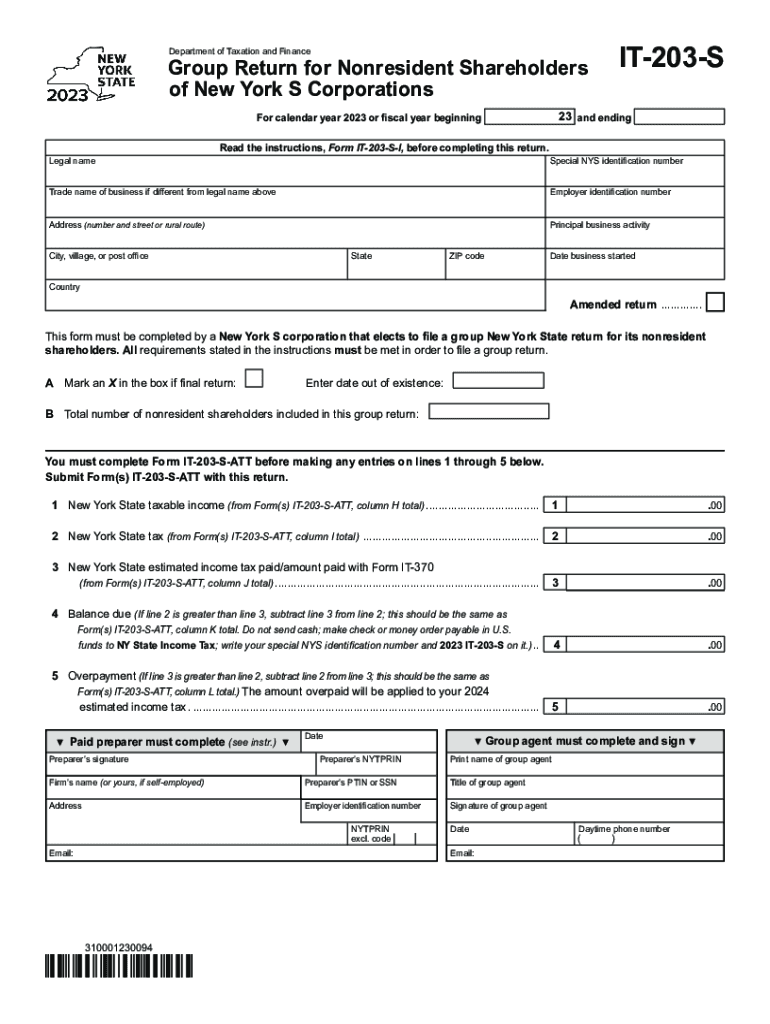
Form it 203 S Group Return for Nonresident Shareholders of New York S Corporations Tax Year 2023


What is the Form IT 203 S Group Return For Nonresident Shareholders Of New York S Corporations Tax Year
The Form IT 203 S is a tax document specifically designed for nonresident shareholders of New York S corporations. This form allows these shareholders to report their share of income, gains, losses, and deductions from the S corporation for a given tax year. By filing this form, nonresident shareholders can ensure compliance with New York tax laws while accurately reporting their income derived from the corporation. This form is essential for nonresidents to determine their tax liability in New York and to properly allocate income earned from the S corporation.
How to use the Form IT 203 S Group Return For Nonresident Shareholders Of New York S Corporations Tax Year
To use the Form IT 203 S, nonresident shareholders must first gather all necessary financial information related to their share of the S corporation's income. This includes details about any distributions received, as well as any deductions or losses that may apply. After collecting this information, shareholders should complete the form by accurately filling out each section, ensuring that all figures are correct. Once completed, the form can be submitted to the New York State Department of Taxation and Finance, either electronically or via mail, depending on the preferences and capabilities of the taxpayer.
Steps to complete the Form IT 203 S Group Return For Nonresident Shareholders Of New York S Corporations Tax Year
Completing the Form IT 203 S involves several key steps:
- Gather all relevant financial documents, including K-1 forms from the S corporation.
- Fill out the identification section of the form, including your name, address, and taxpayer identification number.
- Report your share of the S corporation's income, gains, losses, and deductions as indicated on your K-1.
- Calculate any New York State tax owed based on the income reported.
- Review the completed form for accuracy and completeness.
- Submit the form by the designated deadline, ensuring you keep a copy for your records.
Key elements of the Form IT 203 S Group Return For Nonresident Shareholders Of New York S Corporations Tax Year
The Form IT 203 S includes several key elements that are crucial for accurate reporting. These elements consist of the identification section, where taxpayers provide personal information, and the income section, which details the shareholder's share of the S corporation's income. Additionally, the form requires the reporting of any deductions or losses, as well as a section for calculating the total New York State tax liability. Each element must be filled out carefully to ensure compliance with state regulations.
Filing Deadlines / Important Dates
Filing deadlines for the Form IT 203 S are critical for nonresident shareholders to note. Generally, the form must be filed by the 15th day of the third month following the end of the tax year. For most taxpayers, this means the deadline falls on March 15 for calendar year filers. It is important to keep track of these dates to avoid penalties and ensure timely compliance with New York tax laws.
Penalties for Non-Compliance
Failure to file the Form IT 203 S on time or inaccuracies in the information provided can result in penalties. Noncompliance may lead to fines, interest on unpaid taxes, and potential audits by the New York State Department of Taxation and Finance. It is essential for nonresident shareholders to ensure that the form is completed accurately and submitted by the deadline to avoid these consequences.
Quick guide on how to complete form it 203 s group return for nonresident shareholders of new york s corporations tax year
Complete Form IT 203 S Group Return For Nonresident Shareholders Of New York S Corporations Tax Year effortlessly on any device
Digital document management has gained traction among businesses and individuals. It offers an excellent eco-friendly substitute for traditional printed and signed documents, allowing you to obtain the necessary form and securely preserve it online. airSlate SignNow equips you with all the resources required to create, modify, and electronically sign your documents swiftly without delays. Manage Form IT 203 S Group Return For Nonresident Shareholders Of New York S Corporations Tax Year on any device with airSlate SignNow Android or iOS applications and simplify any document-related procedure today.
How to amend and eSign Form IT 203 S Group Return For Nonresident Shareholders Of New York S Corporations Tax Year seamlessly
- Locate Form IT 203 S Group Return For Nonresident Shareholders Of New York S Corporations Tax Year and click on Get Form to begin.
- Utilize the tools we provide to finalize your document.
- Highlight pertinent sections of the documents or obscure sensitive information with tools that airSlate SignNow offers specifically for this purpose.
- Create your eSignature using the Sign tool, which takes moments and holds the same legal validity as a conventional wet ink signature.
- Review all the details and click on the Done button to save your changes.
- Choose how you wish to share your form, via email, text message (SMS), or invite link, or download it to your computer.
Eliminate concerns about lost or misplaced files, tedious form searches, or mistakes that necessitate printing new document copies. airSlate SignNow fulfills all your document management requirements in just a few clicks from any device you prefer. Modify and eSign Form IT 203 S Group Return For Nonresident Shareholders Of New York S Corporations Tax Year and ensure excellent communication at any stage of the form preparation process with airSlate SignNow.
Create this form in 5 minutes or less
Find and fill out the correct form it 203 s group return for nonresident shareholders of new york s corporations tax year
Create this form in 5 minutes!
How to create an eSignature for the form it 203 s group return for nonresident shareholders of new york s corporations tax year
How to create an electronic signature for a PDF online
How to create an electronic signature for a PDF in Google Chrome
How to create an e-signature for signing PDFs in Gmail
How to create an e-signature right from your smartphone
How to create an e-signature for a PDF on iOS
How to create an e-signature for a PDF on Android
People also ask
-
What is Form IT 203 S Group Return For Nonresident Shareholders Of New York S Corporations Tax Year?
Form IT 203 S Group Return For Nonresident Shareholders Of New York S Corporations Tax Year is a tax return filed by nonresident shareholders. This form allows these individuals to report their share of income from S corporations operating in New York. It is essential for compliance with New York tax laws for nonresident shareholders.
-
How can airSlate SignNow help with Form IT 203 S Group Return For Nonresident Shareholders Of New York S Corporations Tax Year?
airSlate SignNow provides an easy-to-use platform for electronically signing and sending documents. This includes Form IT 203 S Group Return For Nonresident Shareholders Of New York S Corporations Tax Year, making the process streamlined and efficient. You can ensure timely submissions and secure signatures with our solution.
-
What are the benefits of using airSlate SignNow for tax forms like Form IT 203 S Group Return?
Using airSlate SignNow offers several benefits for handling tax forms such as Form IT 203 S Group Return For Nonresident Shareholders Of New York S Corporations Tax Year. The platform is cost-effective, saves time, and ensures compliance with tax regulations. Additionally, it enhances document security and provides a seamless user experience.
-
Is there a pricing model for using airSlate SignNow for filing Form IT 203 S?
airSlate SignNow offers various pricing models to cater to different needs, ensuring accessibility for all users. Subscriptions typically include features for eSigning and document management related to Form IT 203 S Group Return For Nonresident Shareholders Of New York S Corporations Tax Year. You can choose a plan that best fits your business requirements.
-
Can I integrate airSlate SignNow with other software for managing Form IT 203 S?
Yes, airSlate SignNow integrates seamlessly with various software applications to facilitate the management of documents like Form IT 203 S Group Return For Nonresident Shareholders Of New York S Corporations Tax Year. This integration allows you to streamline your business processes and improve productivity signNowly.
-
How secure is airSlate SignNow for filing sensitive tax documents like Form IT 203 S?
AirSlate SignNow prioritizes security, ensuring that sensitive tax documents such as Form IT 203 S Group Return For Nonresident Shareholders Of New York S Corporations Tax Year are protected. The platform uses advanced encryption and robust security measures to safeguard your information from unauthorized access.
-
What features does airSlate SignNow offer for the preparation of Form IT 203 S?
AirSlate SignNow offers features that enhance the preparation of Form IT 203 S Group Return For Nonresident Shareholders Of New York S Corporations Tax Year. These include customizable templates, e-signature capabilities, and real-time collaboration tools. This makes it easier for businesses to manage the document preparation process efficiently.
Get more for Form IT 203 S Group Return For Nonresident Shareholders Of New York S Corporations Tax Year
- Texas railroad commission test form
- Tcpdf signature form
- Reg 3 mc application for motor carrier road tax ct form
- Famu recommendation letter form
- Move in and move out unit condition checklist property name unit head of household movein date moveout inspection date unless form
- 4100 1b form
- Notification of construction project form hse hse gov
- Rev 1500 771243666 form
Find out other Form IT 203 S Group Return For Nonresident Shareholders Of New York S Corporations Tax Year
- How To eSign Vermont Digital contracts
- eSign Vermont Digital contracts Now
- eSign Vermont Digital contracts Later
- How Can I eSign New Jersey Contract of employment
- eSignature Kansas Travel Agency Agreement Now
- How Can I eSign Texas Contract of employment
- eSignature Tennessee Travel Agency Agreement Mobile
- eSignature Oregon Amendment to an LLC Operating Agreement Free
- Can I eSign Hawaii Managed services contract template
- How Do I eSign Iowa Managed services contract template
- Can I eSignature Wyoming Amendment to an LLC Operating Agreement
- eSign Massachusetts Personal loan contract template Simple
- How Do I eSign Massachusetts Personal loan contract template
- How To eSign Mississippi Personal loan contract template
- How Do I eSign Oklahoma Personal loan contract template
- eSign Oklahoma Managed services contract template Easy
- Can I eSign South Carolina Real estate contracts
- eSign Texas Renter's contract Mobile
- How Do I eSign Texas Renter's contract
- eSign Hawaii Sales contract template Myself