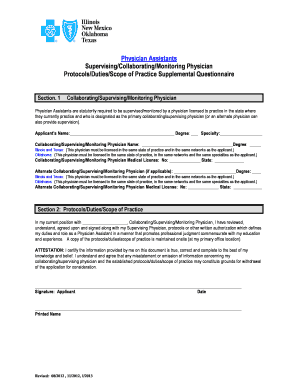
Assistants Monitoring 2013-2026


Understanding the Assistants Monitoring
The Assistants Monitoring process is essential for ensuring that dental practices comply with state regulations regarding the use of nitrous oxide. This monitoring involves overseeing the duties of dental assistants who administer nitrous oxide, ensuring they operate within their legal scope of practice. The supervising physician plays a crucial role in this process, as they are responsible for reviewing the actions of the assistants and ensuring that all protocols are followed. This oversight helps maintain patient safety and the integrity of the dental practice.
Steps to Complete the Assistants Monitoring
Completing the Assistants Monitoring involves several key steps to ensure compliance and patient safety. First, the supervising physician must establish clear protocols for the administration of nitrous oxide. Next, the dental assistants should receive proper training on these protocols. Following training, the assistants must document their procedures accurately in the nitrous oxide dental note template. Regular reviews of these notes by the supervising physician are essential to ensure adherence to established practices. Finally, any deviations from the protocols should be addressed promptly to maintain compliance.
Legal Use of the Assistants Monitoring
The legal use of the Assistants Monitoring is governed by state-specific regulations that dictate how dental assistants can administer nitrous oxide. It is vital for practices to familiarize themselves with these regulations to avoid legal repercussions. The supervising physician must ensure that all monitoring practices align with local laws, which may include specific documentation requirements and training standards. Compliance with these legal frameworks not only protects the practice but also enhances patient trust and safety.
Key Elements of the Assistants Monitoring
Several key elements are integral to the effectiveness of the Assistants Monitoring process. These include:
- Documentation: Accurate record-keeping in the nitrous oxide dental note template is essential for tracking the administration of nitrous oxide.
- Training: Ensuring that dental assistants are adequately trained in nitrous oxide protocols and safety measures.
- Supervision: Regular oversight by the supervising physician to review practices and ensure compliance with established protocols.
- Feedback: Providing constructive feedback to assistants to improve practices and address any concerns.
Examples of Using the Assistants Monitoring
Examples of effective use of the Assistants Monitoring can include case studies from dental practices that have successfully implemented oversight protocols. For instance, a practice may document how regular audits of nitrous oxide dental notes led to improved compliance and patient outcomes. Another example could involve a scenario where a practice identified a gap in training, prompting the development of a targeted training program that enhanced the assistants' skills in administering nitrous oxide safely.
State-Specific Rules for the Assistants Monitoring
Each state has its own set of rules governing the Assistants Monitoring process. It is crucial for dental practices to be aware of these regulations, as they can vary significantly. Some states may require specific training certifications for dental assistants, while others might mandate regular reporting of nitrous oxide administration. Practices should consult their state dental board or regulatory agency to ensure they are compliant with all relevant laws and guidelines.
Quick guide on how to complete assistants monitoring
Complete Assistants Monitoring effortlessly on any device
Digital document management has become increasingly favored by companies and individuals alike. It offers an ideal eco-friendly alternative to traditional printed and signed paperwork, allowing you to find the right form and securely store it online. airSlate SignNow provides you with all the tools necessary to create, modify, and eSign your documents quickly and without delays. Handle Assistants Monitoring on any device with airSlate SignNow's Android or iOS applications and enhance any document-related operation today.
The easiest way to modify and eSign Assistants Monitoring smoothly
- Obtain Assistants Monitoring and then click Get Form to begin.
- Utilize the tools we provide to finalize your document.
- Emphasize important sections of your documents or redact sensitive information with tools that airSlate SignNow supplies specifically for that purpose.
- Create your eSignature using the Sign tool, which takes seconds and carries the same legal validity as a conventional wet ink signature.
- Review the details and then click on the Done button to save your changes.
- Decide how you wish to share your form, whether by email, SMS, or invite link, or download it to your computer.
Eliminate the hassle of lost or mislaid documents, tedious form searches, or errors that necessitate printing new copies. airSlate SignNow meets your document management needs in just a few clicks from any device of your preference. Modify and eSign Assistants Monitoring and ensure effective communication at every stage of the form preparation process with airSlate SignNow.
Create this form in 5 minutes or less
Create this form in 5 minutes!
How to create an eSignature for the assistants monitoring
The way to make an electronic signature for your PDF in the online mode
The way to make an electronic signature for your PDF in Chrome
The best way to generate an electronic signature for putting it on PDFs in Gmail
The way to make an eSignature right from your smart phone
The way to generate an electronic signature for a PDF on iOS devices
The way to make an eSignature for a PDF on Android OS
People also ask
-
What is Assistants Monitoring in airSlate SignNow?
Assistants Monitoring is a powerful feature within airSlate SignNow that allows businesses to track and manage document activities performed by their assistants. This functionality enhances workflow efficiency by providing insights into who is handling which documents and when, ensuring accountability and organization throughout the signing process.
-
How does Assistants Monitoring improve team collaboration?
With Assistants Monitoring, teams can collaborate more effectively by having visibility into each member's actions regarding document management. This feature allows managers to oversee their assistants' progress, enabling better communication and coordination to meet deadlines and maintain productivity.
-
Is there a cost associated with Assistants Monitoring?
Assistants Monitoring is included in airSlate SignNow's pricing plans, which are designed to be budget-friendly for businesses of all sizes. By offering tiered pricing, airSlate SignNow ensures that companies can access essential features like Assistants Monitoring without breaking the bank.
-
What are the key features of Assistants Monitoring?
The key features of Assistants Monitoring include real-time tracking of document status, activity logs for each assistant, and customizable notifications for updates. These capabilities empower businesses to maintain control over their document workflows and enhance operational efficiency.
-
Can I integrate Assistants Monitoring with other tools?
Yes, Assistants Monitoring seamlessly integrates with various third-party applications, enhancing its functionality. Businesses can connect airSlate SignNow with tools like CRM systems and project management software to create a more streamlined workflow that leverages Assistants Monitoring for optimal results.
-
How can Assistants Monitoring benefit my business?
Assistants Monitoring benefits businesses by improving transparency and accountability in document handling. By tracking activities, companies can identify bottlenecks, streamline processes, and ensure that all actions are aligned with business objectives, ultimately saving time and resources.
-
Is Assistants Monitoring user-friendly for all team members?
Absolutely! Assistants Monitoring is designed with user-friendliness in mind, making it accessible for all team members, regardless of their technical expertise. The intuitive interface allows users to easily navigate through document activities and gain insights without extensive training.
Get more for Assistants Monitoring
- 2014 it 1040 2014 it 1040 tax ohio form
- 2013 it 1040 2013 it 1040 ohio department of taxation state of tax brackets form
- Ohio tax return form
- 2013 sd 100 school district income tax return ohio department tax ohio form
- State texas 100477154 form
- Forms fsucontrollers office florida state university
- Dma 5002 ia pdf important notice about your medicaid or special assistance approval notice form
- Administrator questionnaire form
Find out other Assistants Monitoring
- How To Submit Sign Word
- Submit Sign PDF Secure
- How To Submit Sign Form
- Submit Sign Form Online
- How Do I Submit Sign Form
- How To Submit Sign Document
- Submit Sign PPT Myself
- Submit Sign Presentation Myself
- Convert Sign PDF Online
- Convert Sign PDF Now
- Convert Sign PDF Free
- Convert Sign PDF Mac
- Convert Sign Word Online
- How To Convert Sign Word
- Help Me With Convert Sign Word
- Convert Sign Word Now
- Convert Sign Word Later
- How To Convert Sign PDF
- Convert Sign Word Free
- Convert Sign Document Online