
Top eSignature features to consider when choosing your digital signing tool (2025)

- Security and identity proofing moved to the front of the line in 2025.
- Compliance isn’t one-size-fits-all: healthcare (HIPAA): finance, and the public sector require audit-grade trails, strong access controls, and retention.
- Fraud pressure is on the rise: FBI data shows $16.6 billion in U.S. internet crime losses in 2024; BEC and investment scams underscore the need for signer verification, anti-tamper certificates, and administrative controls.
- Remote Online Notarization (RON) has gone mainstream in most states: plan for notarization-ready workflows if you notarize high-value agreements.
- Pricing and scalability matter: SignNow differentiates with unlimited users across paid plans, transparent pricing, and 24/7 support.
If you’re shortlisting e-signature software, the right electronic signature features determine speed-to-sign, compliance posture, and your total cost at scale. In 2025, new identity standards, tighter sector guidance, and higher fraud losses have raised the bar for what “good” looks like. This guide distills the eSignature features that matter most for U.S. B2B teams and flags where airSlate SignNow’s approach can lower risk and cost.
The shortlist: electronic signature features that actually matter
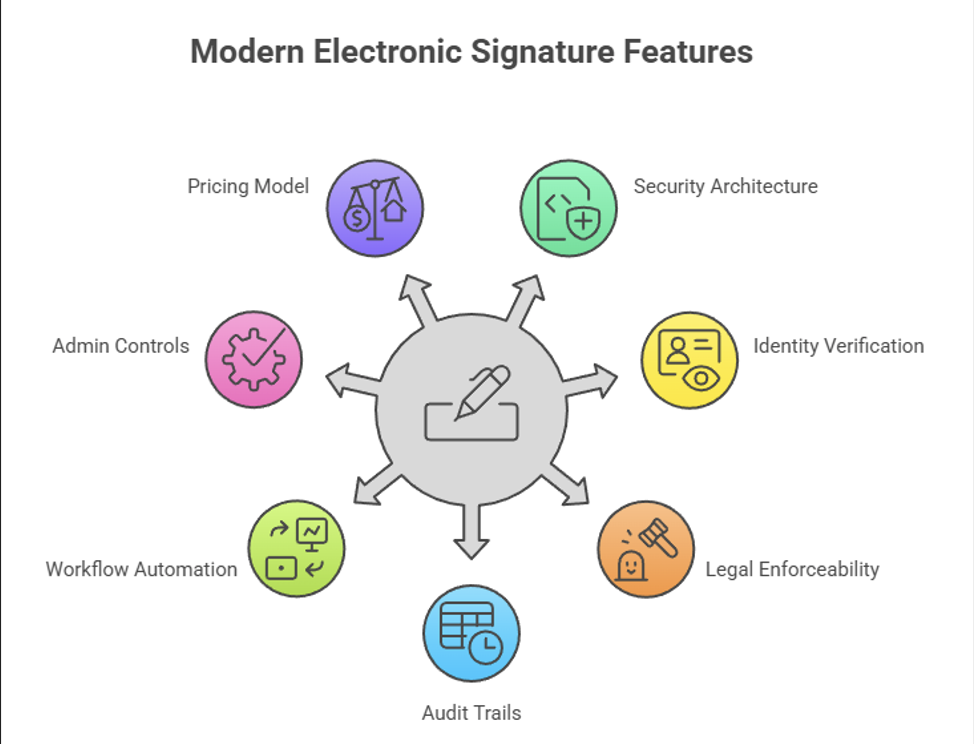
Electronic signature platforms vary widely in their security, compliance, and workflow capabilities, so it’s essential to evaluate them against a comprehensive set of criteria. The following table highlights the key architectural, operational, and legal elements that ensure a trustworthy and scalable e-signing solution..
Consolidated table of requirements & considerations
| Category | Key Points |
| 1) Security architecture & certifications | • Templates, reusable roles, and conditional logic • Bulk send, reminders, completion routing • Mobile + offline signing • API/SDK for CRM/ERP embedding • Accessibility + localization for customer-facing flows |
| 2) Identity verification & authentication | • Map transactions to appropriate IAL/AAL levels • Configure OTP/SMS, email challenge, KBA, or ID document verification • SSO (SAML/OIDC) for internal users • Optional step-up authentication for sensitive flows |
| 3) Legal enforceability & compliance | U.S. baseline: ESIGN + UETA (consent, attribution, record retention) Sector overlays: • Healthcare (HIPAA) – safeguards for ePHI, BAAs, audit logs; watch 2025 cybersecurity NPRM • Life sciences (21 CFR Part 11) – system validation, audit trails, e-record/signature equivalence • Public sector – align authentication with OMB/NIST; follow agency rules (e.g., GSA 2024 directive) • Notarization – Remote Online Notarization (RON) support |
| 4) Audit trails & evidence packages | • Immutable, time-stamped certificate per envelope • Signer IPs tracking, authentication, consent, event logs • Long-term validation (LTV) and timestamping• Exportable logs for regulators/courts |
| 5) Workflow automation & usability | • Templates, reusable roles, conditional logic • Bulk send, reminders, completion routing • Mobile + offline signing • API/SDK for CRM/ERP embedding • Accessibility + localization for customer-facing flows |
| 6) Admin controls & governance | • Granular roles/permissions • Retention policies and data residency options• Domain capture, email allow/deny lists • SLA-backed support • Reporting for queue times, completion, failures |
| 7) Pricing model & scalability | an effective value-per-dollar model with the cost-effective option of adding new users to growing workspaces |
How SignNow’s functionality maps to the 2025 set of crucial electronic signature features
As identity assurance becomes mandatory, not optional, and fraud continues to rise, organizations are re-evaluating whether their eSignature tools can keep up. SignNow is purpose-built for modern security requirements, transparent total cost of ownership, and fast deployment. Here’s how SignNow maps directly to the recommended feature set for 2025 and goes beyond in the platform’s advanced functionality
SignNow’s security architecture & certifications
SignNow provides the security foundation required for compliant, audit-ready digital signing:
- AES-256 encryption at rest and TLS 1.2+ encryption in transit
- Tamper-evident certificates are automatically applied to every completed document
- SOC 2 Type II–aligned controls validating operational and security maturity
- A publicly documented security and compliance program with dedicated resources
SignNow delivers defense-in-depth security designed for regulated workflows, without the bloated, enterprise-heavy overhead of legacy eSignature platforms.
Identity verification & authentication in SignNow
SignNow supports flexible, risk-based authentication layers:
- Email challenge, password-protected access, and SMS/OTP verification
- SSO (SAML/OIDC) for employee authentication
- Step-up authentication for high-value or sensitive transactions
- Granular session management to limit access and reduce token misuse
SignNow enables practical identity assurance without forcing customers into expensive or rigid verification add-ons. Teams can elevate authentication only when risk requires it.
SignNow’s legal enforceability & compliance-ready workflows
SignNow ensures legally enforceable, industry-aligned digital signing processes:
- Full compliance with ESIGN and UETA
- HIPAA-ready workflows with BAAs for healthcare customers
- 21 CFR Part 11–appropriate features, including audit trails and record integrity
- Support for public-sector authentication and retention standards
SignNow gives teams the compliance guardrails they need, especially in healthcare, finance, and government, while maintaining simplicity for everyday business processes.
Audit trails & evidence packages within SignNow
Every SignNow document includes a complete, immutable audit trail that captures:
- All signer actions and timestamps
- Sender activity and document lifecycle events
- Authentication methods used
- Signer IP address and device metadata
- A tamper-evident Certificate of Completion
SignNow’s evidence packages meet the expectations of courts, regulators, and auditors, helping teams resolve disputes quickly and maintain audit readiness throughout the year.
SignNow workflow automation & usability
SignNow prioritizes end-user experience, especially for SMB and mid-market teams that need power without complexity:
- Reusable templates and conditional routing
- Bulk send, reminders, and completion routing
- Mobile-first signing with iOS and Android apps
- Offline signing for field-based teams
- Embeddable API/SDK for CRM, ERP, or custom workflows
SignNow keeps workflows simple and intuitive, enabling teams to deploy automated signing in hours, not weeks, and cut administrative time.
Admin controls & governance in SignNow
SignNow provides practical, enterprise-grade governance controls. The platform offers mature governance without overwhelming admins, making it ideal for teams managing multiple departments, subsidiaries, or compliance needs.
Beneficial pricing model
SignNow’s pricing model is built for clarity and growth, avoiding the “per-seat creep” common in legacy competitors. For organizations with distributed or seasonal signers: HR, procurement, field ops, retail, education – SignNow delivers one of the lowest total costs of ownership in the category.
Advanced platform functionality beyond electronic signature features
In addition to fulfilling all the basic requirements of a modern eSignature solution, SignNow offers extended functionality for document creation, team collaboration, and more.
Team collaboration in SignNow
SignNow provides a comprehensive set of collaboration tools that enable teams to work efficiently on documents, approvals, and signature processes. Users can create shared teams, assign roles, and manage document access with granular permission settings. Team members can collaborate in real time by reviewing, editing, and commenting on documents, ensuring that everyone stays aligned throughout the signing process.
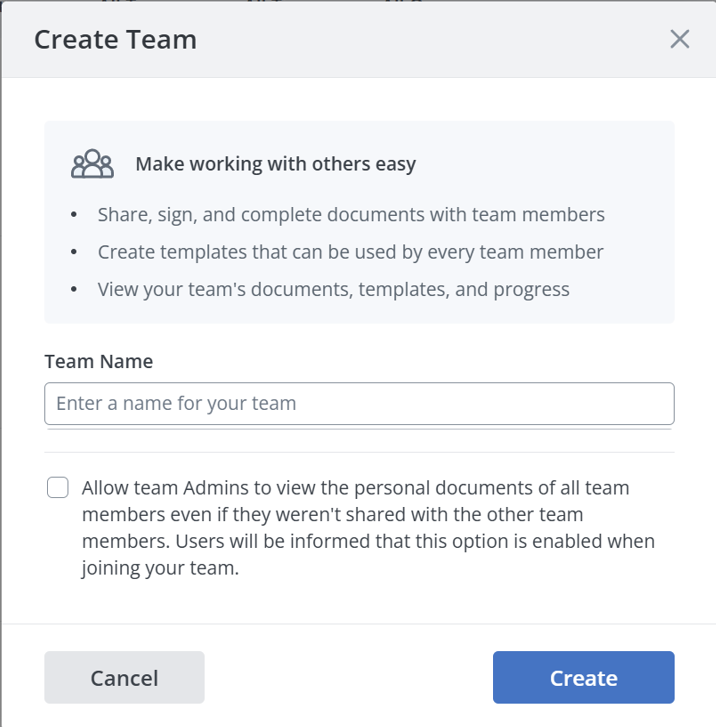
Teams can also automate multi-step workflows by creating templates, routing documents to specific individuals in sequence or in parallel, and tracking progress from a centralized dashboard. Activity logs, notifications, and audit trails help teams stay informed and maintain compliance. These collaboration features streamline internal processes, reduce manual bottlenecks, and ensure faster document turnaround.
Mobile applications
SignNow’s mobile applications for iOS and Android allow users to manage documents and collect signatures on the go. The apps support all essential features such as sending and signing documents, managing templates, creating workflows, and accessing completed files from any device.
Users can take photos of physical documents, convert them into digital forms, and immediately prepare them for signing. The mobile apps also support offline mode, enabling users to review and sign documents without an internet connection; changes sync automatically once the device reconnects.
The kiosk mode features for iPhone and iPad make your device even more functional while organizing events or registrations.
Fillable Fields and Document Creation
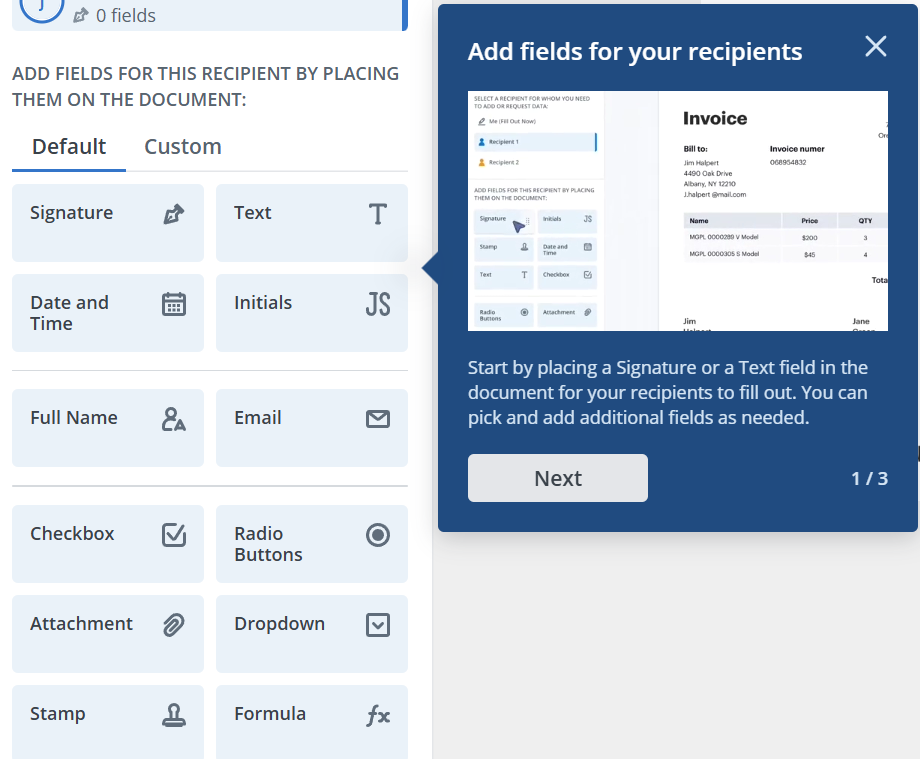
SignNow offers a powerful set of fillable fields that help users create customizable, interactive documents. These fields include text inputs, dropdowns, checkboxes, radio buttons, signature and initials fields, date/time fields, and attachment uploads. Each field can be assigned to specific signers, ensuring that every participant completes only the sections relevant to them.
Advanced options enable users to set validation rules, specify required fields, pre-fill values, and implement conditional logic that displays or hides fields based on previous responses. This capability makes SignNow ideal for building structured forms such as contracts, applications, questionnaires, and onboarding packets. Once configured, documents can be saved as reusable templates to streamline repetitive workflows across an organization.
Case studies of eSignature solutions implementation (USA)
Organizations across the United States are adopting eSignature solutions to improve efficiency, strengthen compliance, and modernize document workflows. The following case studies illustrate how different sectors apply regulatory-aligned digital signing to achieve measurable operational and compliance benefits.
Case 1 — Clinical research org streamlines trial documentation (Part 11)
A U.S. CRO implemented system validation, role-based access, and traceable audit trails to satisfy 21 CFR Part 11 for investigator signatures and source documents. Result: faster monitoring and cleaner inspections per FDA’s finalized guidance expectations.
Case 2 — State agency modernizes public-facing forms
Agency procurement adopted e-signatures with assurance-aligned authentication per GSA CIO 2162.2 and NIST 800-63 references, enabling digital submissions and audit-ready records.
These implementations show that success depends on aligning eSignature capabilities with the specific regulatory and operational requirements of each environment.
By following established standards and tailoring authentication, validation, and audit controls, organizations can realize faster processes, cleaner inspections, and more reliable digital records.
Conclusion
Selecting an e-signature platform in 2025 means weighing electronic signature features through three lenses: (1) risk and identity assurance (NIST 800-63-4), (2) evidence and compliance (ESIGN/UETA plus sector rules like HIPAA/Part 11), and (3) operational scale and cost (automation depth, admin controls, and pricing model). Against that rubric, airSlate SignNow stands out for B2B teams that need speed without per-seat friction: unlimited users, transparent, usage-based economics, and 24/7 support, while maintaining security and auditability. Build your RFP around the checklist above, insist on evidence packages and assurance mapping, and you’ll be positioned to move faster with less risk.
Sources
- NIST, Digital Identity Guidelines, SP 800-63-4, Aug–Sep 2025.
- FBI IC3, 2024 Internet Crime Report (Apr 2025) and prior reports.
- HHS, HIPAA Security Rule Guidance (2025) and NPRM to strengthen cybersecurity (Jan 2025).
- FDA, 21 CFR Part 11 (eCFR), and finalized guidance updates (2024).
- ACC, Overview of ESIGN & UETA (legal explainer).
- MBA, RON policy page (industry context) and NotaryCam, State RON status (2025 snapshot).
FAQ
1) Are electronic signatures legally valid in the U.S.?
Yes, they are. Electronic signatures are legally enforceable under the federal ESIGN Act and the state-level UETA, which grant e-signatures the same status as handwritten ones. What truly determines validity is whether you meet process requirements such as obtaining clear consent, proving signer attribution, and maintaining accurate, accessible records. Courts consistently look at the integrity of the signing process, not just the technology used.
2) What’s the difference between electronic and digital signatures?
An electronic signature is a broad legal category that includes any electronic action showing intent to sign: typed names, clicks, drawn signatures, and more. A digital signature uses cryptographic keys to generate tamper-evident certificates, making it more resistant to alteration and more suitable for regulated environments. Industries with strict audit expectations, such as life sciences, often prefer digital signatures because they provide stronger technical evidence.
3) Do we need identity verification for every signer?
Identity verification should match the risk level of the transaction, following frameworks like NIST SP 800-63-4. For routine, low-risk agreements such as NDAs or simple approvals, basic methods like email verification are usually sufficient. High-risk workflows: healthcare, finance, contracting, or public sector transactions – benefit from stronger measures like OTP codes, ID document checks, or SSO-backed authentication.
4) Is RON necessary?
Remote Online Notarization (RON) is only required if your workflows involve notarized documents. Many U.S. states now permit RON, and industries like real estate, lending, and insurance increasingly expect it as part of digital closing processes. Always confirm both your state’s notarization rules and the requirements of counterparties such as lenders, underwriters, or government agencies.
5) How does SignNow stand out for SMB & mid-market?
SignNow offers unlimited users on paid plans, which helps teams scale without unpredictable per-seat costs. Its pricing is transparent and avoids the hidden add-ons common with other vendors, while also offering volume discounts for growing organizations. In addition, SignNow provides 24/7 support, strong security documentation, and compliance resources, making it a practical fit for businesses that need enterprise-level features without enterprise-level complexity.
- The shortlist: electronic signature features that actually matter
- How SignNow’s functionality maps to the 2025 set of crucial electronic signature features
- SignNow’s security architecture & certifications
- Advanced platform functionality beyond electronic signature features
- Case studies of eSignature solutions implementation (USA)
- Conclusion
- Sources
- FAQ
