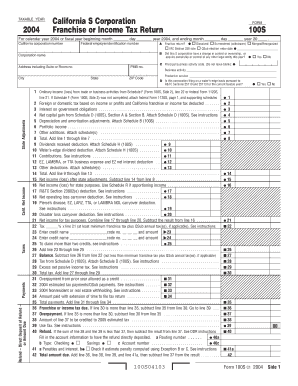
California S Corporation Franchise or Income Tax Return Form 100S 2021


What is the California S Corporation Franchise Or Income Tax Return Form 100S
The California S Corporation Franchise Or Income Tax Return Form 100S is a tax form specifically designed for S corporations operating in California. This form is used to report income, deductions, and credits for the corporation, as well as to calculate the franchise tax owed to the state. S corporations are unique business entities that allow income to pass through to shareholders, avoiding double taxation at the corporate level. Completing this form accurately is essential for compliance with California tax laws.
How to use the California S Corporation Franchise Or Income Tax Return Form 100S
Using the California S Corporation Franchise Or Income Tax Return Form 100S involves several steps. First, gather all necessary financial documents, including income statements, balance sheets, and records of deductions. Next, fill out the form with accurate information regarding your corporation's financial activities for the tax year. Be sure to include details about any special credits or deductions your corporation may qualify for. Once completed, the form must be submitted to the California Franchise Tax Board by the designated deadline.
Steps to complete the California S Corporation Franchise Or Income Tax Return Form 100S
Completing the California S Corporation Franchise Or Income Tax Return Form 100S can be broken down into a series of steps:
- Gather financial records, including income, expenses, and deductions.
- Obtain the latest version of Form 100S from the California Franchise Tax Board.
- Fill out the form, ensuring all information is accurate and complete.
- Review the form for any errors or omissions before submission.
- Submit the completed form by mail or electronically, depending on your preference.
Filing Deadlines / Important Dates
It is crucial to be aware of the filing deadlines associated with the California S Corporation Franchise Or Income Tax Return Form 100S. Generally, the form is due on the 15th day of the third month following the close of the corporation's fiscal year. For corporations operating on a calendar year, this means the form is typically due by March 15. Extensions may be available, but it is essential to file any requests for extension before the original deadline to avoid penalties.
Required Documents
When preparing to complete the California S Corporation Franchise Or Income Tax Return Form 100S, certain documents are essential. These include:
- Income statements detailing revenue generated during the tax year.
- Expense records to substantiate deductions claimed.
- Previous tax returns for reference and consistency.
- Documentation for any credits or special deductions applicable to the corporation.
Penalties for Non-Compliance
Failure to comply with the filing requirements for the California S Corporation Franchise Or Income Tax Return Form 100S can result in significant penalties. These may include late filing fees, interest on unpaid taxes, and potential legal action. It is important for corporations to file on time and accurately to avoid these consequences. Understanding the specific penalties can help corporations prioritize compliance and maintain good standing with the California Franchise Tax Board.
Quick guide on how to complete california s corporation franchise or income tax return form 100s
Complete California S Corporation Franchise Or Income Tax Return Form 100S effortlessly on any device
Online document management has gained popularity among businesses and individuals. It offers an ideal eco-friendly alternative to traditional printed and signed paperwork, allowing you to find the necessary form and securely store it online. airSlate SignNow equips you with all the tools required to create, modify, and eSign your documents quickly without delays. Manage California S Corporation Franchise Or Income Tax Return Form 100S on any device using airSlate SignNow's Android or iOS applications and simplify any document-related process today.
The easiest way to edit and eSign California S Corporation Franchise Or Income Tax Return Form 100S without hassle
- Find California S Corporation Franchise Or Income Tax Return Form 100S and click on Get Form to begin.
- Utilize the tools we offer to complete your form.
- Emphasize relevant sections of your documents or obscure sensitive information with tools that airSlate SignNow provides specifically for that purpose.
- Create your eSignature using the Sign tool, which takes moments and carries the same legal validity as a conventional wet ink signature.
- Review all the details and click on the Done button to save your modifications.
- Select how you wish to send your form, either via email, SMS, or invitation link, or download it to your computer.
Forget about lost or misfiled documents, tedious form searches, or errors that require printing new copies. airSlate SignNow addresses all your document management needs in just a few clicks from any device of your choice. Modify and eSign California S Corporation Franchise Or Income Tax Return Form 100S and ensure outstanding communication at every stage of the form preparation process with airSlate SignNow.
Create this form in 5 minutes or less
Find and fill out the correct california s corporation franchise or income tax return form 100s
Create this form in 5 minutes!
How to create an eSignature for the california s corporation franchise or income tax return form 100s
How to create an electronic signature for a PDF online
How to create an electronic signature for a PDF in Google Chrome
How to create an e-signature for signing PDFs in Gmail
How to create an e-signature right from your smartphone
How to create an e-signature for a PDF on iOS
How to create an e-signature for a PDF on Android
People also ask
-
What is the California S Corporation Franchise Or Income Tax Return Form 100S?
The California S Corporation Franchise Or Income Tax Return Form 100S is a tax form that S corporations must file to report their income, deductions, and credits to the state of California. It is essential for compliance with California tax laws and helps ensure that your business remains in good standing.
-
Who needs to file the California S Corporation Franchise Or Income Tax Return Form 100S?
Any S corporation doing business in California or earning income from California sources is required to file the California S Corporation Franchise Or Income Tax Return Form 100S. This includes both domestic corporations and those that have elected S corporation status in another state but operate within California.
-
What are the key features of airSlate SignNow for filing the California S Corporation Franchise Or Income Tax Return Form 100S?
airSlate SignNow offers several key features that simplify the process of filing the California S Corporation Franchise Or Income Tax Return Form 100S, including customizable templates, real-time collaboration, and secure e-signing capabilities. These features enhance efficiency and ensure accuracy in document preparation and submission.
-
How much does it cost to use airSlate SignNow for filing the California S Corporation Franchise Or Income Tax Return Form 100S?
The pricing for airSlate SignNow varies based on the subscription plan you choose, but it remains a cost-effective solution for businesses needing to file the California S Corporation Franchise Or Income Tax Return Form 100S. Each plan includes essential features that can cater to different business needs and sizes.
-
Can airSlate SignNow integrate with accounting software for filing the California S Corporation Franchise Or Income Tax Return Form 100S?
Yes, airSlate SignNow seamlessly integrates with various accounting software solutions, making it easier for you to gather necessary financial data for the California S Corporation Franchise Or Income Tax Return Form 100S. This integration streamlines the tax preparation process and helps maintain accurate records.
-
What are the benefits of using airSlate SignNow to e-sign documents related to the California S Corporation Franchise Or Income Tax Return Form 100S?
Using airSlate SignNow to e-sign documents related to the California S Corporation Franchise Or Income Tax Return Form 100S offers several benefits, including enhanced security, reduced turnaround time, and easy document tracking. These advantages contribute to a smoother filing process and improved compliance.
-
Is it easy to get started with airSlate SignNow for the California S Corporation Franchise Or Income Tax Return Form 100S?
Absolutely! Getting started with airSlate SignNow for the California S Corporation Franchise Or Income Tax Return Form 100S is straightforward. The platform provides user-friendly tutorials and customer support to assist you in setting up your account and beginning the document preparation and e-signing process.
Get more for California S Corporation Franchise Or Income Tax Return Form 100S
Find out other California S Corporation Franchise Or Income Tax Return Form 100S
- eSignature Police PPT Kansas Free
- How Can I eSignature Mississippi Real Estate Rental Lease Agreement
- How Do I eSignature Kentucky Police LLC Operating Agreement
- eSignature Kentucky Police Lease Termination Letter Now
- eSignature Montana Real Estate Quitclaim Deed Mobile
- eSignature Montana Real Estate Quitclaim Deed Fast
- eSignature Montana Real Estate Cease And Desist Letter Easy
- How Do I eSignature Nebraska Real Estate Lease Agreement
- eSignature Nebraska Real Estate Living Will Now
- Can I eSignature Michigan Police Credit Memo
- eSignature Kentucky Sports Lease Agreement Template Easy
- eSignature Minnesota Police Purchase Order Template Free
- eSignature Louisiana Sports Rental Application Free
- Help Me With eSignature Nevada Real Estate Business Associate Agreement
- How To eSignature Montana Police Last Will And Testament
- eSignature Maine Sports Contract Safe
- eSignature New York Police NDA Now
- eSignature North Carolina Police Claim Secure
- eSignature New York Police Notice To Quit Free
- eSignature North Dakota Real Estate Quitclaim Deed Later