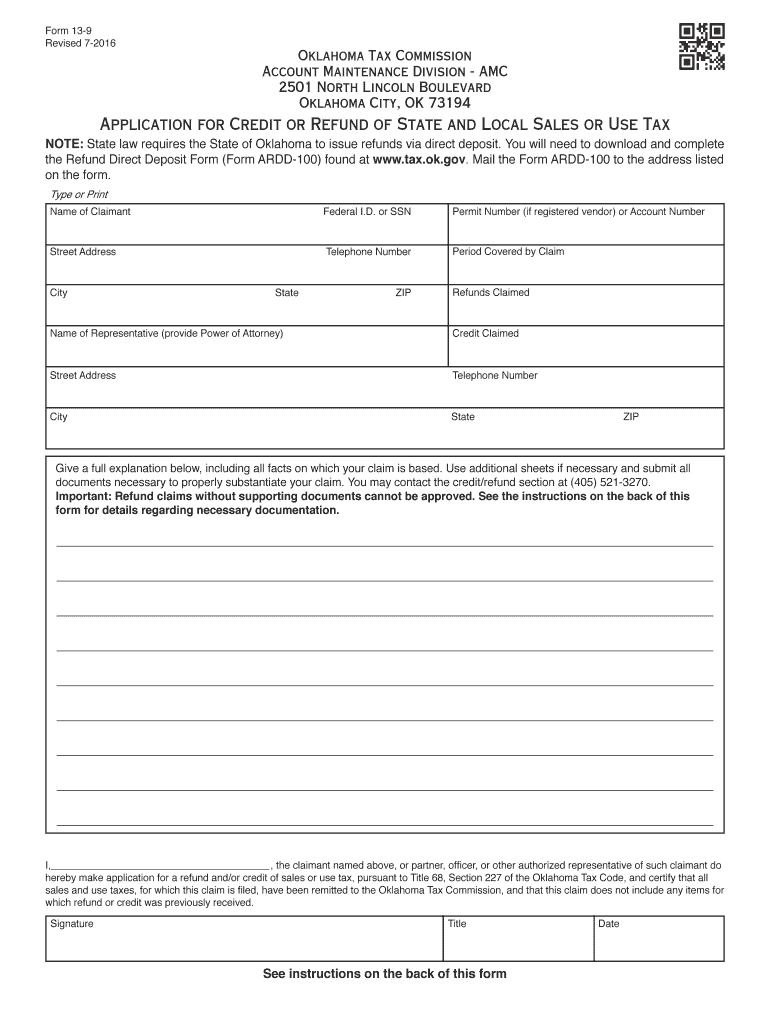
Form 13 9 2016


What is the Form 13 9
The Form 13 9 is an essential document used by residents of Oklahoma for reporting their income tax. This form is specifically designed for individual taxpayers who need to file their state income taxes. It captures various financial details, including income, deductions, and credits, to determine the taxpayer's liability. Understanding the purpose of Form 13 9 is crucial for ensuring compliance with state tax regulations.
How to use the Form 13 9
Using the Form 13 9 involves several steps to ensure accurate reporting of income and deductions. Taxpayers must gather all necessary financial documents, such as W-2s, 1099s, and any other relevant income statements. Once these documents are collected, individuals can begin filling out the form, ensuring all sections are completed accurately. After completing the form, taxpayers can submit it either electronically or via mail, depending on their preference and the options available.
Steps to complete the Form 13 9
Completing the Form 13 9 requires careful attention to detail. Follow these steps:
- Gather all necessary documents, including income statements and deduction records.
- Fill out personal information, such as name, address, and Social Security number.
- Report all sources of income in the designated sections.
- Claim any eligible deductions and credits to reduce taxable income.
- Review the completed form for accuracy before submission.
- Submit the form electronically through the Oklahoma Tax Commission website or mail it to the appropriate address.
Key elements of the Form 13 9
The Form 13 9 consists of several key elements that taxpayers must understand. These include:
- Personal Information: This section requires the taxpayer's name, address, and Social Security number.
- Income Reporting: Taxpayers must report all sources of income, including wages, interest, and dividends.
- Deductions and Credits: This part allows individuals to claim deductions for expenses such as mortgage interest or educational costs.
- Signature: A signature is required to validate the form, affirming that the information provided is accurate.
Form Submission Methods
Taxpayers have multiple options for submitting the Form 13 9. These methods include:
- Online Submission: Individuals can file electronically through the Oklahoma Tax Commission's website, which is a convenient and efficient option.
- Mail Submission: Taxpayers can print the completed form and mail it to the designated address provided by the Oklahoma Tax Commission.
- In-Person Submission: For those who prefer face-to-face interactions, forms can be submitted at local tax commission offices.
Filing Deadlines / Important Dates
It is essential to be aware of the filing deadlines associated with the Form 13 9. Typically, the deadline for submitting this form aligns with the federal tax deadline, which is usually April 15. However, taxpayers should verify any changes or extensions that may apply in a given tax year. Staying informed about these dates helps avoid penalties and ensures timely compliance with state tax laws.
Quick guide on how to complete oklahoma tax commission form 13 9 2016 2019
Your assistance manual on how to prepare your Form 13 9
If you wish to understand how to generate and submit your Form 13 9, here are a few concise guidelines on how to make tax submission easier.
To start, you just need to sign up for your airSlate SignNow account to transform how you handle documents online. airSlate SignNow is a highly user-friendly and robust document solution that allows you to modify, draft, and finalize your tax documents effortlessly. With its editor, you can alternate between text, check boxes, and eSignatures and return to modify information as necessary. Streamline your tax administration with enhanced PDF editing, eSigning, and straightforward sharing capabilities.
Follow the steps below to finalize your Form 13 9 in just a few minutes:
- Sign up for your account and start working on PDFs within moments.
- Utilize our catalog to obtain any IRS tax form; explore various versions and schedules.
- Click Get form to access your Form 13 9 in our editor.
- Complete the necessary fillable fields with your information (text, numbers, check marks).
- Employ the Sign Tool to add your legally-binding eSignature (if needed).
- Examine your document and rectify any mistakes.
- Save changes, print your copy, submit it to your recipient, and download it to your device.
Utilize this manual to electronically file your taxes with airSlate SignNow. Please be aware that submitting on paper can lead to return inaccuracies and prolong reimbursements. Additionally, before electronically filing your taxes, check the IRS website for declaration guidelines applicable in your state.
Create this form in 5 minutes or less
Find and fill out the correct oklahoma tax commission form 13 9 2016 2019
FAQs
-
How do I fill a W-9 Tax Form out?
Download a blank Form W-9To get started, download the latest Form W-9 from the IRS website at https://www.irs.gov/pub/irs-pdf/.... Check the date in the top left corner of the form as it is updated occasionally by the IRS. The current revision should read (Rev. December 2014). Click anywhere on the form and a menu appears at the top that will allow you to either print or save the document. If the browser you are using doesn’t allow you to type directly into the W-9 then save the form to your desktop and reopen using signNow Reader.General purposeThe general purpose of Form W-9 is to provide your correct taxpayer identification number (TIN) to an individual or entity (typically a company) that is required to submit an “information return” to the IRS to report an amount paid to you, or other reportable amount.U.S. personForm W-9 should only be completed by what the IRS calls a “U.S. person”. Some examples of U.S. persons include an individual who is a U.S. citizen or a U.S. resident alien. Partnerships, corporations, companies, or associations created or organized in the United States or under the laws of the United States are also U.S. persons.If you are not a U.S. person you should not use this form. You will likely need to provide Form W-8.Enter your informationLine 1 – Name: This line should match the name on your income tax return.Line 2 – Business name: This line is optional and would include your business name, trade name, DBA name, or disregarded entity name if you have any of these. You only need to complete this line if your name here is different from the name on line 1. See our related blog, What is a disregarded entity?Line 3 – Federal tax classification: Check ONE box for your U.S. federal tax classification. This should be the tax classification of the person or entity name that is entered on line 1. See our related blog, What is the difference between an individual and a sole proprietor?Limited Liability Company (LLC). If the name on line 1 is an LLC treated as a partnership for U.S. federal tax purposes, check the “Limited liability company” box and enter “P” in the space provided. If the LLC has filed Form 8832 or 2553 to be taxed as a corporation, check the “Limited liability company” box and in the space provided enter “C” for C corporation or “S” for S corporation. If it is a single-member LLC that is a disregarded entity, do not check the “Limited liability company” box; instead check the first box in line 3 “Individual/sole proprietor or single-member LLC.” See our related blog, What tax classification should an LLC select?Other (see instructions) – This line should be used for classifications that are not listed such as nonprofits, governmental entities, etc.Line 4 – Exemptions: If you are exempt from backup withholding enter your exempt payee code in the first space. If you are exempt from FATCA reporting enter your exemption from FATCA reporting code in the second space. Generally, individuals (including sole proprietors) are not exempt from backup withholding. See the “Specific Instructions” for line 4 shown with Form W-9 for more detailed information on exemptions.Line 5 – Address: Enter your address (number, street, and apartment or suite number). This is where the requester of the Form W-9 will mail your information returns.Line 6 – City, state and ZIP: Enter your city, state and ZIP code.Line 7 – Account numbers: This is an optional field to list your account number(s) with the company requesting your W-9 such as a bank, brokerage or vendor. We recommend that you do not list any account numbers as you may have to provide additional W-9 forms for accounts you do not include.Requester’s name and address: This is an optional section you can use to record the requester’s name and address you sent your W-9 to.Part I – Taxpayer Identification Number (TIN): Enter in your taxpayer identification number here. This is typically a social security number for an individual or sole proprietor and an employer identification number for a company. See our blog, What is a TIN number?Part II – Certification: Sign and date your form.For additional information visit w9manager.com.
-
Why don't schools teach children about taxes and bills and things that they will definitely need to know as adults to get by in life?
Departments of education and school districts always have to make decisions about what to include in their curriculum. There are a lot of life skills that people need that aren't taught in school. The question is should those skills be taught in schools?I teach high school, so I'll talk about that. The typical high school curriculum is supposed to give students a broad-based education that prepares them to be citizens in a democracy and to be able to think critically. For a democracy to work, we need educated, discerning citizens with the ability to make good decisions based on evidence and objective thought. In theory, people who are well informed about history, culture, science, mathematics, etc., and are capable of critical, unbiased thinking, will have the tools to participate in a democracy and make good decisions for themselves and for society at large. In addition to that, they should be learning how to be learners, how to do effective, basic research, and collaborate with other people. If that happens, figuring out how to do procedural tasks in real life should not provide much of a challenge. We can't possibly teach every necessary life skill people need, but we can help students become better at knowing how to acquire the skills they need. Should we teach them how to change a tire when they can easily consult a book or search the internet to find step by step instructions for that? Should we teach them how to balance a check book or teach them how to think mathematically and make sense of problems so that the simple task of balancing a check book (which requires simple arithmetic and the ability to enter numbers and words in columns and rows in obvious ways) is easy for them to figure out. If we teach them to be good at critical thinking and have some problem solving skills they will be able to apply those overarching skills to all sorts of every day tasks that shouldn't be difficult for someone with decent cognitive ability to figure out. It's analogous to asking why a culinary school didn't teach its students the steps and ingredients to a specific recipe. The school taught them about more general food preparation and food science skills so that they can figure out how to make a lot of specific recipes without much trouble. They're also able to create their own recipes.So, do we want citizens with very specific skill sets that they need to get through day to day life or do we want citizens with critical thinking, problem solving, and other overarching cognitive skills that will allow them to easily acquire ANY simple, procedural skill they may come to need at any point in their lives?
-
How do I fill taxes online?
you can file taxes online by using different online platforms. by using this online platform you can easily submit the income tax returns, optimize your taxes easily.Tachotax provides the most secure, easy and fast way of tax filing.
-
How do I fill out the income tax for online job payment? Are there any special forms to fill it?
I am answering to your question with the UNDERSTANDING that you are liableas per Income Tax Act 1961 of Republic of IndiaIf you have online source of Income as per agreement as an employer -employee, It will be treated SALARY income and you will file ITR 1 for FY 2017–18If you are rendering professional services outside India with an agreement as professional, in that case you need to prepare Financial Statements ie. Profit and loss Account and Balance sheet for FY 2017–18 , finalize your income and pay taxes accordingly, You will file ITR -3 for FY 2017–1831st Dec.2018 is last due date with minimum penalty, grab that opportunity and file income tax return as earliest
-
I received my late husband's W-9 form to fill out for what I believe were our stocks. How am I supposed to fill this out or am I even supposed to?
You do not sound as a person who handles intricasies of finances on daily basis, this is why you should redirect the qustion to your family’s tax professional who does hte filings for you.The form itself, W-9 form, is a form created and approved by the IRS, if that’s your only inquiry.Whether the form applies to you or to your husband’s estate - that’s something only a person familiar with the situation would tell you about; there is no generic answer to this.
-
A staffing firm is asking me to fill out i-9 and tax forms. They want my SSN as well. They want these for our first meeting. Is this right?
What they're attempting to do is a complete background check on you for a possible employer. This takes the load off the eventual hiring firm’s HR department which may not even exist. Many firms outsource every overhead department to be as competitive as possible. It’s not crazy and is an accepted practice if you use a “staffing or headhunter” type firm to do your job search. You may even be asked to apply for or reinstate your security clearance if required. If I were you I would fill out the requested documentation, but withhold it unless all of your questions are answered and a position is offered. I would also do some research on the Staffing Company you are dealing with. You may even have to talk to clients they have placed and where. Just proceed with caution and forethought! As Mr. Barnum has been misquoted over the years “There’s one born every second”.
-
How many forms are filled out in the JEE Main 2019 to date?
You should wait till last date to get these type of statistics .NTA will release how much application is received by them.
Create this form in 5 minutes!
How to create an eSignature for the oklahoma tax commission form 13 9 2016 2019
How to make an eSignature for the Oklahoma Tax Commission Form 13 9 2016 2019 in the online mode
How to generate an electronic signature for the Oklahoma Tax Commission Form 13 9 2016 2019 in Google Chrome
How to make an electronic signature for putting it on the Oklahoma Tax Commission Form 13 9 2016 2019 in Gmail
How to make an eSignature for the Oklahoma Tax Commission Form 13 9 2016 2019 from your mobile device
How to make an electronic signature for the Oklahoma Tax Commission Form 13 9 2016 2019 on iOS
How to make an eSignature for the Oklahoma Tax Commission Form 13 9 2016 2019 on Android devices
People also ask
-
What is Form 13 9 and how can airSlate SignNow help with it?
Form 13 9 is a specific document often required in various business transactions. airSlate SignNow simplifies the process of completing and signing Form 13 9 by providing an intuitive platform for electronic signatures and document management. With our solution, you can securely send, sign, and store Form 13 9, all while ensuring compliance with legal standards.
-
Is there a cost associated with using airSlate SignNow for Form 13 9?
Yes, airSlate SignNow offers various pricing plans to cater to different business needs, including features specifically designed for handling documents like Form 13 9. Our plans are cost-effective, allowing businesses of all sizes to access essential tools for e-signing and document management. You can choose a plan that fits your budget and requirements.
-
What features does airSlate SignNow offer for managing Form 13 9?
airSlate SignNow provides a range of features tailored for managing Form 13 9, including customizable templates, automated workflows, and real-time tracking. These features help streamline the signing process, reduce errors, and enhance overall efficiency. You can easily create, send, and sign Form 13 9 within minutes.
-
Can I integrate airSlate SignNow with other tools while managing Form 13 9?
Absolutely! airSlate SignNow offers seamless integrations with popular business applications, such as Google Drive, Salesforce, and Microsoft Office. This allows you to manage Form 13 9 alongside your existing tools, ensuring a smooth workflow and easy access to all your necessary documents.
-
How secure is the signing process for Form 13 9 with airSlate SignNow?
Security is a top priority at airSlate SignNow. Our platform uses advanced encryption and complies with industry standards to ensure that your Form 13 9 and other sensitive documents are protected. You can confidently send and receive signed documents, knowing that your data is secure.
-
Can I track the status of Form 13 9 once it’s sent with airSlate SignNow?
Yes, airSlate SignNow provides real-time tracking for your documents, including Form 13 9. You can easily monitor who has signed and who still needs to complete the process. This feature helps you stay organized and ensures timely completion of important documents.
-
What benefits does airSlate SignNow offer for businesses handling Form 13 9?
By using airSlate SignNow for Form 13 9, businesses can save time, reduce paperwork, and improve efficiency. Our solution allows for quick document turnaround, which can enhance customer satisfaction and streamline your operations. Plus, the ease of use means your team can adopt it without extensive training.
Get more for Form 13 9
Find out other Form 13 9
- Electronic signature North Carolina Insurance Profit And Loss Statement Secure
- Help Me With Electronic signature Oklahoma Insurance Contract
- Electronic signature Pennsylvania Insurance Letter Of Intent Later
- Electronic signature Pennsylvania Insurance Quitclaim Deed Now
- Electronic signature Maine High Tech Living Will Later
- Electronic signature Maine High Tech Quitclaim Deed Online
- Can I Electronic signature Maryland High Tech RFP
- Electronic signature Vermont Insurance Arbitration Agreement Safe
- Electronic signature Massachusetts High Tech Quitclaim Deed Fast
- Electronic signature Vermont Insurance Limited Power Of Attorney Easy
- Electronic signature Washington Insurance Last Will And Testament Later
- Electronic signature Washington Insurance Last Will And Testament Secure
- Electronic signature Wyoming Insurance LLC Operating Agreement Computer
- How To Electronic signature Missouri High Tech Lease Termination Letter
- Electronic signature Montana High Tech Warranty Deed Mobile
- Electronic signature Florida Lawers Cease And Desist Letter Fast
- Electronic signature Lawers Form Idaho Fast
- Electronic signature Georgia Lawers Rental Lease Agreement Online
- How Do I Electronic signature Indiana Lawers Quitclaim Deed
- How To Electronic signature Maryland Lawers Month To Month Lease