Louisiana Temporary Child Custody Forms 2013-2026


What is the Louisiana Temporary Child Custody Form?
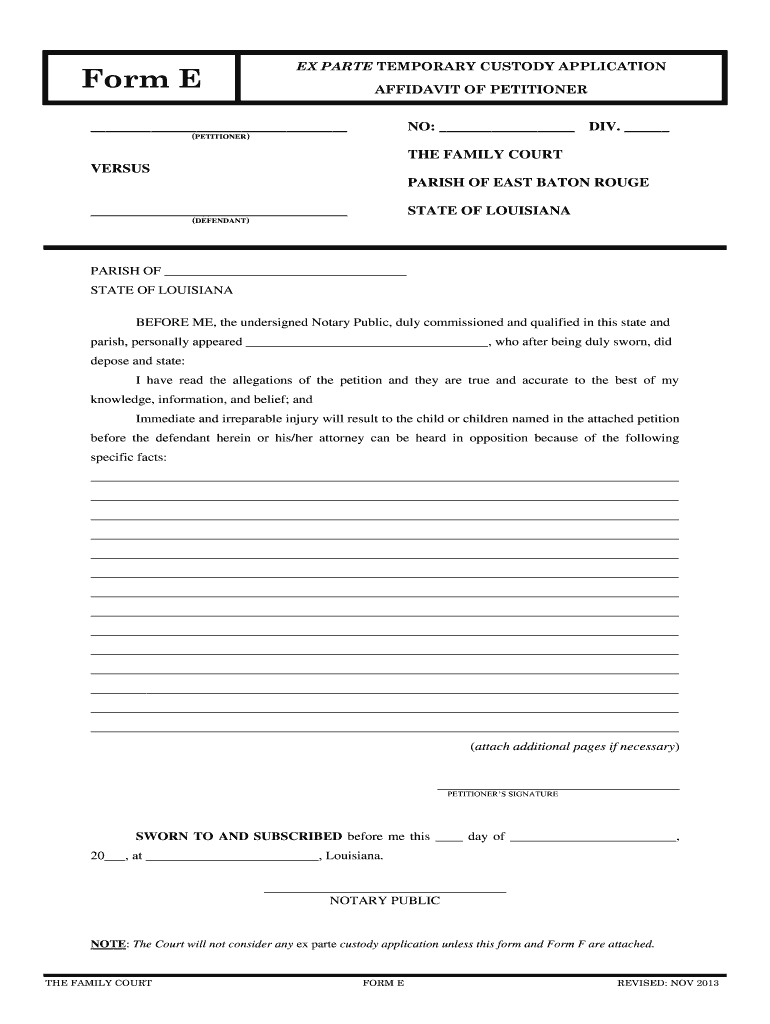
The Louisiana Temporary Child Custody Form is a legal document used to establish temporary custody arrangements for a child. This form is essential in situations where immediate custody decisions are necessary, such as in cases of parental separation, emergency situations, or when a child’s safety is at risk. The form outlines the responsibilities and rights of each parent or guardian during the temporary custody period, ensuring that the child's best interests are prioritized.
How to Use the Louisiana Temporary Child Custody Form
To use the Louisiana Temporary Child Custody Form effectively, begin by gathering all necessary information regarding the child and the parties involved. This includes details about the child's living situation, the reasons for seeking temporary custody, and any relevant background information. After completing the form, it should be filed with the appropriate court to initiate the temporary custody process. It is advisable to keep copies of all submitted documents for personal records.
Steps to Complete the Louisiana Temporary Child Custody Form
Completing the Louisiana Temporary Child Custody Form involves several key steps:
- Gather necessary information about the child, parents, and any other guardians.
- Fill out the form accurately, ensuring all sections are completed.
- Include specific details regarding the reasons for requesting temporary custody.
- Sign and date the form, ensuring that all parties involved do the same if required.
- Make copies for your records before submitting the form to the court.
Legal Use of the Louisiana Temporary Child Custody Form
The legal use of the Louisiana Temporary Child Custody Form is crucial for ensuring that the arrangement is recognized by the court. This form must be filed in accordance with Louisiana law, and it should reflect the current circumstances surrounding the child's welfare. Courts typically review the form to ensure that it serves the child's best interests, and any inaccuracies or omissions may lead to complications in the custody process.
Key Elements of the Louisiana Temporary Child Custody Form
Key elements of the Louisiana Temporary Child Custody Form include:
- Identification of the child and all parties involved in the custody arrangement.
- Details regarding the proposed living arrangements for the child.
- Specific reasons for seeking temporary custody.
- Signatures of all parties, indicating their agreement to the terms outlined in the form.
- Any additional information that may support the custody request, such as evidence of the child's needs.
Eligibility Criteria for the Louisiana Temporary Child Custody Form
Eligibility to file the Louisiana Temporary Child Custody Form typically requires that the petitioner has a legitimate interest in the child's welfare. This can include parents, guardians, or other relatives who can demonstrate a connection to the child. Additionally, the circumstances prompting the request for temporary custody must be compelling enough to warrant immediate intervention by the court.
Quick guide on how to complete ex parte custody form 2013 2019
Finalize and submit your Louisiana Temporary Child Custody Forms swiftly
Powerful tools for digital document transfer and approval are vital for enhancing processes and the ongoing improvement of your forms. When managing legal documents and signing a Louisiana Temporary Child Custody Forms, the right signing solution can save you a signNow amount of time and resources with each submission.
Locate, complete, modify, sign, and distribute your legal documents with airSlate SignNow. This service provides all the essentials to create efficient document submission workflows. Its extensive library of legal forms and intuitive navigation will assist you in obtaining your Louisiana Temporary Child Custody Forms promptly, and the editor featuring our signing capability will enable you to fill it out and authorize it instantly.
Sign your Louisiana Temporary Child Custody Forms in a few easy steps
- Locate the Louisiana Temporary Child Custody Forms you need in our library by utilizing the search function or browsing catalog pages.
- Examine the form's details and preview it to ensure it meets your requirements and local regulations.
- Click Obtain form to access it for modifications.
- Complete the form using the detailed toolbar.
- Verify the information you've entered and click the Sign option to validate your document.
- Select one of three methods to affix your signature.
- Complete your edits and save the document in your files, then download it to your device or share it directly.
Simplify each phase in your document preparation and approval with airSlate SignNow. Explore a more effective online solution that meticulously addresses all aspects of managing your paperwork.
Create this form in 5 minutes or less
Find and fill out the correct ex parte custody form 2013 2019
FAQs
-
How do I fill out 2013 tax forms?
I hate when people ask a question, then rather than answer, someone jumps in and tells them they don't need to know--but today, I will be that guy, because this is serious.Why oh why do you think you can do this yourself?Two things to consider:People who get a masters degree in Accounting then go get a CPA then start doing taxes--only then do some of them start specializing in international accounting. I've taught Accounting at the college-level, have taken tax classes beyond that, and wouldn't touch your return.Tax professionals generally either charge by the form or by the hour. Meaning you can sit and do this for 12 hours, or you can pay a CPA by the hour to do it, or you can go to an H&R Block that has flat rates and will do everything but hit Send for free. So why spend 12 hours doing it incorrectly, destined to worry about the IRS putting you in jail, bankrupting you, or deporting you for the next decade when you can get it done professionally for $200-$300?No, just go get it done right.
-
How do I fill out the JEE Main 2019 exam application form?
Steps to fill out the JEE Mains 2019 application form?How to Fill JEE Main 2019 Application FormJEE Main 2019 Registration Process to be followed on the NTA Website:Step 1: Visit the website of NTA or CLick here.Step 2: Click on NTA exams or on Joint Entrance Examination under the Engineering Section given on the same page.Step 3: You will see the registration button as shown in the image below. Read all the eligibility criteria and click on “Registration”Step 4: Candidates will be redirected to the JEE Main 2019 official website where they have to click on “Fill Application Form”.Step 5: Now, Click on “Apply for JEE Main 2019”. Read all instructions carefully and proceed to apply online by clicking on the button given at the end of the page.Step 6: Fill in all the details as asked. Submit the authentication form with correct details.Step 7: Upload the scanned images in correct specification given on the instructions page.Step 8: Pay the Application fee and take a print out of the filled up application form.Aadhar Card Required for JEE Main 2019 RegistrationFor the last two years, Aadhar card was made mandatory for each candidate to possess for the application form filling of JEE Main. However, since JEE Main 2019 is now to be conducted by NTA, they have asked the candidates to enter their Aadhar card number. The Aadhar card number is necessary for JEE Main 2019 Application form and candidates must be ready with their Aadhar card number to enter it in the application form.JEE main 2019 Application Form will be available twice, once in the month of September for the January 2019 exam and again in the month of February for the April exam. Thus, first, the candidates have to fill out the application form of January 2019 examination in the month of September 2018.
-
How do I fill out a CLAT 2019 application form?
Hi thereFirst of all, let me tell you some important points:CLAT 2019 has gone OFFLINE this yearBut the application forms for CLAT 2019 have to be filled ONLINEThe payment of the application fees also should be made onlineNow, kindly note the important dates:Note the details regarding the application fees:Here, if you want the Previous Year Question papers, Rs.500 would be added to the application fees.Apart from this, there would be bank transaction charges added to the application fees.The application fees is non-refundable.Note one important point here that before you fill the application form, check for your eligibility.To know the complete details of filling the application form along with other information like the eligibility - in terms of age, educational qualification, list of NLUs participating and the seats offered under each category, CLAT Reservation policies, CLAT exam pattern, marking scheme, syllabus, important documents required to be kept ready before filling the form, kindly go to the link below:How to fill CLAT 2019 Application form? Registration OPEN | All you need to knowTo know how to prepare for one of the very important section of CLAT exam, GK and Current Affairs, kindly go to the link below:How to prepare GK & Current Affairs for CLAT 2019To practice, daily MCQs on Current Affairs, kindly go to the link below:#CLAT2019 | #AILET2019 | #DULLB2019 | GK and Current Affairs Series: 5 in 10 Series: Day 12For any other queries, kindly write to us at mailateasyway@gmail.comThanks & Regards!
-
How do I fill out the NEET 2019 application form?
Expecting application form of NEET2019 will be same as that of NEET2018, follow the instructions-For Feb 2019 Exam:EventsDates (Announced)Release of application form-1st October 2018Application submission last date-31st October 2018Last date to pay the fee-Last week of October 2018Correction Window Open-1st week of November 2018Admit card available-1st week of January 2019Exam date-3rd February to 17th February 2019Answer key & OMR release-Within a week after examAnnouncement of result-1st week of March 2019Counselling begins-2nd week of June 2019For May 2019 Exam:EventsDates (Announced)Application form Release-2nd week of March 2019Application submission last date-2nd week of April 2019Last date to pay the fee-2nd week of April 2019Correction Window Open-3rd week of April 2019Admit card available-1st week of May 2019Exam date-12th May to 26th May 2019Answer key & OMR release-Within a week after examAnnouncement of result-1st week of June 2019Counselling begins-2nd week of June 2019NEET 2019 Application FormCandidates should fill the application form as per the instructions given in the information bulletin. Below we are providing NEET 2019 application form details:The application form will be issued through online mode only.No application will be entertained through offline mode.NEET UG registration 2019 will be commenced from the 1st October 2018 (Feb Exam) & second week of March 2018 (May Exam).Candidates should upload the scanned images of recent passport size photograph and signature.After filling the application form completely, a confirmation page will be generated. Download it.There will be no need to send the printed confirmation page to the board.Application Fee:General and OBC candidates will have to pay Rs. 1400/- as an application fee.The application fee for SC/ST and PH candidates will be Rs. 750/-.Fee payment can be done through credit/debit card, net banking, UPI and e-wallet.Service tax will also be applicable.CategoryApplication FeeGeneral/OBC-1400/-SC/ST/PH-750/-Step 1: Fill the Application FormGo the official portal of the conducting authority (Link will be given above).Click on “Apply Online” link.A candidate has to read all the instruction and then click on “Proceed to Apply Online NEET (UG) 2019”.Step 1.1: New RegistrationFill the registration form carefully.Candidates have to fill their name, Mother’s Name, Father’s Name, Category, Date of Birth, Gender, Nationality, State of Eligibility (for 15% All India Quota), Mobile Number, Email ID, Aadhaar card number, etc.After filling all the details, two links will be given “Preview &Next” and “Reset”.If candidate satisfied with the filled information, then they have to click on “Next”.After clicking on Next Button, the information submitted by the candidate will be displayed on the screen. If information correct, click on “Next” button, otherwise go for “Back” button.Candidates may note down the registration number for further procedure.Now choose the strong password and re enter the password.Choose security question and feed answer.Enter the OTP would be sent to your mobile number.Submit the button.Step 1.2: Login & Application Form FillingLogin with your Registration Number and password.Fill personal details.Enter place of birth.Choose the medium of question paper.Choose examination centres.Fill permanent address.Fill correspondence address.Fill Details (qualification, occupation, annual income) of parents and guardians.Choose the option for dress code.Enter security pin & click on save & draft.Now click on preview and submit.Now, review your entries.Then. click on Final Submit.Step 2: Upload Photo and SignatureStep 2 for images upload will be appeared on screen.Now, click on link for Upload photo & signature.Upload the scanned images.Candidate should have scanned images of his latest Photograph (size of 10 Kb to 100 Kb.Signature(size of 3 Kb to 20 Kb) in JPEG format only.Step 3: Fee PaymentAfter uploading the images, candidate will automatically go to the link for fee payment.A candidate has to follow the instruction & submit the application fee.Choose the Bank for making payment.Go for Payment.Candidate can pay the fee through Debit/Credit Card/Net Banking/e-wallet (CSC).Step 4: Take the Printout of Confirmation PageAfter the fee payment, a candidate may take the printout of the confirmation page.Candidates may keep at least three copies of the confirmation page.Note:Must retain copy of the system generated Self Declaration in respect of candidates from J&K who have opted for seats under 15% All India Quota.IF any queries, feel free to comment..best of luck
-
How should I fill out the form for the FRI Entrance Exam 2019? I cannot get into the site.
Hi! You are not able to bump into the official site because the application forms of FRI are not available in an online mode. If you want to apply, then you will be able to grab the forms from the counter of the office of the University. After you get the form, do fill it with correct details.Note: Every Application Form consists of a unique serial number which will be needed while the procedure of admission continues.After you fill the application form, you need to affix a recent passport size photograph on the space which will be provided therein. You have to fill the application form in your own handwriting.Make sure that you pay the fee after you fill the application form. The fee will be paid in an offline mode through Demand Draft which has to be drawn in favour of the Registrar Forest Institute University and must be payable at Dehradun. The amount, which has to be paid is Rs. 1200/-.After you fill the application form accurately, you need to submit the attested copies of the following documents along with the application form to the university:Proof of Date of BirthMarksheet and Certificate of 10th and 12th StandardCertificate and Marksheet of Bachelor's DegreeCertificate and Marksheet of Master's Degree (if applicable)The duly filled application form has to be submitted to the Registrar, Forest Research Institute University P.O.I .P.E Kaulagarh, Dehradun.Hope this answer helps you!
Create this form in 5 minutes!
How to create an eSignature for the ex parte custody form 2013 2019
How to create an eSignature for your Ex Parte Custody Form 2013 2019 in the online mode
How to make an electronic signature for the Ex Parte Custody Form 2013 2019 in Google Chrome
How to make an electronic signature for signing the Ex Parte Custody Form 2013 2019 in Gmail
How to create an eSignature for the Ex Parte Custody Form 2013 2019 from your mobile device
How to create an electronic signature for the Ex Parte Custody Form 2013 2019 on iOS
How to make an eSignature for the Ex Parte Custody Form 2013 2019 on Android
People also ask
-
What are Louisiana Temporary Child Custody Forms?
Louisiana Temporary Child Custody Forms are legal documents used to establish temporary custody arrangements for children during a divorce or custody dispute. These forms help parents outline their custody preferences and responsibilities until a permanent agreement is signNowed. Utilizing airSlate SignNow, you can easily create and manage these forms electronically.
-
How can I obtain Louisiana Temporary Child Custody Forms?
You can obtain Louisiana Temporary Child Custody Forms through legal websites or by visiting your local courthouse. However, for a more efficient process, airSlate SignNow offers customizable templates that allow you to create these forms quickly and conveniently online.
-
Are Louisiana Temporary Child Custody Forms available for free?
While some Louisiana Temporary Child Custody Forms may be available for free, airSlate SignNow offers a cost-effective solution that includes a wide range of features for a small fee. This investment ensures that your forms are legally compliant and tailored to your specific needs.
-
What features does airSlate SignNow offer for Louisiana Temporary Child Custody Forms?
airSlate SignNow provides features like customizable templates, electronic signatures, and document tracking for Louisiana Temporary Child Custody Forms. These tools streamline the process, making it easier for you to manage custody agreements while ensuring all parties can sign the documents securely.
-
How does airSlate SignNow ensure the security of my Louisiana Temporary Child Custody Forms?
Security is a top priority for airSlate SignNow. Our platform uses advanced encryption and compliant practices to protect your Louisiana Temporary Child Custody Forms from unauthorized access, ensuring that your sensitive information remains private and secure.
-
Can I integrate airSlate SignNow with other applications for Louisiana Temporary Child Custody Forms?
Yes, airSlate SignNow offers integration with various applications, including cloud storage services and document management systems. This allows you to seamlessly manage your Louisiana Temporary Child Custody Forms and access them alongside other important documents.
-
What are the benefits of using airSlate SignNow for Louisiana Temporary Child Custody Forms?
Using airSlate SignNow for Louisiana Temporary Child Custody Forms offers several benefits, including time savings, reduced paperwork, and enhanced collaboration. The platform simplifies the process of creating and signing documents, making it easier to navigate custody arrangements.
Get more for Louisiana Temporary Child Custody Forms
Find out other Louisiana Temporary Child Custody Forms
- eSign Kentucky Healthcare / Medical Living Will Secure
- eSign Maine Government LLC Operating Agreement Fast
- eSign Kentucky Healthcare / Medical Last Will And Testament Free
- eSign Maine Healthcare / Medical LLC Operating Agreement Now
- eSign Louisiana High Tech LLC Operating Agreement Safe
- eSign Massachusetts Government Quitclaim Deed Fast
- How Do I eSign Massachusetts Government Arbitration Agreement
- eSign Maryland High Tech Claim Fast
- eSign Maine High Tech Affidavit Of Heirship Now
- eSign Michigan Government LLC Operating Agreement Online
- eSign Minnesota High Tech Rental Lease Agreement Myself
- eSign Minnesota High Tech Rental Lease Agreement Free
- eSign Michigan Healthcare / Medical Permission Slip Now
- eSign Montana High Tech Lease Agreement Online
- eSign Mississippi Government LLC Operating Agreement Easy
- eSign Ohio High Tech Letter Of Intent Later
- eSign North Dakota High Tech Quitclaim Deed Secure
- eSign Nebraska Healthcare / Medical LLC Operating Agreement Simple
- eSign Nebraska Healthcare / Medical Limited Power Of Attorney Mobile
- eSign Rhode Island High Tech Promissory Note Template Simple