Irs Form 1041 Schedule D 2018


What is the IRS Form 1041 Schedule D
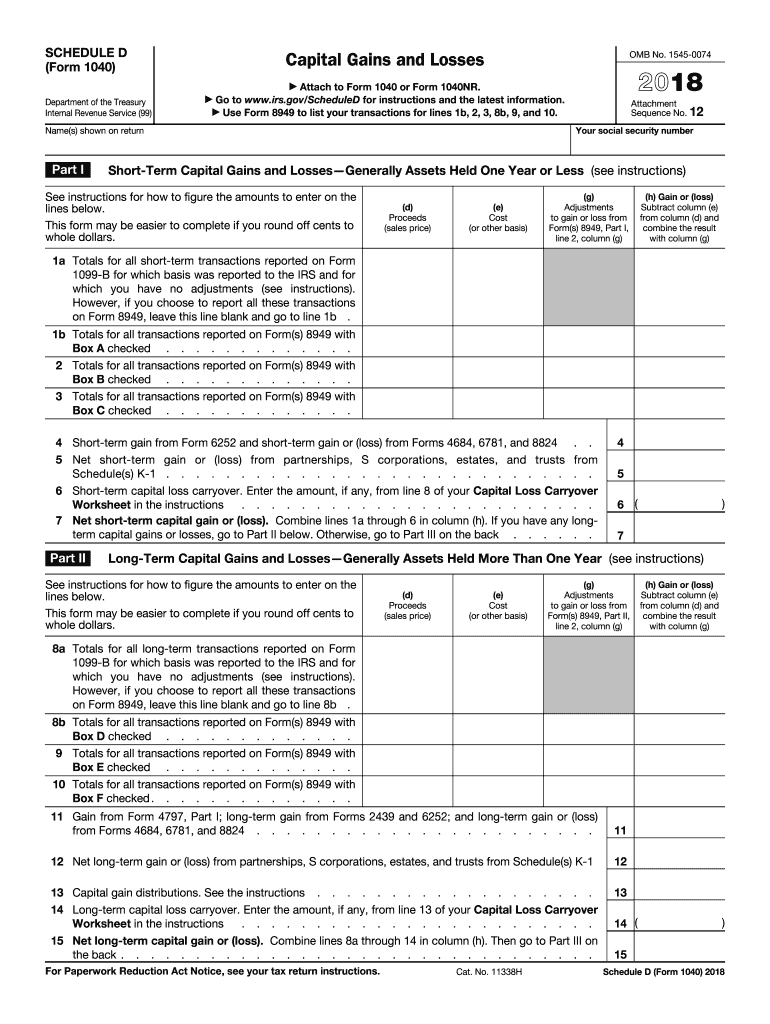
The IRS Form 1041 Schedule D is used to report capital gains and losses for estates and trusts. This form allows fiduciaries to calculate the net gain or loss from the sale or exchange of capital assets during the tax year. It is essential for accurately reporting income generated from these transactions, ensuring compliance with tax obligations. The Schedule D is attached to the Form 1041, which is the U.S. Income Tax Return for Estates and Trusts.
Steps to Complete the IRS Form 1041 Schedule D
Completing the IRS Form 1041 Schedule D involves several key steps:
- Gather necessary documents: Collect all relevant information regarding capital assets, including purchase and sale dates, amounts, and any associated costs.
- Determine the type of capital gain or loss: Classify each transaction as either short-term or long-term based on the holding period of the asset.
- Fill out the form: Input the details of each transaction in the appropriate sections of the Schedule D. Ensure that all required fields are completed accurately.
- Calculate totals: Sum the short-term and long-term gains and losses to determine the net capital gain or loss.
- Attach to Form 1041: Include the completed Schedule D with the Form 1041 submission to the IRS.
Legal Use of the IRS Form 1041 Schedule D
The IRS Form 1041 Schedule D must be used in accordance with federal tax laws. It is legally binding and must be filled out accurately to avoid penalties. Using outdated forms or providing incorrect information can lead to compliance issues. It is crucial to ensure that the form is current and reflects the latest tax regulations. Proper use of this form helps maintain transparency in financial reporting for estates and trusts.
Filing Deadlines / Important Dates
The filing deadline for the IRS Form 1041, including the Schedule D, typically falls on the fifteenth day of the fourth month following the end of the tax year. For estates and trusts operating on a calendar year, this means the deadline is April 15. If this date falls on a weekend or holiday, the deadline is extended to the next business day. It is important to stay informed about any changes to these deadlines to ensure timely submissions.
Form Submission Methods (Online / Mail / In-Person)
The IRS Form 1041 Schedule D can be submitted through various methods:
- Online: Taxpayers can e-file their Form 1041 and Schedule D using approved tax software that supports electronic submissions.
- Mail: Completed forms can be printed and mailed to the appropriate IRS address, depending on the estate or trust's location.
- In-Person: While in-person submissions are less common, certain IRS offices may accept documents directly.
Required Documents
To complete the IRS Form 1041 Schedule D, several documents are necessary:
- Transaction records: Documentation of all capital asset transactions, including purchase and sale confirmations.
- Cost basis information: Details regarding the original cost of the assets, including any improvements or related expenses.
- Prior year tax returns: Previous filings may provide context and assist in preparing the current year's forms.
Quick guide on how to complete schedule d 2018 form
Discover the most efficient method to complete and sign your Irs Form 1041 Schedule D
Are you still spending time preparing your official documents on paper instead of doing it digitally? airSlate SignNow provides an improved way to complete and sign your Irs Form 1041 Schedule D and analogous forms for public services. Our intelligent eSignature solution equips you with everything necessary to process paperwork rapidly and in compliance with formal regulations - comprehensive PDF editing, management, security, signing, and sharing tools all easily accessible within a user-friendly interface.
Only a few steps are needed to fill out and sign your Irs Form 1041 Schedule D:
- Incorporate the fillable template into the editor by using the Get Form button.
- Identify the information you must input in your Irs Form 1041 Schedule D.
- Move between the fields using the Next button to ensure nothing is overlooked.
- Utilize Text, Check, and Cross tools to populate the fields with your details.
- Update the content with Text boxes or Images from the top toolbar.
- Emphasize what is signNow or Eclipse areas that are no longer relevant.
- Select Sign to create a legally binding eSignature using any method that you prefer.
- Add the Date beside your signature and conclude your task with the Done button.
Store your finalized Irs Form 1041 Schedule D in the Documents section of your profile, download it, or transfer it to your chosen cloud storage. Our solution also offers versatile file sharing. There’s no requirement to print out your templates when you need to send them to the relevant public office - simply do it via email, fax, or by requesting a USPS “snail mail” delivery from your account. Experience it now!
Create this form in 5 minutes or less
Find and fill out the correct schedule d 2018 form
FAQs
-
How do I fill out the IIFT 2018 application form?
Hi!IIFT MBA (IB) Application Form 2018 – The last date to submit the Application Form of IIFT 2018 has been extended. As per the initial notice, the last date to submit the application form was September 08, 2017. However, now the candidates may submit it untill September 15, 2017. The exam date for IIFT 2018 has also been shifted to December 03, 2017. The candidates will only be issued the admit card, if they will submit IIFT application form and fee in the prescribed format. Before filling the IIFT application form, the candidates must check the eligibility criteria because ineligible candidates will not be granted admission. The application fee for candidates is Rs. 1550, however, the candidates belonging to SC/STPWD category only need to pay Rs. 775. Check procedure to submit IIFT Application Form 2018, fee details and more information from the article below.Latest – Last date to submit IIFT application form extended until September 15, 2017.IIFT 2018 Application FormThe application form of IIFT MBA 2018 has only be released online, on http://tedu.iift.ac.in. The candidates must submit it before the laps of the deadline, which can be checked from the table below.Application form released onJuly 25, 2017Last date to submit Application form(for national candidates)September 08, 2017 September 15, 2017Last date to submit the application form(by Foreign National and NRI)February 15, 2018IIFT MBA IB entrance exam will be held onNovember 26, 2017 December 03, 2017IIFT 2018 Application FeeThe candidates should take note of the application fee before submitting the application form. The fee amount is as given below and along with it, the medium to submit the fee are also mentioned.Fee amount for IIFT 2018 Application Form is as given below:General/OBC candidatesRs 1550SC/ST/PH candidatesRs 775Foreign National/NRI/Children of NRI candidatesUS$ 80 (INR Rs. 4500)The medium to submit the application fee of IIFT 2018 is as below:Credit CardsDebit Cards (VISA/Master)Demand Draft (DD)Candidates who will submit the application fee via Demand Draft will be required to submit a DD, in favour of Indian Institute of Foreign Trade, payable at New Delhi.Procedure to Submit IIFT MBA Application Form 2018Thank you & Have a nice day! :)
-
How do I fill out the CAT 2018 application form?
The procedure for filling up the CAT Application form is very simple. I’ll try to explain it to you in simple words.I have provided a link below for CAT registration.See, first you have to register, then fill in details in the application form, upload images, pay the registration fee and finally submit the form.Now, to register online, you have to enter details such as your name, date of birth, email id, mobile number and choose your country. You must and must enter your own personal email id and mobile number, as you will receive latest updates on CAT exam through email and SMS only.Submit the registration details, after which an OTP will be sent to the registered email id and mobile number.Once the registration part is over, you will get the Login credentials.Next, you need to fill in your personal details, academic details, work experience details, etc.Upload scanned images of your photograph, and signature as per the specifications.Pay the registration fee, which is Rs. 950 for SC/ST/PWD category candidates and Rs. 1900 for all other categories by online mode (Credit Card/ Debit Card/ Net Banking).Final step - Submit the form and do not forget to take the print out of the application form. if not print out then atleast save it somewhere.CAT 2018 Registration (Started): Date, Fees, CAT 2018 Online Application iimcat.ac.in
-
What's your GATE 2018 result and are you satisfied with it?
I am 2016 pass out from a private college in Mechanical engineering.During campus placements I got placed in TCS, but I didn’t join and opted for coaching from made easy Bhopal. I appeared for GATE 2017 as my first attempt and just cleared the cutoffs by TWO marks.My first attempt was mostly consumed mostly by the fear and some imaginary notion that my preparation is not up to the mark.Braced myself for the second attempt. ( But only doubt I had was “ Will I be able to make that big jump from 30’s to 80’s)Planned everything well this time: Collected all the standard books, studied from them, solved numerals, prepared short notes, formula sheets, took made easy (fully completed) and exergic (half completed) test series. I was constantly under 500 rank in full length test series of made easy. Exergic was a bit too hard to score.In short I did everything I could do.3rd Feb, 2018: Appeared for the morning session. Paper was very much moderate level compared to last year. Attempted 60 questions. ( My best attempt during test series was 55). I was hoping 75+ marks even after normalization.16th March, 2018: My world came crashing down. 63 marks AIR 5099. I was shattered beyond limits. I checked the answers and I found that I had lost 21 marks in silly mistakes. SIMPLE STRAIGHT CALCULATIONS. 16 marks NAT type out of range and rest MCQ. I never felt so hopeless in my entire life as I am feeling now. I am 26 and I have only few psus left I guess to apply even if I attempt gate again.I don’t know what to do and yes I am deeply UNSATISFIED.Suggestion and feedback's from people who has passed this phase in the past. Please!
-
How do I schedule a US visa interview of two people together after filling out a DS160 form?
Here is a link that might help answer your question >> DS-160: Frequently Asked QuestionsFor more information on this and similar matters, please call me direct: 650.424.1902Email: heller@hellerimmigration.comHeller Immigration Law Group | Silicon Valley Immigration Attorneys
-
How do I fill out the NTSE form 2017- 2018 Jharkhand online?
You cannot gove NTSE online or at your own level you have to belong to a school which is conducting ntse. Then download the form online from the page of ntse, fill it and submit it to your school along with fee. If your school is not conducting ntse, sorry to say but you cannot give ntse. It can only be given through, no institutions are allowed to conduct thos exam.
-
How do I fill out the NEET application form for 2018?
For the academic session of 2018-2019, NEET 2018 will be conducted on 6th May 2018.The application form for the same had been released on 8th February 2018.Steps to Fill NEET 2018 Application Form:Registration: Register yourself on the official website before filling the application form.Filling Up The Form: Fill up the application form by providing personal information (like name, father’s name, address, etc.), academic details.Uploading The Images: Upload the scanned images of their photograph, signature and right-hand index finger impression.Payment of The Application Fees: Pay the application fees for NEET 2018 in both online and offline mode. You can pay through credit/debit card/net banking or through e-challan.For details, visit this site: NEET 2018 Application Form Released - Apply Now!
-
How do I fill out the JEE Main 2018 application form?
How to fill application form for JEE main 2018?Following is the Step By Step procedure for filling of Application Form.Before filling the form you must check the eligibility criteria for application.First of all, go to the official website of CBSE Joint Entrance Exam Main 2018. After that, click on the "Apply for JEE Main 2018" link.Then there will be some important guidelines on the page. Applicants must read those guidelines carefully before going further.In the next step, click on "Proceed to Apply Online" link.After that, fill all the asked details from you for authentication purpose and click Submit.Application Form is now visible to you.Fill all your personal and academic information.Then, Verify Your Full Details before you submit the application form.After that, the applicants have to Upload Scanned Images of their passport sized photograph and their signature.Then, click Browse and select the images which you have scanned for uploading.After Uploading the scanned images of your their passport sized photograph and their signature.At last, pay the application fee either through online transaction or offline mode according to your convenience.After submitting the fee payment, again go to the login page and enter your allotted Application Number and Password.Then, Print Acknowledgement Page.Besides this, the candidates must keep this hard copy of the application confirmation receipt safe for future reference.
Create this form in 5 minutes!
How to create an eSignature for the schedule d 2018 form
How to generate an electronic signature for the Schedule D 2018 Form in the online mode
How to generate an electronic signature for the Schedule D 2018 Form in Chrome
How to generate an eSignature for signing the Schedule D 2018 Form in Gmail
How to generate an electronic signature for the Schedule D 2018 Form from your smart phone
How to generate an eSignature for the Schedule D 2018 Form on iOS devices
How to generate an electronic signature for the Schedule D 2018 Form on Android OS
People also ask
-
What is the Irs Form 1041 Schedule D used for?
The Irs Form 1041 Schedule D is used to report capital gains and losses from the sale of assets by estates and trusts. This form is essential for ensuring accurate tax reporting, allowing fiduciaries to calculate the estate's taxable income effectively. By using airSlate SignNow, you can easily manage and eSign this form, streamlining your tax preparation process.
-
How can airSlate SignNow help me with the Irs Form 1041 Schedule D?
AirSlate SignNow empowers you to efficiently prepare, send, and eSign the Irs Form 1041 Schedule D. Our platform simplifies document management, making it easy to collect signatures and ensure compliance with IRS requirements. With intuitive features, airSlate SignNow helps you save time and reduce errors in your tax filings.
-
Is there a cost associated with using airSlate SignNow for the Irs Form 1041 Schedule D?
Yes, airSlate SignNow offers various pricing plans tailored to suit different business needs, including options for managing the Irs Form 1041 Schedule D. Our plans are designed to be cost-effective, providing you with the essential tools to handle your document signing needs without overspending. Explore our pricing page for detailed information.
-
Can I integrate airSlate SignNow with my accounting software for the Irs Form 1041 Schedule D?
Absolutely! AirSlate SignNow seamlessly integrates with popular accounting software, allowing you to incorporate the Irs Form 1041 Schedule D into your existing workflows. This integration ensures that your financial data is synchronized, making tax preparation more efficient and accurate.
-
What features does airSlate SignNow offer for managing the Irs Form 1041 Schedule D?
AirSlate SignNow provides a range of features, including customizable templates, real-time tracking, and secure eSigning options for the Irs Form 1041 Schedule D. These features enhance your document management experience, ensuring that you can focus on compliance and timely submissions without hassles.
-
How secure is airSlate SignNow for handling sensitive documents like the Irs Form 1041 Schedule D?
Security is a top priority at airSlate SignNow. We utilize advanced encryption protocols and comply with industry standards to protect sensitive documents, including the Irs Form 1041 Schedule D. Your data remains safe throughout the signing process, giving you peace of mind.
-
What support options are available if I have questions about the Irs Form 1041 Schedule D?
AirSlate SignNow offers robust customer support to assist you with any questions regarding the Irs Form 1041 Schedule D. Our support team is available via chat, email, or phone to provide timely assistance, ensuring that you have the guidance you need for successful document management.
Get more for Irs Form 1041 Schedule D
Find out other Irs Form 1041 Schedule D
- How To Sign Oregon High Tech Document
- How Do I Sign California Insurance PDF
- Help Me With Sign Wyoming High Tech Presentation
- How Do I Sign Florida Insurance PPT
- How To Sign Indiana Insurance Document
- Can I Sign Illinois Lawers Form
- How To Sign Indiana Lawers Document
- How To Sign Michigan Lawers Document
- How To Sign New Jersey Lawers PPT
- How Do I Sign Arkansas Legal Document
- How Can I Sign Connecticut Legal Document
- How Can I Sign Indiana Legal Form
- Can I Sign Iowa Legal Document
- How Can I Sign Nebraska Legal Document
- How To Sign Nevada Legal Document
- Can I Sign Nevada Legal Form
- How Do I Sign New Jersey Legal Word
- Help Me With Sign New York Legal Document
- How Do I Sign Texas Insurance Document
- How Do I Sign Oregon Legal PDF