
An expense report template helps employees document business spending and request reimbursement in a consistent format. Managers use it to approve costs, while finance teams use it to check receipts, allocate expenses, and process payments. Whether you are reporting a client lunch, a hotel stay, or business mileage, the form should make each charge easy to explain and verify.
You can start with a SignNow expense report template, adapt it to your organization’s reimbursement policy, and route the completed report for eSignature. This guide explains the essential fields, relevant U.S. tax rules, common errors, and the steps for sending a report.
TL;DR
- An expense report should identify the employee, expense date, amount, category, business purpose, supporting evidence, and approval status.
- Under U.S. IRS accountable-plan rules, business connection, timely substantiation, and return of excess advances determine the tax treatment of reimbursements.
- A receipt is generally required for lodging and for other expenses of $75 or more, subject to exceptions and stricter employer policies.
- For 2026, the optional IRS business mileage rate is 72.5 cents per mile for January–June and 76 cents for July–December.
- SignNow can help collect the necessary entries and signatures; it does not independently verify whether an expense is deductible or eligible for reimbursement.
What is an expense report template used for?
An expense report is a record of costs already incurred for work. Unlike a purchase order, which may authorize spending in advance, an expense report explains what was spent and why. Unlike a vendor invoice, it typically supports an internal reimbursement or reconciliation process.
Choose a report that fits the expense
Template type | Best use | Details to capture |
|---|---|---|
General expense report | Supplies, subscriptions, small purchases | Vendor, date, category, purpose, amount |
Travel expense report | Business trips | Transportation, lodging, meals, itinerary |
Mileage expense report | Work-related vehicle use | Trip date, route, business miles, rate |
Project expense report | Costs charged to a project or client | Project code, cost category, approver |
Monthly expense report | Recurring reimbursement cycles | Reporting period, line items, advances, totals |
An expense report is a record of business expenses or other expenses incurred for work. A simple expense report template works well for individuals or small teams that just need dates, categories, amounts, receipt tracking, and basic reimbursement totals. A business expense report template is better when you need approval fields, organized records for bookkeeping or tax preparation, and support for reimbursements or advance deductions. The SignNow expense report template collection includes options such as an expense form, annual expense report, and reimbursement-related forms. Choose the document that matches the transaction rather than assuming every form includes the same fields.
What should an expense report template include?
A useful form captures enough information for an employee to submit a claim and for a reviewer to decide whether it meets company policy, helping teams track expenses, improve expense tracking, and support financial management.
Essential fields, expense categories, and their purpose
Field | What to enter |
|---|---|
Employee information | Name, department, and employee or cost-center ID if used |
Reporting period | Dates covered by the report so users can track spending consistently as part of expense tracking and broader financial management |
Expense date | When each cost was incurred |
Vendor and location | Merchant and relevant city or location |
Category | Use clear expense categories to categorise expenses consistently, such as travel, meals, lodging, or office supplies |
Business purpose | Specific client, meeting, task, or project connected to the expense |
Amount and currency | Original amount; conversion details for foreign-currency spending |
Payment method | Personal card, company card, cash, or advance |
Receipt reference | Supporting receipt or file associated with the line, including attached receipts |
Mileage information | Trip date, origin, destination, business purpose, miles, and rate |
Advances and totals | Total eligible claim, advances already paid, and net amount requested |
Employee and reviewer sign-off | Names, dates, and any signatures required by policy |
These fields capture the key details and expense details needed to calculate totals, maintain accurate records, support accurate records for reimbursements, and keep financial records and accurate financial records aligned with policy.
For business meals involving other people, record their names or identifying details and business relationships when needed for substantiation. The IRS discusses the evidence requirements in Publication 463.
[Screenshot: Capture the selected expense report form showing its employee details, itemized expense rows, and totals. Use fictional entries only.] Alt text: Expense report form with employee information, expense line items, and reimbursement totals. Caption: Check that the selected form captures the details your reimbursement policy requires before sending it.
Example: a complete expense entry
Suppose an employee pays $48 for a taxi from the airport to a client meeting. A useful entry would show the travel date, taxi provider, route, $48 amount, project or client name, and the reason for the trip, with the form set up to capture key details and organize expense details into consistent expense categories. For travel-related expenses, the employee should enter expenses promptly to avoid backlogs and keep records current. The employee should retain any available receipt and follow the employer’s policy, even if the federal documentary-evidence threshold does not independently require one.
A label such as “transportation” without a business purpose makes the expense harder to substantiate. Keep the explanation short but specific.
IRS rules for expense reimbursements
The following guidance concerns U.S. federal tax treatment. Company policies, state rules, and international requirements may differ. This article is informational, not tax or legal advice.
The three accountable-plan requirements
Under IRS Publication 463 and Treasury Regulation §1.62-2, an accountable reimbursement arrangement must meet three conditions:
- Business connection: The expenses have a qualifying connection to the employee’s work.
- Adequate accounting: The employee substantiates expenses to the employer within a reasonable period.
- Return of excess: The employee returns advances or allowances exceeding substantiated expenses within a reasonable period.
Payments meeting the applicable accountable-plan requirements are generally excluded from employee wages. Amounts treated under a nonaccountable plan are generally taxable wages. The precise treatment of particular payments or failures depends on the arrangement and the regulations; a late report does not automatically mean every reimbursement in every situation becomes taxable.
When should employees submit reports?
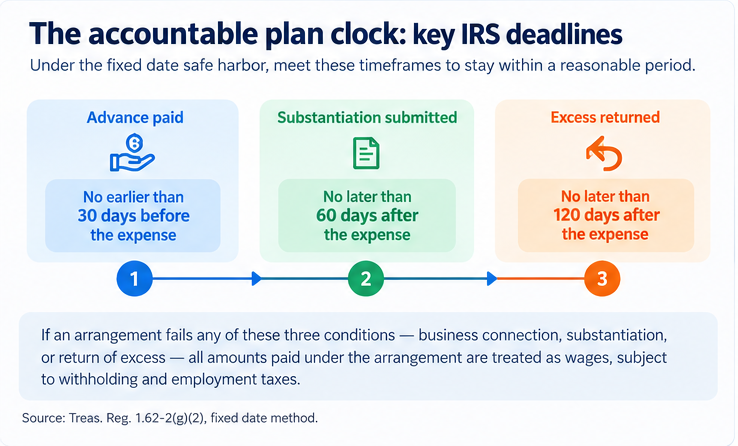
The IRS provides fixed-date safe harbors for what counts as a reasonable period:
Action | Fixed-date safe harbor |
Advance payment | Within 30 days of the expense |
Substantiate expense | Within 60 days after it is paid or incurred |
Return excess advance | Within 120 days after it is paid or incurred |
These are federal safe harbors, not mandatory deadlines for every employer. The regulations also describe a periodic statement method. Employers can set shorter submission periods to leave time for review and corrections. See Publication 463’s accountable-plan guidance.
When are receipts required and how to attach receipts?
Under the general expense substantiation rules, documentary evidence is normally required for lodging expenses and for other expenses of $75 or more. Exceptions include certain transportation expenses where receipts are not readily available and qualifying per diem arrangements.
Even when a receipt is not required, employees still need an adequate record of the expense. A company can require receipts below $75. Keep the report and its supporting files together according to the organization’s retention policy.
How to record mileage and per diem
Use the rate applicable to the trip
The IRS optional standard mileage rate for business driving changed during 2026:
Business travel period | IRS optional rate |
January 1–June 30, 2026 | 72.5 cents per mile |
July 1–December 31, 2026 | 76 cents per mile |
These are optional federal rates, not a universal reimbursement mandate. Employers may use a different policy, and the availability of the standard mileage method depends on the applicable rules. Confirm the trip date and the rate used before calculating the claim. See the IRS standard mileage rate table and 2026 midyear rate announcement.
Record per diem allowances correctly
Some employers reimburse travel using daily allowances rather than actual meal or lodging costs. The applicable federal rate varies by location and travel date; special locations may have different rates. Check the GSA per diem rate lookup when a federal rate is relevant.
A per diem arrangement may simplify substantiation of the amount, but it does not eliminate every requirement to document the business trip, dates, destination, and purpose. Follow the employer’s policy on partial travel days and eligible expenses.
Who completes and approves an expense report?
Divide responsibilities clearly
The employee records costs, explains the business purpose, and supplies available receipts. The manager checks whether the spending was work-related, authorized, and consistent with policy. Finance checks calculations, payment methods, duplicates, cost allocation, and the amount payable.
A second approval may be appropriate for high-value claims or a manager’s own expenses. These are internal control choices, not a universal IRS requirement that every report carry two signatures. Where approval is required, retain a record of the decision and date.
Avoid mistakes that delay reimbursement
- Combining business purchases with personal expenses instead of separating them when preparing reimbursement requests and supporting employee reimbursements.
- Using one vague explanation for multiple unrelated transactions.
- Forgetting to deduct an advance or flag a company-card charge already paid by the employer.
- Applying the wrong mileage rate to an earlier trip.
- Submitting a total that does not match the itemized entries or receipts.
- Treating an approver’s eSignature as proof that the underlying expense is tax-deductible.
Managers review the details needed to approve expenses, and finance uses the report to manage business expenses; review entries for accuracy before submitting the report for payment or final processing.
An eSignature audit trail helps document who reviewed or signed an expense report, when each action occurred, and which participants were involved.
How to prepare and send an expense report with SignNow
Use the featured form as a starting point, then collect employee entries and the appropriate approval signatures to manage expense reporting across travel, meals, supplies, and cases where personal expenses and business purchases are combined. The exact fields and layout depend on the template selected, but a consistent format can reduce manual effort, keep financial data organized, and support smoother finance operations.
Choose and customize the template
- Open the template collection. Visit the SignNow expense report templates page, select an appropriate expense report or reimbursement form, and open its available completion or editing flow. Sign in or create an account if prompted.
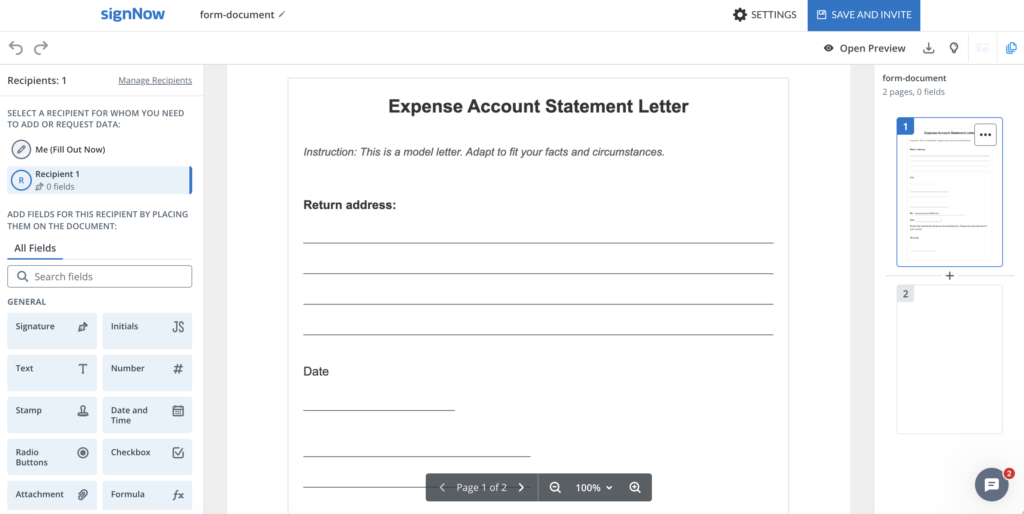
- Check the document content. Confirm that the form has space for employee details, each expense, its purpose, totals, and approval. If important sections are missing, prepare a revised source document or select a better-fitting template before sending. Adding a fillable field is not the same as rewriting fixed PDF text.
- Prepare recipient fields. In the SignNow editor, assign the employee’s entry and Signature fields to the employee role. Add appropriate text, date, and signature fields for the reviewer where the form and workflow require them. Mark essential fields as required when that setting is available.
Review and send for signature
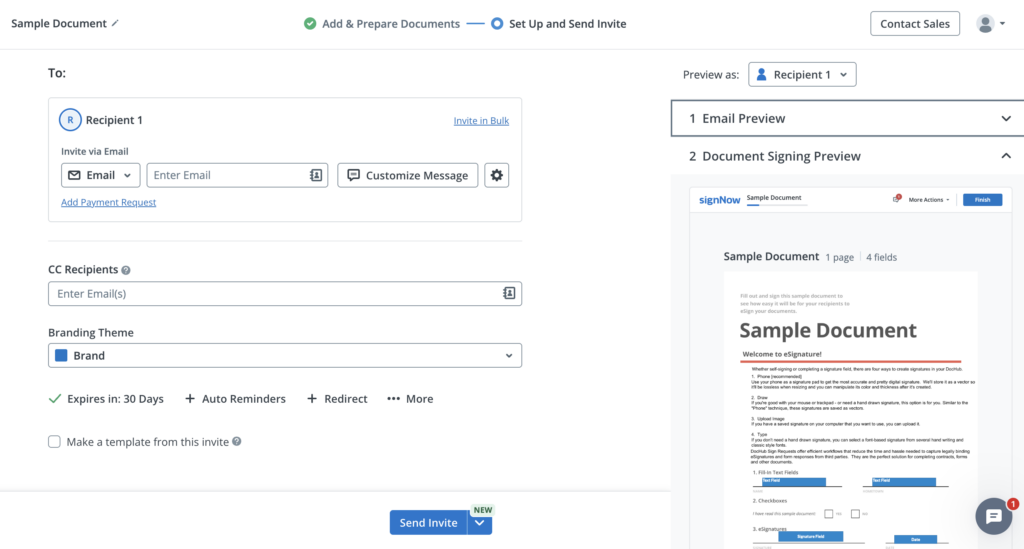
- Add recipients. Continue to the invitation stage and enter the employee’s email address and, if approval is needed, the manager’s address. A finance reviewer may be added when the workflow requires a separate signature or review.
- Set the sequence. If the employee must complete the report before the manager reviews it, enable the Recipients receive document in order on the Invite Page and place the employee first. SignNow documents this option in its signing-order instructions.
- Review the invitation. Check the form, field assignments, recipient addresses, signing order, and invitation message. Send the invitation using the available send control. If the sender must also sign, assign, and complete that signature as part of the chosen signing workflow, do not assume it is added automatically.
- Track completion. Monitor the document’s status and retain the completed report with its receipts and any separate accounting records. SignNow explains its sending and tracking options in the document sending guide. Reminders can help with follow-up, but do not change tax or company submission deadlines.
Disclaimer: The information contained in this blog post is provided for general informational purposes only and does not constitute formal legal advice.
Final thoughts
A well-designed expense report template makes reimbursement easier to review without losing the details needed for accounting and tax records. Start with the right form, capture a clear business purpose for each charge, and keep supporting evidence with the completed report.
Combining expense documentation with a secure electronic signature process helps businesses maintain traceable approvals and consistent reimbursement records. When signatures are part of your process, choose a SignNow expense report template and prepare it for approval.
Glossary
- Accountable plan: A U.S. employer reimbursement arrangement that satisfies business-connection, substantiation, and return-of-excess requirements.
- Business purpose: The work-related reason an expense was incurred.
- Documentary evidence: A receipt, bill, or similar supporting record for an expense.
- Expense category: An accounting classification such as travel, meals, or supplies.
- Per diem: A daily allowance used for eligible travel expenses under an applicable policy.
- Standard mileage rate: An optional IRS cents-per-mile rate used in certain business vehicle calculations.
- Substantiation: The records and evidence used to establish the details of a claimed expense.
FAQ
1. Can a contractor use an employee expense report template?
Yes, a contractor can use a similar itemized form to explain reimbursable project costs. However, contractor payments and documentation may have different contractual and tax treatment; the employee accountable-plan rules should not automatically be applied to independent contractors.
2. What should I do if I lose a receipt?
Ask the merchant for a duplicate or retrieve the transaction details from the payment provider. If a receipt cannot be obtained, follow your employer’s missing-receipt procedure and provide other available evidence; an explanation alone may not satisfy every substantiation requirement.
3. How do I report expenses paid in another currency?
Record the original currency and amount, the conversion rate or actual card conversion, and the resulting reimbursement amount. Follow the employer’s policy for exchange-rate dates and foreign transaction fees so finance can reproduce the calculation.
4. Can an expense report include both reimbursable and company-card expenses?
Yes, if the form clearly distinguishes the payment method and calculates only the amount owed to the employee. Company-card expenses may still need documentation and approval even though they are not personally reimbursed.
5. What happens if a manager rejects an expense report?
The employee should correct the disputed entry, add missing evidence, or remove ineligible costs according to company policy. Keep a record of the original submission and the corrected version when required for internal controls.
6. Is an eSignature mandatory on every expense report?
Not necessarily. Whether a signature is required depends on company policy, the reimbursement arrangement, and any applicable rules. An eSignature can document acknowledgment or approval, but the report must still contain accurate underlying information.
Sources
- What is an expense report template used for?
- What should an expense report template include?
- IRS rules for expense reimbursements
- How to record mileage and per diem
- Who completes and approves an expense report?
- How to prepare and send an expense report with SignNow
- Final thoughts
- Glossary
- FAQ
- 1. Can a contractor use an employee expense report template?
- 2. What should I do if I lose a receipt?
- 3. How do I report expenses paid in another currency?
- 4. Can an expense report include both reimbursable and company-card expenses?
- 5. What happens if a manager rejects an expense report?
- 6. Is an eSignature mandatory on every expense report?
- Sources