
You can sign a PDF without printing by adding an electronic signature on screen. Open the file in a PDF reader, browser, or eSignature app. Then type, draw, or upload your signature, and save the signed file.
Think of it like a rubber stamp you keep in your pocket. You create it once, and you press it onto any page you need. No printer, no pen, no scanner.
Paper still slows many teams down. The AIIM IDP survey 2025 covered 600 large enterprises. It found that 61% of IDP-related processes still rely on paper. This guide covers five methods for Mac, Windows, mobile, and the browser. It also shows when a signature image is enough. Some documents need an audit trail instead.
Key takeaways
- Mac users can sign a PDF in Preview with the trackpad, camera or iPhone.
- Microsoft Edge lets Windows users draw a signature on a PDF, no installation required.
- Adobe Acrobat Reader and Google Drive both offer type and draw signature options.
- SignNow adds a saved signature, signer tracking, and an audit trail.
- Under the US ESIGN Act, electronic form alone cannot void a signature.
- Wills, family law papers, and some court documents fall outside the ESIGN Act.
What signing a PDF without printing actually means
Signing without printing means applying one of three signature types directly to the PDF file. Each type gives a different level of proof.
Why it matters: your method decides how well the signed file holds up later.
1. Signature image. You paste a picture of your handwritten signature onto the page. Preview, Edge, and most free tools work this way. The result looks real, but it records nothing about who placed it.
2. Electronic signature. The ESIGN Act defines an electronic signature in Section 7006. It is “an electronic sound, symbol, or process” attached to a record. The signer adopts it “with the intent to sign the record.” eSignature platforms add an audit trail. It records names, emails, IP addresses, and timestamps.
3. Certificate-based digital signature. This type uses a cryptographic certificate tied to the signer. NIST FIPS 186-5 explains the purpose. Digital signatures “detect unauthorized modifications to data.” They also “authenticate the identity of the signatory.” So they detect tampering after signing.
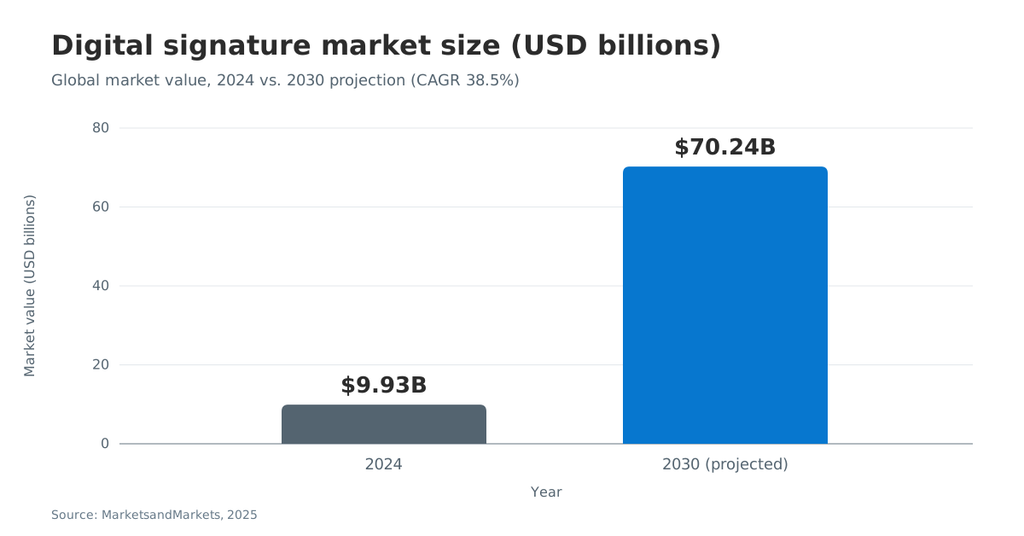
Demand for these tools keeps climbing. MarketsandMarkets valued the digital signature market at USD 9.93 billion in 2024. It projects USD 70.24 billion by 2030.
What you need before you sign
You need the PDF, a device, and one signing tool. Check these items first to avoid a failed save.
- The final PDF document. Confirm nobody plans more edits after you sign.
- A signing tool. Preview, Edge, Acrobat Reader, Google Drive or an eSignature app.
- An input method. A mouse, trackpad, stylus or phone camera works.
- An account, if required. Adobe’s online tool and Google Drive eSignature require a login.
- A safe storage spot. Pick cloud storage or a local folder.
- Permission to edit. Some PDF files block changes. Ask the sender for an unlocked copy.
Method 1: Sign a PDF on a Mac with Preview
Preview lets Mac users sign a PDF without extra software. Apple’s Preview signing guide lists three ways to create a signature.
- Open the PDF in Preview.
- Click the Show Markup Toolbar button, then click the Sign button.
- Pick Trackpad, Camera, or iPhone or iPad to create your signature.
- Click the saved signature in the list to select it.
- Drag the signature into place, then resize it with the handles.
Each capture option suits a different setup:
- Trackpad. Sign with your finger. Press any key when finished, then click Done.
- Camera. Sign on white paper, and hold it up to the camera. Line it up with the blue line.
- iPhone or iPad. Sign with your finger or Apple Pencil, then tap Done.
If you use iCloud Drive, your saved signature appears on your other Macs. Preview places a signature image, not a tracked electronic signature. For a quick personal form, that often works. For a contract with another party, use a method with an audit trail.
Method 2: Sign a PDF in Microsoft Edge on Windows
Microsoft Edge comes with a built-in PDF reader that lets you draw on files. The Microsoft Edge PDF reader documentation covers inking. Microsoft says you can use it to “sign, or fill out PDF forms.”
- Open the PDF in Microsoft Edge.
- Select Draw in the toolbar below the address bar.
- Pick an ink color, and stroke width.
- Draw your signature with the mouse, touchpad or a pen.
- Select Add text to type your name or the date.
- Click Save to keep the signed copy.
Edge has limits worth knowing. It supports basic form filling, but not JavaScript-based forms. It also does not support legacy XFA forms. On the plus side, Edge can view and validate certificate-based digital signatures inside a PDF. A drawn mouse signature can look shaky, so a touchscreen or stylus helps.
A few habits improve the result in Edge. Zoom in on the signature line before you draw. Pick black or dark blue ink at a medium stroke width. If the first try looks wrong, select Erase and draw again. Then save a copy under a new name, so the unsigned original stays intact. Edge also supports comments through Add Comment for notes to the sender.
Method 3: Sign with Adobe Acrobat Reader Fill & Sign
Adobe Acrobat Reader lets you type, draw, or upload a signature in Fill & Sign. The steps below follow Adobe’s Fill & Sign help page.
- Open the PDF in Acrobat or Acrobat Reader.
- Select Fill & Sign in the right pane or under Tools.
- Click Sign Yourself, then choose a full signature or initials.
- Pick Type, Draw, or Image to create the signature.
- Tick Save Signature to reuse it later.
- Click Apply, then click the spot where the signature belongs.
The Type option offers several handwriting style fonts. Click Change Style to see more. When you sign in, Adobe stores the saved signature in Adobe Document Cloud. Adobe says the new Fill & Sign experience “may not be available to all users.”
No desktop app? Adobe’s free online signing tool works in the browser. Adobe describes it as “no trial, no expiry.” Still, you must sign in to an Adobe account to complete a form. Requests for other signers and audit trails may need a paid Adobe Acrobat plan.
Method 4: Sign a PDF in Google Drive with eSignature
Google Drive can collect signatures on PDF files without leaving Google Workspace. Google announced eSignature for PDF files in Drive on December 4, 2024.
To request a signature, open the PDF in Drive. Click the menu icon, then eSignature. Drag in fields like Signature, Initials, Name, Text field, or Date signed. Then click Request signature. Only owners or editors of the file see this button. You can turn on automatic reminders, which go out 72 hours after the request.
To sign a request, follow these steps from Google’s eSignature help article:
- Open the email link, or open the PDF in Drive, and click Sign.
- Fill in any text fields, such as Job Title.
- Click the colored fields assigned to you.
- Choose Type or Draw, then click Adopt, and sign.
- Click Mark Complete, then Agree & Continue.
Google adds an audit trail page to the final PDF. It logs request, signing, and completion events with timestamps. Availability depends on your plan. Business Standard, Business Plus, Enterprise, Education Plus, and Workspace Individual qualify. Without a Workspace plan, Google points users to Workspace Individual.
Method 5: How to sign a PDF without printing in SignNow
SignNow lets you sign a PDF online and keep a court-admissible audit trail. It works in any browser, on mobile, and inside Microsoft Word. More than 28 million users rely on the SignNow eSignature platform.
Why it matters: an audit trail records who signed, when, and from which IP address.
Sign a PDF in the browser
This route suits anyone who signs in from a laptop at home or in the office. Use it when a document needs your signature today, and you have no printer. SignNow also covers the concept in its guide to eSigning without printing.
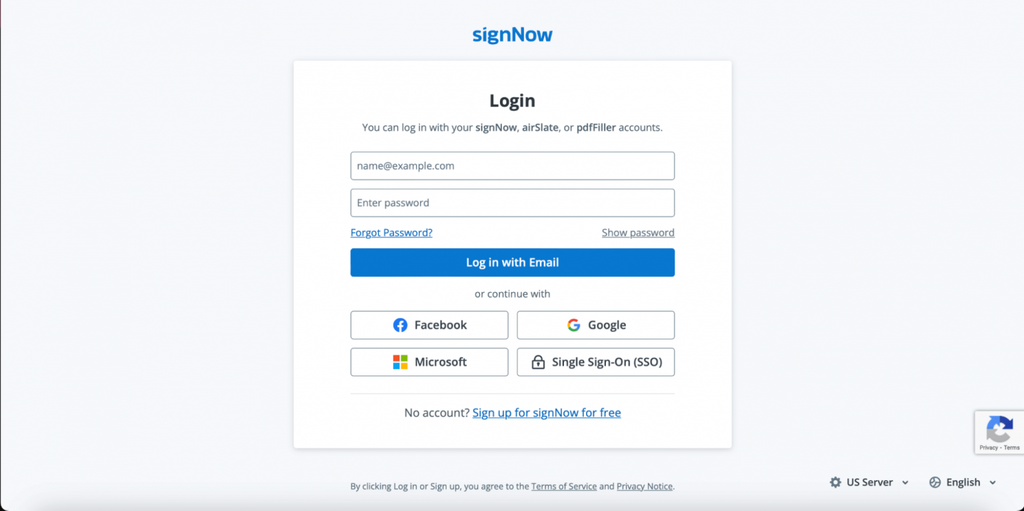
- Log in to SignNow, or start the SignNow free trial with no credit card required.
- Select Sign my own document, and upload the PDF from your computer.
- In the editor, select Me (Fill Out Now) and choose My Signature.
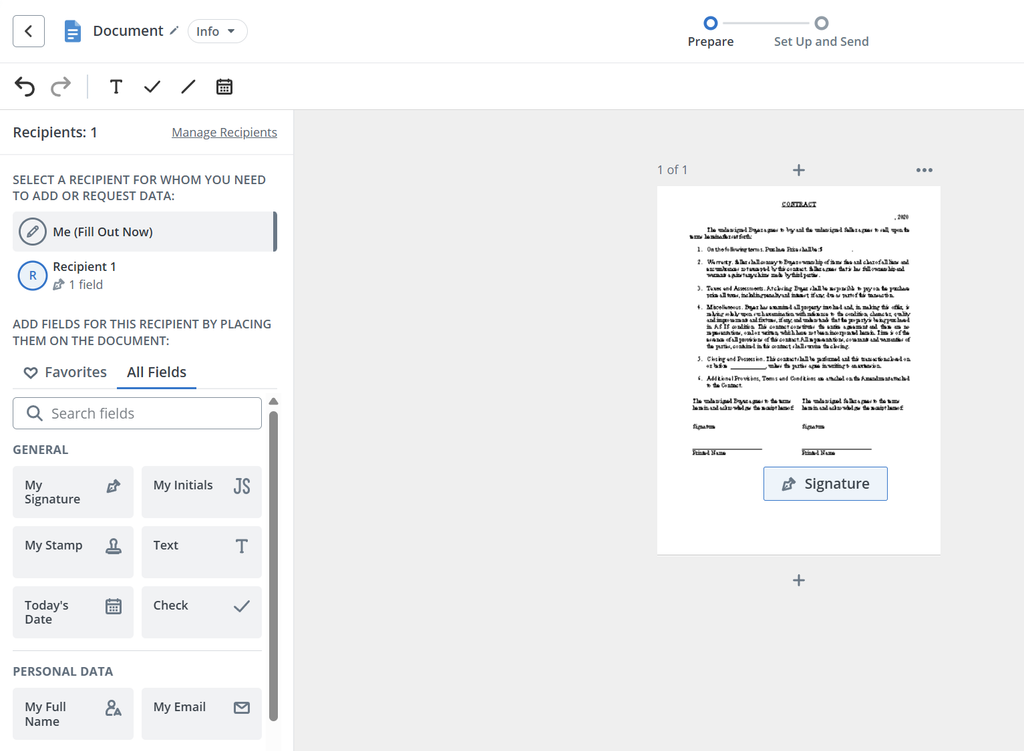
Click the spot on the page where the signature belongs.
- Type your name, draw your signature, or upload an image from your device.
You can use the already saved one or create your eSignature online.
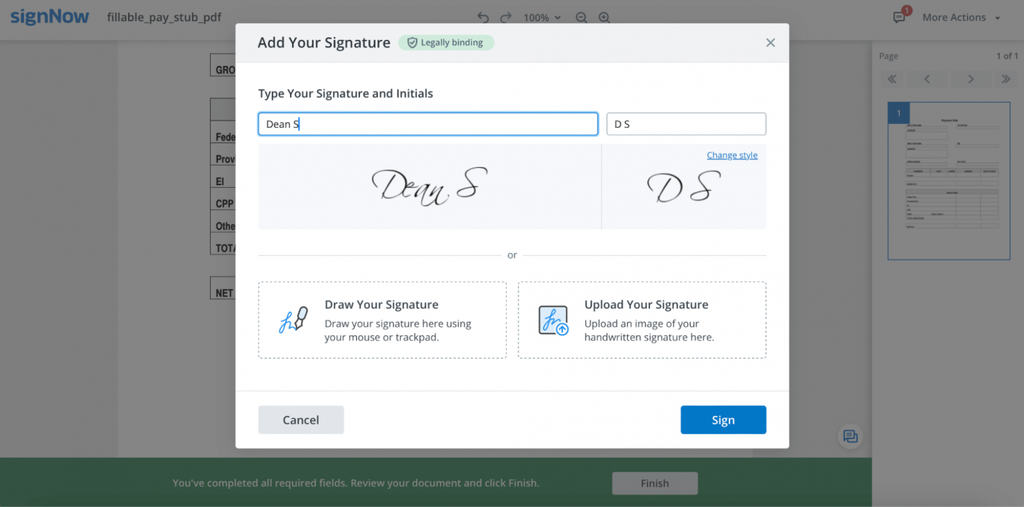
5. Add text, dates, or checkmarks from the same section, then download the signed PDF.
SignNow can store a default signature in your profile. You reuse it on the next document. You can also add fillable fields to a PDF for other signers. SignNow tracks each step. Automatic reminders and notifications keep signers moving.
Sign on a phone or tablet
The SignNow mobile apps for iOS and Android let you sign on the go. You can capture a signature with your phone camera. Offline mode lets you work without a connection and sync later. Mobile scan and sign also turns a paper page into a signable PDF.
Sign inside Microsoft Word
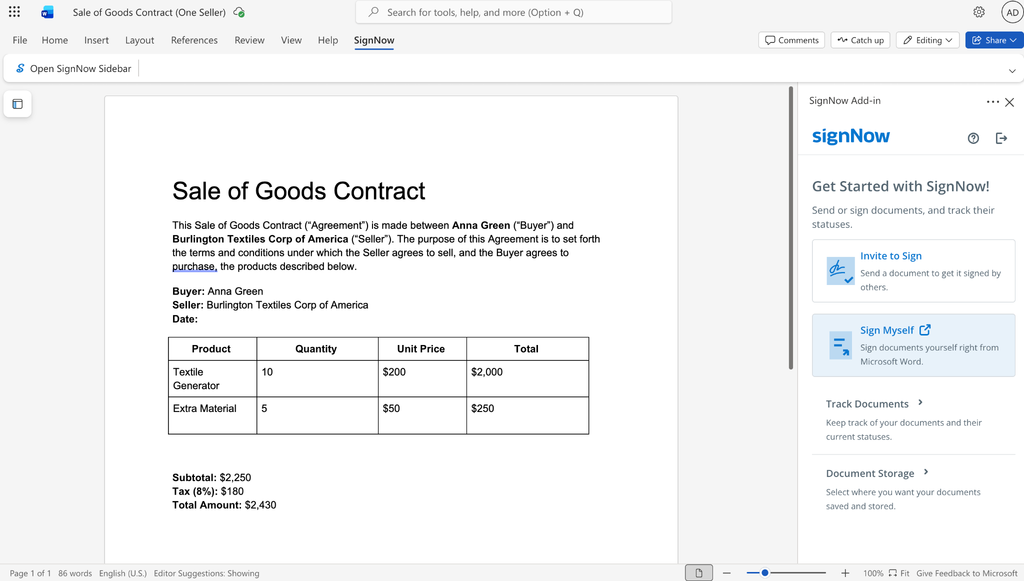
Many contracts start as Word files. The SignNow Word add-in lets you sign without converting the file first.
- In the ribbon, select SignNow, then Open SignNow Sidebar.
- Click Sign Myself, then Continue.
- Select Me (Fill Out Now) in the left panel.
- Click My Signature, then click the spot for your signature.
- Click Sign, then Save and Close, and Download the result.
Which plan includes what
The SignNow Business plan costs $8 per user per month, billed annually. It includes legally binding eSignatures, mobile apps, and court-admissible audit trails. Business Premium at $15 adds bulk send. Enterprise at $30 adds advanced signer authentication and conditional fields.
HR teams see the paper savings fast. Nicholas Tovar, SHRM-CP, shared this result.
“SignNow has changed our workflows to be more streamlined and efficient. We saved more than 1500 pieces of paper converting to an electronic format.”
Need a blank form first? The SignNow library of fillable forms holds more than 25 million ready-to-use forms. You can fill out PDF forms online and sign in one session.
How to save, send, and store the signed file
A signed PDF is only useful if the right people can find it later. Save it carefully, and send it through a secure channel.
- Rename the file. Add “signed”, and the date, for example “lease_signed_2026-10-19.pdf”.
- Keep it as a PDF. Converting it to Word creates a new, editable copy.
- Send a link, not a loose copy. Recipients then get the final version.
- Back it up to cloud storage. SignNow can export to Box, Google Drive, OneDrive, Dropbox, and Egnyte.
- Keep the audit trail. Download the history or certificate of completion too.
Teams that live in Google Workspace can connect the SignNow Google Drive integration. Signed copies can then be exported to Drive automatically.
Which method should you use?
Pick a method based on who else signs, and how much proof you need. The table below compares all five options.
| Method | Cost | Installation | Other signers | Audit trail |
| Preview (Mac) | Free | Built in | No | No |
| Microsoft Edge (Windows) | Free | Built in | No | No |
| Adobe Acrobat Reader | Free app and online tool | Download or browser | May need paid plan | May need paid plan |
| Google Drive eSignature | Eligible Workspace plans | None | Up to 10 signers | Yes, final page |
| SignNow | From $8/user/month; 7-day free trial | None (browser, mobile, Word) | Yes, with signing order | Yes, court-admissible |
Use Preview or Edge for a personal form you return by email. Use Google Drive if your team already works in an eligible Workspace plan. Use SignNow when you send documents to clients and need proof of the signer’s identity.
Is a PDF signed without printing legally binding?
Yes, in most cases. Electronic signatures are legally recognized in the US and the EU.
The ESIGN Act’s general rule of validity covers interstate and foreign commerce. An electronic form alone cannot strip a signature of legal effect. The statute says it “may not be denied legal effect, validity, or enforceability.” Most states also follow the Uniform Electronic Transactions Act (UETA).
The law has exceptions. Section 7003 of the ESIGN Act exceptions list excludes these records:
- Wills, codicils, and testamentary trusts.
- Adoption, divorce, and other family law matters.
- Court orders, notices, and official court documents.
- Notices of utility shut-off, foreclosure, eviction or insurance cancellation.
- Product recall notices and papers that travel with hazardous materials.
The EU follows eIDAS Article 25. An electronic signature “shall not be denied legal effect.” A qualified electronic signature goes further. It has “the equivalent legal effect of a handwritten signature.”
SignNow complies with the ESIGN Act and UETA. The SignNow eSignature legality guide covers rules for more than 30 countries. For high-stakes papers, check local rules with a lawyer. This article is not legal advice.
How to keep signed PDFs secure
A signed PDF can carry financial documents, health data, or lease agreements. Protect it during storage and while you send documents.
- Encrypt the file. SignNow uses TLS 1.2/1.3 in transit, and AES-256 at rest.
- Keep an audit trail. The SignNow audit trail logs names, emails, IPs, and timestamps.
- Verify the signer’s identity. Signers can authenticate by password, text message or phone call.
- Check compliance. SignNow security and compliance covers SOC 2 Type II, GDPR, and CCPA.
- Avoid public computers. Do not leave sensitive files in a shared Downloads folder.
- Control sharing. Share through the signing platform, not an open email attachment.
Healthcare teams can enable HIPAA compliance after signing a Business Associate Agreement (BAA). Advanced signer authentication requires the Enterprise plan.
Industry scenarios
The right signing method depends on the document and the people involved. These short examples show common cases.
Real estate. A property manager sends lease agreements to three tenants at once. A signing order for multiple signers routes the lease to each tenant in turn. The manager downloads one signed file with a full audit trail.
Human resources. An HR coordinator onboards ten new hires a month. She builds reusable document templates for offer letters and tax forms. New hires sign on their phones before day one.
Healthcare. A therapist collects intake forms from remote clients. One SignNow user, Mark Dombeck, Ph.D., described the shift.
“When COVID-19 occurred, we converted to 100% teletherapy within a week. Now I am doing that intake contract work via SignNow, and it has simplified the workflow.”
Legal. A small law firm sends engagement letters to new clients. The firm needs proof of who signed and when. The audit trail records each signer’s email, IP address, and timestamp. The firm stores the signed letter and its history in one place.
Finance. A loan officer needs a signed form from a client abroad. She sends a signing link by SMS. The client signs in the mobile browser in minutes.
Common mistakes and quick fixes
Most signing problems come from locked files, wrong tools, or lost saves. Use these fixes.
Issue: The PDF rejects a signature. The author locked the file or flattened the form. Ask for an unlocked copy. Or upload it to a tool that adds new fields.
Issue: Browser form fields do not respond. The form may use XFA, which Edge lacks. Open it in Adobe Acrobat Reader instead.
Issue: The signature looks pixelated. A small or low-contrast image caused it. Sign on white paper in dark ink, and recapture, or draw it fresh.
Issue: The signed version disappeared. You closed the tool without saving. Use Save as with a new file name, such as “lease_signed.pdf”.
Issue: The other party questions the signature. A pasted image offers no proof of identity. Use a tool that records an audit trail and signer authentication.
Issue: The PDF needs edits after signing. Edits can break a certificate-based signature. Finish every change, then sign last. If you need to edit a PDF online, do it before signing.
Final thoughts
You no longer need a printer to sign a PDF. Preview and Edge cover quick personal forms at no cost. Adobe Acrobat Reader and Google Drive add type and draw options with saved signatures. For contracts with clients, an eSignature platform gives you an audit trail and signer verification. Pick the method that matches the stakes of the document. Then keep the signed file in secure storage.
For the seamless experience of signing PDFs without printing, start a free trial with SignNow!
Glossary
- Audit trail. A log of every document action, with names, emails, IPs, and timestamps.
- Certificate-based digital signature. A certificate-backed signature that detects changes after signing.
- Electronic signature. A sound, symbol, or process adopted with the intent to sign a record.
- ESIGN Act. A 2000 US federal law giving electronic signatures legal effect in commerce.
- eIDAS. The EU regulation on electronic identification and trust services, including eSignatures.
- Flattened PDF. A PDF whose form fields turned into static content.
- Qualified electronic signature (QES). The top eIDAS level, legally equal to handwriting.
FAQ
How do I sign a PDF without printing it?
Open the PDF in Preview, Edge, Adobe Acrobat Reader, Google Drive, or SignNow. Create your signature by typing, drawing or uploading an image. Place it on the page, and save the file.
How can I sign a PDF for free?
Preview on Mac and Microsoft Edge on Windows are free and built-in. Adobe also offers a free online signing tool, though you must sign in. These free tools place a signature image without an audit trail.
Is an electronic signature on a PDF legally binding?
In the US, an electronic form alone cannot void a signature under the ESIGN Act. Exceptions include wills, family law papers, and some court documents. In the EU, eIDAS Article 25 gives similar recognition.
How do I sign a PDF on my iPhone or Android?
Install a mobile signing app, such as the SignNow app for iOS or Android. Open the PDF, tap the signature field, and draw with your finger. You can also capture a signature with the camera.
What is the difference between an electronic signature and a digital signature?
An electronic signature is any electronic mark you adopt with the intent to sign. A digital signature is one type that uses a cryptographic certificate. It detects tampering and authenticates the signer’s identity.
Can I sign a PDF without Adobe?
Yes. Mac users can use Preview, and Windows users can draw a signature in Microsoft Edge. Google Drive eSignature and SignNow also work in any browser without Adobe software.
Can I sign a PDF in Microsoft Word?
Yes, if the document is a Word file. The SignNow add-in for Word adds signing to the ribbon. Click Sign Myself, place My Signature, and download the signed copy.
Do I need an account to sign a PDF online?
It depends on the tool. Preview and Edge need no account. Adobe’s online tool and Google Drive eSignature ask you to sign in. SignNow offers a 7-day free trial with no credit card required.
Sources
- 15 U.S. Code § 7001: General rule of validity (Cornell LII)
- 15 U.S.C. Chapter 96, Electronic Signatures in Global and National Commerce (GovInfo, 2024)
- Regulation (EU) No 910/2014, Article 25 (legislation.gov.uk)
- FIPS 186-5 Digital Signature Standard (NIST, 2023)
- Digital Signature Market worth $70.24 billion by 2030 (MarketsandMarkets, 2025)
- AIIM IDP Survey 2025 findings (SecurityBrief, 2025)
- Fill out and sign PDF forms in Preview on Mac (Apple Support)
- PDF reader in Microsoft Edge (Microsoft Learn)
- Fill and sign PDF forms (Adobe Help)
- Send signature requests, and sign documents with eSignature (Google Docs Editors Help)
- Key takeaways
- What signing a PDF without printing actually means
- What you need before you sign
- Method 1: Sign a PDF on a Mac with Preview
- Method 2: Sign a PDF in Microsoft Edge on Windows
- Method 3: Sign with Adobe Acrobat Reader Fill & Sign
- Method 4: Sign a PDF in Google Drive with eSignature
- Method 5: How to sign a PDF without printing in SignNow
- How to save, send, and store the signed file
- Which method should you use?
- Is a PDF signed without printing legally binding?
- How to keep signed PDFs secure
- Industry scenarios
- Common mistakes and quick fixes
- Final thoughts
- Glossary
- FAQ
- How do I sign a PDF without printing it?
- How can I sign a PDF for free?
- Is an electronic signature on a PDF legally binding?
- How do I sign a PDF on my iPhone or Android?
- What is the difference between an electronic signature and a digital signature?
- Can I sign a PDF without Adobe?
- Can I sign a PDF in Microsoft Word?
- Do I need an account to sign a PDF online?
- Sources
