Project proposal template: What to include and how to get it signed in 2026

A project proposal template helps consultants, agencies, contractors, and service teams explain the work they recommend, what it will cost, and how a client can approve it. A useful proposal does more than describe an idea: it defines deliverables, responsibilities, timing, and the decision the recipient needs to make.
Start with the SignNow project proposal template, then adapt the content to your engagement. This guide explains what to include, how to avoid scope disputes, when a signed proposal may create contractual obligations, and how to route the completed document for eSignature.
TL;DR
- A strong project proposal covers the problem, proposed approach, scope, deliverables, milestones, price, assumptions, exclusions, and acceptance terms.
- Specify measurable deliverables and client dependencies rather than relying on broad promises.
- A signed proposal may form a binding contract, depending on its language, the parties’ intent, applicable law, and any other agreements.
- Use SignNow to assign signing fields, route internal approval where appropriate, and invite the client to sign.
- Keep the accepted version and signing record, and make sure any later statement of work or master agreement preserves important terms.
What to include in a project proposal template: executive summary and more
Define the problem and proposed outcome
Open with an executive summary that helps decision makers and other stakeholders understand the project without reading the entire document. State the client’s challenge, the result you propose, and the expected cost and timeline. The problem statement is one of the key parts of the proposal, and omitting a clear one is a common mistake. Then add enough background and key information to show why the project will matter to the reader and avoid technical jargon.
For example, a website redesign proposal might identify an outdated checkout experience, use relevant research to show where users drop off, and present the proposed redesign and testing work as the solution. Avoid promising a particular revenue increase unless you have a defensible basis and are prepared to make that commitment.
Specify scope, deliverables, project plan, and responsibilities
A reusable project proposal format should answer what the supplier will do—and what it will not do—and outlines the project plan, not just the work being proposed. Include:
- Scope and approach: Workstreams, methods, phases, and boundaries, including how you will develop and deliver the work within the plan.
- Deliverables: Concrete outputs, such as five approved page designs or a migration plan.
- Acceptance criteria: How the client will determine whether each output meets the agreement.
- Responsibilities: Materials, feedback, access, approvals, the project team, and the resources each party must provide.
- Exclusions: Services not included in the quoted price.
Resource requirements should identify team members and the tools necessary to execute the project.
Distinguish a deliverable from an activity. “Conduct stakeholder interviews” describes work; “deliver a findings report covering six stakeholder interviews” describes an output the client can review clearly enough to support the ideas you are proposing.
Set milestones, pricing, and change controls
A proposal should present deadlines and budget key details in a way that stakeholders can scan quickly. If the client must provide source files or approve a draft before the next phase starts, state that explicitly. A timeline without those assumptions can create avoidable disputes, so it should include estimated start and end dates plus key project milestones.
Proposal element | What to specify | Example |
|---|---|---|
Milestone | Output and target date | Initial design review by May 15 |
Dependency | Required client action | Brand assets supplied before design begins |
Budget estimate | Transparent financial estimate of project costs | Fixed project fee of $8,000 |
Payment | Invoice timing and due date | 50% at kickoff; balance after acceptance |
Change control | How additional work is approved | Written approval of the revised scope and fee |
These are examples, not mandatory terms. For review, costs are often easiest to assess when shown at a category level and, where appropriate, with a contingency allowance to support planning and funding decisions. Use amounts, dates, taxes, and payment conditions that fit the actual project and applicable law so readers can judge value and feasibility clearly; inflating or suppressing budget figures undermines credibility.
Include assumptions, exclusions, and acceptance terms
Assumptions, exclusions, and other key points make a quote understandable. A translation proposal, for instance, might assume the source files are editable and that the client supplies one consolidated review. An exclusion could clarify that certified translation is not included. It should also include a risk summary that identifies likely roadblocks and mitigation steps.
An acceptance block commonly identifies the parties, authorized signers, titles, signature dates, and any offer-expiration date. Clear acceptance terms and a visible risk section help build trust with stakeholders. If acceptance is intended to create a contract, the document should make that intent and the governing terms clear, since risk management identifies potential roadblocks and strategies for mitigation, and neglecting the risk section erodes stakeholder trust. A signature field alone does not settle those questions.
When a signed project proposal becomes an agreement
Understand the difference between an offer and a discussion
A project proposal can be an invitation to negotiate, an offer capable of acceptance, or part of a larger contracting process. Its legal effect depends on the wording, certainty of terms, conduct, authority of the parties, and applicable jurisdiction—not merely on whether it contains a signature line.
The Cornell Legal Information Institute’s explanation of an offer provides useful US legal context. If the client changes the price or scope before signing, treat that as a proposed revision and confirm the final version both parties intend to accept.
Check how the proposal relates to an SOW or MSA
A project proposal explains the proposed engagement. A statement of work (SOW) typically details specific services and deliverables; a master services agreement (MSA) sets broader terms for one or more engagements.
If a later agreement contains an integration or order-of-precedence clause, it may replace or control conflicting proposal terms. Do not assume the proposal automatically disappears or remains enforceable: read the documents together. Carry essential pricing, scope, intellectual property, and acceptance provisions into the governing agreement or expressly incorporate them where appropriate.
Know what an eSignature does—and does not do
For transactions within its scope, the US ESIGN Act, 15 U.S.C. § 7001, generally prevents a contract from being denied legal effect solely because an electronic record or eSignature was used. It does not eliminate ordinary contract requirements, establish that every signer had authority, or override applicable exceptions and formalities. Other jurisdictions have different rules.
Disclaimer: This section is general information, not legal advice. Seek qualified advice for consequential agreements, regulated transactions, or questions about enforceability in a particular jurisdiction.
How to prepare and send a project proposal with SignNow
The following workflow takes a customized proposal through recipient setup, review, and signature. Prepare the business terms before adding signing fields: fields collect information and signatures; they do not automatically rewrite the proposal’s underlying text.
Choose and customize the template
1. Open the proposal template. Visit the project proposal template page and use the available template action to begin preparing your document. Sign in or create an account if prompted. The exact starting action may vary by entry point.
2. Complete the proposal content. Fill in the parties’ names, project background, deliverables, milestone dates, price, payment schedule, assumptions, exclusions, and acceptance wording. If the source document requires substantive text changes, edit the source content using an appropriate document-editing workflow before sending it for signature.
3. Check the agreement language. Confirm whether signing means acceptance, whether another agreement must be signed first, and which person is authorized to commit each organization.
Review and send for signature
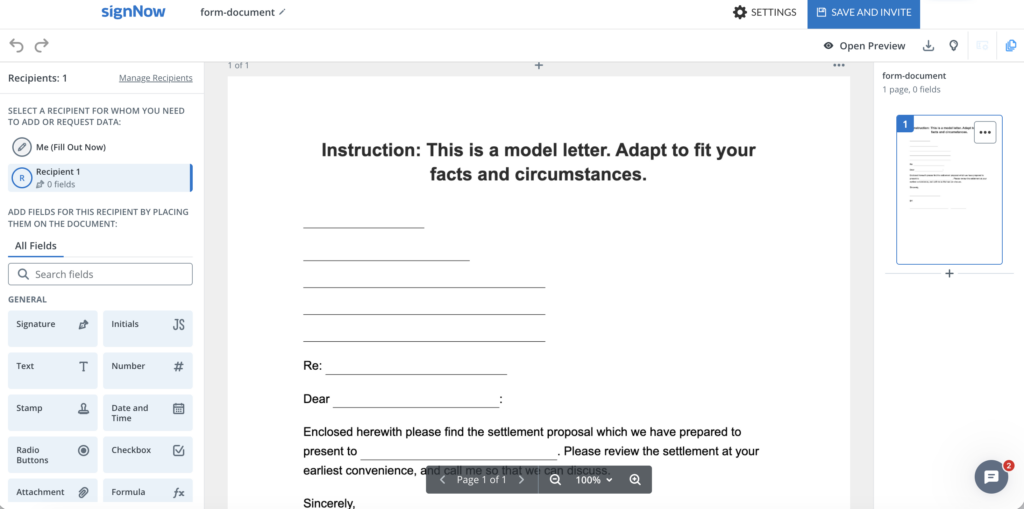
4. Add recipients. In the SignNow editor, open Manage Recipients. Add a Signer for each person who must sign. Add an Approver if an internal reviewer needs to approve the document without signing. According to the SignNow recipient guide, a recipient assigned as a Signer with no fields can have view-only permissions. Enter recipient email addresses here or on the invitation page as applicable.
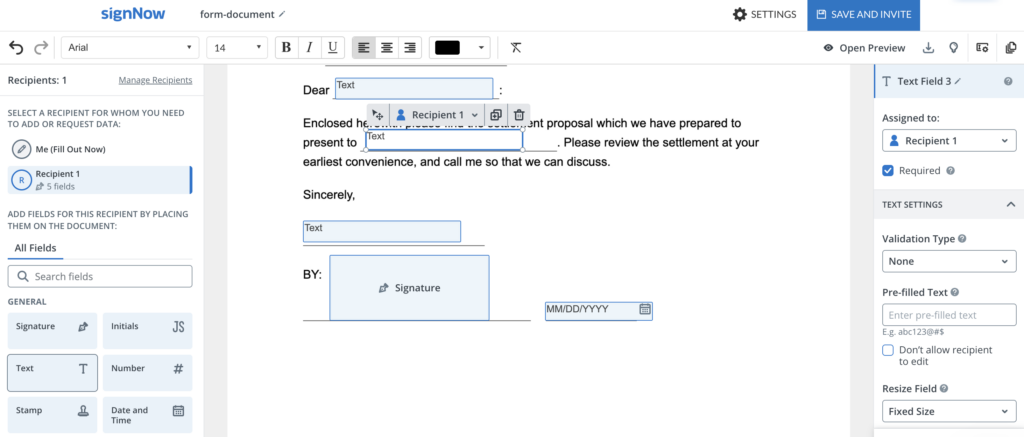
5. Assign fields. Select each signer and place the necessary Signature, Date, and text fields on the acceptance block. Assign every field to the correct recipient and mark essential entries as required. If your organization must sign too, include its authorized representative as a signer; do not assume the sender’s signature is added automatically.
5. Preview the document. Select Open Preview to check the signer experience, then return with Back to Editing. Review the price, version, email addresses, field placement, and required entries. SignNow documents these controls in its send-for-signature instructions. Before sending, put your best foot forward by checking formatting and message clarity.
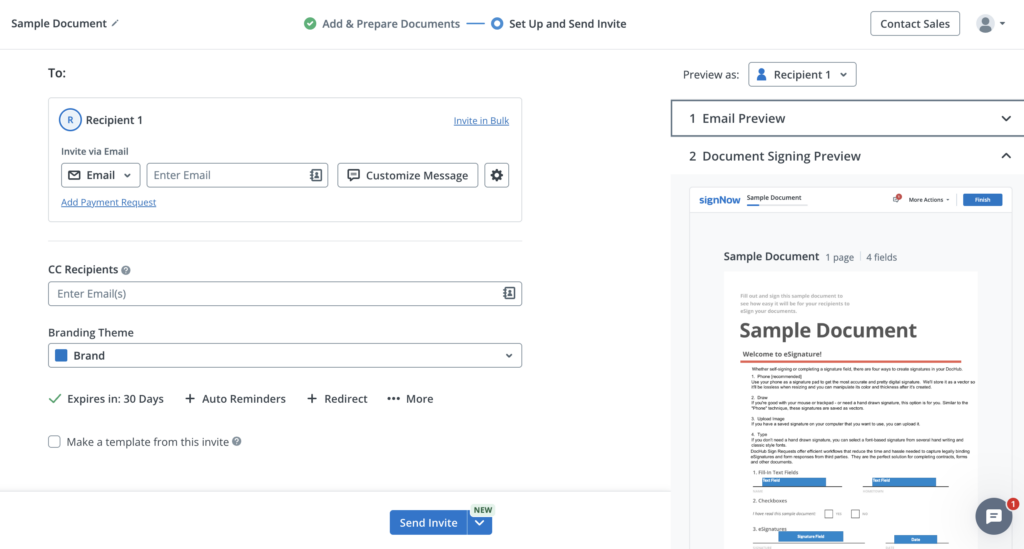
6. Set the routing order. Select Continue to reach the invitation page. If approval must precede signing, enable Recipients receive document in order and place the approver before the client signer. Otherwise, choose the sequence appropriate to the engagement. SignNow’s signing-order guidance explains sequential routing.
7. Customize and send. Use Customize Message to explain what the client is accepting and when you need a response. The note to the potential client should present key details in a concise, professional way and focus on the reader’s priorities and next steps, not your internal process; writing for the author instead of the reader is a frequent error. Review any available authentication or reminder settings under Manage Additional Settings, then send the invitation to put your best foot forward. Availability of some settings depends on the account plan.
8. Track and retain the result. Check the document’s invitation status and save the completed proposal and associated signing record according to your organization’s retention policy. A signing record can help document the process, but it does not by itself resolve disputes about scope or contract interpretation.
Avoid common project proposal mistakes for compelling proposals
Do not leave acceptance criteria vague
“Design a modern website” invites competing interpretations. Instead, define the number of pages, revision rounds, formats, and review process. Where acceptance depends on a test or deliverable, specify who evaluates it and how concerns are reported.
Do not confuse an offer deadline with an invitation setting
A commercial offer might remain valid for 30 days, while an electronic invitation can have a separate technical expiration or reminder schedule. Make the contractual deadline explicit in the proposal. Do not rely on an invitation setting to establish or change the offer’s legal terms.
Do not send an outdated version for approval
Before routing the document, reconcile comments from sales, delivery, finance, and legal. Check that the final amount matches the payment schedule and that the referenced exhibits are attached or clearly identified. A clean approval trail is more useful when everyone reviews the same version.
Final thoughts
A useful project proposal template connects a persuasive business case to precise deliverables, realistic deadlines, and an unmistakable approval decision. Finish the content first, confirm who can accept it, and then use a signing workflow that keeps the right reviewers and signers involved.
Ready to prepare your next engagement? Try SignNow today: open a project proposal template, customize the project terms, and send the final version for eSignature.
Glossary
- Acceptance criteria: Conditions used to decide whether a deliverable meets the agreed requirements.
- Approver: A recipient who reviews and approves a document in the workflow without signing it.
- Change order: An agreed modification to scope, timing, fees, or other project terms.
- eSignature: An electronic indication of a person’s intent to sign a record, subject to applicable legal requirements.
- Integration clause: Contract wording identifying the agreement as the complete statement of the parties’ terms.
- Master services agreement (MSA): A framework agreement governing a continuing commercial relationship.
- Statement of work (SOW): A document specifying the work, deliverables, schedule, and related project requirements.
- Signing order: The sequence in which recipients are invited to review or sign a document.
FAQ
1. Can I use the same proposal template for different clients?
Yes. Reuse the structure, but review every client-specific term, especially scope, fees, dependencies, confidentiality, and acceptance language. Remove details from earlier engagements before sharing a new copy.
2. Should a project proposal include a project budget breakdown?
Include enough detail for the buyer to understand what the price covers. A fixed-fee project may need milestone-based pricing, while time-and-materials work may benefit from rates, estimated hours, and a spending cap or approval threshold.
3. Can a client approve a proposal without signing it?
Possibly. Acceptance may be communicated in different ways under applicable law and the parties’ arrangements. If your process requires a signed acceptance, say so clearly and avoid treating an informal email as equivalent without checking the agreement.
4. What if the client requests changes after receiving the signing invitation?
Pause the signing process as appropriate, revise the proposal, and send the corrected version for review and signature. Make the revised scope, price, and version clear so nobody relies on superseded terms.
5. Does every project proposal need a confidentiality clause?
No universal rule requires one. Consider a separate nondisclosure agreement or tailored confidentiality provisions when the proposal reveals sensitive commercial information, customer data, or proprietary methods.
6. Who should keep the signed proposal?
Both parties should have access to the final accepted document and any incorporated exhibits. The appropriate retention period depends on contract terms, business policy, applicable law, and potential dispute or audit requirements.
Sources
- What to include in a project proposal template: executive summary and more
- When a signed project proposal becomes an agreement
- How to prepare and send a project proposal with SignNow
- Avoid common project proposal mistakes for compelling proposals
- Final thoughts
- Glossary
- FAQ
- 1. Can I use the same proposal template for different clients?
- 2. Should a project proposal include a project budget breakdown?
- 3. Can a client approve a proposal without signing it?
- 4. What if the client requests changes after receiving the signing invitation?
- 5. Does every project proposal need a confidentiality clause?
- 6. Who should keep the signed proposal?
- Sources
