
A quote template helps a business present a clear price for specified products or services before a customer commits. Sales teams, contractors, consultants, and suppliers use quotation templates to define what they will deliver, what it will cost, and how the customer can approve the offer. This guide explains the essential fields, common pricing and acceptance mistakes, and how to prepare and send a quote for eSignature using SignNow’s quote template.
TL;DR:
- Identify the seller, customer, quote number, and issue date.
- Describe each product or service, its quantity, unit price, discounts, tax treatment, and total.
- State delivery, payment, exclusions, assumptions, and a clear quote validity date.
- Explain how the customer may accept the quote; a signature is useful evidence, but is not always legally required.
- Keep the accepted version and related communications together for the order and invoice.
A quotation is more than a price list: it gives the customer enough detail to decide whether to proceed without guessing what is included.
What is a quote template or quotation template?
A quote template is a reusable document layout for sending priced offers to prospective customers. It standardizes the information each quotation contains while leaving room to change the buyer, scope, amounts, and terms for each opportunity.
When to use sales quote templates
A supplier might quote for 12 pieces of equipment plus installation. A marketing agency might quote a fixed fee for a defined campaign. A contractor might price materials and labor for a specific project phase. In each case, a detailed quotation makes it easier to compare proposals, request approval, and reconcile the later invoice.
Use a template when you send similar quotes repeatedly, but create a distinct quote number and review the commercial terms for every customer. A standard layout does not make every offer’s conditions identical.
Is a quote legally binding?
A quotation can constitute an offer. If the customer accepts its terms, a contract may arise depending on the wording, conduct, governing law, and surrounding circumstances. For US sales of goods, UCC § 2-204 recognizes contracts formed through conduct showing agreement. Different rules may apply to services, international transactions, and other jurisdictions.
Do not assume that sending a quote automatically creates a contract—or that writing “nonbinding” resolves every issue. For significant transactions, have appropriate legal counsel review the acceptance and contract terms.
What to include in a quote template
A professional quote template should answer three questions: who is offering what, at what price, and on what conditions?
Seller, customer, and reference details
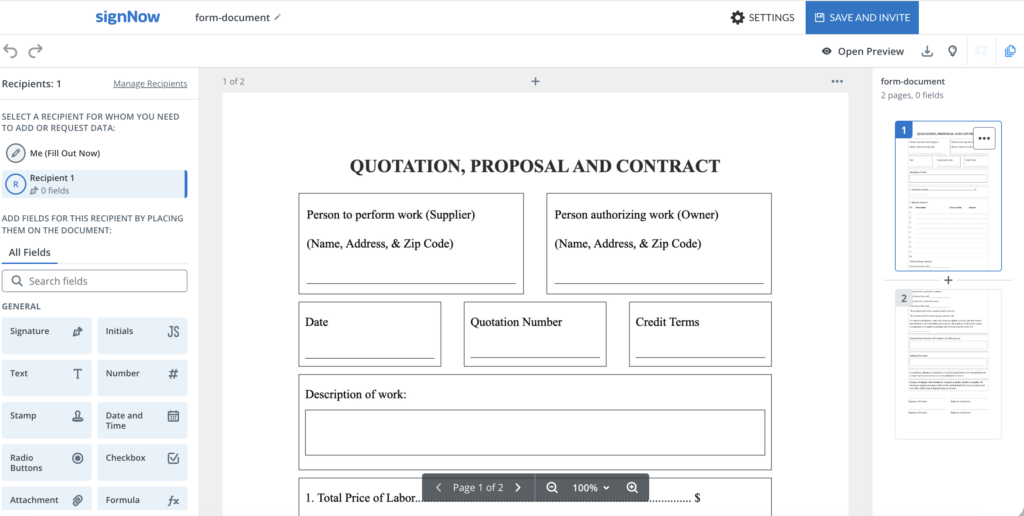
Include the seller’s business name and contact information, such as address, city, phone, and email, the customer’s legal or business name, a contact person, the quote number, and the issue date. Include the company logo with those contact details so the document is clearly branded. If the quotation is tied to a particular location or project, identify it explicitly.
The quote number is especially useful when a buyer replies by email or sends a purchase order. It connects the response to the correct version rather than an older price sheet.
Scope, quantities, and pricing
Describe each deliverable precisely. For goods, include product identifiers, quantities, and unit prices where relevant. For services, identify the work, milestones, or measurable outputs. Show discounts separately and calculate the subtotal and total consistently.
Quote line | Example entry | Why it matters |
|---|---|---|
Description | Equipment installation | Identifies the work |
Quantity | 12 units | Establishes the volume |
Unit price | $150 | Shows the basis of the charge |
Line total | $1,800 | Makes arithmetic review easier |
Tax | Applicable tax, separately stated | Clarifies what the customer pays |
Grand total | Total including applicable charges | Identifies the amount offered |
Illustrative figures only; tax rules and currency depend on the transaction.
If a quote includes many line items, Excel can be a useful format because it calculates quantities, discounts, taxes, and totals automatically. If shipping, travel, setup, or other fees are not included, say so. Do not leave the buyer to infer whether the displayed total is the final amount.
Terms, assumptions, and acceptance
State when the quote expires, the expected delivery or service period, the payment schedule, and any deposit requirements. Include assumptions that affect price, such as site access or customer-provided materials, and exclusions such as permits or out-of-scope revisions.
An acceptance area may include the Client’s signature, printed name, title, and date. If acceptance by purchase order or written email confirmation is allowed, explain how that works and where the customer should send it. You can also export the finished quote as a PDF before you send it, so the layout does not change on the customer’s screen. A signature block is a practical option, not a universal legal requirement.
How long should a quote remain valid?
There is no single validity period appropriate for every business. A short period may suit volatile material prices; a longer one may fit a buyer with several approval stages. Many businesses choose a defined window, such as 14 or 30 days, as a commercial practice rather than a universal legal rule.
State a clear expiry date
Prefer an unambiguous statement such as “This quotation is open for acceptance until October 31, 2026,” including the time zone if the precise cutoff matters. If you expect prices to change after that date, say a revised quote may be required. Confirm whether delivery dates and inventory availability are also subject to change.
Under UCC § 2-205, a qualifying merchant’s signed written assurance to hold a goods offer open may be irrevocable without consideration for the specified period, subject to a three-month limit under that provision. This is not a general three-month maximum for every quote, and it does not govern every service or jurisdiction.
Separate quote validity from signing-invite expiration
A contractual quote deadline and an electronic invitation deadline are different things. The first expresses the commercial offer’s terms; the second controls access to a particular signing link. Changing one does not necessarily change the other.
According to the SignNow guide to expiration dates and reminders, email signing invitations expire after 30 days by default and can be configured for up to 180 days. These settings apply to supported email invitations, not every sending method. Align the invitation with the quote’s stated deadline, and review both independently.
Quote vs. estimate vs. proforma invoice vs. invoice
These documents serve different purposes, although businesses sometimes use the names loosely.
Document | Main purpose | Typical next action |
|---|---|---|
Quote | Offer a defined scope at a stated price and terms | Accept, negotiate, or decline |
Estimate | Approximate costs before the final scope or price is settled | Refine requirements or request a firm price |
Proforma invoice | Present anticipated transaction details, often before shipment or payment | Arrange payment, approval, or customs paperwork |
Invoice | Request payment after work is completed or goods are delivered, under agreed terms | Pay or resolve billing questions |
A quote is not automatically fixed or enforceable in every circumstance; its language and the governing rules matter. Likewise, a proforma invoice does not necessarily prove that a binding agreement already exists, while an invoice is a request to be paid after completion or delivery. An eventual invoice may need additional information under applicable tax rules. For example, GOV.UK‘s invoice guidance sets out requirements for UK invoices.
How customers can accept a quotation
An accepted quote should be traceable to the specific scope, amount, and terms the buyer reviewed. Make the acceptance route explicit before sending.
Signature, email, or purchase order
A signed quotation provides a clear record of approval. Depending on the offer’s terms and applicable law, a customer might instead accept by email, purchase order, or conduct. For US goods transactions, UCC § 2-206 generally recognizes reasonable methods of acceptance unless the offer or circumstances indicate otherwise.
If you require a signed quote before beginning work, say so. If the buyer proposes different terms, such as a revised delivery date or changed quantity, confirm the changes in an updated quotation or agreement rather than assuming the original was accepted unchanged.
When to request a countersignature
Some workflows benefit from signatures by both buyer and seller, particularly when the parties want one document reflecting mutual approval. A countersignature is not required for every quote. If both signatures are necessary for your process, define who signs first and make sure each person receives the correct signing role.
How to prepare and send a quote template with SignNow
You can use a quotation layout to prepare customer-specific prices, add an acceptance section, and request an eSignature. The precise steps depend on whether you begin with the featured template or upload your own file.
Choose and customize the template
1. Open the template. Visit the SignNow quote template page and review the available quote layout. Follow the page’s displayed option to use or access the template; sign in or create an account when prompted. Page-level button labels may vary.
2. Prepare the commercial content. Complete the seller and buyer details, itemized products or services, quantities, rates, taxes, total, delivery conditions, exclusions, and validity date. Review the source document’s text before the signing stage; adding a fillable field does not necessarily edit existing PDF text.
3. Keep a reusable master. If you regularly send similar quotes, prepare a version with standard language and repeatable field locations. SignNow’s reusable-template guide explains how templates preserve roles and fields for future documents. Alternatively, in your account, +Create lets you upload a file as a Template or a one-off Document.
Review and send for signature
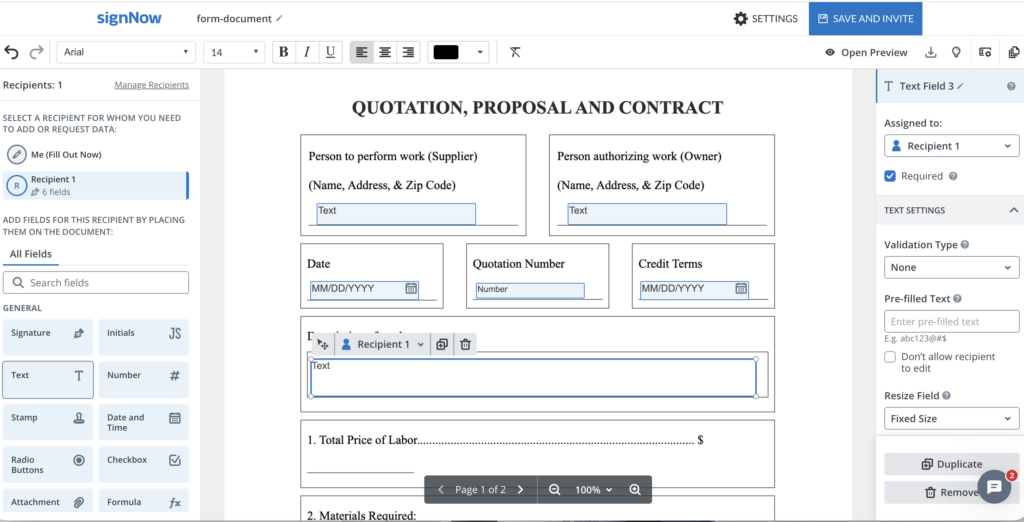
4. Add recipients. In the document editor, open Manage Recipients, enter the customer’s email, and assign a signing role. Add a second signer for your business only if a countersignature is required. A CC recipient can receive the completed copy without signing.
5. Place the acceptance fields. Select the buyer’s role and add a Signature field and, where useful, Date and Time or Full Name fields. Assign each field to the correct person and mark essential fields as required. Use Me (Fill Out Now) only for information you are completing yourself; if you need to sign in sequence, create a separate signing role for yourself.
6. Check the buyer’s view. Preview the document and verify that the itemized price, terms, and required fields are visible and correctly assigned. Confirm that the total and expiry date match the offer you intend to make.
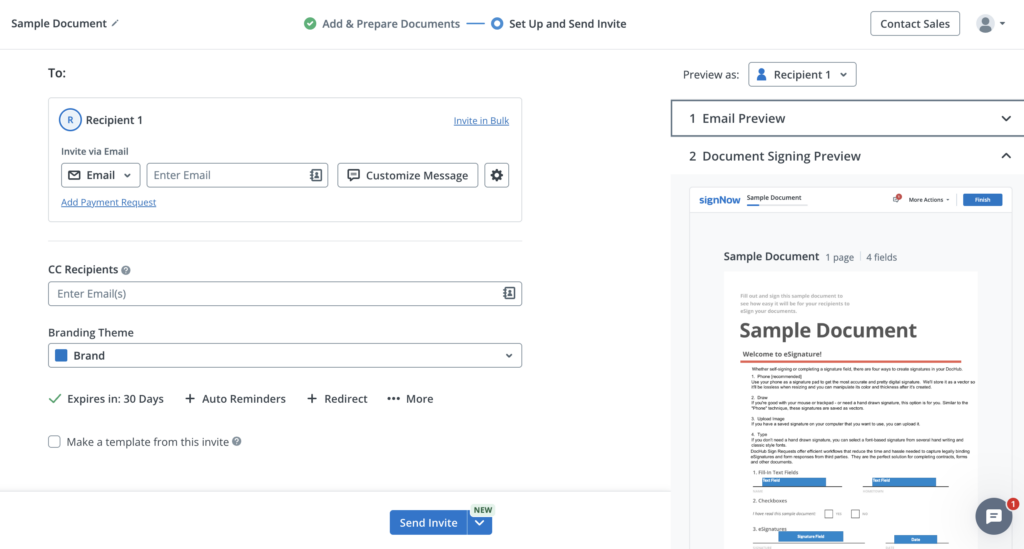
7. Configure and send the invite. Select Invite to Sign (or continue to the invite page), verify the recipient email and signing order, and customize the message. For an eligible email invite, use the gear icon beside the recipient to configure expiration and reminders if needed. Send the request only after reviewing the final quotation.
8. Save the completed record. Monitor the request’s status and retain the completed quote and related signing history with the customer’s order. SignNow’s document-sending instructions cover recipient roles, fields, previews, and sending.
What to do after the quote is accepted
The accepted quote becomes a useful reference for fulfillment and billing. Keep the quote number and approved scope visible throughout the next steps.
Confirm the order and prepare the invoice
Record the customer’s purchase order number if provided, confirm delivery dates and quantities, and document any changes agreed after the original quote. If the customer accepts only part of the scope, issue an updated confirmation instead of treating the full quote as approved.
When invoicing, carry over the correct descriptions and amounts, apply the relevant tax rules, and give the invoice its own identifier. Reconcile deposits, partial deliveries, and approved variations rather than copying the quote total blindly.
Avoid common quotation mistakes
- Vague scope: Replace “installation services” with defined tasks, quantities, and deliverables.
- Missing exclusions: Specify costs or services that are not included.
- Inconsistent totals: Recalculate discounts, shipping, and tax before sending.
- Unclear approval: State whether an eSignature, purchase order, or written confirmation is expected.
- Outdated versions: Use a revised quote number or version identifier when terms change.
- Conflicting deadlines: Check that the offer’s validity date and the signing invitation’s access period make sense together.
Disclaimer: Legal and tax information in this article is general information, not legal or tax advice. Requirements vary by jurisdiction and transaction.
Final thoughts
A useful quote template makes the offer easy to understand and the next step easy to take. Define the scope, show the full price, set a realistic deadline, and specify how the customer should approve it. To prepare your next quotation and request a customer’s eSignature, start with the SignNow quote template.
Glossary
- Acceptance: Agreement to an offer’s terms through a method recognized under the applicable rules.
- Countersignature: A second party’s signature added to a document already signed by another party.
- Estimate: An approximate projection of costs rather than a finalized price offer.
- Firm offer: Under UCC § 2-205, a qualifying merchant’s signed assurance to hold a goods offer open for a limited period.
- Proforma invoice: A preliminary statement of anticipated transaction charges, often used before final invoicing or shipment.
- Quote validity period: The stated window during which the customer may accept the quoted offer on its terms.
FAQs
1. Can I use the same quote template for products and services?
Yes, provided you adapt the pricing structure and terms. Product quotes often need units, delivery charges, and specifications, while service quotes may need milestones, labor assumptions, and revision limits. Google Docs works well in a browser for teams that want to edit and share a master quote file collaboratively. Google Sheets is a better option when the quote needs spreadsheet-style calculations for itemized pricing.
2. Should a quote include a deposit?
Include a deposit if it is part of your proposed payment arrangement. State the amount or percentage, when it is due, whether it is refundable, and how it affects the remaining balance, subject to applicable law.
3. Can a customer request changes after receiving a quote?
Yes. Treat a change in scope, quantity, or price as a proposed revision, and send an updated version for approval where appropriate. Keep the earlier version for reference so there is no confusion about which terms were accepted.
4. Do I need to include a tax registration number on a quotation?
That depends on local requirements and the nature of the transaction. A quotation is not necessarily a tax invoice; check applicable tax rules and make clear whether the quoted amount includes tax.
5. Can more than one customer representative approve a quote?
You can structure an approval process for multiple participants, but decide in advance whose approval is needed and who has the authority to commit to the customer. In SignNow, assign separate recipient roles and signature fields if multiple signatures are required.
6. Can I send a quote without requesting an eSignature?
Yes. Some businesses send a quote for review and collect approval through a separate purchasing process. If you need a signed record, use an eSignature request and make the acceptance method clear in the quote. Creating quotes, templates, and a quote maker can help with free options for professional quotes in seconds.
Sources
- Uniform Commercial Code 2-204, formation in general — Cornell Law School LII
- Uniform Commercial Code 2-205, firm offers — Cornell Law School LII
- Uniform Commercial Code 2-206, offer and acceptance — Cornell Law School LII
- Invoices, what they must include — GOV.UK
- Set deadlines: add expiration dates to signature requests — SignNow Help Center
- Send a document for signature — SignNow Help Center
- What is a quote template or quotation template?
- What to include in a quote template
- How long should a quote remain valid?
- Quote vs. estimate vs. proforma invoice vs. invoice
- How customers can accept a quotation
- How to prepare and send a quote template with SignNow
- What to do after the quote is accepted
- Final thoughts
- Glossary
- FAQs
- 1. Can I use the same quote template for products and services?
- 2. Should a quote include a deposit?
- 3. Can a customer request changes after receiving a quote?
- 4. Do I need to include a tax registration number on a quotation?
- 5. Can more than one customer representative approve a quote?
- 6. Can I send a quote without requesting an eSignature?
- Sources
