
SignNow pricing starts at $8 per month on annual billing, rises to $15 and $30 per month for the two mid tiers, and switches to usage-based pricing from $1.50 per signature invite at the top. Every paid plan includes unlimited users, so the number that shapes your bill is how many signature invites you send, not how many people log in. The current SignNow pricing plans also list a separate, higher price for month-to-month billing.
This guide covers what each tier adds, how the shared invite allowance works, what extra invites cost, and how to estimate the actual annual cost for a solo user, a small team, or a high-volume department. Every figure is linked to the SignNow page or help article it comes from, so you can confirm current pricing before you buy.
TL;DR
- Three self-serve tiers: $8, $15 and $30 per month billed annually ($96, $180 and $360 a year), or $20, $30, and $50 on monthly billing.
- Usage-based top tier: Site License starts at $1.50 per signature invite, with volume discounts and custom pricing through sales.
- Unlimited users on all paid plans: SignNow removed per-seat fees on February 27, 2025, so adding colleagues does not raise the subscription price.
- Invites are the cost driver: annual plans include up to 100 signature invites per year, monthly plans up to 10 per month, and the allowance is shared across the account.
- Extra invites are billed per tier: $0.96, $1.80, or $3.60 per additional invite on the $8, $15, and $30 tiers.
- One invite can carry several documents and recipients, and reminders or resends do not use your allowance.
- A 7-day free trial of a chosen plan is available.
How much does SignNow cost?
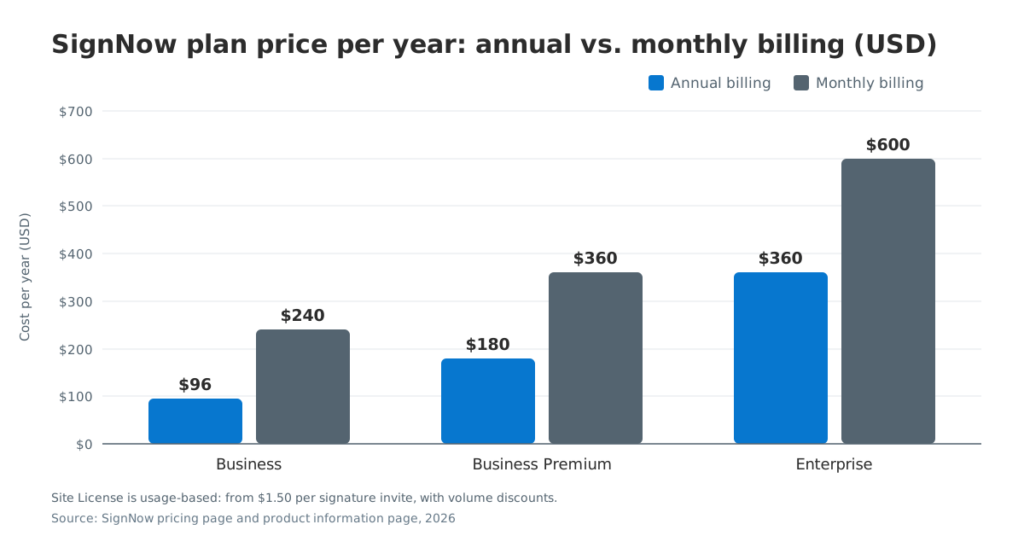
SignNow costs $96 to $360 per year on its three self-serve plans with annual billing, and $240 to $600 per year if you pay month to month. The usage-based Site License tier is quoted per invite instead of per month.
The table below lists current pricing for each pricing tier.
| Plan | Annual billing, per month | Annual billing, per year | Monthly billing, per month | Savings with annual billing |
| Business | $8 | $96 | $20 | $144 |
| Business Premium | $15 | $180 | $30 | $180 |
| Enterprise | $30 | $360 | $50 | $240 |
| Site License | From $1.50 per signature invite | Quote | Not offered | Volume discounts |
Annual billing cuts the plan price by 60% on the entry-level plan and by 50% and 40% on the two higher tiers. For a team that expects to use SignNow for at least a year, monthly billing makes sense only as a short test after the free trial.
What each SignNow pricing tier includes
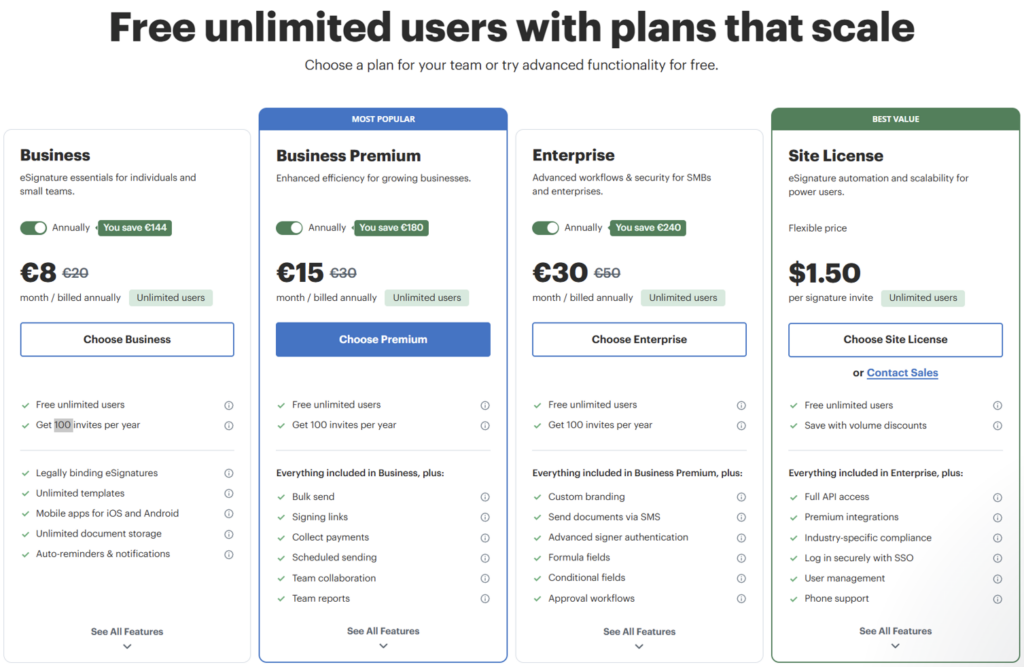
Each tier includes everything in the tier below it and adds a group of features. The lists below follow the plan cards on the pricing page, with details from SignNow’s product information page where the cards are brief.
Business: the entry-level plan
Business ($8 per month billed annually) is the entry-level plan for individuals and small teams that send straightforward agreements. It covers the basic features most people need to send documents and sign documents:
- legally binding eSignatures, valid under the ESIGN Act and UETA
- unlimited templates, so a standard contract can become one of your reusable templates
- unlimited document storage
- mobile apps for iOS and Android
- automatic reminders and notifications
- unlimited users and up to 100 signature invites per year
SignNow’s product information page also lists audit trails with this tier. The SignNow audit trail records names, email addresses, IP addresses, and time stamps for each action, which gives you a detailed audit trail without a higher plan. To learn more about eSignature audit trails and their use, see our blog: What is an eSignature audit trail?
An invite on this tier can go to one or multiple recipients, so a lease that needs two tenants and a landlord still counts as one invite.
A freelance consultant who sends 6 to 8 engagement letters a month fits this tier well. At roughly 90 invites a year, the consultant stays inside the included allowance and pays $96 for the year.
Business Premium: bulk sending, signing links and payments
Business Premium ($15 per month billed annually) adds tools for teams that send the same document to many people or collect money with a signature. The plan card lists:
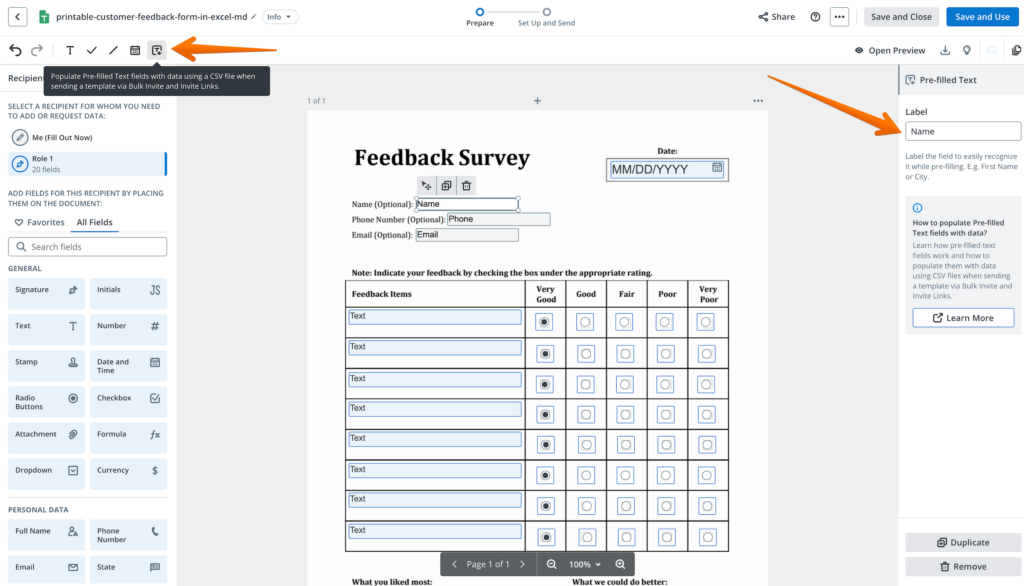
- bulk send, which sends one template to a list of recipients from a CSV file
- signing links that recipients open without a separate email invite
- payment collection, so you can request payments directly inside the signing flow
- scheduled sending
- team collaboration and team reports
SignNow bulk sending is the feature most buyers upgrade for. HR teams that send the same policy acknowledgment to 40 employees can prepare it once instead of 40 times. The saving is in preparation time; bulk sending is a workflow benefit, not a discount on invite usage.
SignNow payment requests connect to payment services in workspace settings. A property manager can collect a deposit at the moment a tenant signs, instead of sending a second request after the lease comes back. The SignNow invite links feature fits forms that many people complete, such as a waiver posted on a website.
Enterprise: branding, logic and signer verification
Enterprise ($30 per month billed annually) is aimed at companies with multiple teams and more complex signing flows. It adds:
- custom branding for the signing experience
- sending documents via SMS
- advanced signer authentication
- formula fields and conditional fields
- approval workflows
Conditional fields show or hide parts of a form based on a signer’s answers, and formula fields calculate totals inside the document. Together they cut errors on order forms and applications. SignNow advanced signer authentication lets a signer confirm identity by password, text message, or phone call before opening the document.
The tier fits mid-sized businesses in regulated or client-facing work. A financial advisory firm that needs recipient verification on account forms and consistent branding across offices gets both on this tier, along with approval workflows for internal sign-off before a document goes out.
Site License: usage-based pricing with full API access
Site License is priced at $1.50 per signature invite, with volume discounts as usage grows. It is the only plan billed by usage rather than by a fixed monthly fee. The plan card adds:
- full API access
- premium integrations
- industry-specific compliance
- single sign-on (SSO)
- user management tools
- phone support
The SignNow Site License page describes the plan as suited to organizations sending more than 1,000 invites a year, with volume discounts above 3,000 invites a year. Rates are the same for invites sent from the web app and through the API. Buyers who need custom plans or custom pricing go through contact sales, and the quote should state the minimum commitment and any add-ons.
Developers can also start with the separate SignNow API pricing. It includes a free sandbox with 250 signature invites and an API plan at $146 per month on an annual commitment that covers 1,000 signature invites per year. HIPAA compliance is available once an organization signs a business associate agreement (BAA), and earlier SignNow pricing data lists HIPAA via BAA and 21 CFR Part 11 as add-ons rather than standard plan features.
Unlimited users: what changed in 2025
Since February 27, 2025, all paid SignNow plans include unlimited users at no extra cost per user. Before that date, only the Site License included unlimited seats.
The SignNow unlimited users announcement removed per-seat pricing from the standard plans and moved the cost to sending volume. A September 2026 help article on SignNow free user seats adds three practical points:
- there is no limit on how many users a workspace can invite
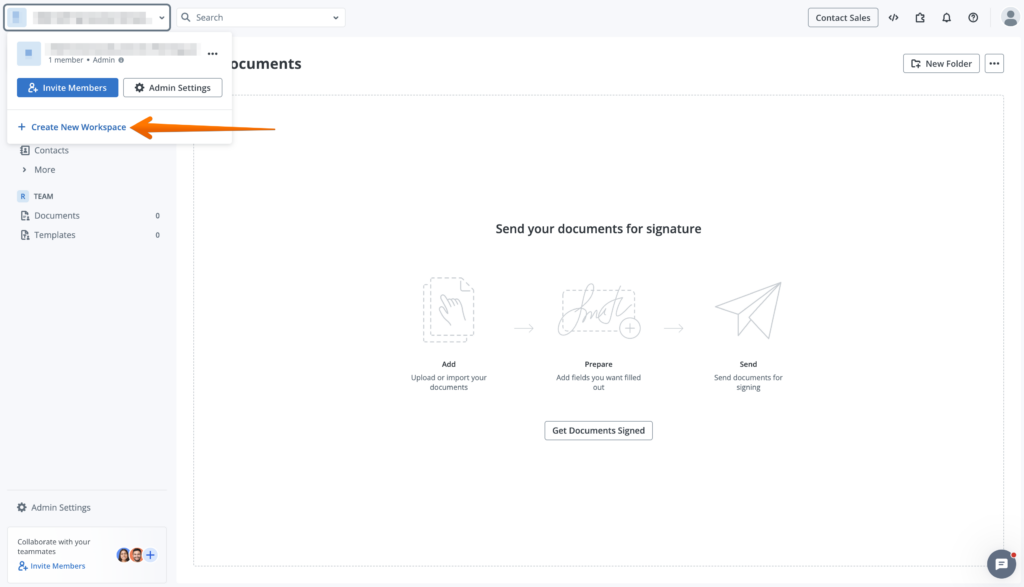
- Only Workspace Admins can add users
- Every member gets sending, signing, templates, and collaboration in the shared Team Space
For team management, this means a seasonal hire or a part-time assistant can get a separate login without a new seat fee. Each person works under their own account, and admins keep control of workspace settings, branding, roles, and billing.
Unlimited users do not mean unlimited sending. The same help article states that the plan includes 100 signature invites per user per year, shared across the account, while the pricing page FAQ describes up to 100 invites per account per year. Until SignNow aligns the wording, budget on the account-level figure and do not assume that each new user adds 100 invites to the pool.
Feedback from customers focuses on the workflow change rather than the seat count. Nicholas Tovar, SHRM-CP, said: “SignNow has changed our workflows to be more streamlined and efficient. We saved more than 1500 pieces of paper by converting to an electronic format.”
How signature invites drive your SignNow cost
Signature invites are the unit SignNow counts against your allowance, so knowing what counts is the most direct way to control cost. The rules below come from SignNow’s help article on invite seats, limits, rollovers, and extra invite fees, dated September 14, 2026.
What counts as one invite
A unique invite or signing link counts as one invite, regardless of how many recipients or documents it includes. Sending a purchase agreement with three attachments to a buyer, a co-buyer, and an agent uses one invite, not nine.
- Email and SMS invites count when you send them.
- Signing links count only after the recipient completes signing and clicks “Finish.”
- Bundled documents: several documents sent in the same invite count once, which makes grouping related paperwork the simplest way to stretch the allowance.
On annual plans, unused invites do not roll over into the next year.
What does not use your allowance
Several follow-up actions are free:
- resending an invite
- sending reminders
- forwarding an invite
- replacing a signer
Canceling works the other way. A canceled invite is not returned to your balance, and if you cancel and resend, that counts as two invites.
Extra invite fees by tier
Once you pass the included allowance, each additional invite is billed at your plan’s rate. You can keep sending; the overage fees appear on your bill.
| Plan by price | Fee per additional signature invite |
| $8 tier (Business) | $0.96 |
| $15 tier (Business Premium) | $1.80 |
| $30 tier (Enterprise) | $3.60 |
| Usage-based tier (Site License) | From $1.50 per invite, all usage |
Each fee equals the tier’s annual price divided by 100, the same per-invite rate as the plan price spread across the 100 included invites. On the $30 tier, an additional invite costs $3.60, which is more than the $1.50 starting rate on the usage-based tier. Teams on the $30 tier that send far beyond 100 invites a year should ask sales for a usage-based quote.
How to estimate your actual annual cost
Your actual annual cost equals the plan price plus extra invites multiplied by your tier’s rate, plus any quoted add-ons. Four steps give you a working estimate.
- Count last year’s signature requests. Use your current tool’s sent folder or reports, and count each unique invite, not each document or recipient.
- Subtract the included allowance. Use 100 invites per year for annual billing or 10 per month for monthly billing.
- Multiply the remainder by your tier’s rate. Use $0.96, $1.80, or $3.60 per invite.
- Add the plan price and any add-ons. Include features such as HIPAA via BAA that sales quotes separately.
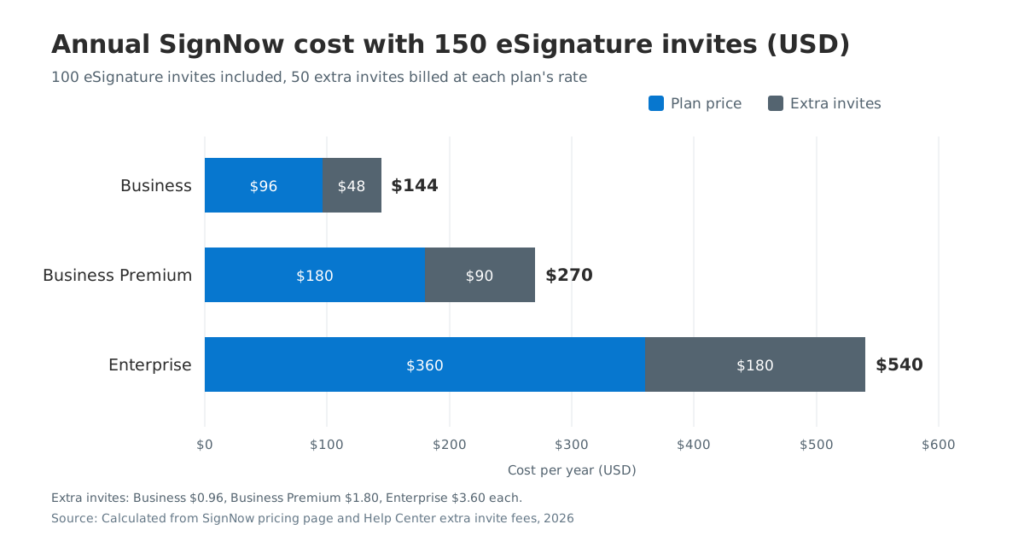
The chart below shows the result for a team that sends 150 invites a year, which leaves 50 chargeable extra invites. These are arithmetic illustrations from published rates, not customer quotes.
Real use case scenarios
- Solo real estate agent, Business. About 80 offers, disclosures, and listing agreements a year, sent as bundled invites. Cost: $96, with no extra fees.
- HR team of 12, Business Premium. Onboarding packets and policy acknowledgments total 150 invites a year, and the team needs bulk sending. Cost: $180 plus 50 × $1.80 = $270 for all 12 users. A per-seat product at $300 per user per year would cost $3,600 for the same 12 people before any envelope limits.
- Operations department, Site License. About 1,200 invites a year through the web app and the API. At the $1.50 starting rate, list cost is $1,800 before volume discounts, and the quote may include add-ons.
For healthcare intake, the same math applies with one extra line for HIPAA. Mark Dombeck, Ph.D, described the shift this way: “When COVID-19 occurred we converted to 100% teletherapy within a week. Now I am doing that intake contract work via SignNow, and it has simplified the workflow.”
Which SignNow plan fits your team
The right plan depends on three questions: how many invites you send, whether you repeat the same document across many recipients, and whether you need verification, logic, or an API. The checklist below matches common needs to the lowest tier that covers them.
SignNow plans checklist
- Choose Business if you send fewer than about 100 invites a year and need templates, mobile apps, and an audit trail. SignNow mobile apps let you sign documents away from a desk, and the web app lets you track documents as recipients complete them.
- Choose Business Premium if you send the same document to groups, collect fees at signing, or share one signing link with many people.
- Choose Enterprise if your forms need SignNow conditional fields, identity checks, or your own branding on every invite.
- Choose Site License if you send more than about 1,000 invites a year, need SSO, or plan to embed signing through the API.
Compliance and integrations
Compliance can move a team up a tier. Healthcare providers that handle protected health information need a signed HIPAA business associate agreement, and life-sciences teams working under FDA 21 CFR Part 11 need controls for electronic records and signatures. SignNow’s security and compliance page lists SOC 2 Type II, GDPR, PCI DSS, CCPA, HIPAA, and 21 CFR Part 11, and the quote for the usage-based tier is the place to confirm which of these come as add-ons.
Integration needs matter too. Teams that keep files in Google Drive, Box, or a CRM can check the SignNow integrations directory for a cloud storage integration before committing, since premium integrations such as Salesforce and NetSuite sit on the usage-based tier.
SignNow pricing compared with other eSignature tools
SignNow’s entry plan has a lower annual base price than the entry plans of Docusign and SignWell, but the tools count usage differently. Compare the plan price and the sending limit together.
| Provider and plan | Published annual price | Users | Sending limit |
| SignNow Business | $96 per year | Unlimited | 100 invites per year, then $0.96 each |
| Docusign Personal | $120 per year | 1 | 5 envelopes per month |
| Docusign Standard | $300 per user per year | Per user | 100 envelopes per user per year |
| SignWell Light | $120 per year ($10 per month) | 1 sender | Unlimited documents |
| SignWell Free | $0 | 1 sender | 3 documents per month |
| Adobe Acrobat Sign Solutions | Contact sales | Quote | Quote |
SignNow Business costs $24 a year less than Docusign Personal or SignWell Light ($96 vs $120). A solo sender who needs more than 100 requests a year may still prefer SignWell’s unlimited documents, and an occasional signer may be fine on SignWell’s free plan. SignNow’s advantage grows with headcount, because adding users does not change the plan price. SignNow publishes its own Docusign pricing breakdown for readers who want a deeper look at that comparison.
Free trial and billing terms
SignNow does not list a free plan on its pricing page.
- Free trial: the SignNow free trial covers every feature, so you can test bulk send or conditional fields before choosing a tier.
- Billing cycle: annual billing is paid for the year, while month-to-month billing costs more per month (see the table above).
- Invite allowance by cycle: annual plans get up to 100 invites per year; monthly plans get up to 10 per month.
Final thoughts
SignNow pricing comes down to two numbers: the plan price and the number of signature invites you send. Because every paid plan includes unlimited users, a growing team can add colleagues without raising the subscription, and the main cost to watch is sending volume beyond the 100 invites included each year.
Try SignNow today and see which tier fits the way your team signs.
Glossary
- Annual billing: paying for 12 months upfront at the lower per-month rate.
- Audit trail: a record of who viewed and signed a document, with time stamps and IP addresses.
- Overage fees: charges for signature invites sent beyond the plan’s included allowance.
- Signature invite: one unique request or signing link sent for signature, counted once regardless of documents or recipients.
- Signing link: a URL that lets recipients open and sign a document without an email invite.
- Workspace Admin: the role that adds users, manages settings, and handles billing in a SignNow workspace.
FAQ
How much does SignNow cost per month?
SignNow costs $8, $15, or $30 per month on annual billing and $20, $30, or $50 per month on monthly billing. The usage-based Site License tier starts at $1.50 per signature invite.
Is SignNow priced per user?
No, that works otherwise. Since February 27, 2025, all paid SignNow plans include unlimited users at no extra cost. The price depends on the plan and on how many signature invites the account sends.
How many signature invites do you get with SignNow?
Annual plans include up to 100 signature invites per year and monthly plans up to 10 per month, shared across the account. Additional signature invites cost $0.96, $1.80, or $3.60 each depending on the tier.
What counts as a signature invite?
One unique invite or signing link counts as one invite, regardless of how many documents or recipients it includes. Reminders, resends, forwarding, and replacing a signer do not count, but a canceled invite is not refunded.
Does SignNow have a free plan?
SignNow does not offer a free plan. It offers a 7-day free trial with all features of your chosen plan, and developers get 250 free signature invites in the API sandbox.
What is the SignNow Site License?
Site License is SignNow’s usage-based plan. It costs $1.50 per signature invite, includes unlimited users, full API access and SSO, and offers volume discounts above 3,000 invites a year.
Which SignNow plan includes bulk sending and payment requests?
Bulk sending and payment requests start on the $15 tier, called Business Premium. Every higher tier includes them too.
Sources
- SignNow plans and pricing, SignNow, 2026
- Invite seats, limits, rollovers and extra invite fees, SignNow Help Center, 2026
- Free user seats logic, SignNow Help Center, 2026
- SignNow unlimited users, SignNow blog, 2025
- SignNow Site License, SignNow, 2026
- Docusign eSignature plans, Docusign, 2026
- SignWell pricing, SignWell, 2026
- Adobe Acrobat business pricing, Adobe, 2026
- Electronic Signatures in Global and National Commerce Act, GovInfo, 2000
- TL;DR
- How much does SignNow cost?
- What each SignNow pricing tier includes
- Unlimited users: what changed in 2025
- How signature invites drive your SignNow cost
- How to estimate your actual annual cost
- Which SignNow plan fits your team
- SignNow pricing compared with other eSignature tools
- Final thoughts
- Glossary
- FAQ
- Sources