Financial statement template: the core statements and the ones you sign

A financial statement template organizes information about assets, debts, income, or cash movements. The format depends on whether you need to explain a business’s financial performance, report personal net worth, or satisfy a lender. Who signs depends on the document and its purpose; there is no universal signature rule.
For small business owners and individuals preparing financial disclosures, SignNow’s financial statement templates offer a starting point for completing and sending documents for signature. Use this guide to prepare your own financial statements and signing workflow.
Disclaimer: This article provides general information for U.S. readers, not accounting, tax, or legal advice. Confirm requirements with the receiving organization and qualified financial or legal advisors.
Key takeaways
- Use a balance sheet for a specific date and income or cash flow statements for a reporting period.
- Choose the recipient’s required form before adapting a general template.
- Reconcile financial data before requesting signatures.
- Confirm electronic signature acceptance and any notarization requirements separately.
Which financial statement template do you need?
Choose the question you need to answer before selecting pre-built templates. The SEC identifies four main business statements: balance sheets, income statements, cash flow statements, and statements of shareholders’ equity. Notes provide additional context.
| Statement type | What it shows | Typical purpose |
|---|---|---|
| Balance sheet template | Assets, liabilities, and equity on one date | Explain a business’s financial position |
| Income statement template | Revenue, expenses, and net income over a specific period | Review profitability |
| Cash flow statement template | Cash inflows and outflows from operating, investing, and financing activities | Assess liquidity |
| Statement of equity | Changes in owners’ interests over a period | Explain contributions, distributions, and earnings |
| Personal financial statement template | Personal assets, liabilities, and net worth on one date | Support loan applications or guarantees |
An income statement, also called a profit and loss statement, includes revenue and operating expenses. A cash flow statement reports cash movements; profit alone does not establish cash availability.
For example, an unpaid customer invoice can create accounts receivable and revenue under accrual accounting without creating cash received. Ask your accountant which accounting basis and presentation the recipient needs.
What should a financial statement template contain?
A useful template breaks information into clearly labeled sections. To produce accurate statements, check:
- Identity and scope: individual or business name, statement type, currency, and relevant entity.
- Timing: an “as of” date or reporting period, with comparable previous periods where useful.
- Line items: categories appropriate to the statement, with space for supporting schedules.
- Calculations: totals and reconciliation checks that you can independently verify.
- Explanations: accounting basis, valuation assumptions, and notes about unusual balances.
- Certification: the recipient’s required wording, signer details, and signature dates, if applicable.
For business finances, gather accounting software reports, bank statements, payroll records, and debt schedules. Check accounts payable and accounts receivable against supporting records. A financial report with unmatched dates can misrepresent the financial situation.
For a personal financial statement, gather evidence for savings, investments, property, mortgages, and credit card balances. Follow the form’s valuation and ownership instructions, especially for jointly owned assets. Keep personal and business finances distinct, disclosing business interests and guarantees as required.
Check how the figures connect
The balance sheet follows assets = liabilities + equity. Opening cash plus the period’s net cash movement should reconcile to closing cash, allowing for any separately presented reconciling items. Retained earnings generally change with net income, dividends, and applicable adjustments.
As a hypothetical personal example, $180,000 in total assets minus $65,000 in liabilities gives a net worth of $115,000. This checks arithmetic, not property values or financial stability. Trace each total back to its source before signing.
Confirm whether the recipient needs the complete package or selected schedules.
For example, a hypothetical business may show rising sales while customers take longer to pay. Ask whether overdue invoices explain the cash shortfall before treating higher revenue as evidence that expansion is affordable. Compare the receivables schedule with collection records, and document any assumptions behind the conclusion. A reviewer should be able to follow the figures from the summary to the underlying records without guessing which period applies.
For planning, generate summaries of financial activities separately from the signed statements. Compare actual results with savings goals or budgets to support smarter decisions.
Who signs a financial statement?
Read the certification and recipient instructions. Preparing, reviewing, and certifying a formal document are different responsibilities.
Personal financial statements for lenders
The applicant or guarantor generally signs where the lender’s form directs. Check requirements for joint applicants, spousal signatures, and statement dates. Do not assume one person’s signature covers another person’s disclosure.
For SBA Form 413, the official instructions distinguish between programs. For 7(a), 504, and surety bonds, they identify proprietors, general partners, LLC managing members, owners of at least 20%, and guarantors as people who must complete the form. The certification also addresses spousal signatures when a qualifying owner’s spousal assets are included.
The form requires information dated within 120 days of submission for 7(a), 504, surety bonds, 8(a), and WOSB; disaster applications use a 90-day window. It certifies truthfulness and completeness to the signer’s knowledge under penalty of criminal prosecution. Confirm program-specific instructions with the recipient.
Financial disclosures for courts
Use the court’s current form and execution instructions. A generic sworn financial statement template may omit required schedules or certification language. Confirm signature, filing, and notarization requirements with your lawyer or the court’s self-help service.
The ESIGN Act’s general validity provisions have exceptions for specified family-law records and official court documents. Those exceptions do not establish a blanket ban on electronic court signatures; applicable court rules determine the accepted procedure.
Company reports and officer certifications
For a private company’s financial statements, confirm authorized signers with the recipient and the company’s governance requirements. Do not assume an accountant’s involvement replaces management’s responsibilities.
Certain public-company annual and quarterly reports require certifications from principal executive and financial officers under Sarbanes-Oxley section 302. These certifications are not required for every small business balance sheet.
Can you sign financial statements electronically?
Electronic signatures may be legally recognized, subject to applicable law and document requirements. Under ESIGN, covered records generally cannot be denied legal effect solely because they are electronic, but the law does not require a person to accept electronic records or signatures. Confirm the lender’s process before sending.
If notarization is required, an ordinary eSignature does not perform that separate notarial act. Arrange notarization before anyone signs. Likewise, completing a SignNow workflow does not establish that financial statements are accurate, audited, or accepted for filing.
How to complete and send a financial statement with SignNow
After confirming figures and recipient requirements, use SignNow to prepare fields, assign participants, and request signatures.
1. Choose and open the appropriate template
Visit SignNow’s financial statement template collection, choose a relevant document, and select View template. If it fits your needs, click Sign now.
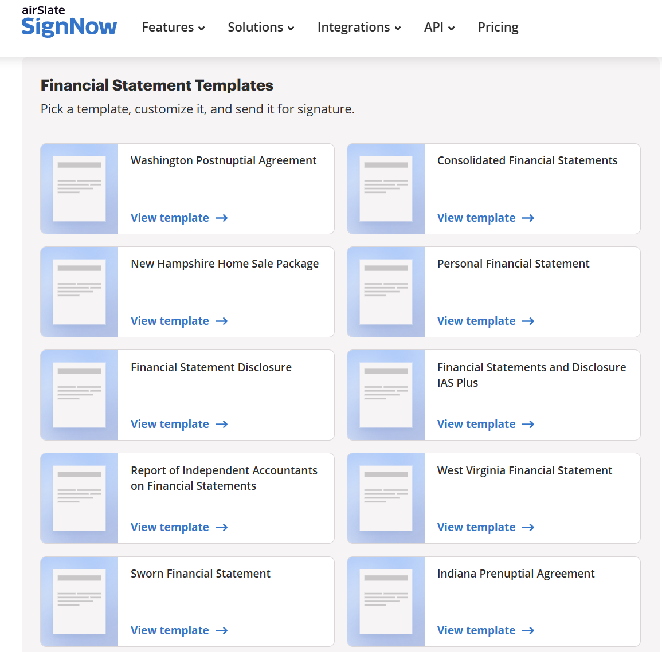
If your lender or court supplies a mandatory form, upload that file instead. Check all pages and schedules before adding fields.
2. Complete the financial information
Enter verified figures and the correct statement date. Check totals against supporting records. If a form permits estimates, identify them as instructed.
Keep calculations in your accounting software or spreadsheet until reviewed. Check the exported document for missing rows, truncated notes, and changed amounts before preparing it for signature.
3. Add recipients and assign fields
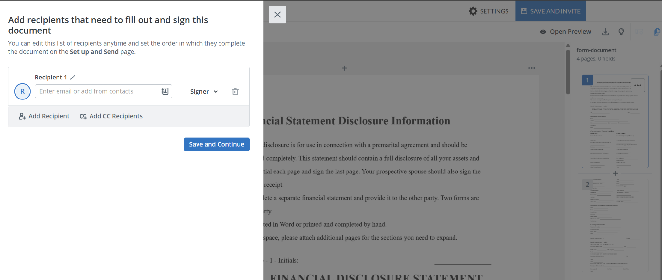
Add the required participants and assign signature, date, and text fields to the correct person. Mark the necessary fields as required and use the available validation settings where appropriate. SignNow also supports Approver roles for review steps.
Where available, Formula fields can calculate values from fields with numeric validation. Test the formula with known values before relying on it; a correctly calculated total can still contain incorrect source information.
4. Review and send for signature
Preview the document and confirm field ownership. Enter recipients’ email addresses and set the signing order if participants must act sequentially. Check that the invitation reaches only authorized people, particularly when the statement contains sensitive financial information.
Send after the financial review is complete. Review-before-signing procedures can support consistent handling, but automated workflows do not replace accounting judgment.
5. Track completion and retain the record
Follow the invitation status and retain the completed document with its supporting records under your organization’s retention policy. Check that the finished copy contains the expected entries and signatures before submitting it through the recipient’s required channel.
For repeat requests, save the prepared field layout as a reusable template. Update figures, dates, recipients, and instructions each time.
Mistakes to avoid before signing
Review these common problems before distributing the final document:
- Mixing periods: compare equivalent months, quarters, or years, and label partial periods.
- Confusing profit with cash: review cash received and cash spent separately from profitability.
- Omitting obligations: include debts and contingent liabilities wherever the form requests them.
- Trusting built in formulas: check cell ranges, signs, and imported values independently.
- Using stale information: check the recipient’s date requirements before requesting signatures.
- Changing a signed statement: follow the recipient’s correction process and preserve the original record.
For loan payments, a loan amortization schedule template can help explain principal and interest, but reconcile it against the lender’s actual balance and terms. Do not substitute a projected schedule for evidence of an outstanding debt.
Final thoughts
A financial statement template helps explain a business’s financial health when it matches the recipient’s purpose and contains supported figures. Verify the reporting dates, totals, required signers, and accepted signing method before sending.
Use SignNow to choose the financial statement template that fits your needs, customize the document, and send it to the required recipients for signature.
Glossary
- Assets: resources with economic value.
- Liabilities: debts and other obligations.
- Owner’s equity: assets minus liabilities; a measure of the company’s net worth on an accounting basis, not its sale price.
- Net income: total income less applicable expenses.
- Liquidity: ability to meet short-term obligations.
- Contingent liability: a potential obligation dependent on future events.
FAQ
1. Can I use free templates in Excel or Google Sheets?
You can use a spreadsheet layout if it suits your purpose and the recipient accepts it. Check formulas, permissions, and export formatting before sharing financial information. A free template’s availability does not establish its suitability for a loan or filing.
2. Can a financial statement replace a tax return?
Do not substitute one when the recipient requests the other. Ask which documents and reporting periods are required, including any reconciliation between accounting and tax figures. Keep the supporting records available during tax season and financial reviews.
3. Should investor presentations include forecasts or historical statements?
Clarify which information investors request and distinguish actual results from projections. Label assumptions and forecast periods so readers can interpret the figures. Have the responsible professionals review investor reporting before distribution.
4. Where do break-even analysis and ratio analysis fit?
Use them for financial planning, strategic planning, and business decisions. Keep assumptions, variable costs, and expense breakdowns available alongside the statements. Compare key ratios across multiple periods to make informed decisions about a company’s financial health.
Sources
- Key takeaways
- Which financial statement template do you need?
- What should a financial statement template contain?
- Who signs a financial statement?
- Can you sign financial statements electronically?
- How to complete and send a financial statement with SignNow
- Mistakes to avoid before signing
- Final thoughts
- Glossary
- FAQ
- Sources
