Is Docusign free? What you can sign, when sending costs money, and how the trial works

Is Docusign free? Yes, for signing. You can usually open a Docusign invitation and sign for free without creating an account. The sender’s security settings may require you to log in. A free signer account also lets you upload, sign, store, and return your own documents.
Sending documents for other people to sign is the part that is limited. A free account comes with three sends in total, the 30-day U.S. web trial lets you request signatures and try many Business Pro features. Think of a phone plan where incoming calls cost nothing and outgoing calls are metered. Every Docusign figure below was read on Docusign’s US pages on 5 November 2026, so check each page before you decide, as pricing and plans can change.
The guide is for professionals searching for Docusign as a free alternative to their signing software and wondering what they can do on the platform without paying.
TL;DR
- Recipients sign for free and usually don’t need a Docusign account. A sender can require login. You can also create a free signer account to upload and sign your own documents.
- A free account includes three sends in total, not three a month, according to Docusign’s blog and a Docusign employee.
- The free trial lasts 30 days, is based on Business Pro, and needs no credit card. Docusign’s trial pages give no envelope count for it.
- The free developer account never expires, but Docusign says envelopes sent from it “are not valid for legal purposes.”
- In the U.S., Docusign Personal costs $120 per year paid upfront, or $11 per month on a 12-month commitment ($132 total). Both billing options include five envelopes per month.
- Under the ESIGN Act, an electronic signature cannot be denied legal effect solely because it is electronic, whatever the tool costs.
What the “Docusign free version” includes
Docusign’s eSignature plans page lists no free plan. The Docusign free version is a separate signer account: it lets you sign, store, and return documents, but not collect signatures from others beyond a few sends. Docusign’s free account page says “It is always free to sign and store documents” and “A free signer account lasts forever.” Personal includes five envelopes per month. Standard and Business Pro include 10 envelopes per user per month on monthly plans or 100 per user per year on annual plans. Docusign’s pay-as-you-go overage policy applies to Standard and Business Pro. For annual plans purchased on Docusign’s website, customers can request a refund within 30 days of purchase, once per customer.
What you can do with a free Docusign account
With a free account, you can:
- Sign as many documents as you want. Docusign’s free electronic signature page says that “with a Docusign free account, you can sign, return, and store as many documents as you want.”
- Upload a document that did not come through Docusign, sign it, and send it back.
- Keep signed documents in the account. Docusign’s own blog says a free account “comes with unlimited document storage.”
- Send three documents for signature. The same post says “Your free account comes with three free ‘sends’.”
If someone sends you a Docusign invitation, you can usually sign as a guest. If the sender requires you to log in, signing is still free. Docusign’s eSignature for individuals page says: “If the document that you need to sign was sent via Docusign, you do not need a Docusign account to sign.”
How many documents can I send with Docusign for free?
You can send three documents for signature from a free Docusign account, and the three are a lifetime total rather than a monthly allowance. A Docusign employee answering in Docusign’s community forum on 3 September 2025 wrote: “Free accounts allow for three lifetime sends.” Some comparison sites describe the limit as three a month; Docusign’s staff do not.
Docusign counts sends in envelopes. An envelope is the package you send: one or more documents, the people who need to sign, and the fields they fill in. Picture a paper envelope holding a contract and a cover letter: it counts once, however many pages are inside. Docusign’s plans FAQ sets out how sends are counted:
- An envelope counts toward your allowance when you send it, even if nobody signs it.
- Signing documents that other people send you does not count. A Docusign Community moderator wrote in November 2024 that “only envelopes sent from your account” come off the quota.
Because an envelope counts once sent, a test send to yourself and a second envelope sent after fixing a mistake in the first both use up allowance. Prepare the document fully before you send it.
Here is an overview of the differences between Docusign’s free options.
Docusign’s free options compared, as of November 2026
| Option | Cost | Sending for others | How long it lasts | Note |
|---|---|---|---|---|
| Signing a document sent to you | Free | Signing only | No subscription required | Recipients can usually sign without an account. The sender may require login. |
| U.S. eSignature web trial | Free for 30 days. No credit card required. | You can request signatures. Check the envelope and recipient limits in your trial account. | 30 days | Includes many Business Pro features. The trial expires without a charge unless you choose a paid plan. |
| Developer account | Free | Demo environment only | Does not expire | Envelopes “not valid for legal purposes” |
Docusign free trial limits: length, envelopes, and what happens after
- Docusign offers a 30-day U.S. eSignature web trial with no credit card required. During the trial, you can send documents to others for signature and use many Business Pro features, including reusable templates and signing reminders.
- Check your trial account’s envelope and recipient limits before sending. This is especially important if several people need to sign the same agreement.
- The web trial expires without a charge unless you choose a paid plan. Signing remains free.
When the trial period ends, nothing is charged, because no card was taken: Docusign’s eSignature FAQ says the trial “will cancel automatically after 30 days.” You do not need to cancel anything yourself. The trial FAQ says an upgrade button appears in the expired account so you can convert to a paid plan and keep sending. The September 2025 answer says trial accounts are then “downgraded to a free one,” and from then on the free account’s rules apply.
Docusign is not the only provider with this approach. For instance, Adobe Sign, now called Adobe Acrobat Sign, also offers a free 30-day trial, so you can compare both trials on the same documents before you choose.
The free developer account is not a free plan
Docusign’s developer account is free and does not expire, but it is a test environment. The developer account page says these accounts “operate in a Docusign non-production (demo) environment” and “have most enterprise features enabled by default and don’t expire.” It also says: “Envelopes sent through your developer account are not valid for legal purposes.”
It is designed for building and testing API integrations and applications, so it is no workaround for the three-send limit on a lease, an offer letter, or a client contract.
When you need a paid Docusign plan
Once the free sends and the trial month are used up, each further envelope needs a paid plan. For multiple users on one account, choose a plan that supports multiple seats. On Docusign’s US eSignature plans page, read on 5 November 2026, the prices in US dollars for annual plans billed monthly were:
- Personal: $11 a month (“an annual commitment of $132”), 5 envelopes a month, one user.
- Standard: $30 per user per month, 100 envelopes per user per year.
- Business Pro: $45 per user per month, 100 envelopes per user per year.
The same page’s FAQ says monthly plans “include an allowance of up to 10 Envelopes per user per month,” that envelopes over the allowance are billed pay-as-you-go, and that annual plans bought on Docusign’s site carry a refund “within 30 days of purchase” that “may only be used once per customer.” Monthly plans can be canceled at any time, and you are not charged for the next month. If you subscribe to an annual plan and cancel after 30 days, the FAQ says you pay the remaining balance on your term. Our Docusign pricing breakdown covers each plan in detail.
A use case example
A solo real estate agent sends six separate envelopes every month. That puts the agent one envelope over Personal’s five-envelope monthly limit. Over 12 months, the agent would send 72 envelopes, within the annual Standard plan’s allowance of 100 envelopes per user.
Docusign envelope allowances and U.S. pricing
| Account or plan | Included envelope allowance | U.S. price on a 12-month commitment billed monthly |
| Personal | 5 per month | 11permonthforoneuser(132 per year) |
| Standard | 100 per user per year | $30 per user per month |
| Business Pro | 100 per user per year | $45 per user per month |
Sources: Docusign eSignature plans and pricing, US page, read 5 November 2026
Beyond eSignature: Docusign IAM and integrations
Docusign also sells Intelligent Agreement Management (IAM) plans on a separate IAM plans page. Docusign describes IAM as an AI-assisted platform for creating, committing to, and managing agreements, and says IAM applications include more functionality than eSignature plans. Its plan allowances page lists IAM Starter, IAM Standard, IAM Professional, IAM Enterprise, and IAM for Sales, and several of them are priced through sales rather than on the page. These plans suit businesses that want to create and manage contracts alongside document signing, such as sales teams working in CRM, rather than someone who needs a few signatures.
Cloud storage and free add-ons
Integrations matter once documents move between apps. Docusign’s free account lets you upload from Google Drive or OneDrive, and its free-account blog post mentions a Microsoft Word and Google Docs add-on. Docusign also lists integrations with Salesforce and Slack, and its integrations directory covers tools such as Microsoft apps. Docusign’s adoption guide says completed envelopes can be transferred to cloud storage services, including Google Drive, Dropbox, Box, and OneDrive. Check which integrations your plan includes before you connect a workflow that depends on one.
Can an agreement signed with a free eSignature tool be legally binding?
Nothing in US federal law on electronic signatures turns on what the tool costs, so legal validity does not depend on price. Under the ESIGN Act, 15 U.S.C. 7001(a), a contract relating to a transaction in or affecting interstate or foreign commerce “may not be denied legal effect, validity, or enforceability solely because an electronic signature or electronic record was used in its formation.” That wording was unchanged as of November 2026.
The law has limits of its own. Section 7003 leaves some documents outside ESIGN, including those governed by rules on “wills, codicils, or testamentary trusts,” family matters such as adoption and divorce, and court orders, whichever tool, free or paid, is used to sign them.
Where SignNow fits if you need to send
If the free route does not cover what you send, SignNow is one option to test against Docusign’s trial. It offers a free trial of its paid plans, and the plans, trial terms, and current prices are on the SignNow pricing page. As with Docusign, people you send documents to do not need an account: SignNow’s Help Center article on signing a document you receive says that “whether or not you have a SignNow account, you can sign any document sent to you via a signature request.” SignNow keeps a document history that records “full names, email and IP addresses, and time stamps,” and states on its security and compliance page that it complies with the ESIGN Act and UETA.
How to send a document for free using SignNow
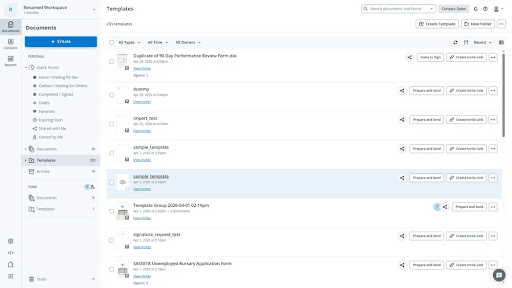
To send your first document in a SignNow trial, follow the Help Center’s step-by-step support article, Send a document for signature:
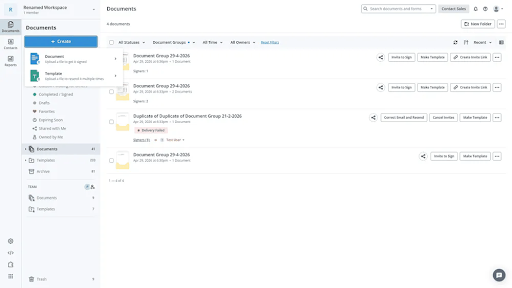
- Click +Create and upload your file as a Document for one-time use, or as a Template if you will send it again. PDF, DOC, and DOCX are among the accepted formats, up to 50 MB.
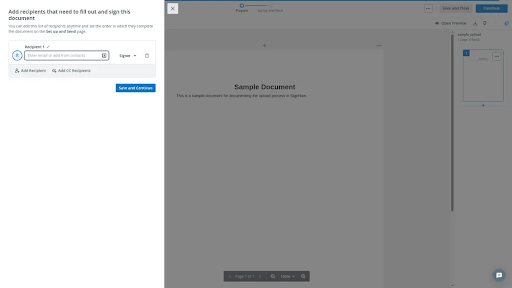
2. In Manage Recipients, add each recipient’s email, give each a role, and click Save and Continue. The fillable fields guide explains what each role can do.
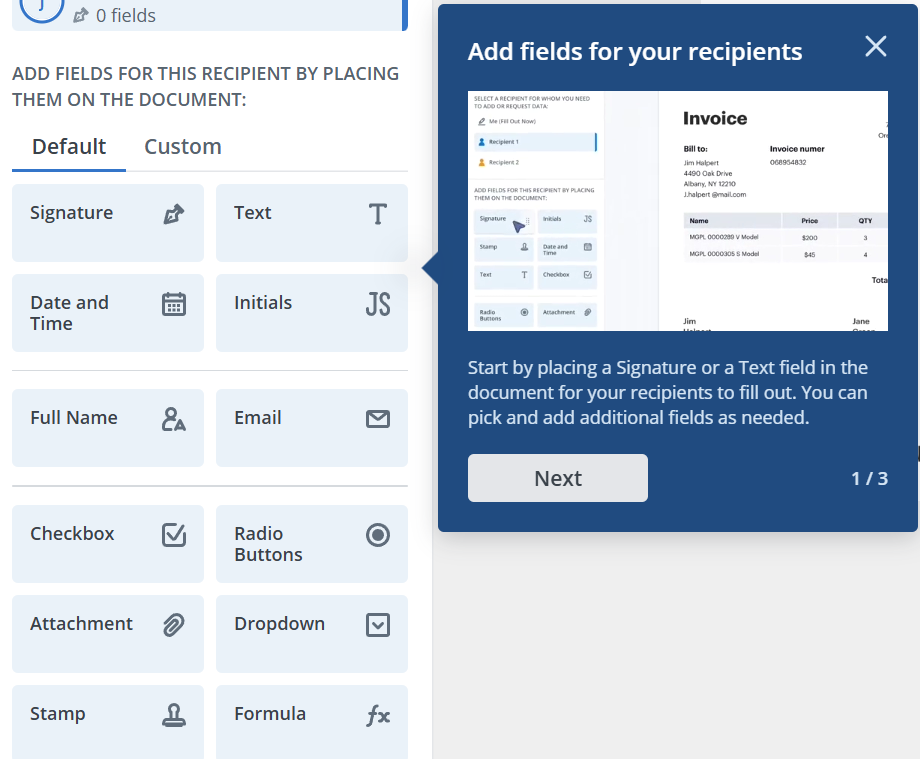
3. Select the signer’s role in the left panel, not Me (Fill Out Now), and drag Signature, Text, and Date and Time fields into place on the page.
4. Click Open Preview to see the document as the signer will, then Back to Editing if a field needs moving.
5. Click Continue to reach the Invite page. Set the signing order if one person must sign before another, edit the email with Customize Message, and send the invite.
For a wider comparison of tools, SignNow’s roundup of 21 Docusign alternatives covers other eSignature products.
Final thoughts
In most cases, Docusign is free to sign with, and its free account, trial, and developer sandbox each serve a different need: occasional signing, a month of testing, and API development. If you need to send beyond your available allowance, you are choosing a paid plan, from Docusign or another provider.
To try SignNow on a real document, start a free SignNow trial and share your first agreement for signature.
Glossary
- Audit trail: a record of who opened and signed a document, with names, email and IP addresses, and timestamps.
- Developer account: a free Docusign demo environment for testing its API; envelopes sent from it are not valid for legal purposes.
- Envelope: Docusign’s unit of sending, holding one or more documents plus recipients and fields, counted once sent.
- Envelope allowance: the number of envelopes a plan lets each user send per month or per year.
- ESIGN Act: the 2000 US federal law under which a signature or contract cannot be denied legal effect solely because it is electronic.
- Free signer account: a no-cost Docusign account for uploading, signing, and storing documents; it does not expire and includes three sends in total.
- Free trial: a 30-day Docusign account based on the Business Pro plan, with no credit card required.
- Intelligent Agreement Management (IAM): Docusign’s line of plans with agreement creation and contract management tools added on top of eSignature.
FAQ
Can you use Docusign for free?
Yes, for signing. You can sign documents sent to you through Docusign without an account, and a free account, which does not expire, lets you upload, sign, and store your own documents and includes three sends in total. To send more, you need the 30-day trial or a paid plan, as of November 2026.
Does the Docusign free trial require a credit card?
No. Docusign’s trial FAQ says “No credit card is required to sign up,” and its trial guide says you won’t be charged when the trial period expires.
What happens when the Docusign free trial ends?
The U.S. web trial expires after 30 days without a charge unless you choose a paid plan. You can upgrade if you want to keep using paid sending features. You can still sign documents that others send you for free.
Do I need a Docusign account to sign a document?
Usually, you can open a Docusign invitation and sign without creating an account. Some senders require you to log in before you can access the document. Signing is free in either case.
Are documents signed with a free eSignature tool legally binding?
Price does not decide validity. The ESIGN Act says a contract may not be denied legal effect solely because an electronic signature was used in its formation, though some documents, such as wills, fall outside it. Envelopes from Docusign’s free developer account are the exception: Docusign says they are not valid for legal purposes.
Sources
- Docusign, Free account (US)
- Docusign, Free electronic signature
- Docusign, eSignature for individuals
- Docusign blog, 4 Ways to Get the Most Out of Your Free Docusign Account
- Docusign Community, Exceeded envelope limit, staff answer of 3 Sept 2025
- Docusign Community, Free edition envelope allowance exceeded, moderator answer of 29 Nov 2024
- Docusign Community, Free trial recipient limit, staff answer of 4 July 2024
- Docusign blog, Docusign free trial
- Docusign blog, Guide to your Docusign eSignature free trial
- Docusign blog, eSignature free trial FAQs
- Docusign blog, Docusign eSignature frequently asked questions
- Docusign, eSignature plans and pricing (US)
- Docusign, IAM plans and pricing
- Docusign, IAM and eSignature plan allowances
- Docusign, Salesforce integrations
- Docusign, Integrations directory
- Docusign, Seamless integrations adoption guide
- Adobe, Adobe Acrobat Sign trial
- 15 U.S.C. 7001, Cornell LII
- TL;DR
- What the “Docusign free version” includes
- How many documents can I send with Docusign for free?
- Docusign free trial limits: length, envelopes, and what happens after
- The free developer account is not a free plan
- When you need a paid Docusign plan
- Beyond eSignature: Docusign IAM and integrations
- Can an agreement signed with a free eSignature tool be legally binding?
- Where SignNow fits if you need to send
- Final thoughts
- Glossary
- FAQ
- Sources