
A terms and conditions template is a starting document for the rules between a business and its customers or users. It helps you explain permitted activities, payment obligations, intellectual property rights, and what happens when the relationship ends. Its usefulness depends on both the wording and how people accept it.
For a small business, online store, or service provider, SignNow’s terms and conditions templates offer starting points for different transactions. This guide explains how to choose one, customize the clauses, document acceptance, and send the terms for eSignature when individual signatures are appropriate for the transaction.
Disclaimer: This article provides general information, primarily using U.S. examples, and is not professional legal advice. Legal requirements vary by jurisdiction and transaction; ask qualified legal counsel to review your agreement and acceptance process.
Key takeaways
- Match the conditions template to your offering and customers.
- Explain obligations in plain language and review sensitive clauses with a lawyer.
- Make acceptance clear and retain the version each customer accepted.
- Use SignNow for individually signed terms; implement website acceptance separately.
Choose a template that fits your business
Choose a terms and conditions template written for your type of business, then adapt it to how you operate. A software subscription, a goods purchase, and a renovation project require different provisions.
Common terms and conditions examples
Here are a few examples of how the document’s focus changes:
| Business or transaction | Clauses to prioritize |
|---|---|
| Online store | Orders, payment terms, delivery, returns, warranties |
| SaaS subscription | Billing cycles, renewal, cancellation, service access |
| Website with user accounts | Account security, acceptable use, suspension |
| Community or marketplace | User-generated content, moderation, responsibilities toward other users |
| Professional service | Scope, fees, deliverables, termination |
An end user license agreement addresses software licensing specifically. A privacy policy explains personal data practices and should remain a separate document, even when linked alongside the website terms.
Free templates and generators need review
Free terms and conditions can provide a useful outline. A terms and conditions generator can also assemble a generated document from your answers, but neither establishes that the final document meets applicable laws.
As with other legal documents, before using your own agreement, confirm the legal entity name, contact details, offering, and customer locations. Remove unrelated clauses and replace assumptions with actual policies. You do not need a law degree to organize these details, but copying legal language without understanding it can create legal and financial risk.
What should a terms and conditions template include?
Use these sections as a review checklist, rather than treating every clause as legally required for every business.
Parties, accounts, and acceptable use
Identify the business and explain which activities the agreement covers. For business customers, identify who can accept on the company’s behalf.
Describe how users access the service, manage their own accounts, protect credentials, and report suspected misuse. Connect acceptable use rules to specific conduct, such as harassment, unauthorized access, or posting unlawful material. Community guidelines can provide operational detail without overloading the main agreement.
A termination clause should explain when you may suspend access or terminate accounts, any prior notice or opportunity to remedy a breach, and what happens to prepaid fees and stored content.
Intellectual property and user content
An intellectual property clause should distinguish your intellectual property from customer-owned material. Explain the license users receive and any permission needed to host or display their submissions; uploading content should not be described as automatically transferring ownership.
For user-generated content, address permissions, prohibited submissions, and copyright infringement reports. Avoid saying users are solely responsible for everything on the platform as a substitute for reviewing the business’s own obligations.
If relevant, ask your legal team about Digital Millennium Copyright Act safe-harbor requirements. A copyright notice in your terms alone does not establish eligibility for those protections.
Payments, warranties, and liability limitations
State prices or explain where pricing appears, then cover billing dates, taxes, refunds, and cancellation. Align these provisions with checkout screens and actual billing practices.
A limitation of liability clause may address financial risk, damages caps, and excluded losses, subject to applicable law. Phrases such as “own risk,” “maximum extent permitted,” and “error-free” need careful context; they cannot erase mandatory customer rights.
For example, UK consumer law prohibits excluding liability for death or personal injury resulting from negligence. Have counsel adapt any liability clause to the appropriate laws and customer category rather than relying on the phrase “to the maximum extent permitted by law” for legal protection.
Governing law and dispute resolution
A governing law clause identifies which jurisdiction’s laws govern the agreement. Court location and the dispute resolution process are separate decisions: explain where claims may be brought, whether arbitration is proposed, and what happens when a dispute arises.
Do not assume choosing one state’s law removes protections owed to consumers elsewhere. Arbitration and class-action waivers need jurisdiction-specific review.
If your site links to third-party websites, describe the relationship accurately. Links to third-party sites do not necessarily mean endorsement, and a disclaimer should not contradict services you actually provide.
How do you make terms and conditions legally binding?
A template alone does not create a binding legal contract. Acceptance, lawful provisions, capacity, and other contract requirements matter; documenting a signature cannot make every conditions agreement enforceable.
Give clear notice and capture agreement
In Berman v. Freedom Financial Network, the Ninth Circuit emphasized conspicuous notice and an action unambiguously showing assent. The court found the screens insufficient to establish agreement to the disputed terms.
For website acceptance, consider these practical safeguards:
- Place a clearly identified terms link beside the acceptance control.
- Use an unchecked acknowledgment or wording explicitly connecting the button to agreement.
- Make links distinguishable and test readability on mobile.
- Record the accepting user, time, and accepted version.
A terms and conditions page in the website footer helps people find the site’s terms later. Avoid relying on that link alone to establish that users agree.
Use signatures when the transaction calls for them
Individually signed terms can suit negotiated service arrangements or business sales. Under the U.S. ESIGN Act, covered agreements generally cannot be denied legal effect solely because they are electronic.
Other legal requirements still apply, including relevant consumer electronic-disclosure requirements. SignNow supports document preparation and eSignature collection; it does not implement your website’s checkout acceptance screen or determine whether your conditions are legally enforceable.
Keep subscriptions and changes consistent with the agreement
Renewal and amendment provisions need processes that work outside the document itself.
Disclose renewal terms and provide cancellation
For covered online negative-option transactions, the Restore Online Shoppers’ Confidence Act requires material disclosures before obtaining billing information, express informed consent before charging, and simple mechanisms to stop recurring charges.
The FTC’s 2024 expanded “click-to-cancel” rule was vacated; the FTC’s subsequent rule revision reflects that court decision. This does not eliminate other federal or state obligations.
For example, California’s automatic renewal guidance describes affirmative-consent and cancellation protections under its amended law. Review the rules applicable to your customers rather than copying a generic renewal clause.
Notify users about changes
In Douglas v. U.S. District Court, posting revised terms online without notifying the customer was insufficient to bind him to the changes.
Plan how to inform users, when changes take effect, and when renewed acceptance is appropriate or required. Archive earlier versions with effective dates and acceptance records. Changing the public page should not overwrite the evidence of an existing customer’s agreement.
How to prepare and send terms and conditions with SignNow
SignNow lets you prepare a customer-specific document, assign fields, and send the reviewed terms for eSignature.
Choose and customize the template
- Choose the relevant document. Visit SignNow’s terms and conditions template collection and select View template for an appropriate form. The collection includes transaction-specific documents, so inspect the actual clauses before proceeding.
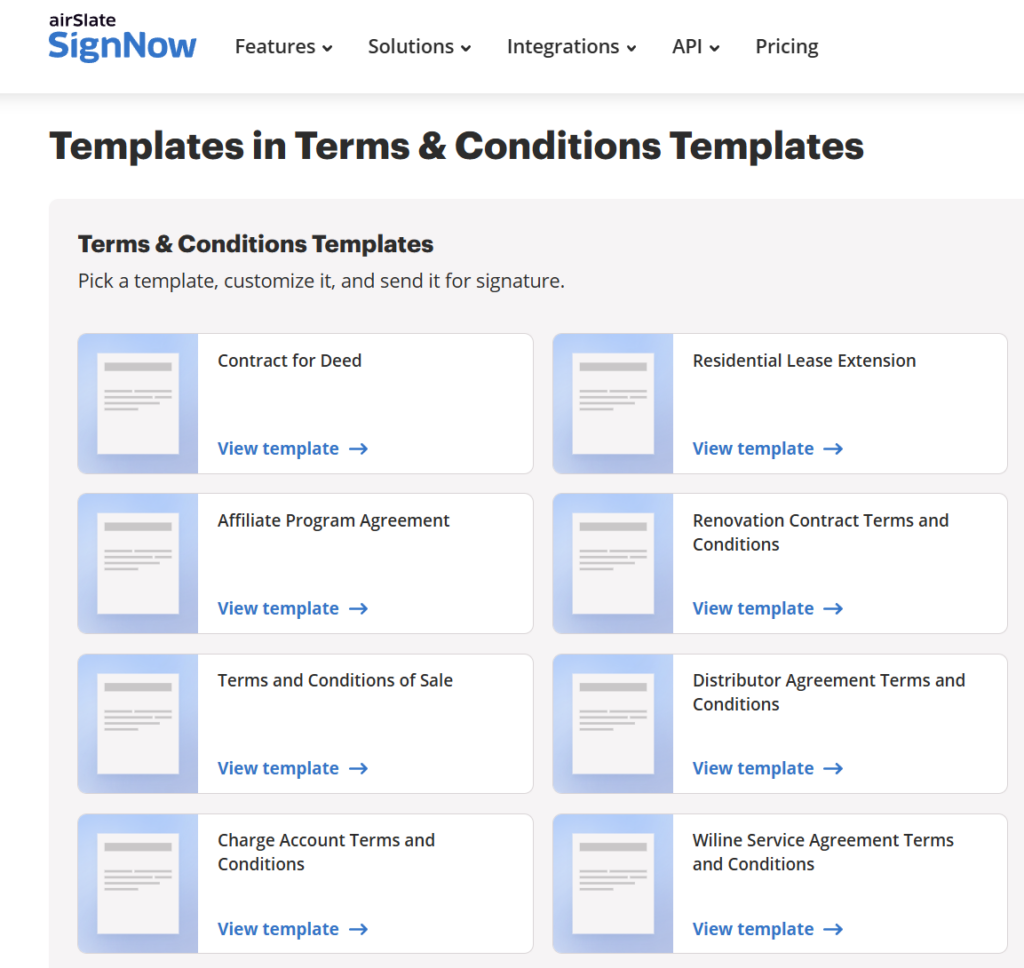
2. Complete and review the wording. For example, the Terms and Conditions of Sale page provides editable text and fields before the Sign Now option.. Customize the parties, goods, prices, and payment details. Complete substantive revisions before adding recipient fields; these are different tasks.
3. Continue into SignNow. Click Sign Now and log in, then find your document on the dashboard and open it using Prepare and Send option..
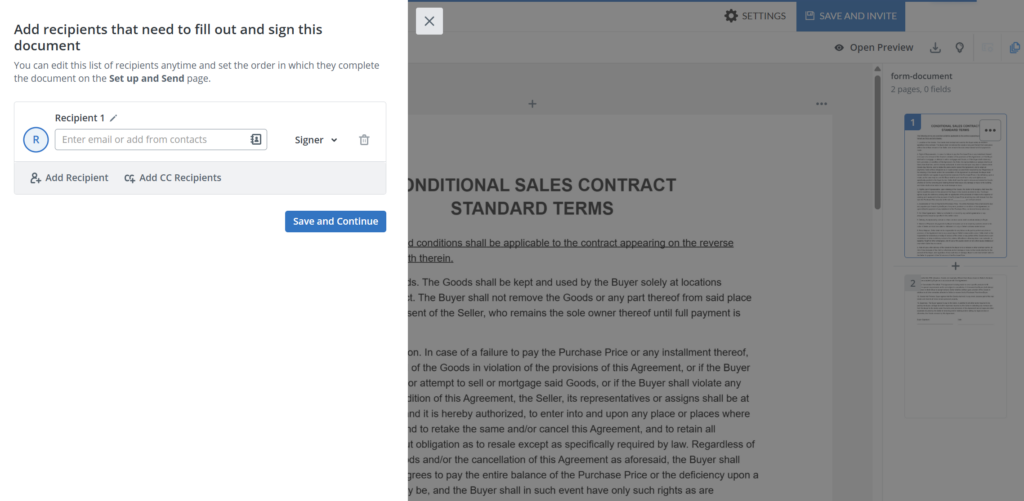
4. Set up participants. Add recipients such as a customer Signer and, if needed, an internal Approver. Enter recipient emails on the Invite Page; for reusable templates, emails are configured there.
Review and send for signature
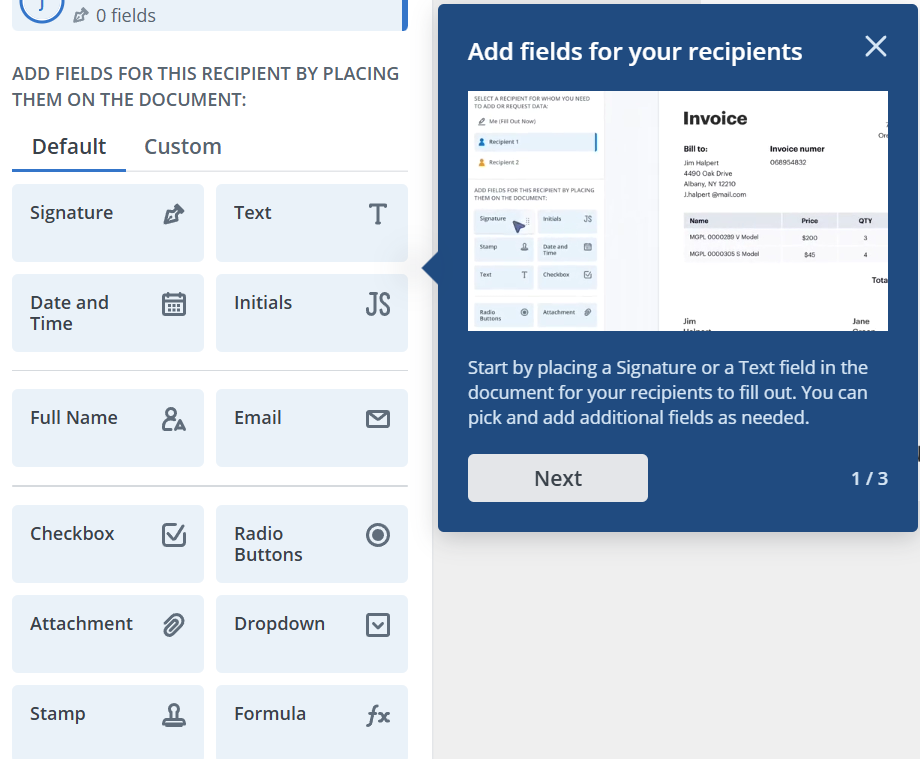
5. Assign fields. Select the intended recipient and add Signature, Text for name and title, and Date and Time fields as appropriate. Use field settings to assign required status. If you must countersign, add your own signing role and fields.
6. Preview the document. Use Open Preview to check assignments, legibility, and completed details. Do not collect unnecessary sensitive data.
7. Configure the invitation. Continue to the Invite Page, verify addresses, and use Customize Message for instructions. If an internal approval must precede customer signing, configure the order accordingly. Available settings depend on the plan.
8. Send and retain records. Send the invitation, follow progress in Document History, and retain the completed agreement. You can learn more about record retention in SignNow from our blog about eSignature audit trail.
Final thoughts
A useful template connects clear obligations with a reliable acceptance process.
Try SignNow today to choose a terms and conditions template, adapt it to your transaction, and send the reviewed document to the appropriate signers.
Glossary
- Assent: An expression of agreement to contractual terms.
- Clickwrap: An online acceptance process requiring an explicit agreement action.
- Governing law: The jurisdiction’s law designated to interpret an agreement.
- Limitation of liability: A provision restricting specified financial exposure, subject to law.
- Negative option: An arrangement treating failure to cancel as acceptance of continued charges.
- Severability: A provision addressing whether remaining terms survive an invalid clause.
FAQs
1. Can I copy a competitor’s terms and conditions?
Avoid copying another business’s wording without checking permission and suitability. Use conditions examples to identify questions, then write terms reflecting your own operations and obtain legal review.
2. What if a negotiated contract conflicts with standard terms?
Specify which document takes precedence, including any separate agreement or order form. Ask counsel to resolve conflicting provisions before acceptance rather than leaving customers to interpret them.
3. What happens if one clause is unenforceable?
A severability clause expresses an intention to preserve the remaining provisions where legally possible. It does not guarantee that a court will preserve the agreement or rewrite an invalid clause.
4. Should I translate terms for international customers?
Consider the languages customers understand and any local language requirements. Have translations reviewed for legal meaning and explain which version controls, subject to applicable law.
5. What should I do if a customer requests changes?
Record the proposed changes and obtain approval from the person responsible for commercial and legal decisions. Send the agreed revision for acceptance and clearly distinguish it from the standard version.
Sources:
- United States Court of Appeals for the Ninth Circuit – D.C. No. 06-75424 OPINION
- The Digital Millenium Copyright Act – Section 512 of Title 17
- Attorney General Bonta Issues Consumer Alert on California’s Automatic Renewal Law
- Revision of the Negative Option Rule, Withdrawal of the CARS Rule, Removal of the Non-Compete Rule To Conform These Rules to Federal Court Decisions
- 15 U.S.C.- §7001. General rule of validity
- Key takeaways
- Choose a template that fits your business
- What should a terms and conditions template include?
- How do you make terms and conditions legally binding?
- Keep subscriptions and changes consistent with the agreement
- How to prepare and send terms and conditions with SignNow
- Final thoughts
- Glossary
- FAQs
- Sources: