Contract management software: Top tools, key features, and how to choose

Contract management software stores your contracts and runs the work around them. It covers creation, approval, signing, storage, and renewal in one place. The stakes are real. World Commerce & Contracting research puts average value erosion from poor contracting at 8.6%. This guide explains the features that matter and compares seven tools. It also gives you a practical way to pick the right one.
Key takeaways
- Contract management software centralizes contract data, approval workflows, signatures, and renewal dates in one system.
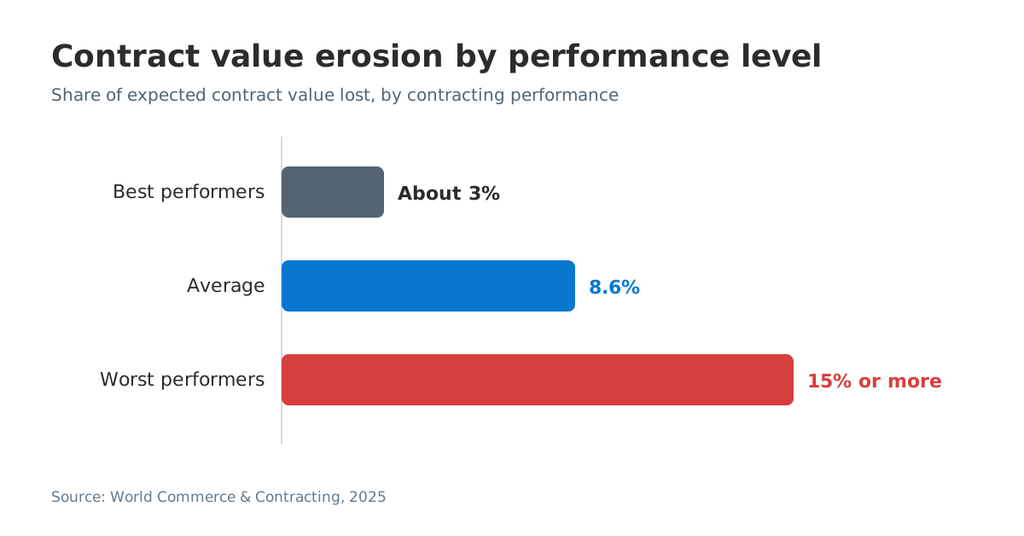
- WorldCC estimates average value erosion at 8.6%, with the worst performers losing 15% or more.
- Contract data typically sits across 24 different systems, according to the same WorldCC research.
- Tools fall into three tiers: eSignature-first platforms, mid-market repositories, and enterprise CLM suites.
- The must-have features are templates, approval workflows, eSignature, date alerts, access controls, and audit trails.
- Choose by contract volume, contract type, and integrations, not by the longest feature list.
What is contract management software?
Contract management software is a system that stores contracts and automates the workflows around them. Think of it as a shared filing cabinet with a calendar and a mailroom attached. The cabinet holds every contract. The calendar flags key dates. The mailroom routes drafts to the right people for review and signature.
Most tools follow the contract lifecycle. A typical lifecycle has these stages:
- Request and intake
- Contract drafting from an approved template
- Contract negotiation and redlining
- Legal review and internal approval
- Signing process with electronic signature
- Storage in a central repository
- Tracking obligations, renewals, and notice periods
Who uses it? Legal teams, sales teams, procurement, HR, and finance all touch contracts. Each team cares about a different stage. Legal focuses on drafting and review. Sales focuses on speed to signature. Finance tracks payment terms and contract value after signing.
Contract lifecycle management (CLM) software usually covers all seven stages. Lighter contract management systems focus on drafting, approval, signing, and storage. Today the two terms overlap heavily. The real difference is depth, especially in negotiation, analytics, and post-signature obligation tracking.
Why it matters: Weak contract processes cost money. WorldCC reports average value erosion of 8.6%. Best performers lose about 3%. The worst lose 15% or more. The same research finds contract data scattered across 24 systems on average. Almost 90% of business users find contracts difficult or impossible to understand.
SignNow Contract Value Erosion by Performance Level.png
The SignNow contract management system page shows these stages in product form. It walks through draft, review, sign, and store.
Signs your team needs a contract management system
You need a contract management system when contracts start slipping through the cracks. Watch for these signals:
- Missed renewal dates. Vendor contracts auto-renew because nobody saw the notice period.
- Scattered contract records. Signed copies live in inboxes, shared drives, and desk drawers.
- Manual entry of key terms. Someone retypes payment terms and contract value into a spreadsheet.
- Slow approval processes. Drafts wait days in email threads for legal review.
- Version confusion. Multiple team members edit different copies of the same agreement.
- No audit trails. You cannot prove who approved or signed a contract, or when.
Two or more of these signs usually justify a dedicated tool. Even a basic digital contract management setup removes much of the manual work.
Key features to look for
The core features cover storage, templates, approvals, eSignature, date alerts, access controls, and reporting. Advanced tools add AI review, risk scoring, and deep analytics. Start with the basics, then add depth where your contract volume demands it.
Central repository and search
A central repository keeps every contract in one place. Good tools support full-text search and filters by contract type, party, and status. This replaces centralized document storage scattered across drives. Test search with real scanned files, because some tools need OCR to read them.
Templates and a clause library
Templates turn contract creation into a repeatable process. A sales team can generate new contracts from an approved template in seconds. A clause library stores pre-approved language and fallback positions for negotiation. In SignNow, reusable templates predefine roles, fields, and routing orders for recurring contracts.
Approval workflows and conditional logic
Approval workflows route each contract to the right reviewers in order. Conditional logic changes the route based on contract value, region, or contract type. For example, deals above a threshold can require finance sign-off. SignNow supports conditional fields on the Advanced plan. Rules use AND, OR, NOT AND, and NOT OR logic.
Electronic signature and signing order
Built-in eSignature closes the loop without a separate tool. Look for signing order, signer authentication, and mobile signing. In the US, the ESIGN Act and UETA give electronic signatures legal effect. SignNow’s security page lists ESIGN and UETA compliance.
Renewal dates and key-date alerts
Date tracking protects you from surprise renewals. The system should flag upcoming renewals, notice periods, and payment schedules. SignNowhandles this on the signing side with automatic reminders and document expiration settings. Full CLM suites add obligation tracking after signature.
Version control and collaboration
Version control keeps everyone on the same page during negotiation. Many tools offer real-time collaboration, comments, and redlining. Real-time editing helps different teams work on one draft instead of email attachments. Check how the tool compares versions and records who changed what.
Access controls, audit trails, and data security
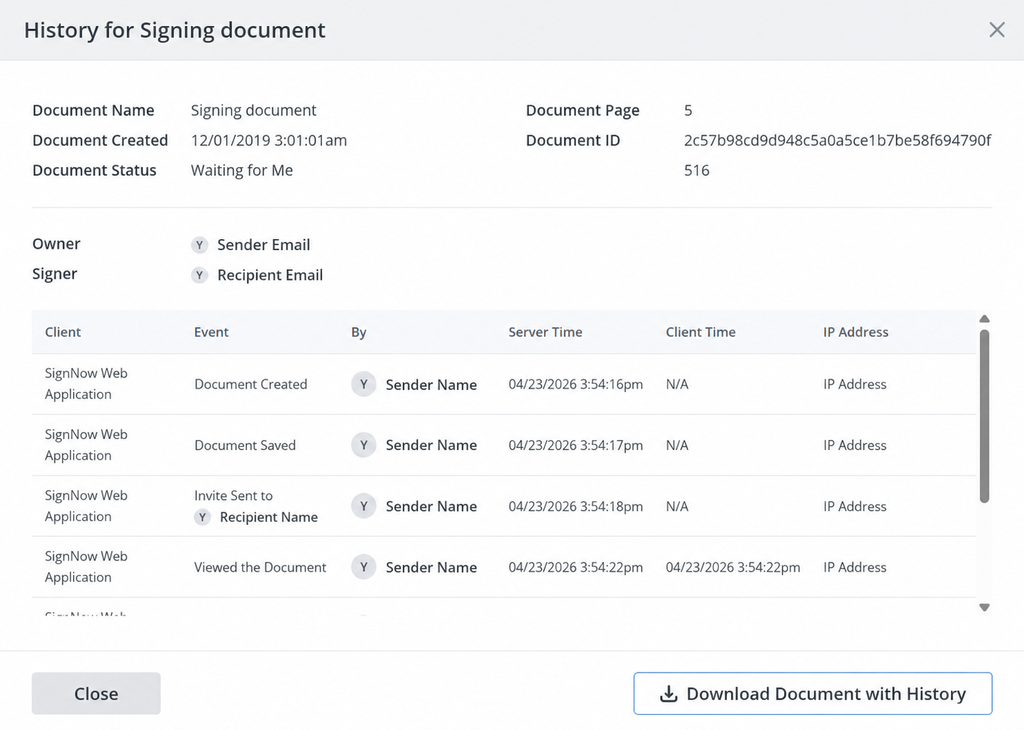
Access controls ensure only the right people see sensitive contract terms. Role-based permissions separate admins from regular members. Audit trails record every view, approval, and signature. SignNow’s Document History is an append-only, tamper-evident audit log. It lists timestamps, emails, IP addresses, and actions. For data security, SignNow holds SOC 2 Type II certification. It also lists HIPAA, GDPR, and 21 CFR Part 11 compliance.
Contract analytics and reporting
Reporting shows contract volume, cycle times, and contract status at a glance. SignNow offers Workspace Analytics and scheduled reports. Advanced analytics go further, with risk scoring and portfolio-level questions. Docusign, for example, describes its CLM repository as using over 100 pre-trained AI models. Test any AI output on your own contracts before you rely on it.
Integrations with CRM and ERP systems
Contracts rarely live alone. Revenue operations teams want deal data from the CRM. Finance wants payment terms in ERP systems. Procurement wants links to procurement systems. SignNow’s Salesforce and NetSuite integrations cut manual entry. The Salesforce integration pre-fills contracts from Salesforce objects.
Three tiers of contract management tools
Contract management tools fall into three tiers, based on depth and rollout effort. Picking the right tier matters more than picking a brand.
| Tier | Typical buyer | Core strengths | Trade-offs |
| eSignature-first workflow platforms | Small businesses and growing business teams | Templates, approval routing, eSignature, audit trails, fast setup | Lighter negotiation and post-signature analytics |
| Mid-market repository and CLM | Legal ops and operations teams with rising contract volume | Searchable repository, AI extraction, renewal alerts, browser editing | Less configurable for complex enterprise processes |
| Enterprise CLM suites | Large legal operations teams and global procurement | AI review, clause libraries, deep integrations, custom workflows | Higher cost and longer implementation |
A quick test helps you place your team. Count how many contracts you sign each month. Note how often counterparties redline your terms. Low volume with few redlines points to the first tier. Heavy negotiation across many contract types points to the third. A team can start in a lower tier and move up as volume grows.
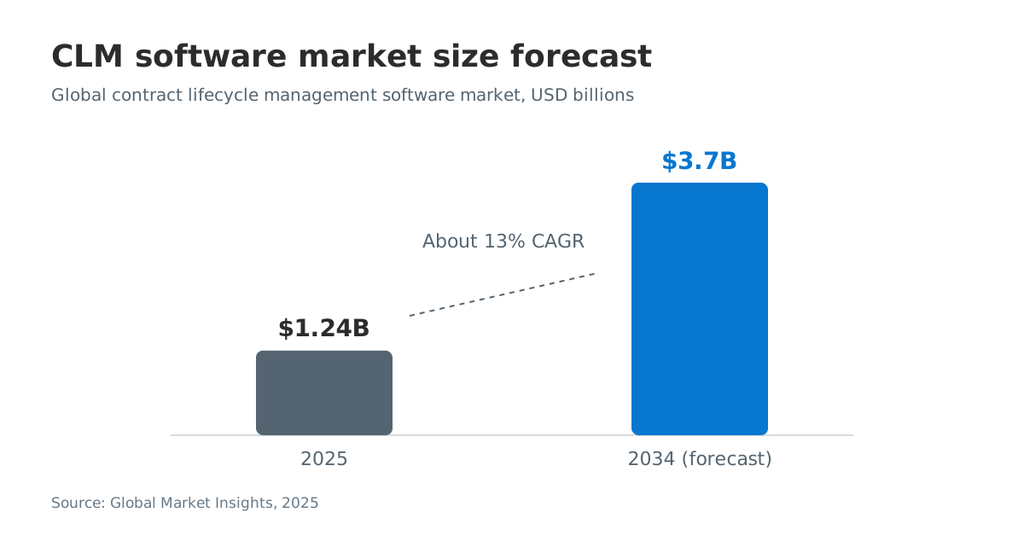
The market keeps growing across all tiers. Global Market Insights estimates the CLM software market exceeded USD 1.24 billion in 2025. It projects about USD 3.7 billion by 2034.
Top contract management software tools in 2026
The tools below cover all three tiers. Each one fits a different contract volume and team structure.
| Tool | Best for | Standout features | Consider |
| SignNow | SMBs and teams that need fast contract workflows | Templates, conditional fields, signing order, audit trails, unlimited users | Lighter negotiation and post-signature analytics |
| Docusign CLM | Enterprises already using Docusign eSignature | Drag-and-drop workflows, clause library, AI repository | Enterprise-scale rollout |
| Ironclad | Legal teams running high-volume commercial contracts | Workflow Designer, collaborative editor, AI redlines | Higher cost and complexity |
| Icertis | Global enterprises with complex contract portfolios | AI contract intelligence, SAP co-innovation | Built for large enterprises |
| Agiloft | Teams with unusual or complex processes | Configurable without code, 1,000+ connectors | Setup effort for configuration |
| Juro | Sales-led teams that negotiate in the browser | Browser collaboration, template builder, AI Extract | Plan features vary by tier |
| ContractSafe | Teams that want a simple repository with unlimited users | OCR search, reminders and alerts, AI data extraction | Lighter drafting and negotiation |
SignNow
SignNow is an eSignature-first platform with contract workflow features built in. Teams build templates with predefined roles, fields, and routing orders. Document group templates bundle several contracts into one reusable package. The Advanced plan adds conditional fields, formula fields, and approval workflows. Every plan includes unlimited users. The platform’s Document History records every action for compliance tracking.
Docusign CLM
Docusign CLM suits enterprises that already run Docusign eSignature. It offers a drag-and-drop editor for contract processes. Legal teams can define a library of pre-approved clauses. Its AI-powered repository supports search by keyword, concept, and metadata.
Ironclad
Ironclad targets legal teams that manage many commercial contracts. Its Workflow Designer lets teams build contract flows by drag and drop. A collaborative editor supports comments and version comparison. AI Assist generates redlines based on pre-approved legal guidelines. Ironclad mainly serves larger companies, so smaller teams may find it heavy.
Icertis
Icertis positions itself as an enterprise-wide contract intelligence layer. Its Engage product line covers AI-driven drafting, redlining, and negotiation. Its AI assistant is called Vera. Icertis lists a co-innovation partnership with SAP. The platform serves large enterprises across sectors like healthcare, banking, and manufacturing. Its focus on large enterprises makes it a heavier choice for small teams.
Agiloft
Agiloft focuses on configuration. Agiloft’s homepage says teams can configure contracts and approval chains “without writing a line of code.” It claims over 1,000 pre-built connectors, including Salesforce, SAP, and Oracle. eSignature works with Docusign and Adobe Sign. This tier suits organizations with unusual contract workflows.
Juro
Juro fits sales-led teams that negotiate inside the browser. Teams can comment, approve, and negotiate with counterparties in the browser. A template builder supports self-serve contract creation. AI Extract pulls key data from uploaded documents. Juro also lists renewal reminders and OCR search.
ContractSafe
ContractSafe is a repository-first tool for teams that want simple adoption. It includes unlimited users on all plans, per its pricing page. Features include OCR search, unlimited reminders and alerts, and AI data extraction. Custom roles and permissions control access. Its feature list centers on storage, search, and alerts rather than negotiation.
Contract management software pricing models
Contract management software pricing follows four common models. The model shapes adoption as much as the sticker price.
- Per-user pricing. Cost grows with each seat. Teams often limit seats, so fewer people use the tool.
- Unlimited users pricing. One subscription covers the whole organization. Sales, procurement, and finance can all join the workflow.
- Volume-based pricing. Cost scales with contracts, envelopes, or signature invites.
- Quote-only enterprise pricing. Vendors negotiate each deal, often on multi-year terms.
Budget beyond the license, too. Implementation, data migration, integrations, and admin time add to the total contract cost. AI add-ons can also raise the total price. Ask each vendor to list every fee in writing.
SignNowuses four tiers: Basic, Business, Advanced, and Enterprise. Every plan includes unlimited users. Enterprise pricing works per signature invite, with volume discounts. It adds full API access, premium integrations, and SSO. Compare tiers on the SignNow pricing plans page before you commit.
How different teams use contract management software
Different teams use the same system for different jobs. Plan your rollout around each team’s main task.
- Legal teams and legal ops. Legal controls templates, the clause library, and legal review. SignNow for legal services supports role-based signing order and signing links.
- Sales and revenue operations. Reps generate contracts from CRM data and track contract status. Faster signatures shorten the time to revenue.
- Procurement. Buyers manage vendor contracts, payment terms, and upcoming renewals in one repository.
- HR. HR sends offer letters, NDAs, and onboarding packets from approved templates. SignNow HR solutions focus on employment contracts.
- Healthcare. Providers collect intake forms and consent documents with strict access controls. HIPAA support matters here.
- Real estate. Agents send leases and purchase agreements to multiple parties for eSignature.
Customer feedback reflects these patterns. Bob Dutkowsky, CEO of Tech Data, said: “Tech Data uses SignNow to improve our internal and external customer service while increasing our speed to revenue.” Dan Rotelli, CEO of BIS, pointed to compliance: “We felt most comfortable investing with SignNow given their SOC 2 certification and strict focus on ESIGN and UETA act compliance.”
How to set up a contract workflow in SignNow
You can build a repeatable contract workflow in SignNow with templates, roles, and invite settings. The steps below follow the SignNow Help Portal.
- Create a reusable template. Upload a contract, add fillable fields and signer roles, then save it as a template. Templates store roles, fields, and routing orders for recurring contracts.
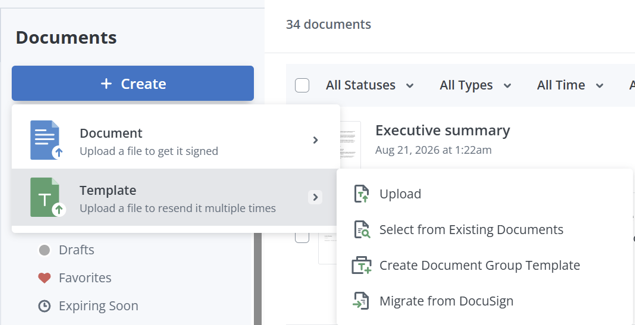
- Bundle related contracts. Select several templates in the Templates folder to build a document group template. This works well for onboarding packets or multi-part agreements.
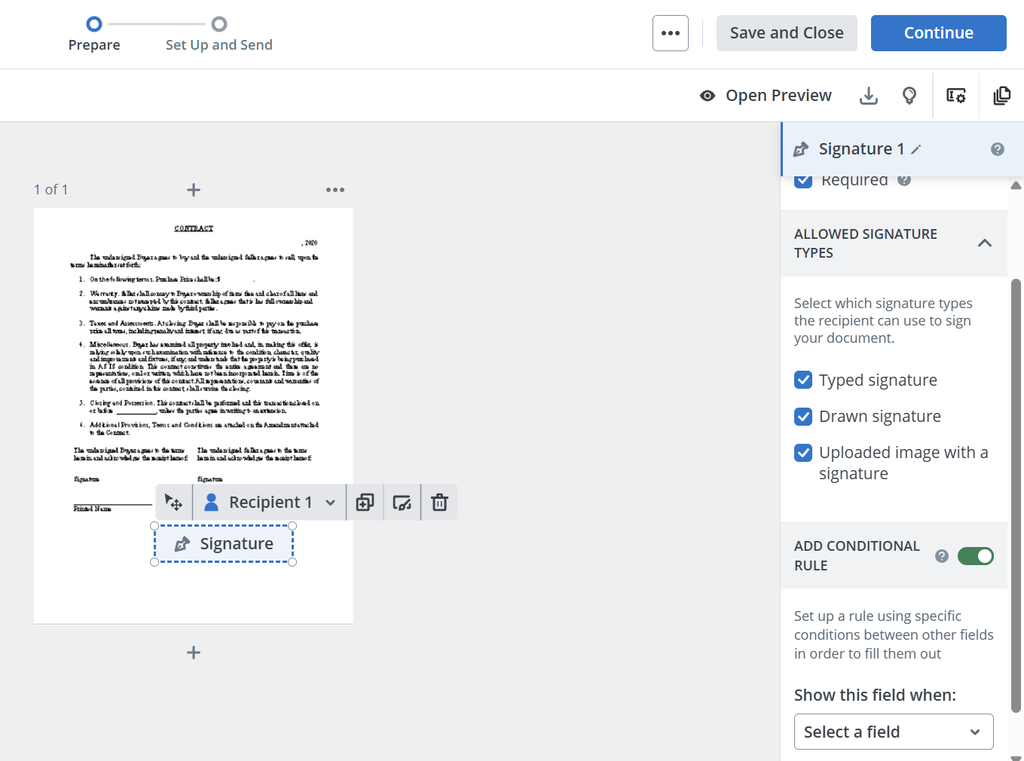
- Add conditional logic. On the Advanced plan, set conditional fields with AND or OR rules. Conditional signing can skip a signer role unless conditions are met.
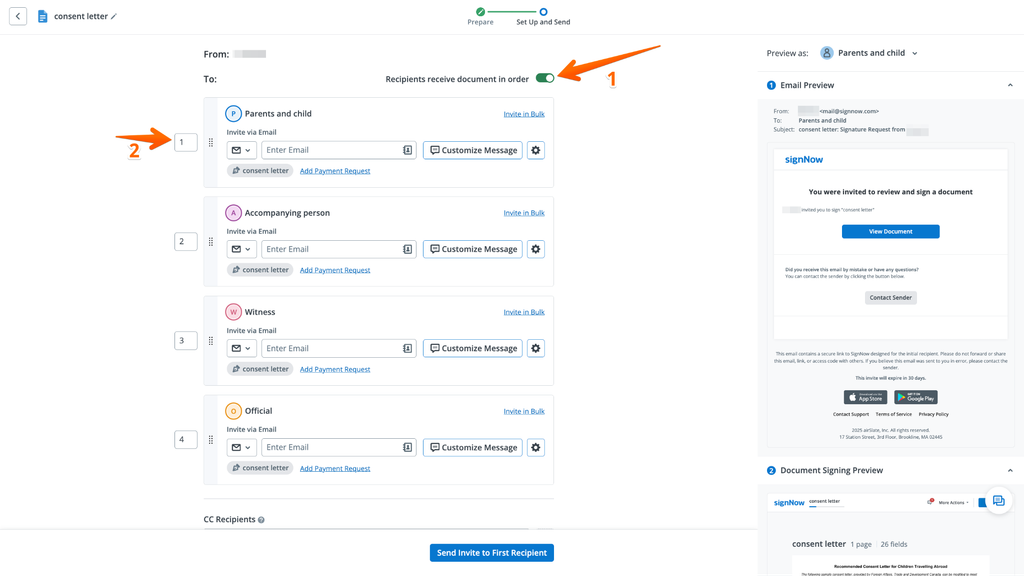
- Set the signing order. Open the Invite page and enable “Recipients receive document in order.” Arrange recipients by number or drag-and-drop.
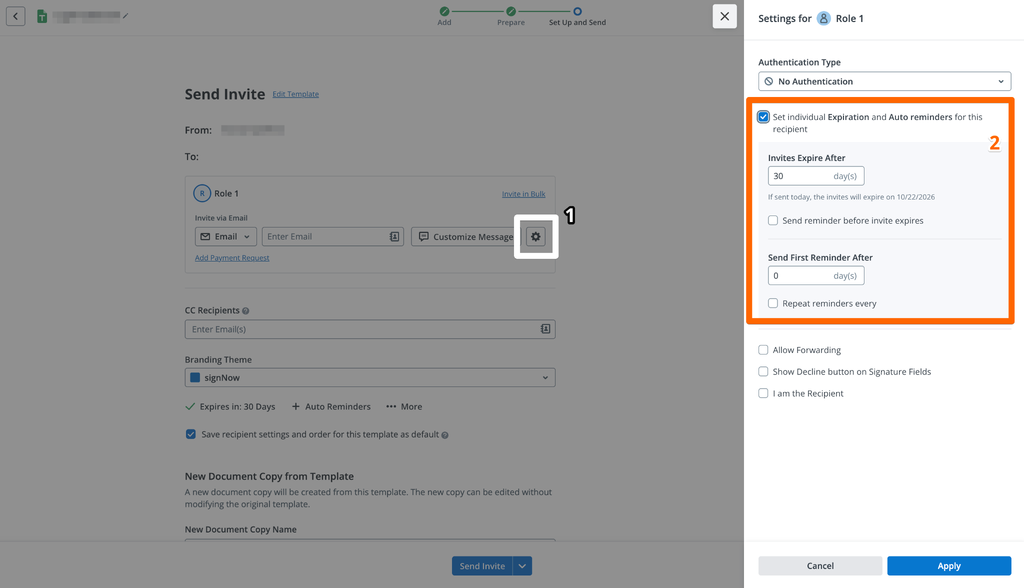
- Configure reminders and expiration. Use the gear icon in recipient settings for one-time, recurring, or pre-expiration reminders.
- Track status and history. Open a document’s More menu and select History. You can also download a PDF with History for your records.
Admins can manage who sees what through workspace roles. Admins control members, settings, security, and branding. Members create, send, and manage their own and shared team documents. High-volume senders can use SignNow bulk invites. Bulk send comes with the Business plan.
How to choose contract management software
Choose contract management software by matching tool depth to your contract volume and complexity. Follow these seven steps.
- Map your contract volume and types. Count contracts per month and list each contract type. Note which ones carry the most contract value.
- List must-haves by team. Legal teams need clause control and legal review. Sales teams need speed. Procurement needs vendor contracts and renewal tracking.
- Pick your tier. Low-to-mid volume with standard terms fits an eSignature-first tool. High volume with heavy negotiation points to enterprise CLM.
- Check integrations early. Confirm native connections to your CRM, ERP systems, and storage. Ask whether integrations are native or require middleware.
- Verify security and compliance. Ask for SOC 2 reports, encryption details, and access controls. Regulated industries should confirm HIPAA or 21 CFR Part 11 support.
- Compare pricing models. Per-seat pricing can limit adoption across different teams. Unlimited users pricing lets every stakeholder join the workflow.
- Run a pilot with real contracts. Test five to ten live agreements. Measure cycle time, approval delays, and user feedback.
A few scenarios show how this plays out:
- Legal services firm. A small firm sends engagement letters in a fixed role order. It needs templates, signing order, and audit trails more than AI review.
- Sales team on Salesforce. Reps need contracts pre-filled from opportunity data. The CRM integration matters more than clause analytics.
- Procurement team. The team manages hundreds of vendor contracts with notice periods. Renewal alerts and a searchable repository come first.
For regulated work, check the vendor’s security page. SignNowlists GDPR, HIPAA, and 21 CFR Part 11 among its compliance programs.
How to measure success
Measure success with a small set of contract metrics. Track them before rollout and again after three months.
| Metric | What it shows | How to track it |
| Contract cycle time | Days from request to signature | Compare sent and completed dates |
| Approval wait time | Delay at each approval step | Review workflow history per contract |
| Missed renewals | Contracts that auto-renewed without review | Count renewals with no prior alert action |
| Template usage | Share of new contracts from an approved template | Template reports or document counts |
| Completion rate | Share of sent contracts fully signed | Document status dashboard |
Set your own baseline first. Improvement against your baseline matters more than any vendor benchmark. WorldCC’s research notes the best performers operate almost four times faster than the worst.
Common mistakes to avoid
Most failed rollouts trace back to a mismatch between tool and team. Avoid these mistakes:
- Buying enterprise CLM for low volume. A long implementation can outlast the problem it should solve.
- Ignoring adoption outside legal. If sales and procurement avoid the tool, contracts drift back to email.
- Skipping the migration plan. Legacy contract records need clean metadata before import.
- Trusting AI output without testing. Validate extraction and risk scoring on your own contracts first.
- Leaving renewals without an owner. Alerts only work when a named person acts on them.
- Over-customizing on day one. Complex custom workflows slow the launch. Start with two or three core contract workflows.
- Choosing on price alone. A cheap tool with poor integrations creates manual entry later.
Final thoughts
The best contract management software fits your team’s workload and the problems you need to solve. Start with your contract volume, approval process, and recurring bottlenecks. Templates, approvals, eSignature, and audit trails may cover your immediate needs, while more complex legal workflows may call for AI-assisted review and advanced analytics. Test your shortlist with representative contracts before committing.
Start your free trial with SignNow to explore how reusable templates and eSignature workflows can support your contract process.
Glossary
- Audit trail: A time-stamped record of every action on a document, including views and signatures.
- Clause library: A store of pre-approved contract language that drafters reuse across contracts.
- Contract lifecycle management (CLM): Software that manages a contract from request to renewal.
- Conditional logic: Rules that show fields or route approvals based on entered values.
- Fallback position: A pre-approved alternative clause offered when the other party rejects a standard term.
- Notice period: The window before renewal or termination when a party must give notice.
- Value erosion: The gap between a contract’s expected results and what it delivers.
FAQ
What is the difference between CLM and contract management software?
The terms overlap and vendors often use them interchangeably. CLM usually means full lifecycle coverage, including negotiation analytics and post-signature obligation tracking. Contract management software can be lighter, with a focus on drafting, approval, signing, and storage.
Can small businesses use contract management software?
Yes. Many tools now target small businesses with simple setup and flat pricing. An eSignature-first platform with templates and approval workflows covers most small business needs. Enterprise CLM usually makes sense only at higher contract volume.
Can I manage contracts in Excel?
You can track a few contracts in a spreadsheet. Spreadsheets break down as volume grows. They lack version control, access controls, and audit trails. They also depend on manual entry, which creates errors in key dates and terms.
How long does implementation take?
It depends on the tier and the number of integrations. ContractSafe’s 2026 buyer guide estimates weeks for lightweight tools and months for enterprise CLM. Data migration and custom workflows add the most time. Ask each vendor for a written implementation scope.
What features should contract management software have?
Start with a central repository, templates, approval workflows, and eSignature. Add date alerts, access controls, and audit trails. Larger teams may need a clause library, contract analytics, and AI review. Pick features that solve your current bottleneck first.
How much does contract management software cost?
Pricing depends on the model and tier. Vendors charge per user, per contract volume, or through custom enterprise quotes. eSignature-first tools usually cost less than full CLM suites. Remember to budget for implementation, migration, and integrations.
Is an electronic signature legally binding on a contract?
In the US, the ESIGN Act and UETA cover most contracts. Both give electronic signatures legal effect. The EU regulates electronic signatures under the eIDAS regulation. Some document types have exceptions, so check local rules for your contract type.
Sources
- Contract Management: An Overlooked Driver of Business Agility and Financial Performance, World Commerce & Contracting, 2025
- From value leakage to better outcomes: why contracting needs integration, World Commerce & Contracting, 2026
- Contract Lifecycle Management Software Market, Global Market Insights, 2025
- Docusign named a Leader in the 2025 Gartner Magic Quadrant for CLM, Docusign, 2025
- Ironclad company report, Contrary Research
- Agiloft homepage, Agiloft
- ContractSafe pricing, ContractSafe
- Electronic Signatures in Global and National Commerce Act, US Government Publishing Office
- 16 Best Contract Management Software Platforms for 2026, ContractSafe, 2026
- Key takeaways
- What is contract management software?
- Signs your team needs a contract management system
- Key features to look for
- Central repository and search
- Templates and a clause library
- Approval workflows and conditional logic
- Electronic signature and signing order
- Renewal dates and key-date alerts
- Version control and collaboration
- Access controls, audit trails, and data security
- Contract analytics and reporting
- Integrations with CRM and ERP systems
- Three tiers of contract management tools
- Top contract management software tools in 2026
- Contract management software pricing models
- How different teams use contract management software
- How to set up a contract workflow in SignNow
- How to choose contract management software
- How to measure success
- Common mistakes to avoid
- Final thoughts
- Glossary
- FAQ
- What is the difference between CLM and contract management software?
- Can small businesses use contract management software?
- Can I manage contracts in Excel?
- How long does implementation take?
- What features should contract management software have?
- How much does contract management software cost?
- Is an electronic signature legally binding on a contract?
- Sources
