AI Digest
eIDAS 2.0 introduces the European Digital Identity Wallet and keeps the EU’s three electronic signature levels. Qualified electronic signatures retain the legal effect of handwritten signatures. For businesses, the practical priorities are to check which signature level each document requires and whether their online services must accept the wallet for identity verification.
TL;DR
- The signature levels stay the same. Teams can continue using simple, advanced, or qualified electronic signatures where they meet the requirements for the document.
- Two wallet deadlines matter. EU Member States must provide a wallet by 24 December 2026. Covered private services must accept it for online identity verification at the user’s request by 24 December 2027.
- Wallet use is voluntary. Wallets must offer individuals free qualified electronic signatures by default. Member States can limit free use to non-professional purposes.
- Teams can set up qualified signing today. Qualified trust service providers already support remote signing. SignNow offers qualified electronic signatures on its Site License plan.
If your team sends contracts, onboarding forms, or other documents to signers in the EU, start by reviewing two parts of your workflow. First, check what signature level each document requires. Then check how you verify users’ identities when they access your services. eIDAS 2.0 expands the options for identity verification and qualified signing. The rules that apply to a specific document still depend on the document and the governing law.
What is eIDAS 2.0?
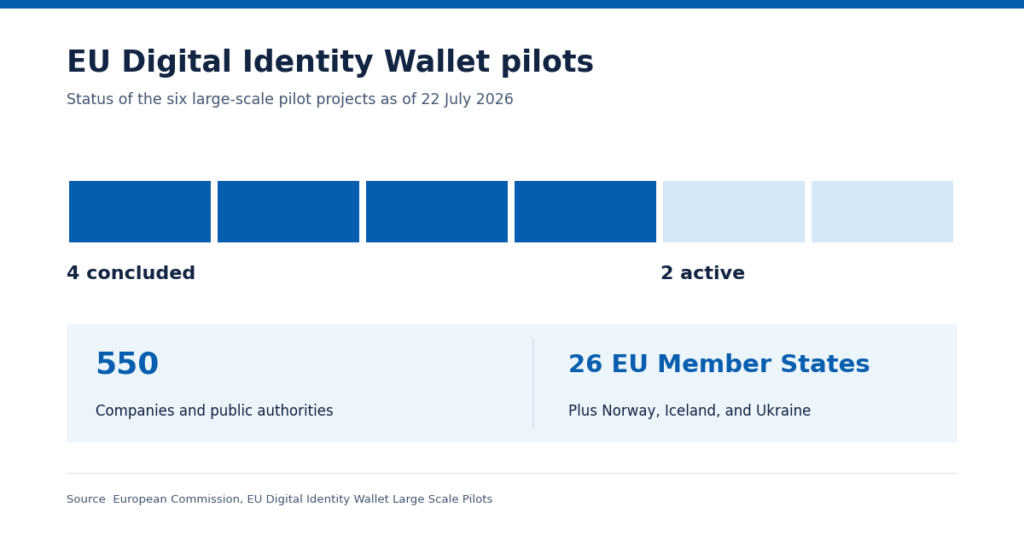
eIDAS 2.0 is Regulation (EU) 2024/1183, which amends the EU’s original eIDAS Regulation, Regulation (EU) No 910/2014. It entered into force on 20 May 2024 and established the European Digital Identity Framework. The revision requires each Member State to offer at least one European Digital Identity Wallet and expands the rules for trust services such as electronic archiving and remote qualified signing.
| Area | Original eIDAS framework | eIDAS 2.0 |
| Digital identity | Member States could notify national electronic identification schemes for cross-border recognition. | Each Member State must offer at least one European Digital Identity Wallet. |
| Acceptance | Cross-border recognition applies to notified electronic IDs for eligible public services. | Covered public and private services must accept the wallet under the conditions in Article 5f. |
| Electronic signatures | The framework distinguished simple, advanced, and qualified electronic signatures. | All three levels remain. The wallet adds a way for individuals to create qualified electronic signatures. |
| Trust services | The framework covered electronic signatures, seals, timestamps, electronic registered delivery, and website authentication. | The framework also covers electronic attestations of attributes, electronic archiving, electronic ledgers, and management of remote qualified signature and seal creation devices. |
Source: EUR-Lex, consolidated eIDAS Regulation.
How eIDAS 2.0 affects electronic signatures
Article 25 protects electronic signatures from being denied legal effect or excluded as evidence solely because they are electronic or fall short of qualified electronic signature requirements. It expressly gives a qualified electronic signature the same legal effect as a handwritten signature. The applicable law can still set form requirements for a particular document or transaction.
| Signature level | What it means |
| Simple electronic signature (SES) | The common term for a basic electronic signature. For example, a signer can type their name in a signature field to indicate agreement. |
| Advanced electronic signature (AES) | Meets all four Article 26 requirements. It is uniquely linked to the signer, can identify them, uses signing data the signer can control with a high level of confidence, and makes later changes to the signed data detectable. |
| Qualified electronic signature (QES) | An advanced electronic signature created with a qualified signature creation device and based on a qualified certificate. It has the same legal effect as a handwritten signature under eIDAS. |
Source: EUR-Lex, eIDAS Articles 3, 25, and 26.
Related blog: Types of electronic signatures: QES, AES, and SES explained.
Free qualified electronic signatures through the wallet
Under Article 5a(5)(g), European Digital Identity Wallets must let individuals create qualified electronic signatures free of charge by default. Member States may take proportionate measures to limit free use to non-professional purposes. If your team needs QES for business agreements, check the relevant country’s rules and your signing provider’s offerings.
Remote signing and qualified trust services
Under Article 29a, a qualified trust service provider can manage a remote qualified signature creation device on the signer’s behalf. This allows a signer to create a QES without carrying a physical smart card or token. It gives teams a way to offer remote qualified signing while the wallets roll out.
What is the European Digital Identity Wallet?
The European Digital Identity Wallet, or EUDI Wallet, lets people prove their identity online, share verified credentials, and sign electronically. Using the wallet is voluntary. A person could use it to share a driving license or diploma, or to prove a specific fact about themselves.
For example, a service that needs to verify someone’s age can request proof that the user meets the age threshold. The wallet’s selective disclosure features allow the user to share relevant information while keeping other details private. Organizations that rely on the wallet must register under Article 5b and indicate what data they intend to request.
eIDAS 2.0 timeline and wallet acceptance requirements
The first wallet implementing acts took effect on 24 December 2024. That date starts the 24-month period for Member States to provide a wallet and the 36-month period for covered private services to accept it under Article 5f(2).
| Date or trigger | Who it applies to | What they must do |
| 24 December 2026 | EU Member States | Provide at least one EUDI Wallet. Wallet issuance, use, and revocation must be free for individuals. |
| 24 December 2027 | Private services covered by Article 5f(2) | Accept a compliant wallet when the user requests it if EU law, national law, or a contract requires strong user authentication for online identification. Micro and small enterprises are exempt from this obligation. |
| When a public online service requires electronic identification and authentication | Member States providing public-sector online services | Accept compliant wallets under Article 5f(1). |
| When a very large online platform requires users to authenticate | Very large online platforms covered by Article 5f(3) | Accept and facilitate wallet authentication at the user’s request, requesting only the data needed for that service. |
Source: EUR-Lex, eIDAS Articles 5a and 5f.
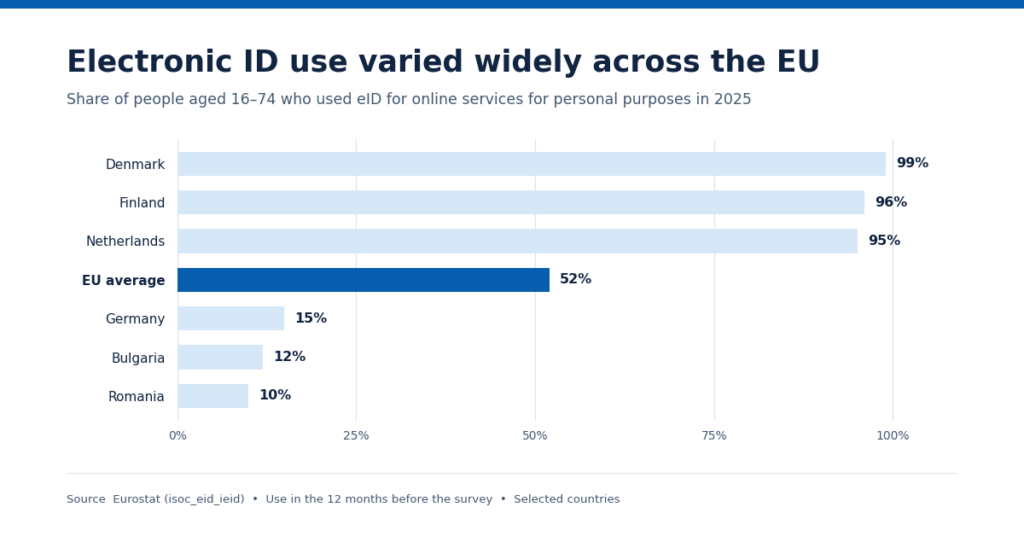
Rollout as of November 2026. Availability and features vary by country. Denmark launched AltID in June 2026 with digital ID and proof of age among its first features. Germany’s official wallet site lists early 2027 for the first release of its state wallet. If you serve users in multiple countries, check which wallets each supports before adding it to a signing or onboarding workflow.
eIDAS 2.0 compliance checklist for eSignature teams
- Map documents to signature levels. List the documents your team sends, the jurisdictions involved, and the required signature level for each document. Check for sector-specific and national form requirements, especially for regulated or cross-border transactions.
- Check whether wallet acceptance applies. Identify online services where law or contract requires strong authentication for online identification. If your business plans to rely on wallet data, review the registration requirements and document which attributes you need.
- Review the full AES workflow. Check how your process links the signature to the signer, verifies their identity, gives them control over the signing data, and detects changes made after signing. A passcode can support one part of that process.
- Test your QES process. Confirm which countries and identity verification methods your provider supports. Send a test document, complete the signing process, and verify the finished signature and any separate evidence files.
- Review what you retain after signing. Confirm how your team can retrieve the signed document, the relevant audit trail, and any certificates or evidence required for validation. Check where those records are stored and who can access them.
How SignNow supports eIDAS signature levels
SignNow supports simple electronic signatures across its plans. Teams can send agreements, track which recipients have signed, and review a tamper-evident document history with timestamps and signing activity. SignNow’s pricing matrix lists advanced and qualified electronic signatures on its Site License plan. See SignNow plans and pricing.
How QES works in SignNow
SignNow offers QES on the Corporate (Site License) plan through an integration with eIDeasy. A qualified trust service provider issues the qualified certificate used to sign the document. Setup takes place at the organization level.
- Confirm your requirements with SignNow. Identify which documents need QES, where your signers are based, and which verification methods fit your workflow.
- Have SignNow Support configure QES. Support sets up the integration and enables the QES setting for your organization.
- Activate the approved methods. An organization admin opens Organization → Workflow settings and selects the approved methods and providers.
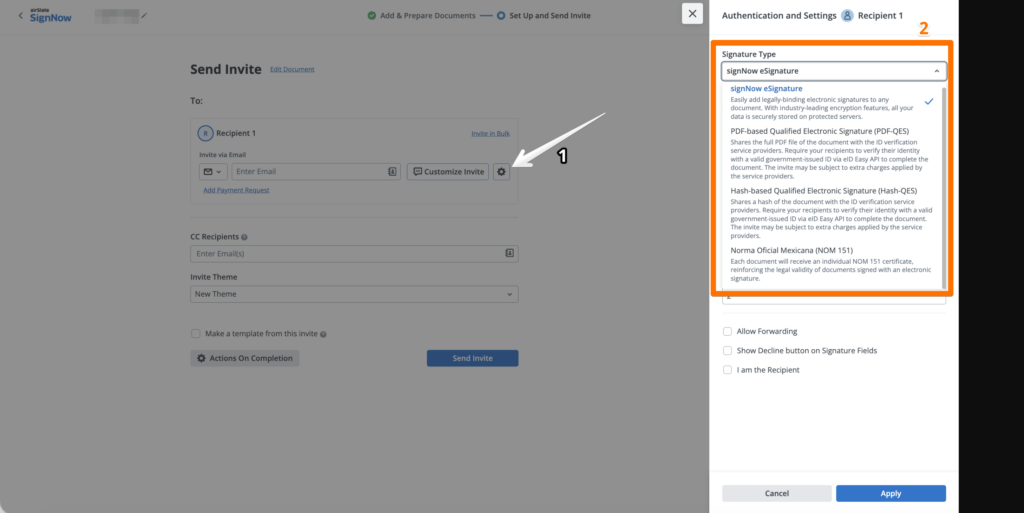
SignNow documents two QES formats. PDF-QES embeds the qualified signature in the PDF, which recipients can check in Adobe Acrobat Reader. Hash-based QES signs a cryptographic fingerprint of the file. Verification uses the original file together with separate evidence from the qualified trust service provider.
Disclaimer: The information contained in this blog post is provided for general informational purposes only and does not constitute formal legal advice.
Final thoughts
Start with the documents your team sends most often. Confirm the signature level each one requires, test how you’ll verify completed signatures, and check whether your online services need to accept the European Digital Identity Wallet.
With SignNow, you can send everyday agreements for eSignature, track their progress, and keep an audit trail. If your team needs qualified electronic signatures, contact SignNow Sales to discuss Site License and the verification methods available for your signers.
Start using SignNow to send your first document for signature.
Glossary
- EUDI Wallet (European Digital Identity Wallet) — A digital wallet people can use to prove their identity, share verified information, and sign electronically.
- AES (advanced electronic signature) — An electronic signature that meets the four requirements in Article 26 of eIDAS.
- QES (qualified electronic signature) — An AES created with a qualified signature creation device and based on a qualified certificate.
- QTSP (qualified trust service provider) — A provider with qualified status for one or more specific trust services listed in a national trusted list.
- Wallet-relying party — A public or private entity that relies on data presented through a European Digital Identity Wallet.
FAQ
1. Can a QES issued in one EU country be recognized in another?
Yes. Under Article 24a, a qualified electronic signature based on a qualified certificate issued in one EU Member State must be recognized as qualified in the other Member States. Check any form requirements that apply to the document itself.
2. How can I check whether a trust service provider is qualified?
Search the European Commission’s EU/EEA Trusted List Browser by provider name, country, or service type. Check the status of the specific service you plan to use, such as issuing qualified certificates for electronic signatures.
3. Can a signer get a QES without using the European Digital Identity Wallet?
Yes. A qualified trust service provider can verify the signer’s identity through another supported method and issue a qualified certificate. Available methods depend on the provider and the countries it supports.
4. Can I require customers to use the EUDI Wallet?
Wallet use is voluntary. Under eIDAS, people who choose not to use an EUDI Wallet must still be able to access services through other existing identification and authentication methods.
5. Can a business use an electronic seal to indicate where a document originated?
Yes. An electronic seal can help establish that a document came from an organization and that its contents are intact. Under Article 35, a qualified electronic seal carries a presumption of data integrity and correct origin. An electronic signature records a person’s act of signing.
Sources
- Regulation (EU) 2024/1183 establishing the European Digital Identity Framework — EUR-Lex
- Consolidated eIDAS Regulation (EU) No 910/2014 — EUR-Lex
- Commission Implementing Regulation (EU) 2024/2979 on European Digital Identity Wallet functions — EUR-Lex
- Commission Implementing Regulation (EU) 2024/2981 on European Digital Identity Wallet certification — EUR-Lex
- Commission Implementing Regulation (EU) 2025/848 on registering wallet-relying parties — EUR-Lex
- European Digital Identity Wallet Q&A — European Commission
- EU/EEA Trusted List Browser — European Commission
- Denmark’s AltID launch announcement — Danish Agency for Digital Government
- Germany’s EUDI Wallet FAQ and rollout plans — German federal government
- What is eIDAS 2.0?
- How eIDAS 2.0 affects electronic signatures
- What is the European Digital Identity Wallet?
- eIDAS 2.0 timeline and wallet acceptance requirements
- eIDAS 2.0 compliance checklist for eSignature teams
- How SignNow supports eIDAS signature levels
- Final thoughts
- Glossary
- FAQ
- 1. Can a QES issued in one EU country be recognized in another?
- 2. How can I check whether a trust service provider is qualified?
- 3. Can a signer get a QES without using the European Digital Identity Wallet?
- 4. Can I require customers to use the EUDI Wallet?
- 5. Can a business use an electronic seal to indicate where a document originated?
- Sources