
A lease agreement template provides landlords and tenants with a starting point, but making it legally enforceable means filling in the clauses your state requires and having it signed properly. Generic templates often skip state-specific deposit and notice rules, and many landlords still print a lease, sign it by hand, and scan it back in when the document could be filled out and signed online instead. With nearly half of renter households now cost-burdened, getting the payment and security deposit terms right matters to both sides.
TL;DR
- To ensure compliance, a lease agreement template must contain core identifying, financial, and legal provisions, with additional terms tailored to your state’s regulations and property type.
- A lease agreement sets fixed-term rental terms, usually 12 months, while a rental agreement typically renews month-to-month.
- Security deposit caps and notice periods vary by state, so a template written for one state may not comply in another.
- Building a reusable template means uploading a base lease once and saving it, rather than rebuilding the document for each unit.
- Fillable fields turn tenant name, rent, and deposit lines into blanks that change per signer instead of static text.
- Under the ESIGN Act and UETA, an electronically signed lease carries the same legal weight as a wet-ink signature once intent, consent, attribution, and record retention are established.
- Optional clauses, such as pet policy, parking, and guest limits, are worth adding once the required terms are in place.
This guide covers what a lease agreement template must include, how the requirements shift by state, and how to build and send a free online lease agreement template for signature in SignNow. A lease template works like a fill-in-the-blank contract: the blanks have to match your state’s rules to hold up.
What is a lease agreement template, and how is it different from a rental agreement?
A lease agreement is a legally binding contract in which a landlord grants a tenant the right to occupy a property for a specific period in exchange for rent, paid under agreed terms. A rental agreement is a similar contract, but typically lasts a shorter term and automatically renews unless either party provides notice to terminate.
A lease agreement usually sets rental terms for a fixed duration, commonly 12 months, while a rental agreement often renews on a month-to-month basis, per the lease vs. rental agreement distinction.
The two document types share most of the same core clauses: parties, property, rent, and deposit terms. The difference is duration and renewal. A lease locks in the terms for a set start and end date, with a penalty for breaking it early. A rental agreement lets either party end the arrangement with roughly 30 days’ notice and gives the landlord more room to adjust rent between renewals. Treating the two terms as interchangeable is a common mistake, since the notice and termination clauses that apply to one often do not apply to the other.
What should a lease agreement template include?
A lease agreement needs to identify the parties and property, state the rent and deposit terms, and spell out maintenance and termination rules before either side signs. At a minimum, a template should cover:
- Full legal names of the landlord and all tenants
- Property description, address, and unit description
- Lease term, including start and end dates
- Monthly rent amount, due date, and accepted payment methods
- Security deposit amount and the conditions under which it is returned
- Landlord and tenant responsibilities, including for maintenance and repair
- Occupancy limits
- Utilities and who is responsible for paying them
- Termination and renewal conditions
- Signature lines for landlord and tenant(s)
Because these clauses repeat on every lease a landlord signs, reusable lease templates let a property manager keep the same structure and swap in the property-specific fields for each new tenant.
How security deposits and notice periods vary by state
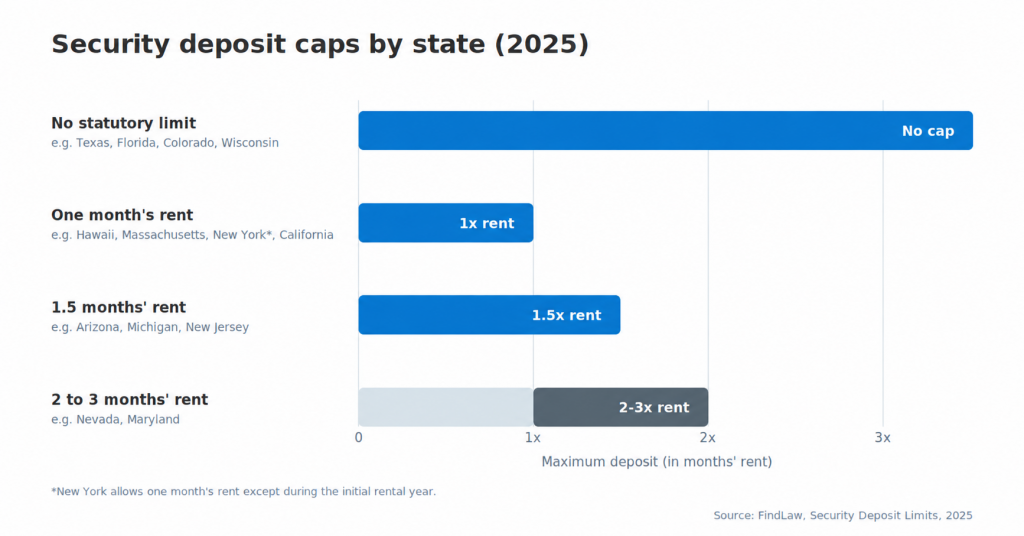
Security deposit caps range from no statutory limit in states like Texas and Florida to one month’s rent in states like California under AB 12. A template built for one state can fall short in another. Security deposit limits by state fall into a few broad categories: 22 states, including Texas, Florida, Colorado, and Wisconsin, set no statutory cap at all. Hawaii and Massachusetts limit deposits to one month’s rent on leases of 12 months or less, and New York allows one month’s rent except during the initial rental year. Arizona, Michigan, and New Jersey cap deposits at one and a half months’ rent. Effective July 1, 2024, California’s AB 12 caps security deposits at one month’s rent for both furnished and unfurnished units. Landlords who own no more than two residential properties with a combined total of no more than four units may charge up to two months’ rent, unless the tenant is a service member, in which case the one-month cap still applies. Arkansas and Maryland cap unfurnished units at two months, and Nevada allows up to three months for furnished units.
Notice periods for landlord entry and lease termination follow the same pattern: some states require 24 hours’ written notice before entry, others require 48, and termination notice for month-to-month arrangements commonly runs 30 days but is not universal. Checking state e-signature and lease requirements before finalizing a template is worth the extra step, since a deposit clause or notice period valid in one state may be unenforceable in another.
Before you build your template and start a leasing process
You need the property and tenant details on hand, a base template or existing PDF lease, and an account that supports reusable templates and fillable fields.
- Property details: address, unit type, and included utilities or amenities
- Tenant screening results, if your process includes one
- Your state’s required disclosures (lead paint, mold, or similar, where applicable)
- A base lease document, either an existing PDF or Word file, or a SignNow template to start from
- A plan with unlimited templates and fillable fields; SignNow’s Business plan, $8 per user per month billed annually, includes both
Step 1: Create a reusable lease template
Upload your base lease document once and save it as a template so you can reuse the same structure for every unit.
1. Upload the existing lease PDF or Word document, or start from a blank document.
2. Save it as a template in your account rather than as a one-time document.

3. Name it by property type or unit, so it is easy to find later, and click Create Template.
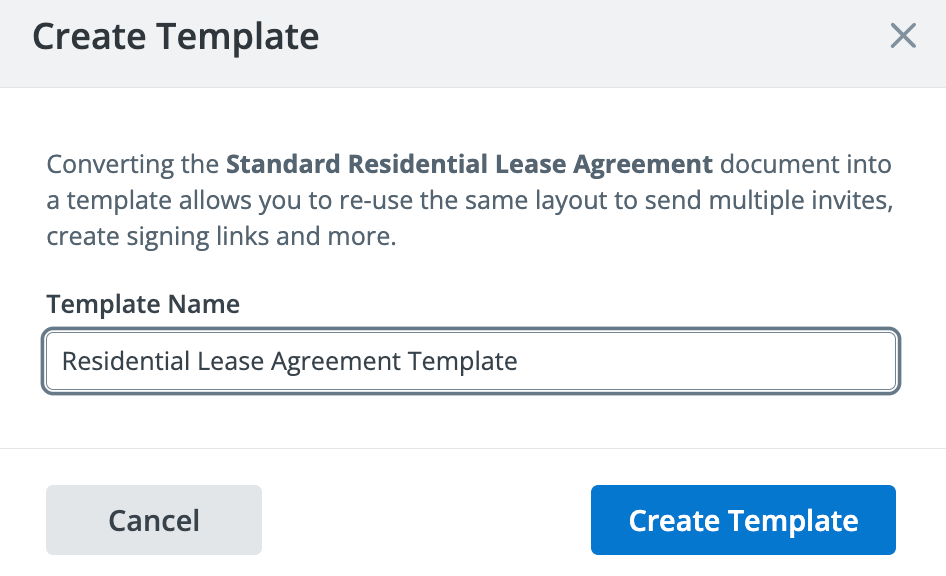
Saving a template is like keeping a master copy of a form: only the parts that change, such as name, rent, and dates, need to be edited each time.
Step 2: Add fillable fields for tenant, rent, and deposit details
Fillable fields turn the static parts of your template, such as tenant name, rent amount, and deposit, into blanks that change for each signer.
- Click on the file name to open the template in the editor.
- Drag text fields from the left-side panel onto the tenant name, property address, rent amount, and deposit lines.
- Mark which fields are required before signing.
- Add a date field and a signature field for each party.
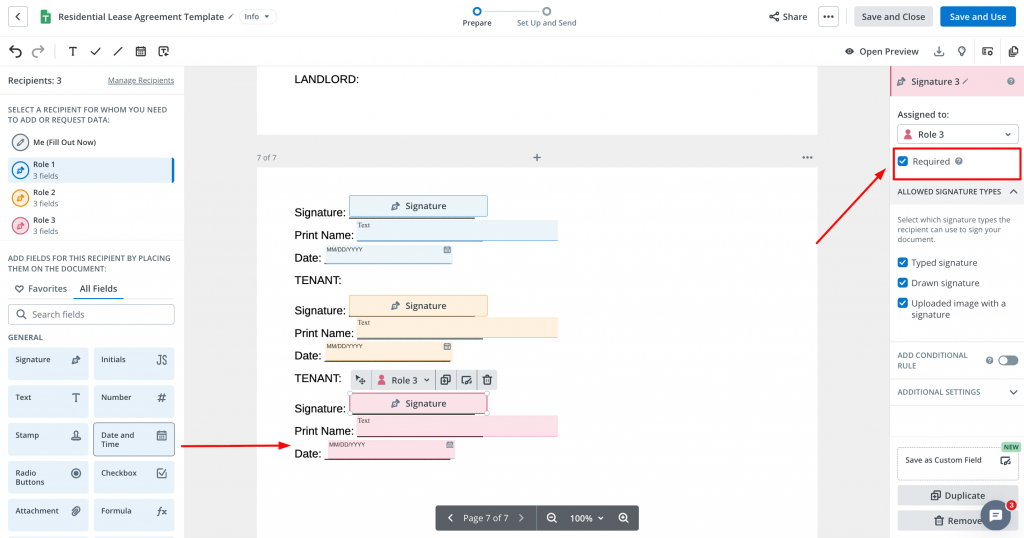
SignNow’s automatic field detection can suggest field placement on typed documents, which speeds up this step on longer leases with repeated blanks.
Step 3: Send the lease for electronic signature
Sending the filled template for eSignature replaces printing, mailing, or scanning the lease back and forth between landlord and tenant.
- Click Save and use when all fields are in place to invite the tenant and any co-signers to eSign the agreement.
- Enter email addresses of the signing parties, customize the invite message for them, and set the signing order.
- The signer receives the agreement, reviews it, completes the assigned fields, and signs.
Under the federal E-Sign Act requirements and the state-level Uniform Electronic Transactions Act, an electronically signed lease carries the same legal weight as a wet-ink signature once intent to sign, consent to electronic dealing, signature attribution, and record retention are established. Every signature request also creates a SignNow audit trail that records signer names, timestamps, and IP addresses, which supports the attribution requirement if a lease is ever disputed.
Tim Martin, Founder of Martin Properties, described their experience with SignNow this way: “I used to use DocuSign, but thanks to SignNow, I can process and execute all of these documents online with 100% compliance and built-in security. Whether I’m initiating templates on my mobile devices or working in offline and limited wi-fi mode, I can get forms back to their necessary parties in an efficient and expeditious manner.“
Optional clauses worth adding to your lease terms
Beyond the required clauses, most landlords add a handful of specific property rules:
- Pet policy, including any additional deposit and breed or size limits
- Parking assignment
- Guest and subletting limits
- Smoking policy
- Landlord entry notice period
- Renters insurance requirement
These can be saved as custom fillable fields within the template, so they do not need to be retyped for every new property or unit.
Common mistakes to avoid with lease agreement templates
Most lease template mistakes come from treating a generic form as state-ready or from leaving key fields blank at signing.
- Using a generic template without checking state limits. A deposit amount or notice period copied from a downloaded template may exceed what the state allows, making that clause unenforceable even if the rest of the lease holds.
- Leaving the deposit return timeline unspecified. Several states require an explicit deadline, often 14 to 30 days after move-out, for returning a deposit or providing an itemized deduction list.
- Skipping a signed record of move-in condition. Without a dated, signed condition report, a later deposit deduction is harder to support if the tenant disputes it.
- Treating an emailed PDF as signed without an audit trail. A signature image pasted into a PDF does not, on its own, prove who signed, when, or with what consent; a proper e-signature workflow records that automatically.
Final thoughts
A lease agreement locks a landlord and tenant into a fixed term, usually 12 months, and spells out the property, rent, deposit, and maintenance terms that govern that period, while a rental agreement covers the same ground on a shorter, renewing basis. What belongs in either document isn’t entirely generic: security deposit caps, notice periods, and disclosure rules vary by state, so any template requires a local law review before signing.
SignNow turns that paperwork into a repeatable process. A saved lease agreement template holds the lease’s standard clauses, and fillable fields turn the tenant name, rent amount, and deposit lines into blanks that populate for each new signer instead of getting retyped for every unit. Multiple signers, including co-tenants and guarantors, can complete the same document from a phone or laptop, and each completed lease keeps an audit trail that records who signed, when, and from where.
Try SignNow today and turn lease paperwork into a repeatable, compliant workflow.
Key terms
- Audit trail. A record of every action taken on a document, including who viewed, edited, or signed it, with timestamps and IP addresses.
- ESIGN Act. The federal law, establishing that electronic signatures carry the same legal weight as handwritten ones when specific requirements are met.
- Fillable field. An area added to a document template, such as a text box or signature line, that a signer completes.
- Security deposit. A refundable sum a tenant pays before moving in, held to cover unpaid rent or damage beyond normal wear and tear.
- UETA. The Uniform Electronic Transactions Act, the state-level counterpart to the ESIGN Act, adopted by 49 states.
FAQ
What is a lease agreement template?
A lease agreement template is a pre-drafted rental contract that a landlord fills in with rental property, tenant, and payment details instead of writing the agreement from scratch for every tenancy. Once created, this pre-designed document with pre-set fillable fields for data entry can be used for multiple future operations.
Is a lease agreement the same as a rental agreement?
Not exactly. A lease agreement sets a fixed term, usually 12 months, while a rental agreement typically renews month-to-month, with shorter notice for either party to end it.
What should be included in a lease agreement?
At a minimum, you should include the following information in your lease agreement:
the parties’ names, the residential property address, the lease term, rent and tenant’s security deposit amounts, maintenance responsibilities, and termination conditions, plus signatures from all parties.
Can you sign a lease agreement electronically?
Yes. Under the ESIGN Act and UETA, an electronic signature on a lease carries the same legal weight as a handwritten one, provided the signer’s intent, consent, and identity are properly recorded.
How much notice is needed to end a lease agreement?
It depends on the state and the type of agreement. Month-to-month rental agreements commonly require around 30 days’ notice, while fixed-term leases typically end on the stated date unless the lease specifies an early-termination process.
Do lease agreement templates need to be state-specific?
For the deposit amount, notice periods, and required disclosures, yes. The core structure is similar nationwide, but the specific limits and required language vary by state.
Sources
- America’s Rental Housing 2026
- Security deposit limits by state
- FDIC E-Sign Act summary
- Uniform Electronic Transactions Act adoption
- LegalNature lease vs. rental agreement
- TL;DR
- What is a lease agreement template, and how is it different from a rental agreement?
- What should a lease agreement template include?
- How security deposits and notice periods vary by state
- Before you build your template and start a leasing process
- Step 1: Create a reusable lease template
- Step 2: Add fillable fields for tenant, rent, and deposit details
- Step 3: Send the lease for electronic signature
- Optional clauses worth adding to your lease terms
- Common mistakes to avoid with lease agreement templates
- Final thoughts
- Key terms
- FAQ
- Sources
