
A scope of work template is needed to establish the frame for describing what will be built, delivered, or performed. It needs enough detail that both sides can tell when the job is finished. It rarely travels alone. In most commercial arrangements, it sits inside a larger contract or statement of work. That contract supplies the money and the legal terms around it. A scope of work template fixes the sections in advance. The description of the work is then complete before anyone signs, not argued about afterwards. Project managers use the project scope to keep project planning, budget, and delivery on the same page.
TL;DR
- A scope of work describes the work, its boundaries, and the test that says it is done.
- A good template covers eight sections, from the project overview to roles and approvals.
- Name each deliverable as a thing you can hand over, and pair it with an acceptance test.
- List exclusions so everyone has the same picture of the work.
- In PMI’s 2018 survey, 52% of projects experienced scope creep. A written change-control clause helps prevent it.
- SignNow lets you build the scope once as a template. You then route it through approval and signature in one place.
What a scope of work actually describes
A good scope covers three things and nothing else.
The work, its boundaries, and the test
They are the work, its boundaries, and the test that says it is done. The clearest public statement of how to write that description comes from federal procurement.
The performance work statement rules in the Federal Acquisition Regulation set the standard. Agencies must describe the work “in terms of the required results rather than either ‘how’ the work is to be accomplished or the number of hours to be provided”. They must also write it so it can be assessed “against measurable performance standards”. That instruction travels well outside government.
A scope that lists activities tells you what someone will be busy doing. A scope that lists results tells you what you are paying for.
A scope of work defines the work, so keep every line tied to a result.
What belongs in a scope of work template
A usable template lists the same essential elements in the same order. To learn more about transforming your business agreements with eSignatures, see our related blog.
The eight sections
Open the document with project information. Give the project title, the client name, the company name, and the date. Use the same project name in every related file. Then add these sections, in this order:
- Project overview. A short description of the business reason for the work. Two or three sentences are enough.
- Objectives. The project objectives and project goals the work should produce, stated as results rather than tasks.
- Deliverables. Each discrete output, named and numbered, with its format and recipient.
- Acceptance criteria. The test each deliverable must pass. Most templates leave this as a blank line.
- Tasks and work breakdown. Outline tasks as individual tasks grouped under the deliverable they produce.
- Schedule and key milestones. Dates tied to deliverables, not to effort. Together, they form the project timeline.
- Exclusions, assumptions, and dependencies. What is out of scope? What is taken as true? What the work needs from the other side.
- Roles and approvals. Name the parties involved and the key stakeholders. Say who performs, who reviews, and who gives formal sign-off. Say how long each reviewer has.
Use related templates, such as a statement of work, when you need payment terms.
Deliverables and acceptance criteria that survive review
Two things decide whether a scope survives review: the deliverable and its test.
Deliverables are nouns
A deliverable is a noun. If you cannot hand it to someone, it is a task. “Site survey” is a task. “Site survey report, PDF, delivered to the project manager” is a deliverable.
Clear project deliverables give the project owner something to accept or reject.
Acceptance criteria a third party can check
Acceptance criteria are where scope documents earn their keep. A reasonable third party should be able to check the criterion. They should not need to ask either side what they meant.
Compare “the website will be fast and mobile-friendly” with measurable outcomes. Each of the five templates scores 85 or above on Google Lighthouse performance. The test runs on a simulated 4G connection. Each also renders without horizontal scrolling at 375px width.
Write the criterion at the same time as the deliverable. If nobody can propose a test, the deliverable is not defined yet. Better to discover that before the work starts than at the invoice.
A deliverable with a test leaves fewer surprises at project completion.
Boundaries: what the work excludes
Boundaries stop a scope from stretching to cover everything.
Exclusions
The second half of scope is everything the work is not. Exclusions name adjacent work a reader might assume is included. On a web build, that is content writing, photography, and hosting. On a construction job, it is site clearance, permits, or making good after other trades.
A job site exclusions section might list site prep, exterior finishes, or paint color. An exclusion costs one line and removes an entire argument.
Written boundaries put everyone on the same page. A scope of work protects both sides.
Change control is part of the scope, not a separate problem
Change will come, so plan its route before the work starts.
How common scope creep is
Scope changes. The question is whether it changes through a written procedure or through email drift.
The PMI Pulse of the Profession 2018
Projects reporting scope creep, PMI Pulse of the Profession 2018
| Group | Share of projects that experienced scope creep |
|---|---|
| All projects completed in the previous 12 months (2018) | 52% |
| Same measure five years earlier (2013) | 43% |
| Organizations PMI classes as champions | 33% |
| Organizations PMI classes as underperformers | 69% |
Source: Project Management Institute, Pulse of the Profession 2018: Success in Disruptive Times (10th Global Project Management Survey), 2018. Self-reported by surveyed project practitioners.
How to control scope changes
A change-control clause inside the written document closes that gap. Four elements do the job:
- Who may request a change
- What a request has to contain
- Who prices and approves it
- How long approval takes
The last one matters more than teams expect. GAO’s review of federal construction contract changes covered completed Army Corps of Engineers changes. The period ran from January 2013 to August 2018. Roughly 45% took more than 60 days to finalize. A little over 3% took more than a year.
Version the document each time it changes. Route each version through the same approval path as the original. SignNow handles that with approval workflows and an audit trail. The trail records who approved which version and when. That is the evidence you want if the change is later disputed.
A written change-control clause prevents scope creep from turning into a dispute.
How to create and send a scope of work with SignNow
SignNow lets you review, approve, and sign a finished scope in one place.
1. Start from a template
Once the scope text is settled, the remaining problem is distribution. Every party must receive the scope and sign it. That signature must be stored where you can find it.
Start from SignNow’s scope of work templates, or upload your own PDF, Word, or Excel file. SignNow’s document templates let you reuse the same structure on every project.
2. Fill and send the scope of work easily using SignNow
Follow these steps, which match the Help Center guidance for sending a document for signature:
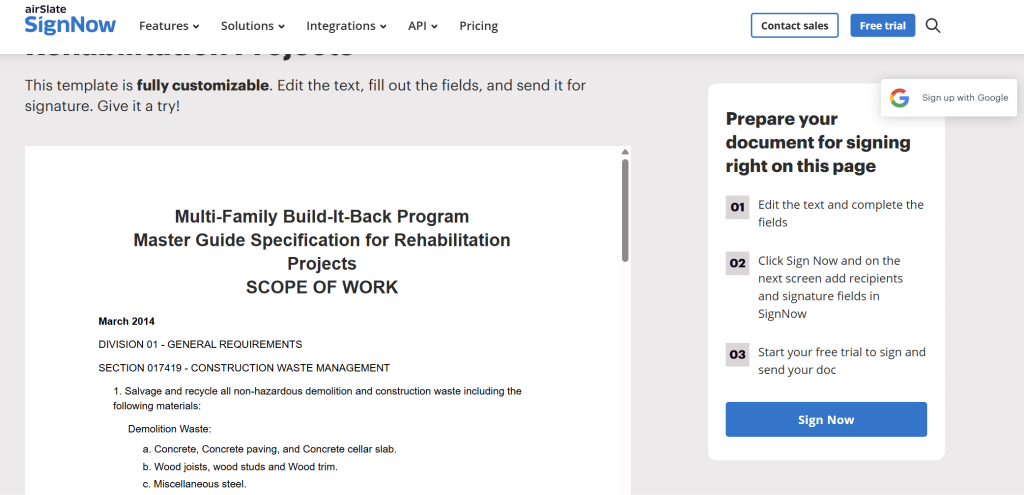
- Visit SignNow’s scope of work templates page. It lists ready-made scope templates you can edit online.
- Click View template to open the template that fits your project. The preview shows its sections, so you can compare them with the eight sections above.
- Check that it is the correct template, then click Sign Now. For a construction scope, the Multi-Family Build-It-Back Program Master Guide Specification for Rehabilitation Projects is one option. The template opens in the SignNow editor.
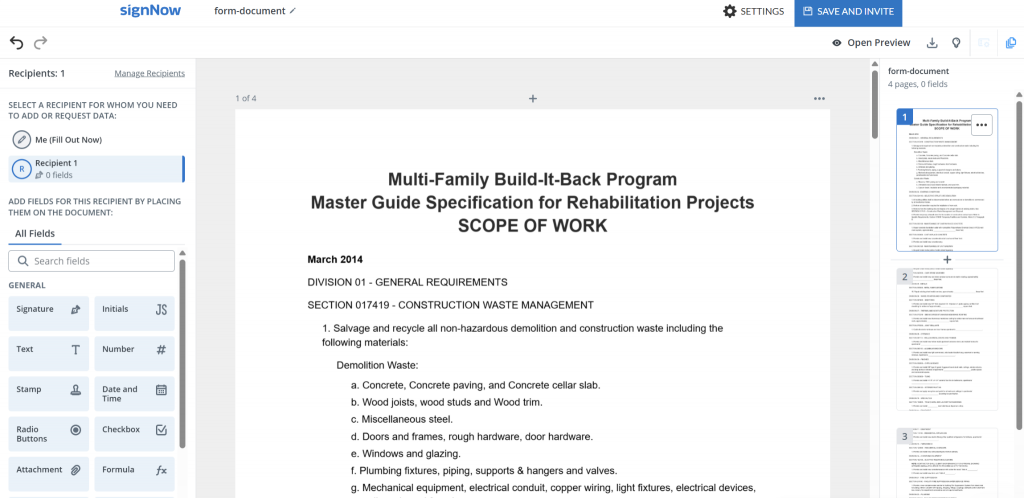
- Add your recipient’s email. Enter the email of the client or project owner who signs the scope. Add internal approvers too. Set the signing order if an internal approver clears the scope before the client signs.
- Add fields for your recipient. Place Signature and Date and Time fields where each party accepts the scope. Add a Text field for each signer’s printed name and job title. Use Checkbox for acceptance of each deliverable and Initials beside the exclusions section. Use Attachment to require the appendix the scope refers to. Use Formula to total the estimated cost with calculated fields. Mark each field required. SignNow’s fillable field and role setup covers each option.
- Sign up for the 7-day free trial of SignNow, or log in to your account. No credit card is required for the trial.
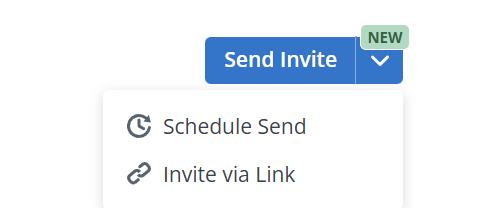
- Access the document on your dashboard and send it for signature. Customize the email message, and schedule the send if needed. Set the invite to expire before the planned project start date. Invites expire after 30 days by default, and you can extend that to 180 days in the invite expiration settings. You can also send the scope via signing link.
Document History records every action taken on the document. The audit trail shows who signed, and when.
For legal and security details, see SignNow’s security and compliance page, its eSignature legality by country list, and the E-SIGN Act’s general rule of validity.
Once the parties sign, the scope and its audit trail sit in one place.
Final thoughts
A scope of work is the work document everyone returns to when projects get hard. Name the deliverables. Write a test for each one. Say what is excluded. Add a change-control clause so the document can be updated instead of abandoned. The template supplies the structure. You supply the specifics.
Start from SignNow’s scope of work templates and route the finished document through approval and signature in one place.
Glossary
- Acceptance criteria. The stated test a deliverable must pass before it counts as complete. Written so a third party could apply it.
- Deliverable. A discrete output handed over to a named recipient, in a defined format. It is the opposite of the task that produces it.
- Exclusion. Adjacent work explicitly named as outside the scope. It prevents that work being assumed as included.
- Scope creep. Uncontrolled change to scope after the work has begun.
FAQ
Does a scope of work need to be signed?
If it forms part of a contract, execute it with the rest of that contract. Then there is no dispute about which version governs. Even internally, a signed or formally approved scope gives you a dated record. It shows what the sponsor agreed to.
Can I write a scope of work in Google Docs?
Yes. Draft it in Google Docs, then export it as a PDF or Word file. Upload that file to SignNow to add fields and collect signatures. Keep the Google Doc as your editable master for later versions.
What is the difference between a scope of work and a statement of work?
A scope of work describes the job: deliverables, standards, and exclusions. A statement of work is the wider agreement that adds price, payments, and legal terms. Often, the scope is just a section or appendix inside the statement of work.
What should I do when a client asks for work outside the scope?
Point to the exclusions in your signed scope of work, and call the request new work. Price it as a change request with its schedule impact. Start only after both sides approve it in writing, which keeps scope creep in check.
Can I reuse one scope of work template for different projects?
Yes, the structure works for software, marketing, construction, and most other project types. Only the project name, deliverables, acceptance criteria, and schedule change each time. Save one scope of work template, then adjust the details for each new client.
Do freelancers and small businesses need a scope of work?
Yes, and a short scope is often enough for a small job. Half a page naming the deliverables, the deadline, and the exclusions can prevent many misunderstandings. Have the client sign it electronically before work starts, and file the signed copy.
How often should a scope of work be updated?
Review it at each milestone and after any approved change to scope, schedule, or cost. Give every revision a new version number and date. Collect fresh signatures on the updated version so everyone works from the same document.
Sources
- Pulse of the Profession 2018: Success in Disruptive Times. Project Management Institute, 2018
- FAR 37.602 Performance work statement. Acquisition.gov
- Federal Construction: Army Corps of Engineers and GSA Need to Improve Data on Contract Changes, GAO-19-500. U.S. Government Accountability Office, 2019
- Understanding Construction Change Orders. U.S. Department of Transportation, Volpe Center, 2025
- 15 U.S.C. section 7001, General rule of validity. Office of the Law Revision Counsel, U.S. House of Representatives
- TL;DR
- What a scope of work actually describes
- What belongs in a scope of work template
- Deliverables and acceptance criteria that survive review
- Boundaries: what the work excludes
- Change control is part of the scope, not a separate problem
- How to create and send a scope of work with SignNow
- Final thoughts
- Glossary
- FAQ
- Does a scope of work need to be signed?
- Can I write a scope of work in Google Docs?
- What is the difference between a scope of work and a statement of work?
- What should I do when a client asks for work outside the scope?
- Can I reuse one scope of work template for different projects?
- Do freelancers and small businesses need a scope of work?
- How often should a scope of work be updated?
- Sources
