Cifrado AES
Cifrado de contenido con algoritmos estándar del sector para evitar accesos no autorizados y proteger los datos del documento en reposo y tránsito.




Proteger un PDF con contraseña contribuye a la seguridad y al cumplimiento normativo en EE. UU., complementando firmas electrónicas reguladas por ESIGN y UETA; además reduce el riesgo de divulgación accidental de datos sensibles.

Responsable de configurar políticas de contraseñas, gestionar integraciones con almacenamiento en la nube y mantener registros de auditoría; colabora con seguridad para aplicar estándares como cifrado AES y rotación de claves.
Encargado de revisar controles de acceso, validar cláusulas de confidencialidad y asegurar que la protección de PDFs cumpla requisitos de ESIGN, UETA y políticas internas relacionadas con retención y privacidad.
Organizaciones y profesionales que manejan información confidencial adoptan la protección por contraseña como parte de su control de seguridad documental.
La adopción típica incluye pequeñas empresas, organizaciones educativas y grandes corporaciones que integran la protección por contraseña en flujos de trabajo existentes para reducir riesgo operativo.
Cifrado de contenido con algoritmos estándar del sector para evitar accesos no autorizados y proteger los datos del documento en reposo y tránsito.
Controla quién puede abrir el PDF estableciendo una contraseña de usuario que se solicita al intentar visualizar el archivo.
Limitación de impresión, edición y copia mediante ajustes de permisos que complementan la contraseña de apertura para mayor control.
Asignación de roles y permisos para definir quién puede establecer o quitar contraseñas y quién puede ver o descargar documentos protegidos.
Registro de eventos que captura acciones de protección, intentos de apertura y cambios de permiso para cumplir con políticas internas y regulaciones.
Conexión con almacenamiento en la nube y sistemas de gestión documental para aplicar protección de forma automatizada en flujos existentes.
Exportar documentos a PDF y aplicar contraseña automáticamente al guardarlos, manteniendo control de versiones y restricciones de impresión desde el flujo de trabajo de Google.
Sincronizar contratos y acuerdos desde el CRM para aplicar protección por contraseña antes de compartirlos con clientes, asegurando confidencialidad durante negociaciones.
Proteger archivos al guardarlos en carpetas designadas, con reglas que aplican contraseñas y limitan descargas no autorizadas.
Permite integrar la función add password to pdf document en sistemas internos para aplicar protección de forma programática y consistente.

| Feature | Configuration |
|---|---|
| Política de contraseña y expiración automática | Contraseña mínima 8 caracteres, caduca 90 días |
| Aplicación por carpeta en la nube | Regla que protege archivos nuevos automáticamente |
| Asignación de permisos por rol de usuario | Roles predefinidos con permisos de apertura y edición |
| Notificaciones de gestión y registro | Alertas por intentos fallidos y registros centralizados |
Verifique la compatibilidad de su dispositivo, navegador y versión del sistema antes de intentar add password to pdf document.
En móviles use la app oficial signNow o un navegador actualizado; confirme permisos de almacenamiento, mantenga el sistema al día y elija contraseñas seguras para garantizar compatibilidad y recuperación.
Proteger extractos y acuerdos financieros antes del envío
Resulting in mayor control y cumplimiento en auditorías internas y externas.
Proteger expedientes académicos y transcripciones oficiales antes de compartirlos
Leading to mayor confidencialidad estudiantil y cumplimiento con FERPA.
| Criteria | Column Name 1 | Column Name 2 | Column Name 3 |
|---|---|---|---|
| signNow (Recommended) | Sí | Limitado | AES-256 |
| DocuSign | Sí | Parcial | AES-256 |
| Adobe Sign | Sí | Parcial | AES-256 |
| Dropbox Sign | N/A | Protección básica |
Conservar 7 años
Conservar 6 años
Conservar 7 años
Conservar 5 años
Retener 3 copias en 2 ubicaciones
| Criteria | Plan | Monthly Cost | Max Docs | Password Protection | Enterprise Support |
|---|---|---|---|---|---|
| signNow (Recommended) | Business | $8-$15 | Ilimitado | Incluido en plan | Soporte empresarial opcional |
| DocuSign | Standard | $10-$30 | Según plan | Funcionalidad en capas | Soporte empresarial disponible |
| Adobe Sign | Individual/Team | $15-$30 | Según plan | Integrado en niveles superiores | Soporte empresarial |
| Dropbox Sign | Standard | $10-$20 | Según plan | Limitado o ausente | Soporte básico |
| PandaDoc | Business | $19-$49 | Según plan | Opciones según plan | Soporte para empresas |
Para agregar una capa adicional de protección a tu transacción de firma electrónica y asegurarte de que solo tú y tu destinatario puedan acceder a un documento, usa la autenticación de dos factores. Protege tu archivo con una contraseña.
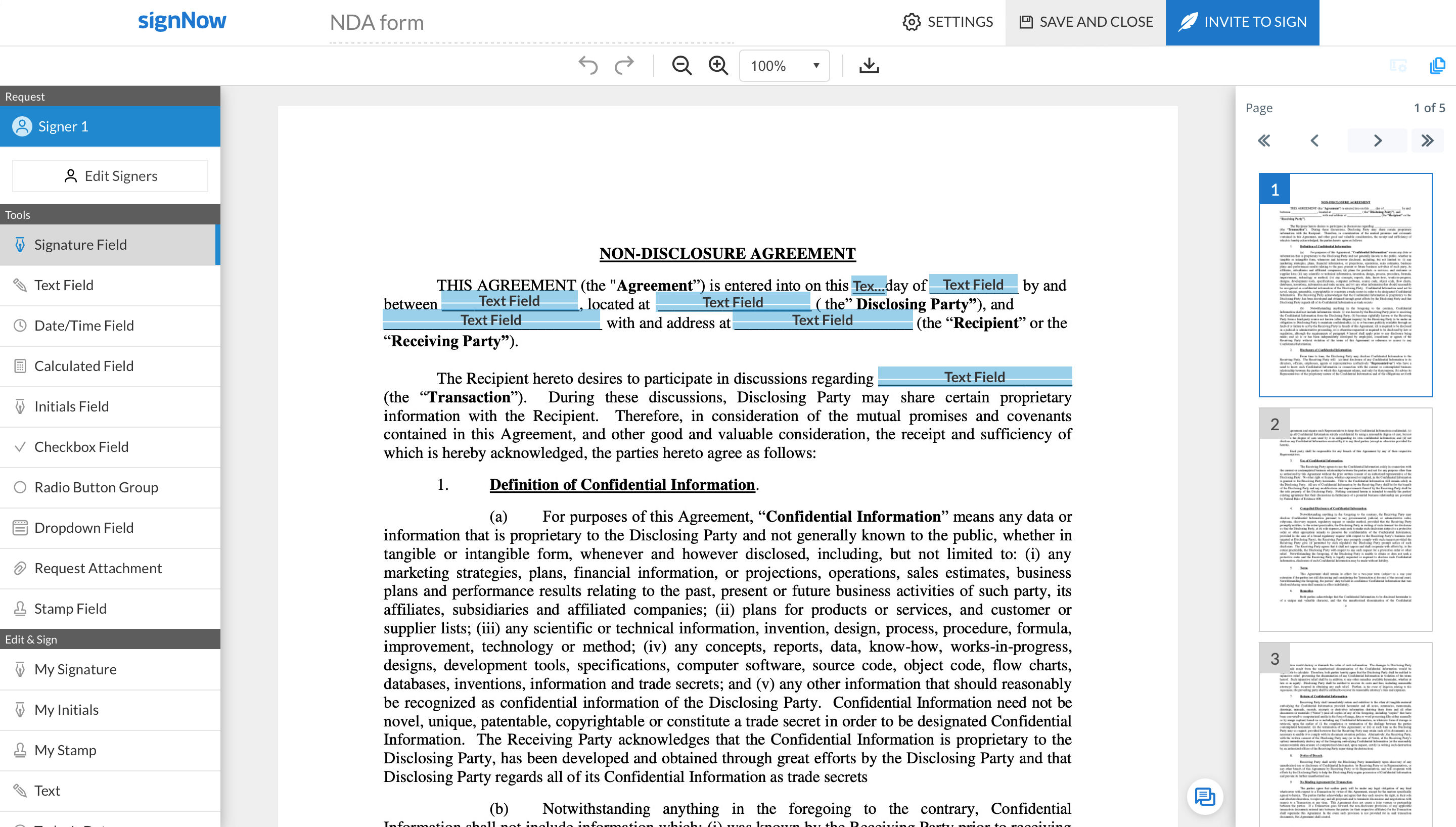
Una vez que hayas agregado campos rellenables a un documento y asignado roles de firma, haz clic en Invitar a Firmar.
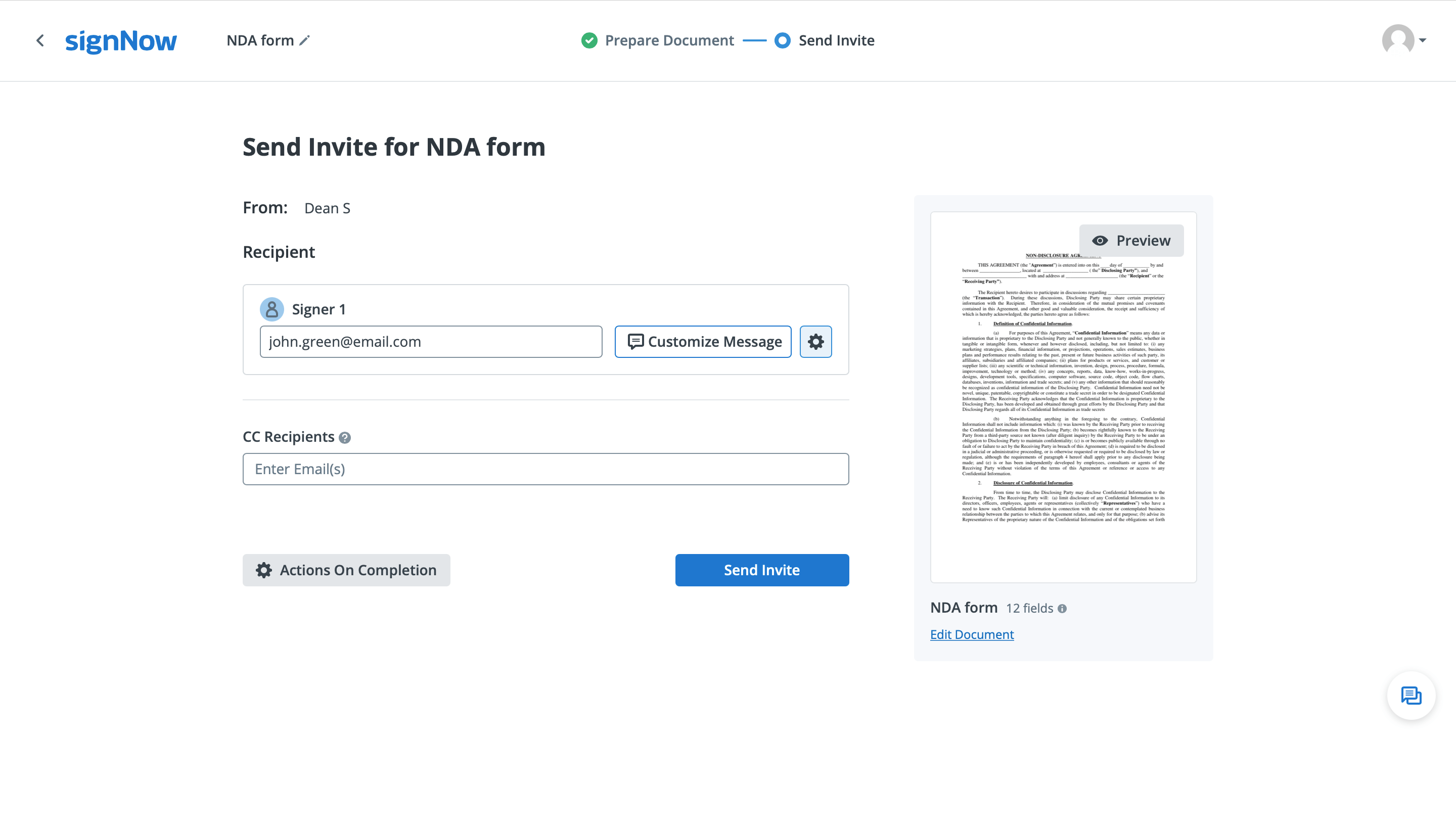
Al finalizar tu invitación de firma, haz clic en el icono de engranaje junto a la dirección de correo electrónico de tu firmante para ver la configuración avanzada.
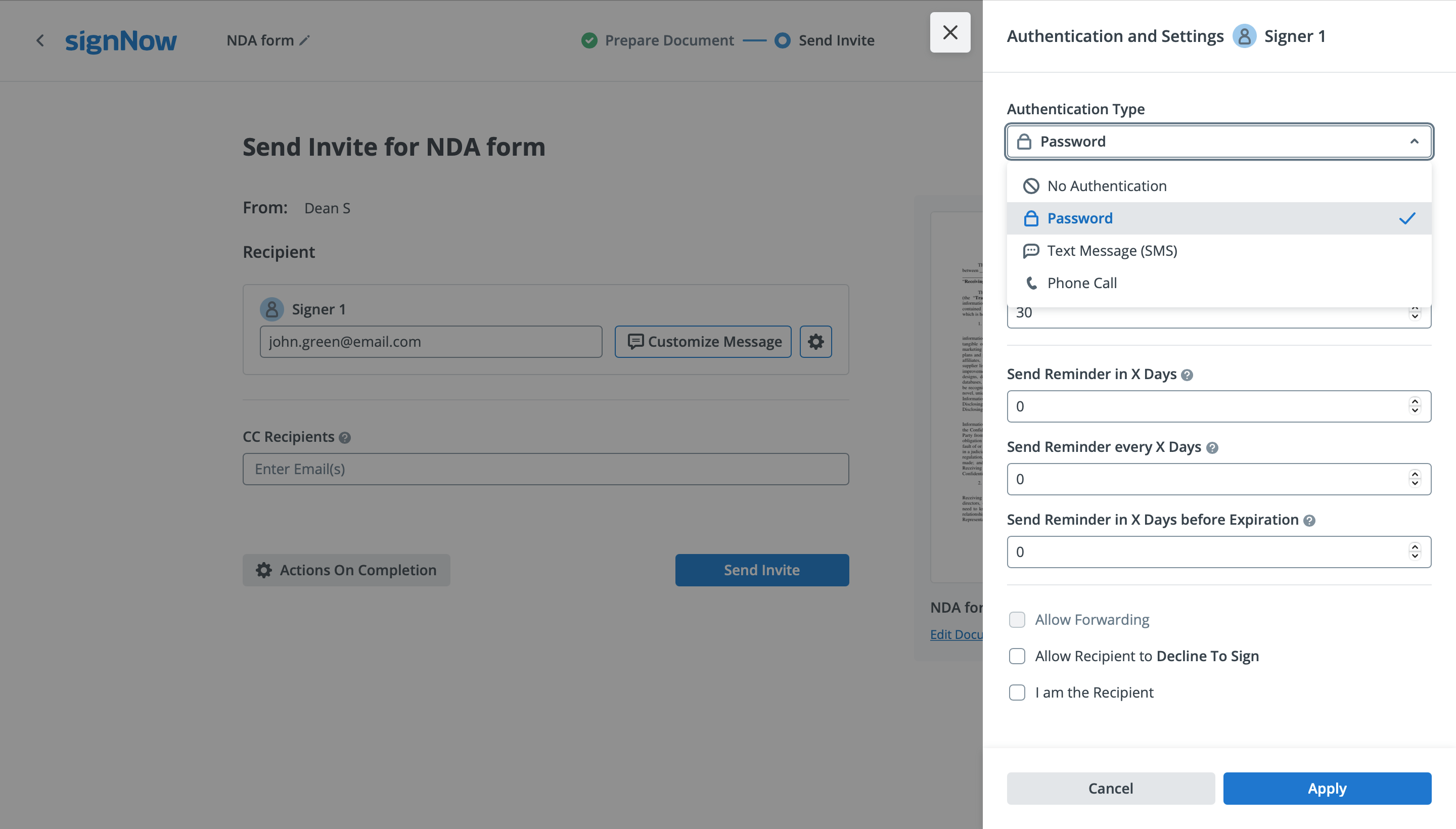
Selecciona Contraseña en el menú desplegable Tipo de Autenticación. Luego, ingresa tu contraseña en el cuadro a continuación y haz clic en el botón Aplicar.
Cuando termines, envía tu invitación de firma. Ahora, tu destinatario tendrá que ingresar la contraseña que has creado para acceder a tu documento. No olvides comunicar esta contraseña a tu firmante (por correo electrónico, teléfono, en persona, etc.). De lo contrario, no podrán firmar tu documento.











