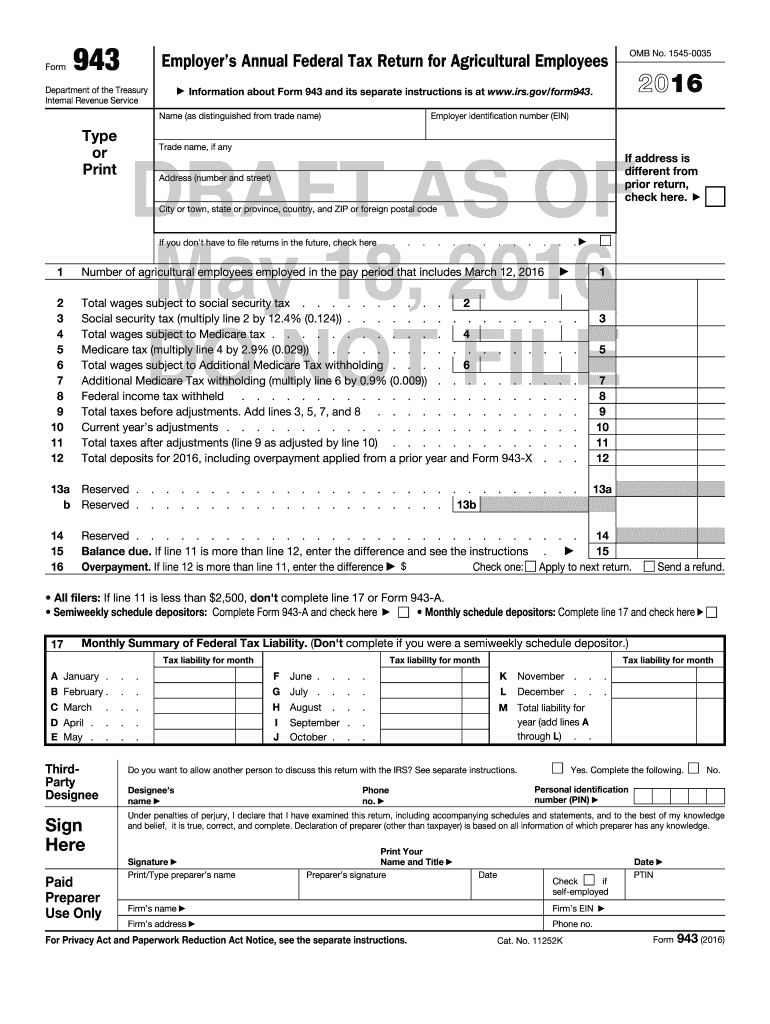
2016 Form 943 Employers Annual Federal Tax Return for Agricultural Employees
Overview of the 2016 Form 943 Employers Annual Federal Tax Return for Agricultural Employees
Why accurate completion of Form 943 matters
Completing the 2016 Form 943 correctly ensures compliance with federal employment tax rules, prevents penalties, and aligns annual payroll records with IRS deposit history. Accurate returns protect employer tax credits and limit examination risk.
Who typically completes the 2016 Form 943 and why it matters
Responsibilities include reconciling payroll records, verifying deposits, and signing the federal return or authorizing a preparer to sign on the employer's behalf.
- Small farm owners and operators who employ seasonal or year-round agricultural workers and must report annual social security and Medicare wages.
- Payroll managers at agricultural cooperatives or processing businesses who reconcile deposits and annual tax liabilities for multiple worksites.
- Tax preparers and CPAs who prepare employer returns, reconcile deposits, and advise on deposit schedules and corrections.
Step-by-step process to complete Form 943 (2016)
-
01Gather records: Collect payroll registers, Form W-2 totals, and deposit receipts for the tax year.
-
02Compute liabilities: Calculate Social Security, Medicare, and withheld federal income tax for agricultural employees.
-
03Reconcile deposits: Match computed tax to IRS deposit receipts and Form 941/943 deposit schedule records.
-
04Sign and file: Sign the return and submit it by the IRS filing method you choose (paper or electronic).
Set up an online filing workflow for Form 943
| Field | Configuration |
|---|---|
| Authentication | Email plus optional SMS code for signer verification |
| Bulk processing | Enable bulk send to distribute returns to multiple signers or preparers |
| Retention policy | Retain completed returns and audit trails for at least three years |
| File format | Save signed returns as PDF/A for long-term preservation |
Where electronic completion and submission fit in the filing flow
-
Upload: Upload the completed Form 943 PDF to the e-sign platform.
-
Place fields: Add signature, date, and preparer fields as required.
-
Invite signer: Send signer an authenticated signing link via email or SMS.
-
Archive: Store the signed PDF and audit trail for compliance.
Technical considerations for eSubmission and signing
Ensure the vendor provides an auditable certificate of completion and exportable records to reconcile with IRS deposit history.
- File formats: PDF, DOCX, and PDF/A support
- Integrations: Connectors for Salesforce, NetSuite, Google Workspace
- Authentication: Email plus optional SMS or two-factor methods
Key timing and filing considerations for Form 943
Annual return due:
File by the IRS annual deadline for employer returns; verify current IRS Form 943 instructions.
Deposit schedule:
Follow monthly or semiweekly deposit rules for employment taxes per IRS deposit guidance.
Reconcile with W-2:
Ensure Form 943 totals match W-2 wages and tax withholding for employees.
Amendments:
Use Form 943-X to correct errors or adjust amounts after filing.
Record retention:
Keep payroll and deposit records for the minimum period required by IRS rules.
Milestones from preparation to final filing for Form 943
Stage 1: Gather records
Compile payroll ledgers, deposit receipts, and employee W-2 summaries.
Stage 2: Calculate totals
Compute annual taxable wages and employer/employee tax amounts.
Stage 3: Reconcile deposits
Match computed liability against IRS deposit and EFTPS records.
Stage 4: File and retain
Submit the return and keep signed copies plus audit trail.
Common preparation errors to avoid
- Mismatched EINs between payroll records and the Form 943 can delay IRS processing and trigger notices.
- Failing to reconcile deposited amounts to reported liabilities leads to balance due notices or underpayment penalties.
- Using incomplete W-2 totals for agricultural employees can understate wages subject to Social Security and Medicare.
- Late signatures or missing preparer information may complicate IRS follow-up and slow resolution of discrepancies.
Penalties and compliance risks tied to Form 943
Real-world examples of digital signing and payroll reporting
Optica Ventures LLC
The interface is simple and easy-to-use for our team; more importantly, it is just as easy for our customers.
- Rapid adoption by remote signers improved turnaround.
- The streamlined process reduced manual follow-up and kept payroll records aligned with signed authorizations and audit trails.
Martin Properties
I can process and execute all of these documents online with 100% compliance and built-in security.
- Mobile and offline signing supported critical field operations.
- This approach allowed us to collect signed documents faster and reconcile them with internal payment and payroll systems more efficiently.
Authoritative signers for Form 943
Farm Owner
The owner with authority over payroll and tax matters normally signs the employer return. If the owner delegates signing authority, retain written authorization and ensure the signer is an authorized officer for legal accountability.
Payroll Specialist
A payroll manager or authorized preparer may complete and sign the return if granted explicit signature authority; paid preparers must include preparer information and PTIN where required.
Best practices for accurate and efficient completion
eSignature pricing and capability comparison relevant to Form 943 workflows
| signNow | DocuSign | Adobe Sign | PandaDoc | HelloSign | |
|---|---|---|---|---|---|
| Starting Price | $8/user/mo | $15/user/mo | $14/user/mo | $19/user/mo | $15/user/mo |
| Free Trial | 7-day trial | Varies by vendor | Varies by vendor | Varies by vendor | Varies by vendor |
| Bulk Send | Yes | Yes | Yes | Yes | No |
| Audit Trail | Yes | Yes | Yes | Yes | Yes |
| HIPAA Compliant | Yes | Yes | Yes | No | No |
| Envelope Cap | No cap | 100 envelopes/user/year | Varies | Varies | Varies |
Frequently asked questions about Form 943 (2016) and e-signatures
-
Can Form 943 be signed electronically?
Yes. Electronic signatures are legally acceptable under the ESIGN Act and UETA when the signer intends to sign, consents to electronic records, the signature is attributable to the signer, and the record is retained in a reproducible form.
-
Who must sign Form 943?
The owner, corporate officer, or authorized preparer may sign. If a paid preparer signs, include the preparer’s identification (such as PTIN) and contact information as required on the form.
-
How do I correct errors after filing?
File Form 943-X to amend an already-filed Form 943 and provide corrected amounts and an explanation; retain documentation supporting the change for IRS review.
-
What records should I keep?
Retain payroll ledgers, deposit confirmations, copies of the signed Form 943, and any supporting schedules for at least three years, longer if required by statute or state law.
-
Are there penalties for late filing or deposits?
Yes. Failure to file or deposit can lead to penalties under applicable IRC provisions and employment tax rules; intentional disregard carries higher sanctions.
-
Does using e-signature affect audit readiness?
Proper e-signature workflows that produce a complete audit trail and retain records in a durable format support audit readiness and help substantiate the authenticity of filed returns.