Establishing secure connection…Loading editor…Preparing document…

Affidavit by Parent to Prove Date of Birth and Parentage

This template is fully customizable. Edit the text, fill out the fields, and send it for signature. Give it a try!
Affidavit by Parent to Prove Date of Birth and Parentage

What this affidavit is and when it’s used

An Affidavit by Parent to Prove Date of Birth and Parentage is a sworn written statement from a parent or legal guardian attesting to a child’s date of birth and biological parentage when primary records are unavailable or incomplete. Common uses include school enrollment, replacement of a lost birth certificate, Social Security or passport applications, immigration documentation, and hospital or vital-record corrections. The affidavit is typically signed under oath and notarized; some agencies accept electronically signed affidavits when state law and the receiving agency permit electronic records and notarization.

Why parents and institutions rely on this affidavit

This affidavit provides a formal, sworn record to establish age and parentage where official documents are missing, inconsistent, or delayed; it creates a clear administrative trail for agencies and institutions and can speed access to benefits, enrollment, and identity documents when supported by notarization or accepted e-signature workflows.

Why parents and institutions rely on this affidavit

Who completes and who accepts this affidavit

Institutions differ in what they accept; confirm whether notarization, witnesses, supporting documents, or a state-approved electronic signature method is required before submitting.

  • Parents and legal guardians who lack a certified birth certificate or need to correct registry data
  • School registrars, social services, and hospital records staff verifying identity for enrollment or care
  • Immigration officers, passport agents, and Social Security administrators reviewing evidence of age or parentage

How to complete and formalize the affidavit

Follow these steps to complete the affidavit correctly and tailor delivery to the receiving agency’s requirements.

  • 01
    Prepare draft: Complete all fields, attach supporting documents, and include explanatory notes for uncertain details.
  • 02
    Review identity: Confirm parent names match photo ID and supporting documents to avoid discrepancies.
  • 03
    Notarize: Sign the affidavit before a notary public or use state-permitted remote online notarization if accepted.
  • 04
    Submit: Send the notarized affidavit and attachments to the agency specified (school, vital records, USCIS) following their submission rules.

Typical submission and verification workflow

A consistent workflow reduces processing delays and supports record acceptance by agencies and institutions.

  • Draft and attach: Collect supporting documents and draft the sworn statement with clear facts and dates.
  • Swear and notarize: Appear in person for notarization or use a permitted RON provider, retaining evidence of the notarization session.
  • Submit to recipient: Provide the notarized affidavit plus copies of supporting documents per the recipient’s instructions.
  • Record update: Recipient reviews and updates records or requests further evidence; maintain copies and audit trail.

Configuring a digital workflow for this affidavit

Key settings when preparing an electronic version for e-signature and notarization.

Field Configuration
Document upload PDF or DOCX; ensure printable layout for notarization.
Signature fields Place signature, date, and initials; mark notarization block as required.
Authentication Enable email or SMS code; require stronger ID proofing for RON when needed.
Retention Save signed PDF and notarization certificate in encrypted storage for the required retention period.

Technical requirements for eSigning and notarization

Confirm the recipient accepts e-signed affidavits and any RON evidence (audio-video record, notary certificate); store the signed package with audit trail and notarization records.

  • Document formats: PDF and DOCX support; signed output must preserve notarization block.
  • Notarization support: Remote Online Notarization (RON) or in-person notarization depending on state law.
  • Authentication options: Email, SMS, KBA, or advanced signer authentication for higher-assurance transactions.

Key security and compliance considerations

Encryption in transit: TLS 1.2/1.3
Encryption at rest: AES-256
Major certifications: SOC 2 Type II available
Privacy frameworks: GDPR and CCPA compliance
Health data: HIPAA support (BAA required)
e-signature law: ESIGN and UETA compliance

Risks and consequences of an incorrect affidavit

Perjury risk: Sworn false statements may carry criminal penalties.
Administrative rejection: Incomplete or unnotarized affidavits can be rejected, causing delays.
Identity mismatch: Wrong DOB can trigger benefit denials or extra verification.
Immigration impact: Inconsistent evidence can complicate USCIS or consular processes.
Legal disputes: Conflicting affidavits may undermine credibility in court.
Record delays: Processing delays may impede access to services or records.

Common mistakes to avoid when preparing the affidavit

  • Submitting unsigned or unnotarized affidavits when the recipient explicitly requires notarization leads to immediate rejection and resubmission delays.
  • Entering inconsistent names or dates across the affidavit and supporting documents causes identity mismatches and extra verification steps.
  • Failing to attach the specified supporting documents (hospital record, medical certificate, baptismal record) often results in requests for supplemental evidence.
  • Using informal language or vague statements instead of precise factual assertions can reduce the affidavit’s evidentiary value and invite follow-up.

Essential elements of a professional affidavit

Include these components to maximize acceptance and legal clarity.

Sworn declaration

A clear, first-person statement of facts under oath describing the date of birth and parentage with concise factual language and any relevant context.
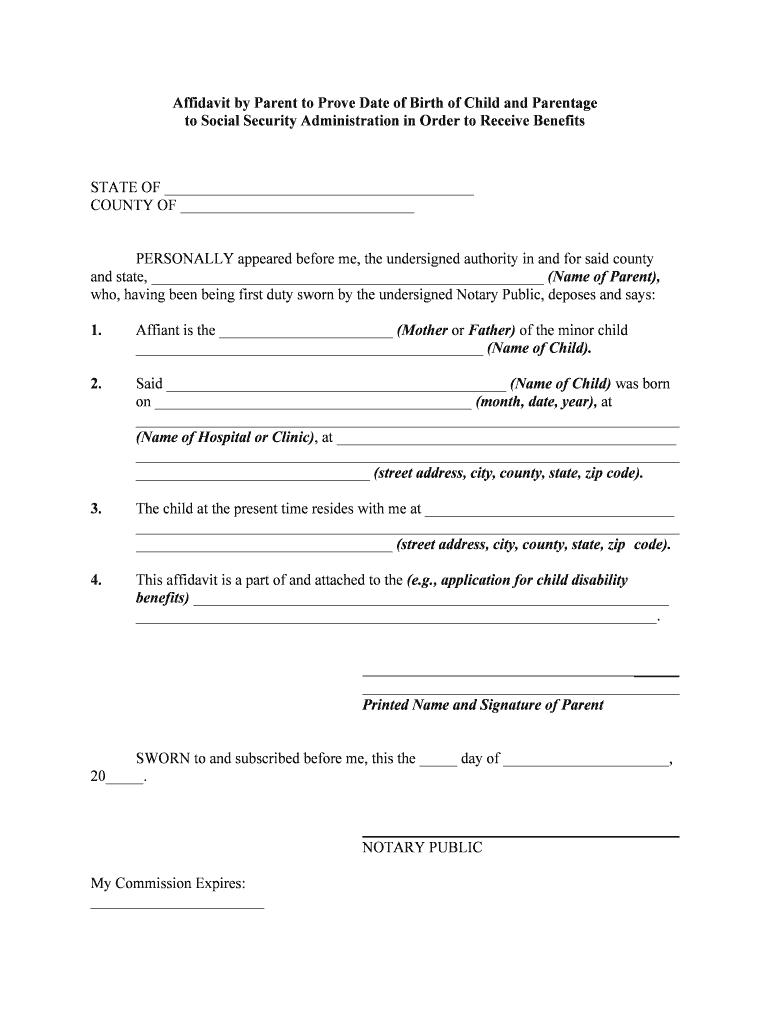
Notary acknowledgement

A notary block with signature, seal, and date showing the oath and identity proofing; RON evidence when permitted by law.

Detailed facts

Specifics such as exact date, time or best estimate, hospital name or place of birth, and circumstances that support the parent’s knowledge.

Supporting list

A numbered list of attached documents (medical records, statements, certificates) and why each corroborates the affidavit.

Identity references

IDs for the signing parent and, where applicable, secondary identifiers to help agencies confirm identity.

Jurisdiction clause

A statement of governing state law and venue for disputes or record corrections to guide legal interpretation.

Real-world situations where this affidavit is used

Two common scenarios illustrate how the affidavit resolves practical problems when primary documents are missing.

School Enrollment

A parent lacks a certified birth certificate at registration but has hospital records and a sworn affidavit by parent.

  • School accepts affidavit as temporary proof pending certified copy.
  • The affidavit allowed the child to start school while the parent worked with the vital records office to obtain a replacement birth certificate.

Consular or Immigration Filing

An applicant needs evidence of a dependent’s age and parentage for a visa petition but the original birth record is held abroad.

  • The sworn affidavit plus translated hospital records supports the petition.
  • The affidavit, notarized and accompanied by corroborating records, helped advance the immigration filing while consular verification proceeded.

Comparing eSignature solutions commonly used for affidavits

Basic pricing and capability differences for popular eSignature vendors; confirm plan details and notarization or RON support with each provider.

signNow DocuSign Adobe Sign PandaDoc HelloSign
Starting Price $8/user/mo $15/user/mo $14/user/mo $19/user/mo $15/user/mo
Free Trial 7-day free trial Varies by vendor Varies by vendor Varies by vendor Varies by vendor
Bulk Send Yes Yes Yes Yes No
Audit Trail Yes Yes Yes Yes Yes
HIPAA Compliant Yes Yes Yes No No
Envelope Cap No envelope cap 100 envelopes/user/year Varies by plan Varies by plan Varies by plan

Timelines and expected processing windows

Typical timelines for notarization, state vital-records processing, and agency review vary by jurisdiction and workload.

Notarization time:

Immediate at a public notary or scheduled RON session; session recorded when RON is used.

Vital records processing:

Varies by state; commonly 2–8 weeks for replacement or amendment requests.

School or local agency review:

Often same-day to 2 weeks depending on verification needs.

Immigration or consular review:

Processing time varies widely; expect several weeks to months depending on the filing type.

Document retention:

Keep certified copies and the notarized affidavit for the retention timeline required by recipient.

Frequently asked questions and practical answers

Answers to common questions about acceptance, notarization, and correcting errors when using an affidavit to prove birth date and parentage.


Need help? Contact support

be ready to get more
Join over 28 million airSlate SignNow users