Establishing secure connection…Loading editor…Preparing document…

Affidavit of Continuing Improvements

This template is fully customizable. Edit the text, fill out the fields, and send it for signature. Give it a try!
Affidavit of Continuing Improvements

What an Affidavit of Continuing Improvements Is

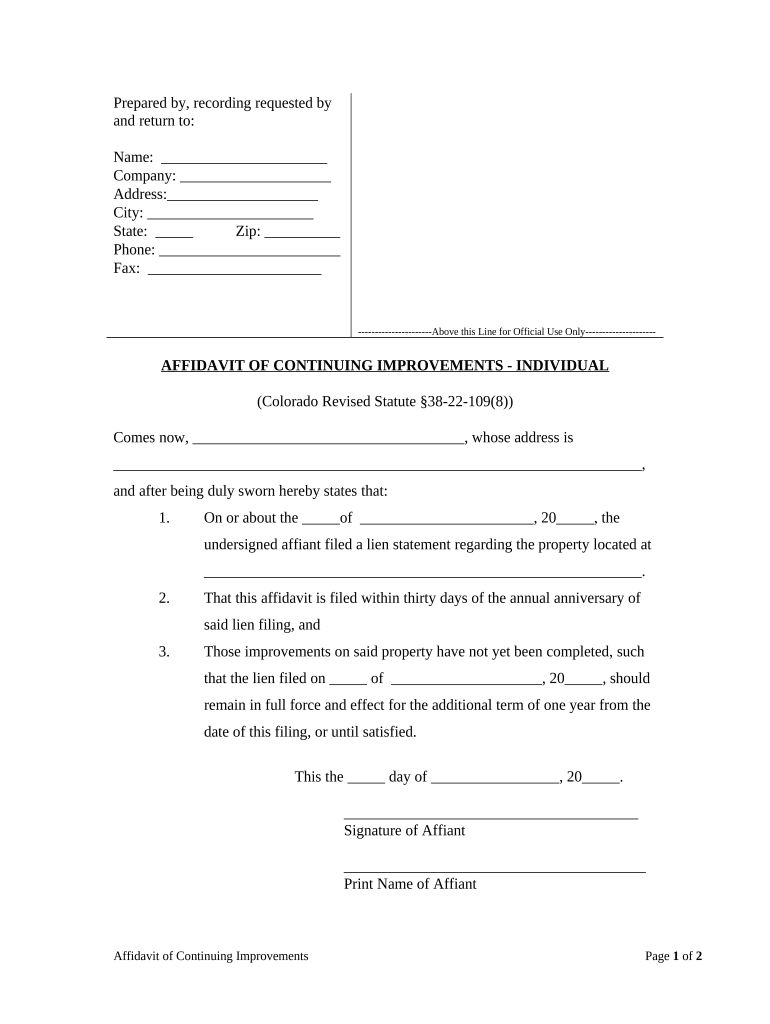
An Affidavit of Continuing Improvements documents work performed on real property that supplements an earlier claim, lien, or notice. It is a sworn statement by an owner, contractor, or subcontractor describing ongoing or completed improvements, dates, costs, and parties involved. The affidavit helps preserve or clarify rights to payment, supports change-order claims, and may be required to update public records after additional work. Typically notarized, it becomes a formal record used by title companies, lenders, and courts when assessing encumbrances or resolving disputes over the scope and timing of construction activity.

Why this affidavit matters to project and title clarity

Use this affidavit to document continued construction, changes, or post-closing repairs that affect liens, title, or lender priorities. It provides sworn factual detail useful for payment disputes, title clearance, and ensuring accurate public records without requiring a full contract revision.

Why this affidavit matters to project and title clarity

Who typically completes and relies on this affidavit

Typical signers and users include contractors, property owners, and lenders who need a sworn record of ongoing upgrades.

  • General contractors — establish continuing scope, costs, and dates for project payment records.
  • Subcontractors and suppliers — document work or materials supplied after initial lien filing to preserve lien rights.
  • Title companies and lenders — confirm property condition changes and resolve encumbrance questions before closing.

Core sections to include in a professional affidavit

Key sections of a professional Affidavit of Continuing Improvements ensure clarity about parties, work scope, dates, costs, legal declarations, and notarized authentication.

Identification

Full name, company, mailing address, and any government-issued identifier for the affiant and the property owner to establish who is making the statement.
Property Description

Precise legal description, street address, and parcel or tax ID; reference to recorded instruments helps link the affidavit to public records.

Scope of Work

Concise but specific description of the improvements performed, areas affected, and distinguishing details that separate this work from prior filings.

Dates and Costs

Start, completion, or milestone dates and an itemized cost summary indicating whether amounts are estimates or final billed figures.

Legal Declaration

A sworn statement under penalty of perjury affirming truthfulness, with jurisdictional language and acknowledgement of legal consequences for false statements.

Notary & Signatures

Notary acknowledgment, signature line(s) for the affiant and any required witnesses, printed names, titles, and execution dates for chain-of-custody.

Required information elements at a glance

Affiant Identity: Full legal name as on ID.
Property Identifier: Parcel number and full address.
Work Description: Brief list of improvements performed.
Cost Summary: Total and itemized amounts stated.
Date Entries: Start and completion dates included.
Notary Statement: Acknowledgment, seal, and notarization.

Step-by-step: completing the affidavit correctly

Follow these steps to complete and execute the affidavit accurately and in the correct order.

  • 01
    Gather documents: Collect contracts, change orders, invoices, permits, and prior notices.
  • 02
    Describe work: Summarize improvements with dates, locations, and clarifying details.
  • 03
    Itemize costs: Provide itemized amounts, indicate estimates versus final sums.
  • 04
    Sign and notarize: Affiant signs before notary; obtain witnesses if required by state law.

How to set up an online affidavit workflow

Configure your online affidavit workflow to capture required fields, verify identities, apply conditional fields, and route completed copies to stakeholders.

Document Field or Workflow Setting Configuration
Identity verification method Email link plus SMS OTP or ID credential analysis.
Conditional field visibility rules Show cost details only when change-order checkbox is selected.
Routing and notification targets Auto-send final PDF to recorder, lender, and contractor contact.
Output file format and retention Save as PDF/A and retain audit trail for evidentiary use.

Where to send the executed affidavit

After signing, route the affidavit to filing destinations and interested parties; maintain copies and an audit trail for proof of delivery and execution.

  • County Recorder: File recorded affidavit per county recording office rules.
  • Lender: Provide certified copy to lender for loan file retention.
  • Contractor: Share executed copy with general contractor and relevant subcontractors.
  • Title Company: Send to title for clearance and update of closing documents.

Technical requirements for electronic completion and submission

Use a platform that supports PDF and DOCX uploads, secure storage, identity verification, notarization workflows, and a detailed audit trail.

  • Supported file formats: PDF, DOCX, and PDF/A export.
  • Authentication options: Email, SMS OTP, KBA, or ID verification.
  • Integration endpoints: Salesforce, NetSuite, Google Workspace integrations.

Timing considerations and recommended filing cadence

Timelines vary by purpose and jurisdiction; act promptly when completion milestones occur to protect lien, payment, or title interests.

After substantial completion:

File promptly after substantial completion to support payment claims.

Prior to closing:

Provide updated affidavits before title transfer or loan funding to avoid surprises.

When costs change:

Submit updated affidavits when approved change orders materially alter costs.

For lender requests:

Comply with lender timelines for document submission in loan covenants.

Record retention timing:

Keep executed copies per retention rules and auditor requests.

Common mistakes to avoid

  • Incomplete property descriptions that do not match recorded instruments, creating ambiguity about which parcel the affidavit affects.
  • Mismatched names between the affiant, contract documents, and government-issued ID that may undermine enforceability or cause recorder rejection.
  • Vague scope language that fails to distinguish new work from prior filings, reducing the affidavit’s usefulness in dispute resolution.
  • Skipping notarization or required witness signatures because this can void recordability or fail county recorder acceptance.

Consequences of incorrect or false affidavits

Perjury exposure: Criminal or civil penalties
Recording rejection: County may reject an incomplete affidavit
Title issues: Unclear title or delayed closings
Payment disputes: Claims may be denied without proof
Lien risk: Priority disputes between creditors
Increased costs: Additional legal and correction expenses

Real-world examples of electronic affidavit use

These short examples show how organizations use sworn affidavits of continuing improvements to support transactions and reduce delay.

Martin Properties

A regional property manager needed remote execution across multiple sites to proceed with closings.

  • Challenge: coordinate signatures from dispersed project managers.
  • "I can process and execute all of these documents online with 100% compliance and built-in security. Whether on mobile or working offline, I can get forms back to their necessary parties efficiently." The digital affidavit reduced turnaround time and travel costs.

Optica Ventures LLC

A small development firm required a clear supplemental statement after additional tenant improvements.

  • Point: preserve payment priority after change orders.
  • "The interface is simple and easy-to-use for our team; more importantly, it is just as easy for our customers." The affidavit established a public record that supported subsequent billing and title updates.

Practical tips for accurate and efficient completion

Adopt consistent practices that reduce errors, speed approval, and improve the affidavit’s evidentiary value.

Use recorded references
Reference recorded instrument numbers, parcel IDs, and the exact legal description to avoid ambiguity about the property. This practice prevents recorder rejections and simplifies title searches.
Attach supporting invoices
Attach or reference invoices, change orders, and permits to substantiate cost figures and the scope of work; this minimizes follow-up requests and improves defensibility in disputes.
Follow state execution rules
Confirm whether witnesses or special notarization wording are required by your state; compliant execution prevents invalidation and recorder rejection.
Preserve audit trails
When using electronic execution, retain the audit trail (IP, timestamp, certificate of completion) to document intent, attribution, and the signing process for legal admissibility.

eSignature vendor comparison for executing affidavits

Pricing and feature availability vary; the table below summarizes key vendor characteristics relevant to affidavits and notarization workflows.

signNow DocuSign Adobe Sign PandaDoc HelloSign
Starting Price $8/user/mo $15/user/mo $14/user/mo $19/user/mo $15/user/mo
Free Trial 7-day free trial Varies by plan Varies by plan Varies by plan Varies by plan
Bulk Send Yes Yes Yes Yes No
Audit Trail Yes Yes Yes Yes Yes
HIPAA Compliant Yes Yes Yes No No

Frequently asked questions

Answers to common execution, filing, and legal-validity questions about Affidavits of Continuing Improvements.


Need help? Contact support

be ready to get more
Join over 28 million airSlate SignNow users