Establishing secure connection…Loading editor…Preparing document…

Agreed Order

This template is fully customizable. Edit the text, fill out the fields, and send it for signature. Give it a try!
Agreed Order

What an Agreed Order is and when it applies

An Agreed Order is a written court document that records terms the parties have negotiated and asks the court to adopt those terms as an official order. It combines elements of a private settlement and a judicial order: the parties draft and agree the language, then submit it for the judge’s signature. Once entered by the court, an Agreed Order carries the enforceable weight of a judicial order and typically includes deadlines, performance obligations, and remedies for noncompliance.

Why parties use an Agreed Order instead of litigating

An Agreed Order lets parties memorialize negotiated resolutions while securing judicial enforcement; it reduces uncertainty, shortens resolution time compared with contested hearings, and preserves the court’s authority to enforce performance or sanctions.

Why parties use an Agreed Order instead of litigating

Who prepares and who signs an Agreed Order

Courts vary on whether they require a separate submission cover letter or proposed order format; follow the local rules for the clerk’s preferred form and delivery method.

  • Plaintiff or petitioner representatives who negotiated settlement terms with defendants or respondents.
  • Defense counsel or corporate signatories authorized to bind their organization.
  • Judicial staff ultimately signs or enters the document into the court record after review.

Who can sign and why their role matters

Attorney of Record

An attorney signing an Agreed Order represents a party and certifies authority to settle. The attorney’s signature binds the represented client and signals to the court that the attorney obtained client authorization.

Corporate Signatory

A corporate officer or other authorized individual signs on behalf of an entity; confirm corporate authorization to settle and keep a corporate resolution or signature authority document available.

Essential clauses and structure in a professional Agreed Order

A clear Agreed Order is concise, uses numbered paragraphs, and includes defined deadlines and enforcement language so the court and parties can easily identify obligations and remedies.

Caption and case info

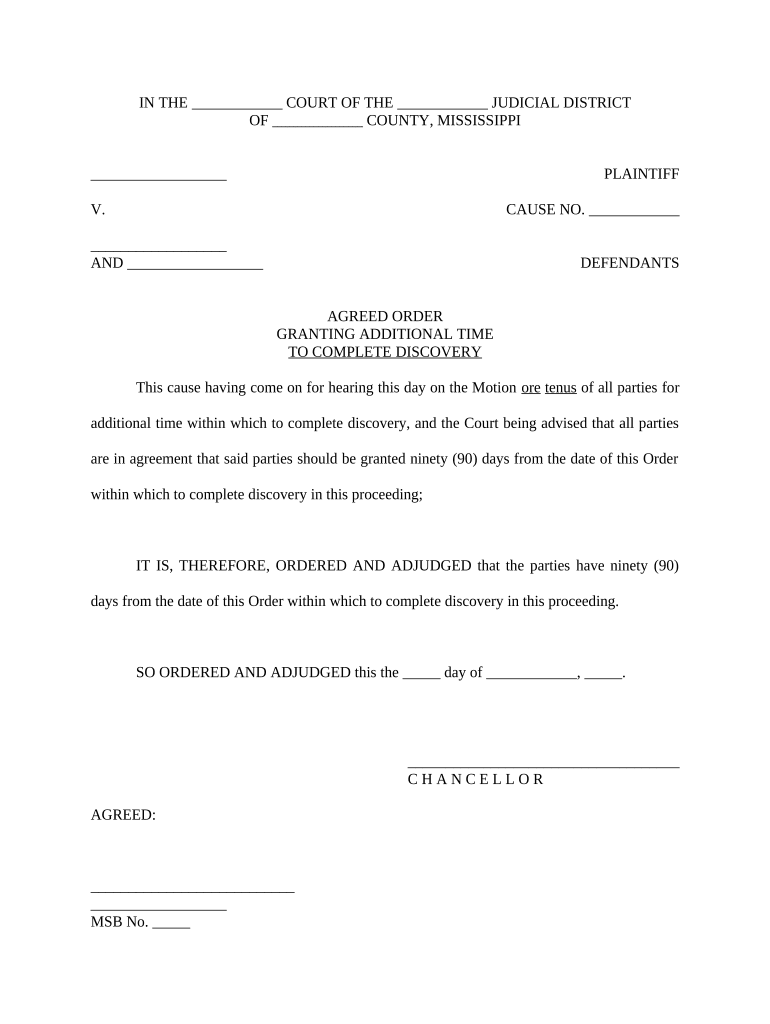
Include the court name, docket number, case caption, and title 'Agreed Order' so the clerk can file and the judge can identify the matter quickly.
Recitals

Brief background facts and a statement that the parties negotiated the terms and jointly request the court to enter the order.

Agreement terms

Clear, numbered obligations for each party, including deliverables, performance standards, deadlines, and any conditional actions.

Enforcement clause

Language stating that the order is entered by the court and may be enforced through contempt, sanctions, or other remedies if breached.

Retention and reporting

Specify required reports, monitoring duties, and recipients for periodic updates to the court to ensure compliance.

Signatures and entry

Signature blocks for counsel and parties, plus a space for the judge’s signature and an entry date to show when the order becomes effective.

Required data elements to include

Court caption: Case title
Docket number: Case ID
Party names: Full legal names
Specific obligations: Clear actions
Deadlines: MM/DD/YYYY
Signatures: Parties and judge

Step-by-step: preparing and submitting an Agreed Order

Follow a deliberate sequence: draft agreed terms, verify authority to bind parties, format per local rules, obtain signatures, then submit to the clerk with a proposed order for judicial entry.

  • 01
    Draft terms: Write clear, numbered obligations and remedies.
  • 02
    Confirm authority: Obtain written authorization from signatories or corporate resolution.
  • 03
    Format to local rule: Use the court’s required margins, caption, and proposed order template.
  • 04
    File and serve: Submit to clerk and serve all parties per local procedure.

Configuring an online workflow for an Agreed Order

Set up a simple digital routing sequence so each signatory reviews, signs, and receives a filed copy with an audit trail.

Field Configuration
Signer order Sequential or parallel routing
Authentication Email link or SMS code
Document locking Lock after signing
Delivery Auto-send signed PDF and audit

Where to file and how the court enters an Agreed Order

After parties sign, submit the proposed Agreed Order to the appropriate court clerk using the court’s filing method; clerks review and the judge signs to enter it as a formal order.

  • Local clerk’s office: File original per court electronic filing rules
  • Proposed order format: Follow the court’s template or local rule
  • Service on parties: Serve all counsel and pro se parties
  • Entry by judge: Judge signs and clerk stamps date of entry

Sharing and signing: delivery options and technical needs

Preserve all transmission records and the signed PDF with audit trail for court entry and future enforcement, and verify accepted formats with the clerk beforehand.

  • Email delivery: Good for serving parties; keep delivery receipts
  • Court e-filing: Check clerk’s accepted file types (PDF preferred)
  • eSignature platform: Record audit trail and signer authentication

Common timing elements and deadlines in an Agreed Order

Agreed Orders frequently include staged deadlines for performance, reporting, and court appearances; set explicit dates and compliance intervals to reduce disputes.

Performance deadline:

Exact MM/DD/YYYY date for completing obligations

Interim reports:

Weekly or monthly status reports with due dates

Compliance hearing:

Court date for reviewing compliance, if required

Cure period:

Number of days to remedy breaches after notice

Entry date:

Date the judge signs and the order becomes enforceable

Key processing milestones from agreement to entry

Track milestone stages to ensure timely filing, entry, and compliance; use a checklist tied to calendar alerts.

01

Draft and review

Finalize agreed language and confirm authority to bind each party.

02

Signatures collected

Obtain all party signatures and supporting authorizations or corporate resolutions.

03

File proposed order

Submit to the clerk per e-filing rules with proof of service attached.

04

Judge entry

Judge signs, clerk stamps, and the entry date becomes the enforcement start.

Common pitfalls to avoid when drafting an Agreed Order

  • Vague obligations that use non-measurable terms such as 'promptly' or 'reasonable' without defined timeframes or criteria.
  • Mismatched party names or titles that differ from pleadings or corporate records, which can delay filing or challenge enforceability.
  • Attempting to pre-sign the judge’s entry line or leaving the judge’s signature area filled in before submission.
  • Failing to follow local court formatting or e-filing requirements, which can lead to rejection or required re-filing.

Consequences of errors or noncompliance

Enforcement risk: Contempt or sanctions
Rejection: Clerk may refuse filing
Delay: Missed deadlines prolong litigation
Liability: Monetary damages exposure
Invalid signature: Could void terms
Evidence gaps: Missing audit trail harms enforcement

Real-world examples of Agreed Orders in practice

Practical examples show how Agreed Orders streamline case resolution and create enforceable, court-entered settlements.

Optica Ventures LLC

A small business settled a contract dispute into an Agreed Order that avoided trial and preserved business relationships.

  • The signed order reduced proceedings to a single enforcement remedy.
  • Brian Fitzgibbons, COO, said the interface and process made execution straightforward and allowed the parties to secure judicial entry without additional hearings.

Tech Data

A large vendor resolved account reconciliation issues by converting the settlement into an Agreed Order.

  • Consolidated payment schedule and reporting obligations were included.
  • Bob Dutkowsky, CEO, noted the process improved internal service and speed to revenue while ensuring clear court-enforceable obligations.

eSignature vendor comparison for executing Agreed Orders

Basic vendor comparisons highlight starting price, trial availability, bulk send, audit trails, HIPAA support, and document/envelope caps; signNow appears first for parity in comparison.

signNow DocuSign Adobe Sign PandaDoc HelloSign
Starting Price $8/user/mo $15/user/mo $14/user/mo $19/user/mo $15/user/mo
Free Trial 7-day free trial Varies by plan Varies by plan Varies by plan Varies by plan
Bulk Send Yes Yes Yes Yes No
Audit Trail Yes Yes Yes Yes Yes
HIPAA Compliant Yes Yes Yes No No

Frequently asked questions about Agreed Orders and eSignatures

Answers address enforceability, eSignature acceptance, notarization, revisions, withdrawal, and best practices for court filing.


Need help? Contact support

be ready to get more
Join over 28 million airSlate SignNow users