Establishing secure connection…Loading editor…Preparing document…

Purchase Agreement for Hunting Cabin

This template is fully customizable. Edit the text, fill out the fields, and send it for signature. Give it a try!
Purchase Agreement for Hunting Cabin

What a Purchase Agreement for Hunting Cabin Covers

A Purchase Agreement for Hunting Cabin is a legally binding contract that sets out the terms for transferring ownership of a cabin and associated land. It identifies buyer and seller, a legal property description, purchase price and payment terms, earnest money, financing and inspection contingencies, fixtures included, access and hunting rights, closing mechanics, and title/recording instructions. The agreement allocates risk between the parties, establishes deadlines for performance, and forms the basis for deed preparation and recording at closing.

Why a Detailed Agreement Matters and Its Legal Basis

A clear Purchase Agreement for Hunting Cabin records price, contingencies, and specific property rights such as hunting access and easements, reducing post-closing disputes. When executed properly, electronic signatures generally meet federal requirements under the ESIGN Act (15 U.S.C. ch. 96) and state UETA laws where adopted.

Why a Detailed Agreement Matters and Its Legal Basis

Who Typically Prepares and Signs This Agreement

Typical parties who prepare or complete this agreement include buyers, sellers, and real estate brokers or agents handling rural properties.

  • Prospective buyers acquiring a cabin and adjoining hunting acreage, often arranging financing or inspections.
  • Sellers or heirs disposing of rural property who must provide condition disclosures and conveyable rights.
  • Real estate agents, title companies, and closing attorneys coordinating funds, title, and recording.

Representative Signer Roles

Buyer — Individual

A private purchaser who will occupy or rent the cabin for recreation or hunting; often requires inspection contingencies, a title review, and lender conditions when financing. Accurate legal name, proof of funds, and timely responsiveness reduce closing delays and lender issues.

Seller — Landowner

A homeowner, trust, or estate selling a cabin and parcel; must provide a full legal description, required seller disclosures, and clear title. Sellers typically coordinate title insurance, arrange access for inspections, and specify which fixtures and rights convey.

Essential Clauses to Include in the Agreement

Core clauses and provisions to include in a Purchase Agreement for a Hunting Cabin to ensure clarity, allocate risk, and facilitate a timely closing process.

Parties

Identify buyer(s) and seller(s) using full legal names or entity names, list authorized signers and contact details, and state any capacity (trustee, executor) to avoid identity disputes at closing and with the title company.
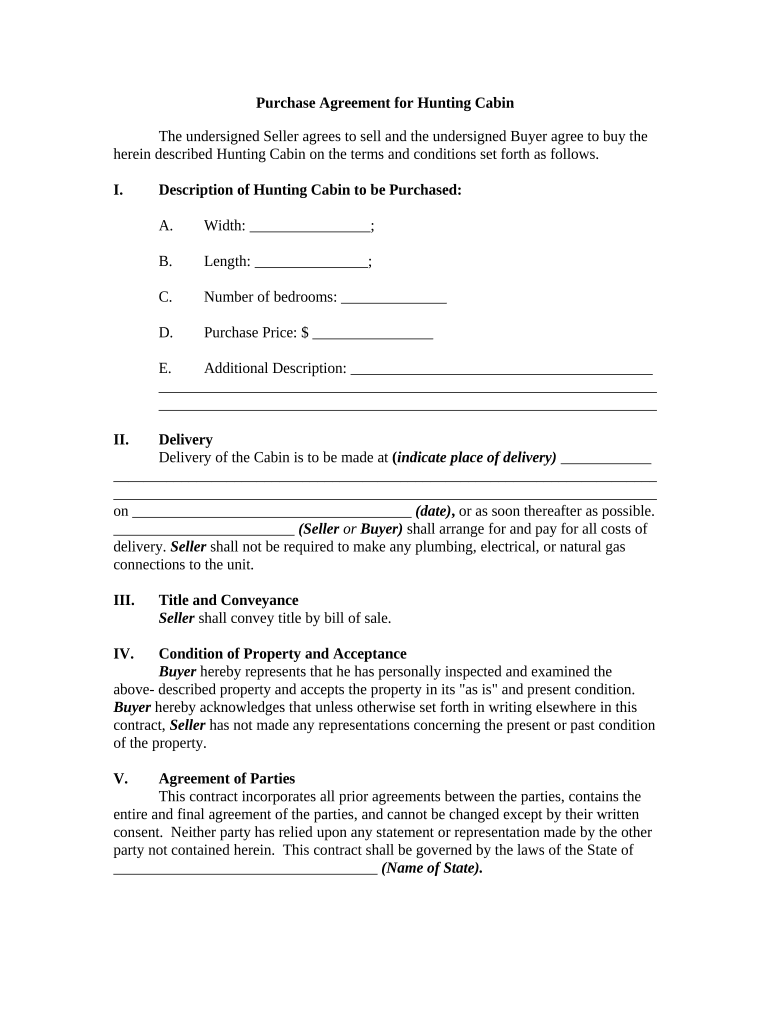
Property Description

Provide an exact legal description, parcel number, acreage, and attach surveys or maps as exhibits; include access easements, trail rights, and any shared road agreements that affect hunting access or ingress.

Purchase Terms

State the purchase price in numbers and words, earnest money amount and holder, payment method, seller concessions, and whether personal property, timber, or mineral rights convey with the sale.

Contingencies

Include inspection, appraisal, title, and financing contingencies with clear deadlines, remedy paths, and instructions for earnest money release if contingencies are not satisfied or waived.

Title and Closing

Require delivery of marketable title, specify the title company or closing agent, request title insurance endorsements as needed, and state deed type and recording responsibilities at closing.

Hunting & Access Rights

Document whether hunting leases, guest access, or seasonal restrictions convey; address parking, use of trails, and any third-party rights to prevent post-closing disputes.

Key Information to Collect on the Form

Property Description: Street address, acreage, parcel ID
Legal Description: Recordable metes-and-bounds text
Purchase Price: Total amount in numbers and words
Earnest Money: Amount, deposit holder, and timing
Closing Date: MM/DD/YYYY format; agreed schedule
Title Company: Name, contact, escrow instructions

Step-by-Step: Completing the Agreement

Follow these steps to complete and execute a Purchase Agreement for a hunting cabin accurately and efficiently.

  • 01
    Prepare Draft: Populate parties, description, price, and contingencies.
  • 02
    Review Title: Order title search and address any defects.
  • 03
    Inspections: Schedule home, septic, and boundary inspections promptly.
  • 04
    Close: Coordinate funds, sign deed, and record at county.

How to Configure an Online Signing Workflow

Configure an online workflow to collect signatures, authenticate signers, and route executed documents to title and lender agents.

Field Configuration
Signer Authentication Email link plus optional SMS code verification
Magic Fields Enable automatic field detection and pre-fill from templates
Conditional Fields Show inspection deadlines only when clause selected
Routing Rules Route signed document to title, lender, and each party

Digital Signing and Integration Considerations

Digital signing and sharing require compatible file formats and common integrations with title, escrow, and lender systems.

  • File Formats: PDF, DOCX; preserve signature metadata
  • Integrations: Salesforce, NetSuite, Microsoft 365, Google Workspace
  • Authentication: Email, SMS, KBA, or SSO options

Where to Send the Executed Agreement

Typical destinations and routing steps after signing include the title company, lender, escrow agent, and county recorder for deed recording.

  • Title Company: Send executed agreement and closing instructions to the title company.
  • Lender: Provide the executed contract to the lender for loan processing and appraisal.
  • Escrow Agent: Deliver earnest money and escrow instructions for safekeeping and disbursement.
  • County Recorder: Record the deed post-closing at the county recorder's office.

Common Deadlines to Include in the Agreement

Typical deadlines and timeframes to include in the Purchase Agreement help manage contingencies, inspections, financing, and closing expectations.

Inspection Period:

Commonly 7–14 days for home, septic, and boundary inspections.

Financing Contingency:

Date by which buyer must obtain a loan commitment or terminate.

Appraisal Deadline:

Deadline to complete appraisal required by lender, often 14 days.

Title Objection:

Time allowed for buyer to object to title defects after search.

Closing Date:

Mutually agreed day for funding, signing, and deed recording.

Sequential Milestones from Offer to Recording

Key processing milestones from offer through deed recording, presented as sequential stages to track progress.

01

Offer Accepted

Seller signs and contract becomes binding subject to contingencies.

02

Due Diligence

Buyer completes inspections, survey review, and title examination.

03

Loan Approval

Lender issues commitment and clears financing contingencies.

04

Closing & Recording

Funds exchanged, deed signed, and deed recorded at county.

Common Preparation Errors to Avoid

  • Vague property descriptions or omitted legal descriptions that lead to boundary disputes or incorrect title searches.
  • Failing to state whether hunting leases, timber, or mineral rights convey, which can cause post-closing disputes.
  • Missing contingency deadlines or unclear inspection windows that forfeit buyer remedies or earnest money returns.
  • Not verifying title defects or skipping title insurance, exposing buyers to liens or adverse claims after closing.

Risks and Consequences of an Incorrect Agreement

Earnest Money Forfeit: Buyer may lose deposit
Title Defect: Clouded title delays closing
Financing Failure: Contract may terminate
Boundary Dispute: Potential litigation costs
Tax Liability: Unpaid property taxes transfer
Default Remedies: Specific damages or performance

Practical Examples from Electronic Signing Use

Real-world examples illustrate how electronic execution and organized document packets simplify remote cabin transactions and preserve required audit trails.

Optica Ventures LLC

Optica used e-signatures to complete rural property contracts without in-person meetings, simplifying buyer communications and document exchange.

  • The interface was simple and easy to use.
  • Consolidating the purchase agreement, escrow instructions, and title documents into one signed packet reduced mailing delays and allowed multiple remote closings with complete audit trails for title insurance.

Martin Properties

Martin Properties processed several rural cabin sales online to meet tight closing windows while supporting mobile signers offsite.

  • Compliance remained 100% with security controls.
  • The firm executed agreements, managed amendments, and delivered final closing packets electronically to title companies, preserving timestamps and audit trails that satisfied lenders and shortened closing cycles.

eSignature Pricing and Feature Overview for Closing Workflows

A concise comparison of common eSignature vendors and plan characteristics relevant to signing and routing Purchase Agreements for Hunting Cabin.

signNow DocuSign Adobe Sign PandaDoc HelloSign
Starting Price $8/user/mo $15/user/mo $14/user/mo $19/user/mo $15/user/mo
Free Trial 7-day free trial Varies by vendor Varies by vendor Varies by vendor Varies by vendor
Bulk Send Yes (Premium) Yes Yes Yes Varies
Audit Trail Yes Yes Yes Yes Yes
HIPAA Compliant Yes (BAA available) Yes Yes No No
Envelope Cap No cap 100 envelopes/user/year Varies by plan Varies by plan Varies by plan

Frequently Asked Questions and Practical Answers

Answers to common practical and legal questions about completing, signing, and recording a Purchase Agreement for Hunting Cabin.


Need help? Contact support

be ready to get more
Join over 28 million airSlate SignNow users