Establishing secure connection…Loading editor…Preparing document…

Partial Release from Deed of Trust

This template is fully customizable. Edit the text, fill out the fields, and send it for signature. Give it a try!
Partial Release from Deed of Trust

What a Partial Release from Deed of Trust Is and how it functions

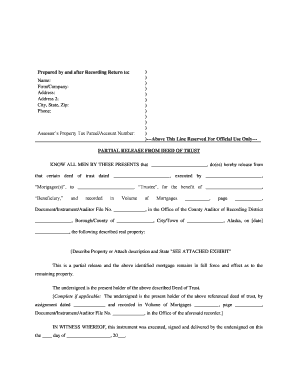
A Partial Release from Deed of Trust is a recorded instrument by which a beneficiary or lender releases a specified portion of real property from an existing deed of trust lien while leaving the remainder of the lien in place. It is typically used after partial loan payoff, subdivision, or sale of a portion of secured property. The document must identify the original deed of trust, describe the portion being released with legal precision, be executed by the beneficiary or its authorized agent, and is commonly recorded with the county recorder to update title.

Why a Partial Release matters for title and transaction flow

A properly drafted and recorded partial release clears the released parcel from the lien, prevents title defects, and allows transfers or financing of that portion. It reduces closing friction and aligns public records with the parties' intentions.

Why a Partial Release matters for title and transaction flow

Who typically prepares, approves, or receives a Partial Release

Several parties interact with a partial release: the lender or beneficiary, the borrower/trustor, title or escrow companies, and local recording authorities.

  • Lenders and servicers — prepare or authorize the release after verifying payoff or agreement terms; coordinate execution and recording.
  • Title and escrow agents — confirm legal description accuracy, request the release, and ensure county recording updates title.
  • Property owners and purchasers — receive the recorded release to remove the lien from the released parcel prior to sale or refinance.

Each stakeholder has specific responsibilities: lenders sign or authorize the release; title professionals confirm recordation; owners ensure the released portion is free of encumbrances.

Primary signers and their responsibilities

Lender/Beneficiary

Typically the party holding the deed of trust; must authorize and execute the partial release or delegate signature authority to an officer, attorney, or agent with written proof of signing authority and ensure proper notarization if required.

Borrower/Trustor

The property owner whose parcel is being released needs to confirm legal descriptions and any payoff receipts; in some workflows the borrower acknowledges the release but the beneficiary usually executes the release instrument.

Key security and compliance facts for electronic handling

Encryption: TLS 1.2/1.3 in transit; AES-256 at rest
Audit trail: Detailed timestamps and signer metadata
ESIGN / UETA: Electronic signatures valid per federal/state law
HIPAA: BAA required for PHI workflows
21 CFR Part 11: Supported for regulated records
SOC 2 / ISO: SOC 2 Type II and ISO 27001 certified

Consequences of incorrect or missing Partial Release steps

Title clouding: Released portion still shows lien
Transaction delay: Closings postponed or aborted
Recording rejection: County returns defective instruments
Liability exposure: Claims against lender or preparer
Insurance claims: Title insurer denial or claim
Cost increases: Additional legal or recording fees

Common preparation errors to avoid

  • Using an imprecise or abbreviated legal description that fails county recording requirements and leaves ambiguity in which parcel is released.
  • Failing to confirm authorized signer or corporate signature authority, which can lead to rejected recordings or subsequent contested releases.
  • Omitting or misstating the deed of trust recital (book/page or instrument number), preventing clerks from linking the release to the original lien.
  • Not recording the release promptly after execution, which allows purchasers or lenders to rely on outdated public records and causes delays.

Real-world examples of partial-release usage

Two brief examples show how partial releases resolve title issues and speed transactions in real estate closings.

Optica Ventures LLC — operational efficiency

A small investment firm streamlined portfolio sales by documenting partial releases for subdivided lots

  • The partial release clarified liens during escrow
  • The firm reported smoother closings and fewer title exceptions after using standardized release templates and verified recordings.

Martin Properties — remote execution

A regional broker used online signing to complete a partial release remotely

  • signer authentication ensured validity
  • The ability to execute and deliver a recorded release electronically reduced holding time and reduced in-person notary coordination for buyer and seller.

Step-by-step: preparing and completing a Partial Release

Follow these sequential steps to prepare a compliant partial release and minimize recording delays.

  • 01
    Confirm payoff: Obtain lender payoff or written release authorization.
  • 02
    Draft release: Prepare legal description and reference original deed instrument.
  • 03
    Execute and notarize: Beneficiary signs; include notary acknowledgement if required.
  • 04
    Record and distribute: File with county recorder and provide copies to parties.

How the partial-release process typically flows between parties

A concise process map clarifies responsibilities from lender authorization through county recordation and title update.

  • Request: Title or owner requests release after payoff or agreement.
  • Authorize: Lender verifies conditions and approves release scope.
  • Execute: Beneficiary signs; notarize if state requires.
  • Record: County records instrument and returns stamped copy.

Essential components to include in a professional partial release

A complete partial release contains a consistent set of elements; include these to ensure recording and title clarity.

Legal Description

Provide the metes-and-bounds or recorded plat description for the specific portion released, not just an address; accuracy is required for county indexing and title clarity.
Reference to Original

Cite the original deed of trust instrument by book/page or instrument number and recording county to tie the release to the correct lien.

Scope of Release

Specify whether release is by percent, legal area, lot number, or conveyance parcel; avoid vague terms that can be interpreted inconsistently later.

Authorized Signature

Include printed name, title, and evidence of authority for the beneficiary signer; corporate or trustee sign-off often requires an officer or agent signature block.

Notary Acknowledgement

Provide a notary block or remote notarization statement when the county requires notarization for recording acceptance.

Recording Details

Leave space for county clerk recording data (book/page, instrument number) and include instructions for return copies to owner and escrow agent.

Digital workflow settings to support partial-release execution

Set these fields and checks when configuring an online signing workflow for a partial release.

Field Configuration
Authentication method Email link with SMS code or higher-level ID verification
Notary support Enable remote online notarization where state permits
Return routing Auto-send recorded copy to owner and title company
Retention policy Retain executed document with audit trail for required period

Technical considerations for e-signing and recording-ready output

Ensure your e-signature platform supports required file formats, audit trails, and integrations with title/escrow workflows before digital execution.

  • Document formats: PDF and DOCX support required
  • Integrations: Salesforce, NetSuite, Microsoft 365 available
  • Audit detail: IP, timestamp, and signer metadata

Choose a platform that produces tamper-evident signed PDFs, preserves a complete audit trail, and can attach or return recorded copies to automated workflows.

Typical timelines and recording expectations

Timelines vary by lender and county; these common expectations help set scheduling for closings and title updates.

Lender authorization time:

1–10 business days depending on payoff and internal approvals

Execution and notarization:

Same day if parties available; remote notarization may add scheduling steps

County recording time:

Same-day to several business days depending on county workload

Returned recorded copy:

Expect 1–14 days; many counties return digital copy faster

Title update window:

Title insurers typically reflect release within 1–3 weeks after recording

Comparison: eSignature pricing and key features relevant to partial releases

Compare starting prices and core features relevant to executing and tracking partial releases; signNow is listed first for parity in comparison.

signNow DocuSign Adobe Sign PandaDoc HelloSign
Starting Price $8/user/mo $15/user/mo $14/user/mo $19/user/mo $15/user/mo
Free Trial 7-day free trial Varies by plan Varies by plan Varies by plan Varies by plan
Bulk Send Yes Yes Yes Yes No
Audit Trail Yes Yes Yes Yes Yes
HIPAA Compliant Yes Yes Yes No No

Frequently asked questions about Partial Releases from Deed of Trust

Answers to common questions about execution, electronic signatures, recording, and remediation steps for defective releases.


Need help? Contact support

be ready to get more
Join over 28 million airSlate SignNow users