Establishing secure connection…Loading editor…Preparing document…

Application for Informal Appointment of Successor Personal Representative

This template is fully customizable. Edit the text, fill out the fields, and send it for signature. Give it a try!
Application for Informal Appointment of Successor Personal Representative

What this Application Is and When it’s Used

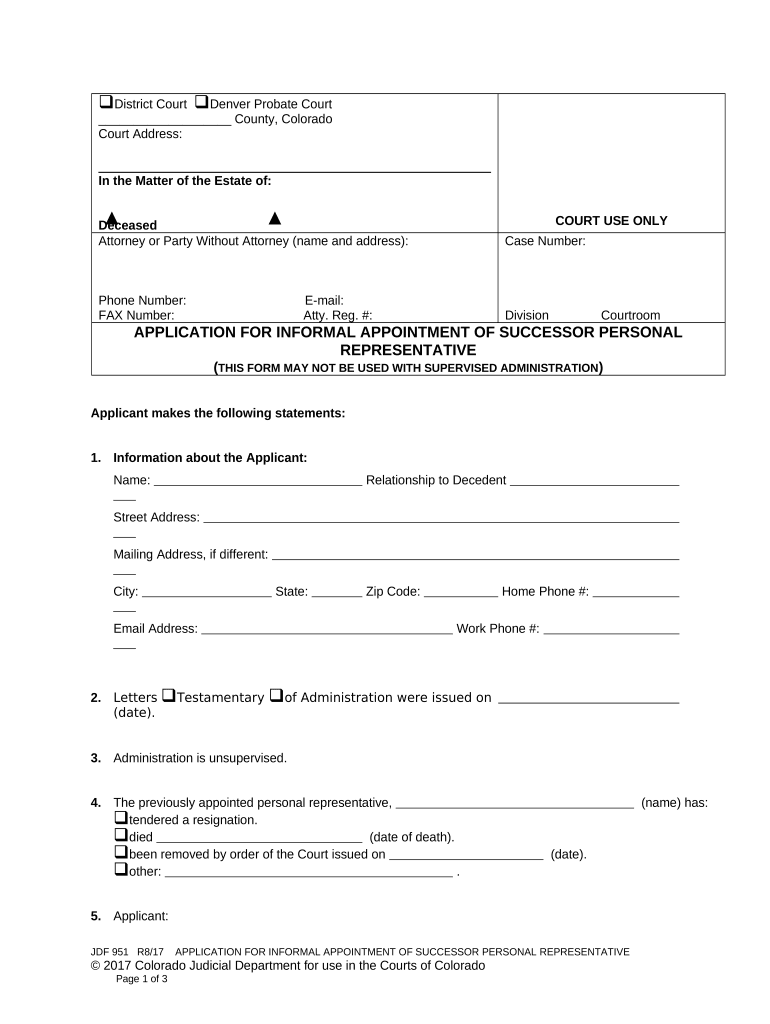
The Application for Informal Appointment of Successor Personal Representative is a probate filing used when an appointed personal representative resigns, is removed, or cannot serve and a successor is needed to administer an estate without formal contested proceedings. It initiates a probate clerk review and, when approved, transfers statutory authority to the successor so they can manage estate assets, pay valid debts, and complete distribution under state probate rules.

Why filing this application matters

This application enables orderly estate administration by replacing a departing representative quickly and without formal adversarial proceedings, preserving asset value, meeting creditor deadlines, and maintaining continuity for beneficiaries and institutions such as banks and title companies.

Why filing this application matters

Who typically completes this application

The form is most often completed by the nominated successor, an attorney, or a current estate administrator acting on behalf of beneficiaries.

  • Nominated successor seeking appointment to manage estate affairs for beneficiaries and creditors.
  • Estate attorney preparing court paperwork and verifying jurisdictional requirements for probate filings.
  • Current personal representative delegating or transferring duties due to incapacity, conflict, or resignation.

Courts and clerks use the submitted information to schedule any required hearing and issue letters of administration or authority to the successor upon approval.

Step-by-step: Completing the application

Follow the sequence below to prepare a compliant submission and reduce processing delays.

  • 01
    Gather records: Collect decedent’s death certificate and existing probate case documents.
  • 02
    Complete form: Enter decedent, successor, and estate details accurately.
  • 03
    Attach evidence: Include consent letters, waiver forms, and any court orders.
  • 04
    File with clerk: Submit to the probate clerk with required fees or e‑filing.

How to prepare an electronic submission

Set up a digital workflow that mirrors the court’s paper requirements and preserves an audit trail.

Field Configuration
Form upload Use a flattened PDF, ensure form fields are fillable
Signer order Place successor signature field and clerk acknowledgment slot
Attachments Require upload for death certificate and consent letters
Retention Enable audit trail and long-term storage

Processing flow for an informal appointment application

A clear routing model reduces friction between filers, clerks, and beneficiaries.

  • Prepare: Complete application and collect supporting documents.
  • Submit: File with county clerk via e‑file or in person.
  • Clerk review: Clerk checks completeness and schedules hearing if required.
  • Issuance: Court issues letters of administration to successor.

Key components included on a professional application

The application should be complete, clear, and supported by evidence to enable expedited clerk review and issuance of authority to the successor.

Applicant information

Full contact details for the successor or attorney plus mailing address so the court can issue official notices and letters.
Decedent details

Legal name, date of death, and last residence to establish jurisdiction and connect the application to the existing estate file.

Appointment reason

A concise statement why the successor is needed (resignation, incapacity, death of prior representative) with any supporting orders.

Consent and waivers

Signed beneficiary consents or waivers when available; these can eliminate the need for formal adversarial hearings.

Supporting evidence

Attach the death certificate, letters testamentary/administration, and any prior court rulings affecting appointment.

Signature and verification

Complete successor signature, date, and any verifier or notary block required by state practice or the clerk.

Security and compliance considerations

Encryption: AES-256 at rest
Transport security: TLS 1.2/1.3 transit
Access controls: Role-based permissions
Audit trail: Timestamped action log
HIPAA BAA: Available when required
21 CFR support: Compliant options available

Consequences of incorrect or incomplete submissions

Probate delay: Holds estate administration
Invalid appointment: Powers not legally transferred
Clerk rejection: Requires refiling and fees
Creditor risk: Missed notice deadlines
Increased cost: Additional attorney hours
Litigation exposure: Objections may lead to contested hearings

Common errors that create delays

  • Mismatched names or dates between the application and the death certificate, causing clerks to request corrected documents and re‑filing.
  • Failing to attach required supporting documents such as the original letters or death certificate, which commonly triggers administrative denial.
  • Incorrect county or case number entered on the form, forcing transfers and adding weeks to processing timelines.
  • Using unsigned or improperly witnessed consent forms; many clerks require original wet signatures or specified electronic signature methods.

Typical timeline elements to track after filing

Monitor procedural deadlines to keep administration moving and to satisfy creditor and court timeframes.

Filing:

File as soon as successor is identified to avoid administrative gaps.

Clerk review:

Clerks typically review within days to weeks, depending on backlog.

Hearing schedule:

If required, hearings are commonly scheduled 2–8 weeks after filing.

Issuance of letters:

Letters of administration may issue days after approval or after entry of an order.

Notice to creditors:

Follow state rules for creditor notice timelines once successor is appointed.

Technical considerations for eSubmission and signatures

Use platforms that support required formats, authentication, and an auditable trail to mirror court-ready records.

  • Supported formats: PDF, DOCX accepted
  • Authentication: Email, SMS, or stronger MFA
  • Integrations: Connectors for case management

Confirm the probate clerk accepts electronic submissions and whether the court requires original signatures or certified copies before relying solely on eSubmission.

Comparison of eSignature vendor pricing and capabilities

Core pricing and compliance differences among common eSignature vendors; signNow is listed first per comparison conventions.

signNow DocuSign Adobe Sign PandaDoc HelloSign
Starting Price $8/user/mo $15/user/mo $14/user/mo $19/user/mo $15/user/mo
Free Trial 7-day free trial Varies by plan Varies by plan Varies by plan Varies by plan
Bulk Send Yes Yes Yes Yes No
Audit Trail Yes Yes Yes Yes Yes
HIPAA Compliant Yes Yes Yes No No
Envelope Cap No cap 100 envelopes/user/year Varies by plan Varies by plan Varies by plan

Frequently asked questions about the application

Answers to common filing and signature questions encountered when preparing an informal appointment application.


Need help? Contact support

be ready to get more
Join over 28 million airSlate SignNow users