Establishing secure connection…Loading editor…Preparing document…

Arkansas Petition Form

This template is fully customizable. Edit the text, fill out the fields, and send it for signature. Give it a try!
Arkansas Petition Form

What the Arkansas Petition Form is and when it’s used

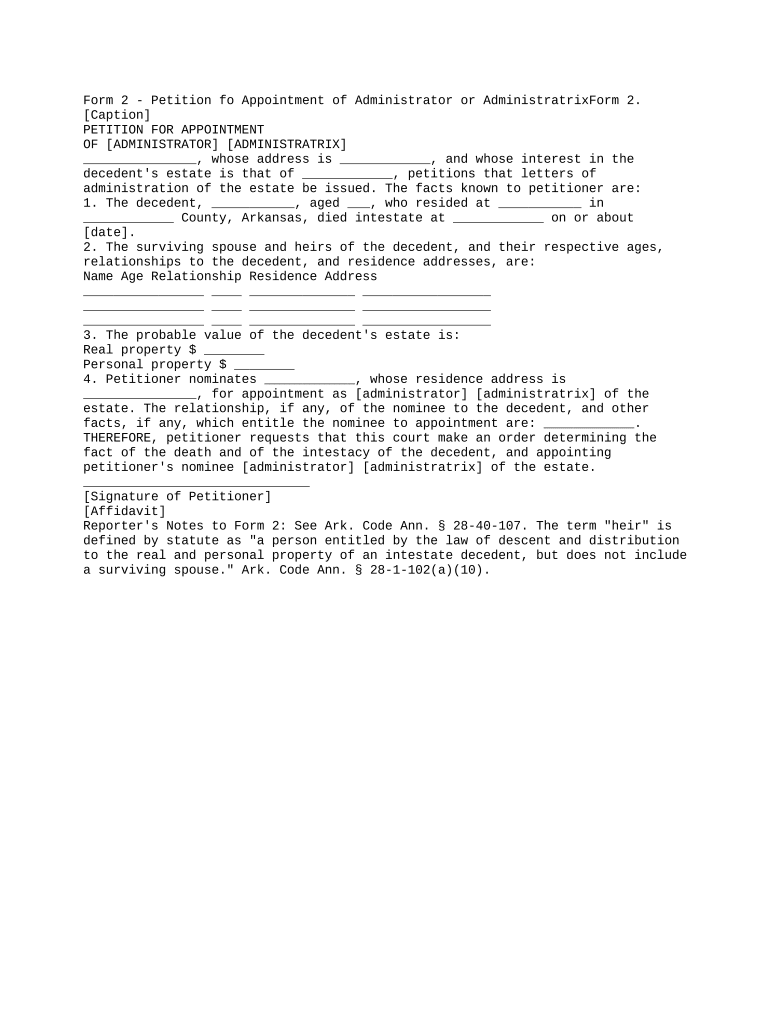
The Arkansas Petition Form is a formal court document used to start or initiate a civil or administrative matter in Arkansas courts. It names the parties, summarizes jurisdictional facts, states the legal claims or causes of action, and specifies the relief requested. Different petition types exist (family law, probate, guardianship, small claims and others), each subject to local court rules and filing requirements. Electronic signatures and e-submission are permitted where state and local rules allow, consistent with federal ESIGN (15 U.S.C. ch. 96) and applicable state law.

Why completing the petition correctly matters

A complete, properly formatted Arkansas Petition Form reduces delays, avoids dismissal or service problems, preserves procedural rights, and speeds court processing. Accurate parties, venue, and relief help judges and clerks route the case correctly; when allowed, electronic signing and e-filing can shorten turnaround and create an audit trail under ESIGN and UETA.

Why completing the petition correctly matters

Who typically prepares and files these petitions

Choose filing and signature methods consistent with the court’s local rules; complex matters typically require attorney review before filing.

  • Attorneys and law firms: Draft petitions to meet procedural rules, attach exhibits, and manage service and hearing scheduling.
  • Self-represented litigants: Use standardized forms and templates for name changes, small claims, and uncontested matters.
  • Court clerks and agency staff: Review filings for completeness, assign case numbers, and communicate filing deficiencies.

Step-by-step: fill, sign, and file an Arkansas petition

Follow these core steps to prepare and submit a petition correctly to an Arkansas court.

  • 01
    Prepare the petition: Complete caption, facts, jurisdiction, relief, and required attachments.
  • 02
    Obtain signatures: Have petitioner or attorney sign; notarize if required for verification sections.
  • 03
    File with court: Submit via clerk’s office, e-filing portal, or in person per local rules.
  • 04
    Serve opposing parties: Serve process according to Arkansas rules and file proof of service with the court.

Core components of a professional Arkansas petition

A well-drafted petition contains standardized sections that make the court’s review and clerical processing straightforward.

Caption

Includes court name, county, case caption, and party names in a standard format so the clerk can assign the correct file and case type.
Jurisdiction and Venue

Concise statement of the court’s authority to hear the matter and why the chosen county is proper for filing and adjudication.

Statement of Facts

Chronological, factual recitation supporting the legal claims; avoid argument-style language and support assertions with exhibits when possible.

Causes of Action

Numbered legal claims or causes of action, each linked to factual paragraphs and the statutory or common-law basis for relief.

Relief Sought

Clear, specific requests for relief (damages amount, injunction terms, custody arrangement), enabling the court to set appropriate remedies.

Verification and Signature

Signature block showing petitioner or attorney signature, printed name, date, contact information, and notarization if required by the petition type.

Typical filing flow for an Arkansas petition

Understand the common sequence from document preparation through service and hearing to prevent procedural delays.

  • Draft and review: Prepare the petition with exhibits and review against local rule checklists.
  • Sign and notarize: Complete required signatures and notarizations prior to filing, if applicable.
  • File with the clerk: Submit documents via e-filing portal or clerk’s office and obtain a stamped copy.
  • Serve and file proof: Serve opposing parties per rules and submit proof of service to the court.

How to set up a digital workflow for petitions

Configure fields, signer roles, and authentication for an efficient electronic petition workflow.

Field Mapping Map PDF fields to form data for consistent automated population.
Signer Roles Assign roles (petitioner, attorney) and signing order for multi-party matters.
Authentication Choose email, SMS code, or KBA depending on court or case sensitivity.
Conditional Fields Use conditional logic to show only relevant questions for each petition type.
Retention Settings Set document retention and export rules to meet court and recordkeeping obligations.

Digital filing and platform compatibility

Choose a platform that exports court-ready PDFs, provides an audit trail, and works with your e-filing portal or local clerk procedures.

  • Supported Formats: PDF, PDF/A, and editable DOCX are commonly accepted for preparation.
  • Integrations: Integrate with Google Workspace, Microsoft 365, NetSuite, Salesforce, and cloud storage providers.
  • Authentication: Email or SMS codes are common; courts may require notarization or stronger ID proofing.

Saving and exporting the petition for court use

Exporting in the correct file type and with an audit trail helps satisfy clerk requirements and creates a reliable record.

PDF/A archival

Export a PDF/A version for long-term archiving; courts and repositories often prefer or require PDF/A for records preservation.

Editable DOCX

Keep an editable DOCX master to make redlines and prepare exhibits without reconstructing the document from PDF.

Flattened PDF for filing

Create a flattened PDF for submission when portals reject form layers or dynamic fields to ensure consistent rendering.

Audit trail export

Include a signing certificate or audit trail export showing signer identity, timestamps, and IP addresses for evidentiary support.

Deadlines and typical timing to monitor

Timing obligations differ by petition type and local rule; consult the clerk or local rules for exact deadlines.

Response period:

Defendant response windows commonly range from 20 to 30 days; local rules control exact timing.

Motion deadlines:

Deadlines for motions and supporting briefs follow local civil rules—meet filing and service schedules precisely.

Hearing notices:

Clerks typically issue hearing dates allowing reasonable notice; check required notice periods for emergency matters.

Service proof:

Proof of service must be filed promptly after service per local rules to avoid postponement.

Statute windows:

Substantive statute-of-limitations and jurisdictional deadlines remain controlling; confirm those with counsel.

Key milestones from filing to disposition

This sequence outlines common milestones; specific timing depends on court schedules and the petition type.

01

Document Preparation

Complete petition, attach exhibits, and ensure signatures and notarizations are in place.

02

Court Filing

File the petition with the clerk and obtain a stamped and docketed copy.

03

Service Completion

Effectuate service on opposing parties and file proof of service with the court.

04

Hearing or Ruling

Court schedules hearing or issues a written decision after briefing and any required notice.

Common mistakes that cause rejections or delays

  • Incorrect caption or venue selection that leads the clerk to reject or transfer the filing, adding procedural delay and expense.
  • Omitted or unsigned verification or signature blocks that require re-filing or a corrective filing to cure the defect.
  • Missing or improperly labeled exhibits and indexes that prevent the clerk or judge from locating the evidence supporting claims.
  • Failure to serve parties correctly or to timely file proof of service, which can halt scheduling or lead to default motions.

Consequences of filing errors or noncompliance

Case Dismissal: Court may dismiss for failure to comply with procedural requirements.
Default Judgment: Failure to serve or defend may result in a default against a party.
Monetary Sanctions: Clerks or courts can assess fines or attorney-fee sanctions for improper filings.
Delay of Relief: Improper filings delay hearings and the availability of interim relief.
Evidentiary Gaps: Lost or incomplete exhibits weaken the party’s case at hearing or trial.
Re-filing Costs: Correcting errors may require new filing fees and additional attorney time.

Security and compliance considerations for electronic petitions

In-transit encryption: TLS 1.2/1.3
At-rest encryption: AES-256
Audit trails: Detailed signer actions and timestamps
ESIGN / UETA: Federal and state e-sign law compliance
HIPAA support: BAA available where required
Certifications: SOC 2 Type II and ISO 27001

eSignature platform pricing and capability snapshot

A concise comparison of starting prices and key capabilities from major eSignature vendors; signNow appears first per platform data.

signNow DocuSign Adobe Sign PandaDoc HelloSign
Starting Price $8/user/mo $15/user/mo $14/user/mo $19/user/mo $15/user/mo
Free Trial 7-day free trial Varies by plan Varies by plan Varies by plan Varies by plan
Bulk Send Yes (Premium tier) Varies by plan Varies by plan Varies by plan Varies by plan
Audit Trail Yes Yes Yes Yes Yes
HIPAA Compliant Yes Yes Yes No No
Envelope Cap No cap 100 envelopes/user/year Varies Varies Varies

Real-world examples of digital petition workflows

Two brief examples showing how organizations use e-signature and digital workflows when petitions or form filing are part of their process.

Martin Properties — Tim Martin, Founder

The firm moved eviction and lease-related petitions online to reduce turnaround.

  • They used mobile signing for onsite execution.
  • This reduced in-person steps while keeping full audit trails and consistent formatting for filing with the clerk.

Fertility Centers of Illinois — John Butler, Founder

Clinical intake and consent petitions required secure signatures and record retention.

  • The team applied HIPAA-compliant electronic workflows.
  • The result was consistent consent capture, auditable records, and fewer missing or unsigned documents at submission.

Practical tips for accurate, efficient petition preparation

Adopt these practices to reduce clerical rejections and support smooth e-filing and service.

Verify venue and caption consistency
Confirm the correct court and county before filing; inconsistent captions or wrong venue are common grounds for rejection or involuntary transfer and create unnecessary delay and cost.
Use clear exhibit labeling
Number or label exhibits and include an index; clearly referenced exhibits speed judicial review and prevent disputes over missing documents during hearings.
Record signature intent and consent
For electronic signatures, record the signer’s intent and consent to transact electronically to satisfy ESIGN standards and to produce reliable evidence if signature authenticity is questioned.
Keep a secured master copy
Retain an editable master and archived PDF/A of the filed petition with audit trail and proof of service to meet retention requirements and facilitate any post-filing amendments.

Frequently asked questions about Arkansas petition forms and e-signing

Answers to common questions about completion, electronic signing, notarization, and filing of petitions in Arkansas.


Need help? Contact support

be ready to get more
Join over 28 million airSlate SignNow users