Establishing secure connection…Loading editor…Preparing document…

Assignment Creditor's Claim Against Estate

This template is fully customizable. Edit the text, fill out the fields, and send it for signature. Give it a try!
Assignment Creditor's Claim Against Estate

What the Assignment Creditor's Claim Against Estate Is

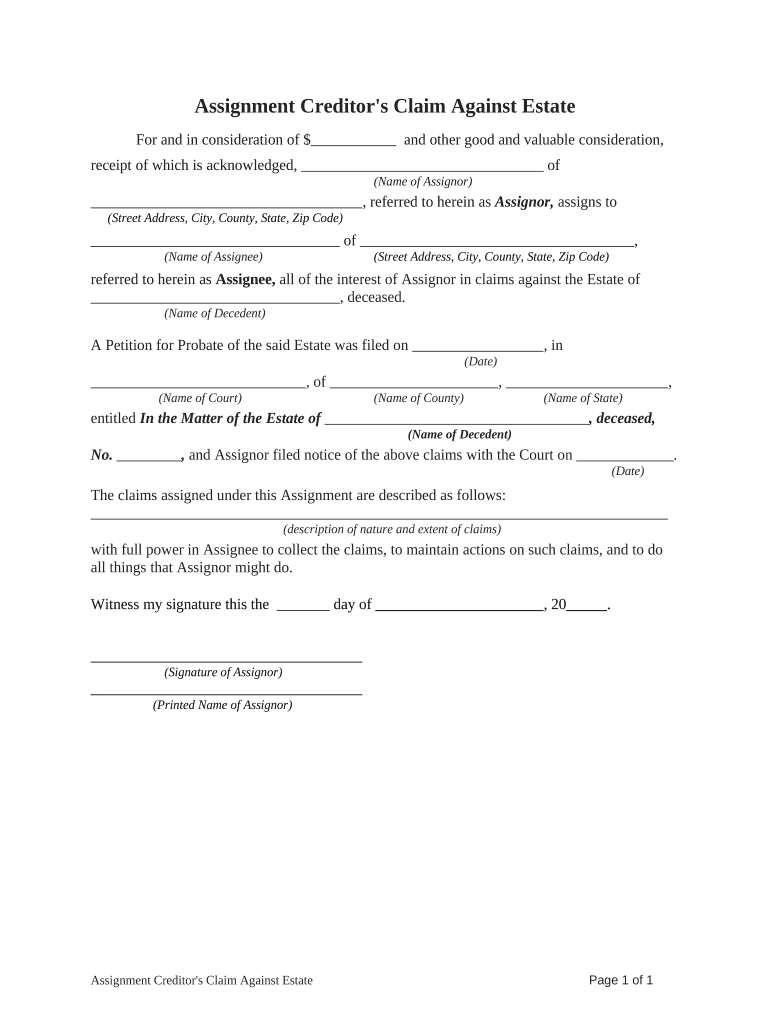
An Assignment Creditor's Claim Against Estate is a written instrument used when a creditor assigns or transfers its right to pursue a debt owed by a decedent to another party, or when a claimant presents a claim to a probate estate for collection. The form documents the claimant, the underlying debt, the assignor and assignee (if any), the estate or probate case identifier, and the amount or nature of the claim. It is submitted to the personal representative, executor, or probate court according to jurisdictional rules and may affect priority among competing creditors during estate administration.

Why this form matters in estate administration

Using a clear, properly completed Assignment Creditor's Claim Against Estate preserves the creditor's rights, transfers enforceable claim rights when assigned, creates a record for the probate file, and helps the estate administrator evaluate and prioritize liabilities against estate assets.

Why this form matters in estate administration

Who typically prepares or receives this claim

Typical users include creditors, assignees, estate attorneys, and executors who must document or respond to creditor claims in probate.

  • Creditors and collection agencies who need to assert an unpaid obligation against the decedent's estate and secure priority for payment.
  • Assignees or purchasers of claims who require a written assignment to establish standing and enforce the debt in probate or settlement.
  • Estate representatives (executors, administrators) and probate counsel who review, accept, or object to presented claims during estate administration.

Accurate completion and timely service help avoid disputes, preserve rights, and ensure the probate process resolves creditor claims efficiently.

Step-by-step: completing the claim form

Follow these core steps to prepare and submit the Assignment Creditor's Claim Against Estate accurately and on time.

  • 01
    Gather documents: Collect assignment instruments, invoices, contracts, and proof of balance.
  • 02
    Complete fields: Fill creditor, assignee, decedent, case number, claim amount, and contact details.
  • 03
    Attach evidence: Include copies of judgment, invoice, assignment, and correspondence supporting the debt.
  • 04
    Serve and file: Deliver to the estate representative and file per local probate rules.

Routing and processing overview

A clear routing process reduces disputes and helps estate administrators evaluate claims consistently.

  • Submit to Executor: Provide the claim and supporting documents directly to the personal representative.
  • File with Probate Court: If required, lodge the claim with the court using the probate case number.
  • Notice to Other Parties: Executor may notify other creditors and interested parties of the claim.
  • Allowance or Objection: Estate or court disposes by allowing, compromising, or disputing the claim.

Key elements to include in a professional claim form

A professionally prepared Assignment Creditor's Claim Against Estate is complete, legible, and supported by documentation to establish standing and the amount claimed.

Parties Identified

Full legal names for creditor, assignee (if any), and decedent so the claim maps to the correct probate file and avoids identity confusion.
Case Reference

Clear probate court name and case number so the executor and the court can match the claim to estate records without additional searches.

Claim Basis

Concise statement of why the claim exists (contract, judgment, invoice) with dates and brief factual context for quick assessment.

Amount Stated

Exact dollar amount, itemized where appropriate, including interest, fees, or credits to avoid later disputes over calculation methods.

Support Attached

Copies of invoices, contracts, judgments, and assignment agreements that substantiate the claim and the transfer of rights if assigned.

Signature and Authority

Signed by an authorized person with printed name, title, date, and contact information to permit follow-up and authentication.

Required information checklist

Creditor Name: Full legal name
Assignee Name: Full legal name
Decedent Name: Full legal name
Probate Case: Court name and case number
Claim Amount: Exact dollar figure
Evidence Attached: Invoices, judgment, assignment

Common mistakes to avoid when preparing the claim

  • Failing to include the probate case number or court name, which often causes the executor to misfile or delay the claim review for weeks.
  • Submitting unsigned or improperly authorized claims, such as missing the signatory's printed name or the signer's title when acting for an entity.
  • Omitting supporting documents like invoices or assignment agreements, leaving the claim unsubstantiated and subject to objection or denial.
  • Using inconsistent names or addresses between the claim and attachments, which invites requests for verification and slows estate administration.

Consequences of incorrect or late claims

Claim Barred: Late claims can be time-barred
Loss of Priority: Untimely filing may reduce payment priority
Objection Risk: Executor may contest unsupported claims
Increased Costs: Extra legal fees for disputes
Potential Sanctions: Court sanctions for bad-faith filings
Record Rejection: Form rejection for incomplete data

Customizing an online workflow for claims

Configure an eSubmission workflow to reduce manual handling, ensure consistent fields, and attach supporting documents automatically.

Field Configuration
Claim Type Required dropdown (judgment, invoice, other)
Attach Evidence Required file upload (PDF preferred)
Signer Authentication Email + SMS code or advanced auth
Routing Auto-send to executor and legal counsel

Digital submission and eSigning considerations

Electronic completion and signature speed processing but must meet legal and probate requirements for authenticity and retention.

  • Audit Trail: Timestamps, IP, action history
  • Authentication: Email, SMS, or advanced methods
  • Document Formats: PDF preferred; preserves layout

Typical timing and deadlines to watch

Timely presentation and filing are critical; probate statutes and local rules set specific claim periods and notice deadlines for creditors.

Presentment Period:

Varies by state; often 4 months after notice

Filing With Court:

File when local rules require or when executor requests

Response Time:

Executor may allow or object within set period

Statute of Limitations:

May govern enforceability beyond probate deadlines

Service Requirements:

Follow local rules for notice to executor and heirs

eSignature vendor pricing and feature snapshot

Comparison of starting prices and core capabilities relevant for completing and storing Assignment Creditor's Claim Against Estate documents.

signNow DocuSign Adobe Sign PandaDoc HelloSign
Starting Price $8/user/mo $15/user/mo $14/user/mo $19/user/mo $15/user/mo
Free Trial 7-day trial Varies Varies Varies Varies
Bulk Send Yes Yes Yes Yes No
Audit Trail Yes Yes Yes Yes Yes
HIPAA Compliant Yes Yes Yes No No

Practical tips for accurate, efficient claims handling

Implement consistent document standards and verifiable signatures to reduce objections and speed estate resolution.

Standardize templates
Use a single, jurisdiction-tailored claim template to reduce omissions and ensure required fields are completed consistently for every claim.
Attach clear evidence
Always attach invoices, contracts, judgments, and chain-of-assignment documents in PDF format so the executor can verify the claim quickly.
Confirm service rules
Follow local probate rules for service and filing—some courts require both filing and personal service on the executor or counsel.
Use authenticated eSignatures
When submitting electronically, capture an audit trail and acceptable authentication to support intent and attribution under ESIGN and UETA.

Real-world examples of claim handling

These brief case summaries show how different organizations prepared and used creditor claims in probate contexts.

Optica Ventures LLC

Optica used a standardized claim form to present unpaid invoice balances to an estate executor, streamlining documentation review.

  • Assigned account receivables were attached with invoices and communication history.
  • The executor accepted the claim after verifying invoices, allowing a timely partial payment from estate funds while preserving Optica's collection rights.

Martin Properties

A property management firm filed a claim for outstanding rents with clear ledger summaries and lease copies.

  • They included a signed assignment when the claim was sold to a third party.
  • The clear paperwork reduced objections and enabled the assignee to collect against remaining estate assets after creditor reconciliation.

Frequently asked questions about claims and electronic submission

Answers to common procedural and legal questions about Assignment Creditor's Claim Against Estate forms and submitting them electronically.


Need help? Contact support

be ready to get more
Join over 28 million airSlate SignNow users