Establishing secure connection…Loading editor…Preparing document…

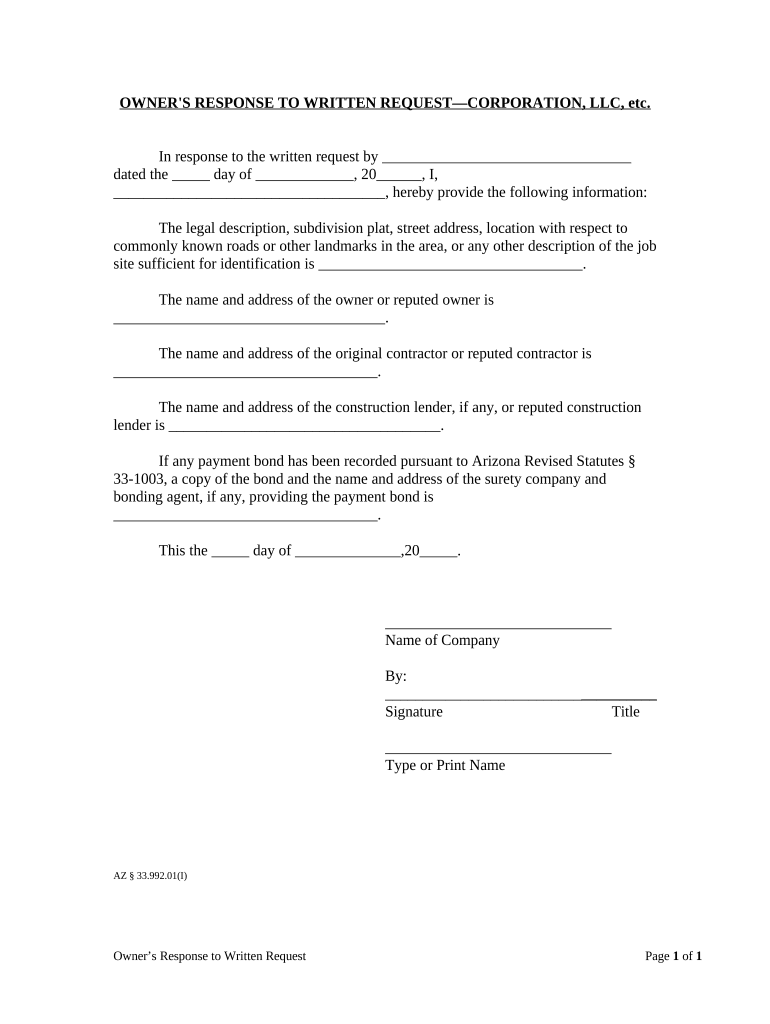
Arizona Owner's Response to Written Request

This template is fully customizable. Edit the text, fill out the fields, and send it for signature. Give it a try!
Arizona Owner's Response to Written Request

What the Arizona Owner's Response to Written Request Is and when it applies

The Arizona Owner's Response to Written Request is a formal written reply an owner provides after receiving a contractor, subcontractor, supplier, or claimant's written demand or information request tied to a construction project, payment dispute, or contract claim. The response documents the owner's position, admits or disputes claimed amounts, lists contract or payment facts, and attaches supporting records. It creates a dated record that can affect lien rights, notice periods, and dispute resolution. Parties typically use this response to preserve defenses, notify other stakeholders, and record the chain of communications about the contested claim.

Why preparing a clear written response matters

A timely, accurate response preserves legal rights, reduces ambiguity in payment disputes, documents positions for potential lien or contract enforcement, and creates a retrievable record for future audits or litigation.

Why preparing a clear written response matters

Who typically prepares or receives this response

Accurate, signed responses reduce downstream disputes and help preserve or challenge lien and contract remedies.

  • Property owners and managers responding to contractor claims or inquiries about payment or scope
  • General contractors responding to subcontractor notices or forwarding owner information requests
  • Suppliers and subs who receive an owner reply as part of a payment or lien prevention process

Core elements to include for a professional Owner's Response

Include precise identifiers, factual statements, and verifiable attachments to make the reply usable in administrative or legal proceedings.

Document Header

Project name, job address, contract number, and date of response. These identifiers tie the reply to the exact contract and help recipients and recorders locate related files.
Respondent Details

Owner name, legal entity type, mailing address, contact person, phone and email. Use the owner entity name exactly as it appears on formation or tax records to avoid mismatches.

Claim Summary

Brief description of the underlying claim or request, including disputed dollar amounts, dates of work or invoices, and the claimant's stated basis for relief.

Position Statement

A clear admission, denial, or qualified statement of facts and reasons including references to contract sections, withheld payments, or conditions precedent.

Attachments

Attach contracts, change orders, payment records, lien waivers, invoices, and correspondence. Label each attachment and reference it in the body for clarity.

Signature Block

Printed name, title, date, and signature line for an authorized signatory. Indicate whether signature is electronic and include authentication details if e-signed.

Security and compliance considerations for the response

Encryption: TLS 1.2/1.3 in transit
Data at Rest: AES-256 encrypted storage
Audit Trail: Tamper-evident signing history
HIPAA: BAA required for PHI
ESIGN / UETA: Compliant for electronic signatures
Access Controls: Role-based permissions

Step-by-step: preparing and sending the Owner's Response

Follow these steps in order to prepare a complete, dated, and properly attributed response.

  • 01
    Collect records: Gather contract, change orders, invoices, and prior correspondence.
  • 02
    Draft response: State facts, admit or deny, reference attachments and contract clauses.
  • 03
    Review internally: Have legal or procurement review for accuracy and obligations.
  • 04
    Sign and send: Execute by authorized signer and deliver via documented method.

Where to deliver the response and common routing pathways

Choose delivery methods that create reliable evidence of receipt and chain of custody for dispute resolution or recording.

  • Claimant: Send directly to the claimant or their counsel with delivery proof.
  • Prime contractor: Forward to the general contractor if they manage project disputes.
  • County recorder: If the response affects lien filings, file attachments per local recorder rules.
  • In-house records: Store a signed copy in your contract and claims management system.

Digital workflow settings recommended for eCompletion and tracking

Configure your electronic workflow to authenticate signers, preserve attachments, and notify stakeholders automatically.

Field Configuration
Signature authentication Email + SMS code or stronger
File format PDF/A for archival
Routing order Sequential signer routing
Retention policy Automated archival for retention period

Digital signing and platform compatibility

Ensure your signing platform supports secure audit trails, attachments, and the authentication level needed for your jurisdiction and industry.

  • Formats supported: PDF, DOCX, and XML
  • Common integrations: Salesforce, NetSuite, Google Workspace
  • Authentication options: Email, SMS, KBA, SSO

Short risks of incomplete or incorrect responses

Waiver risk: Possible waiver of defenses
Lien impact: Unclear positions may affect lien rights
Contract penalties: Contract breach or damages exposure
Evidence gaps: Missing attachments weaken claims
Regulatory risk: Noncompliance with notice rules
Tax consequences: Incorrect amounts may trigger withholding

Common mistakes to avoid when preparing the response

  • Failing to use the owner's exact legal name or entity form, which creates ambiguity and may invalidate matching to corporate records or tax identifiers.
  • Leaving out critical attachments such as signed contracts, change orders, or proof of payment, which weakens the factual foundation of the reply.
  • Missing or misstating dates and amounts, producing downstream calculation errors and creating opportunities for claimants to assert inaccuracies.
  • Using informal language or vague denials rather than numbered factual statements and specific contract citations that are easier to verify and enforce.

Practical tips for accuracy, speed, and defensibility

Use consistent templates, authoritative attachments, and reliable delivery methods to reduce disputes and preserve evidence.

Verify identities and authority
Confirm the person signing has authority to bind the owner and record the entity name exactly as on formation documents; a signature by an unauthorized person invites later challenges and may void the reply.
Use numbered factual paragraphs
Set out facts in small numbered paragraphs with cross-references to attachments so reviewers can quickly confirm each point without rereading the entire document.
Keep an index of attachments
Label and index every attachment in the body and include a cover sheet listing filenames and dates to avoid lost exhibits in electronic or recorded submissions.
Preserve delivery records
Use delivery methods that generate receipt evidence (registered mail, tracked courier, or documented electronic delivery) and retain confirmation for dispute or lien proceedings.

Real-world examples showing how owners use the response

Two brief examples demonstrate common use cases in real estate and healthcare-related property projects.

Tim Martin — Martin Properties

When subcontractors disputed final payment for a residential rehab, the owner issued a concise written response documenting change orders and payments.

  • The reply attached invoices and lien waivers.
  • The documented response shortened negotiations, clarified the payment schedule, and provided a dated record that the owner used to resolve the claim without formal lien litigation.

John Butler — Fertility Centers of Illinois

An owner response addressed a vendor's claim for alleged unpaid services during an equipment upgrade, with clear contract references and delivery receipts.

  • The response included scanned attachments and an authenticated electronic signature.
  • The signed, timestamped record allowed both parties to reconcile billing differences and avoid escalation to formal collection proceedings.

Pricing and plan overview for common eSignature vendors

Basic pricing and capability markers across vendors. Confirm plan details with each vendor before purchasing or committing to a plan.

signNow DocuSign Adobe Sign PandaDoc HelloSign
Starting Price $8/user/mo $15/user/mo $14/user/mo $19/user/mo $15/user/mo
Free Trial 7-day free trial Varies by plan Varies by plan Varies by plan Varies by plan
Bulk Send Yes (Business Premium) Varies by plan Varies by plan Varies by plan Varies by plan
Audit Trail Yes Yes Yes Yes Yes
HIPAA Compliant Yes (BAA available) Varies by plan Varies by plan Varies by plan Varies by plan
Envelope Cap No cap 100 envelopes/user/year limit Varies Varies Varies

Frequently asked questions and troubleshooting guidance

Answers to common questions about execution, electronic signing, witnesses, and correcting mistakes when issuing an Owner's Response.


Need help? Contact support

be ready to get more
Join over 28 million airSlate SignNow users