Establishing secure connection…Loading editor…Preparing document…

Bomb Threat Checklist

This template is fully customizable. Edit the text, fill out the fields, and send it for signature. Give it a try!
Bomb Threat Checklist

What the Bomb Threat Checklist Is and Why It Exists

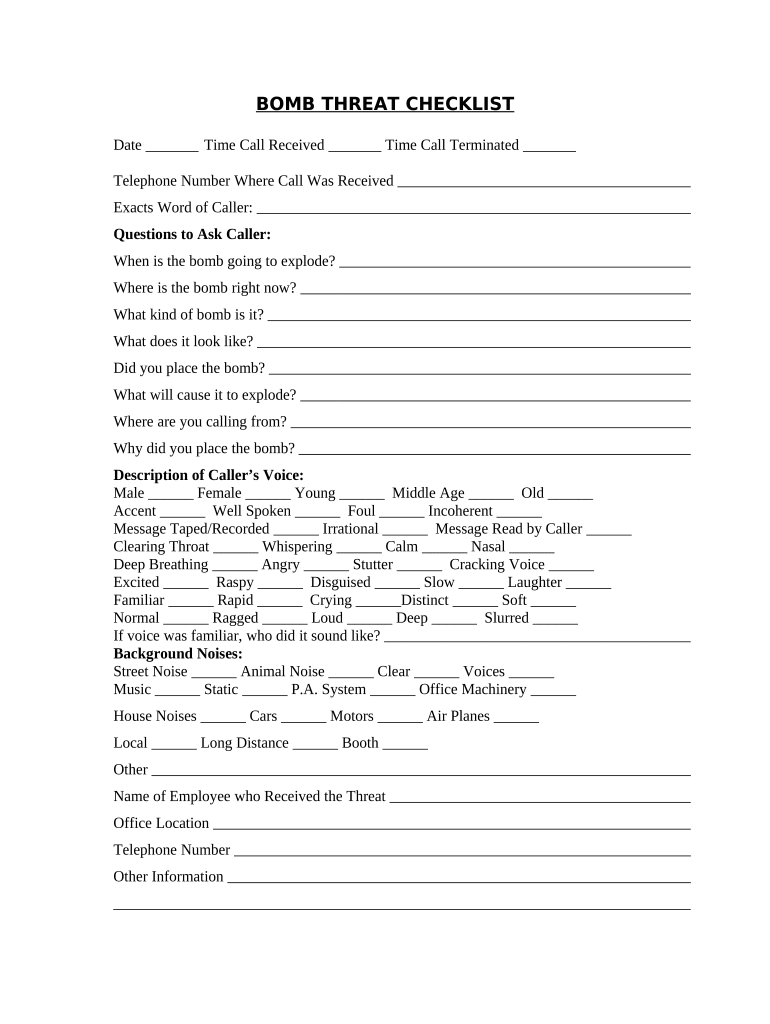
Bomb Threat Checklist is a structured, incident-focused form used by facility staff and security teams to record details when a bomb threat is received. The checklist centralizes caller information, threat specifics, time and location, items observed, and immediate actions taken to ensure consistent response and evidence preservation. It supports coordination with law enforcement, internal escalation, evacuation decisions, and post-incident reporting. The form is suitable for schools, workplaces, hospitals, and public venues and can be completed on paper or electronically to ensure rapid, auditable documentation.

Why a Standardized Checklist Matters

A Bomb Threat Checklist standardizes immediate actions, ensures accurate capture of critical evidence, and reduces decision-making delays during high-pressure incidents. Clear documentation improves coordination with law enforcement, supports legal and insurance follow-up, and creates an auditable record for post-incident review and training.

Why a Standardized Checklist Matters

Who Typically Completes This Checklist

Intended users include front-desk staff, facility managers, security officers, emergency coordinators, and designated incident commanders who may receive or document a bomb threat.

  • Front-desk and reception staff responsible for answering calls and initiating the checklist immediately.
  • Security personnel and supervisors who assess threat credibility and coordinate evacuation or shelter-in-place.
  • Facility managers, safety officers, and school administrators overseeing communication with law enforcement and stakeholders.

Core Elements Every Professional Checklist Should Include

Core elements of a professional Bomb Threat Checklist ensure consistent information capture, rapid assessment, and clear delegation for immediate and follow-up actions.

Caller Details

Record caller number, caller's voice characteristics, language, background noise, exact words used, time of call, and any identifying phrases. Accurate caller details assist law enforcement analysis and threat prioritization.
Threat Content

Document the alleged device type, location named, how the device is concealed, timing mentioned, and any claimed motive. Exact phrasing supports investigators and shapes immediate protective actions and search priorities.

Caller Behavior

Note tone, clarity, intoxication, threats, background activity, interruptions, and call duration. Behavioral clues help assess credibility and guide officers on whether the threat appears imminent or fictitious.

Immediate Actions

List actions taken during and immediately after the call: who was notified, evacuation or shelter decisions, area searches initiated, department heads alerted, and any items secured as potential evidence.

Law Enforcement

Record time and agency notified, officer names or badge numbers, incident report number if provided, and instructions received. Preserve copies of reports and maintain a single liaison for follow-up.

Evidence & Chain

Identify physical items, surveillance footage, electronic logs, and personnel interviewed. Note custody transfers and secure storage locations. Maintaining chain-of-custody details preserves evidentiary integrity for investigations and potential legal actions.

Required Fields at a Glance

Caller Phone: Number and originating line
Call Time: Date and time of call
Exact Words: Verbatim phrases used by caller
Device Location: Precise room or area noted
Observer Names: Witnesses and staff present
Law Enforcement: Agency, officer, report number

Step-by-Step: How to Complete the Checklist during a Threat

Follow this sequence to capture information, notify authorities, and secure the scene while preserving chain of custody for evidence.

  • 01
    Answer Call: Stay calm, keep caller on line, note details.
  • 02
    Record Info: Write exact words, time, caller ID, and noises.
  • 03
    Notify Security: Inform security supervisor and follow site alert protocol.
  • 04
    Call Police: Contact 911 or local agency and share checklist.

How to Configure an Online Checklist Workflow

Configure an online Bomb Threat Checklist with conditional fields, required markers, and secure recipient routing for rapid completion and auditability.

Field Configuration
Required Fields Mark caller ID, time, and location required
Conditional Logic Show device details when device reported
Signer Authentication Enable two-factor for report approval
Audit Trail Capture IP, timestamp, and user actions

Where to Send and File the Completed Checklist

After completion, route the checklist to security, the facility manager, and local law enforcement contacts; retain a signed copy for incident records.

  • Internal Security: Immediate upload to security incident folder
  • Law Enforcement: Send copy to responding agency per instructions
  • Facilities: Notify building operations and lock or clear areas
  • Records: Store signed checklist in secure retention system

Platform Capabilities for eSubmission and Distribution

Ensure your platform supports secure uploads, audit trails, multi-user access, and preserves metadata for legal and investigative purposes.

  • File Types: PDF, DOCX, image support
  • Integrations: Link with case management systems
  • Authentication: Email, SMS, or stronger methods

Timelines and Expected Reporting Actions

Time-critical actions and reporting expectations following a bomb threat ensure coordinated response and documentation for investigators and insurers.

Immediate Notification:

Notify 911 and on-site security within minutes.

Law Enforcement Arrival:

Officer response time varies; document arrival and badge info.

Internal Reporting:

Submit completed checklist to incident records within 24 hours.

Evidence Preservation:

Secure scene and retain physical evidence until cleared.

After-Action Review:

Conduct review within 7 days and update procedures.

Common Mistakes to Avoid

  • Failing to record exact caller language, which can eliminate critical leads for investigators and reduce the checklist's evidentiary value in follow-up inquiries.
  • Delaying notification to law enforcement or failing to document the time of notification undermines coordinated response and can complicate liability assessments.
  • Allowing multiple staff to overwrite a single checklist without preserving earlier versions destroys chain-of-custody and hinders forensic review.
  • Using informal abbreviations or inconsistent location descriptions makes searching and site sweeps less effective for responding teams.

Consequences of Incomplete or Incorrect Checklists

Investigation Delay: Slows law enforcement response
Liability Exposure: Increases employer legal risk
Insurance Denial: Incomplete record may affect claims
Evidence Loss: Compromises prosecutable case
Regulatory Review: Triggers inspection or fines
Reputational Harm: Erodes public trust

Illustrative Scenarios Showing Checklist Use

Real-world scenarios show how checklists improve response coordination, evidence preservation, and after-action reviews in varied settings.

K-12 School Incident

A public school receptionist received a threatening call naming a classroom and time, then completed the checklist verbatim and alerted administrators.

  • Immediate evacuation and police response were initiated.
  • Law enforcement used the recorded phrases and caller details to prioritize a targeted search; the signed checklist was later used in the district's after-action review to update training, revise communication trees, and improve parent notifications for future threats.

Corporate Campus Threat

Security at a university-based research campus logged a bomb threat that referenced a lab building and specific equipment, using the checklist to capture details.

  • Security isolated the area and notified specialized bomb squad.
  • Stored digital checklist and associated video were preserved under chain-of-custody procedures; the record supported campus legal counsel and insurance claim processing, and informed revisions to access control and visitor screening policies.

Practical Tips to Improve Accuracy and Usability

Apply these practical measures to improve accuracy, speed, and legal defensibility when completing a Bomb Threat Checklist.

Record Caller Statements Verbatim at all times
Write or type the caller's exact words without summarizing. Include hesitations, numerals, or slang. Verbatim transcription preserves investigative leads and strengthens evidentiary value during police interviews and legal proceedings.
Designate a Single Recorder for Each Call
Assign one trained staff member to complete the checklist to avoid conflicts or overwritten entries. Maintain versioned records if multiple staff contribute, and log each update with timestamp and initials.
Provide Regular Training and Drills
Conduct periodic training and simulated drills so staff practice filling the checklist under stress. Review common errors and update forms based on after-action lessons to reduce mistakes in real incidents.
Secure Completed Checklists and Evidence
Store signed checklists in an encrypted records system with restricted access. Preserve physical evidence and surveillance footage per chain-of-custody procedures and document any transfers to law enforcement.

eSignature Pricing and Feature Comparison for Incident Forms

Pricing varies by vendor and plan; compare starting price, trial availability, bulk-send features, audit capabilities, and HIPAA compliance when evaluating eSignature options.

signNow DocuSign Adobe Sign PandaDoc HelloSign
Starting Price $8/user/mo $15/user/mo $14/user/mo $19/user/mo $15/user/mo
Free Trial 7-day free trial Check vendor site for trial details Check vendor site for trial details Check vendor site for trial details Check vendor site for trial details
Bulk Send Yes, available on Business Premium Available on select enterprise plans and tiers Available on enterprise and business plans Available on paid plans with bulk send Available on higher-tier paid plans
Audit Trail Yes, full audit trail with timestamps and IP Yes, includes audit trail and certificate Yes, includes audit trail and certificate Yes, includes basic audit trail Yes, includes basic audit trail
HIPAA Compliant Yes, HIPAA-compliant options available Yes, HIPAA-compliant options available Yes, HIPAA-compliant options available No HIPAA offering by default No HIPAA offering by default

Frequently Asked Questions About the Bomb Threat Checklist

Answers to common questions about completing, signing, and storing the Bomb Threat Checklist in compliance with legal and investigative needs.


Need help? Contact support

be ready to get more
Join over 28 million airSlate SignNow users