Establishing secure connection…Loading editor…Preparing document…

Bylaws Resolution

This template is fully customizable. Edit the text, fill out the fields, and send it for signature. Give it a try!
Bylaws Resolution

What a Bylaws Resolution Is and Why It Matters

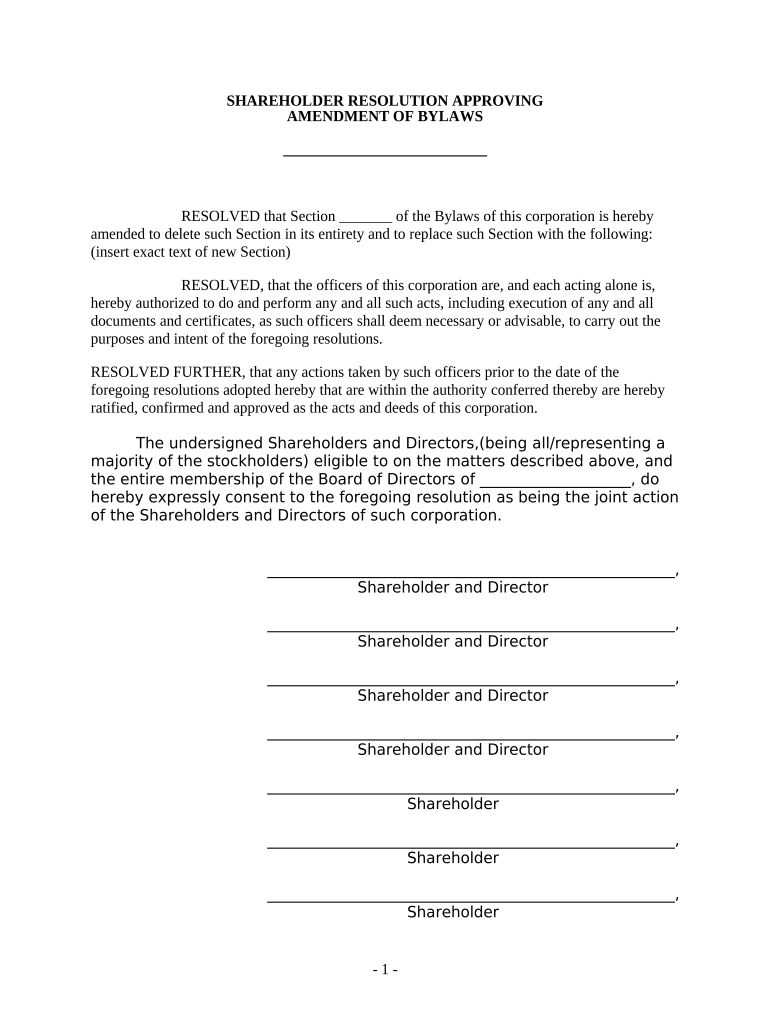
A Bylaws Resolution is a formal corporate record used by a board of directors to adopt, amend, or reaffirm a corporation’s bylaws and internal governance decisions. It documents the board’s action, records the vote, identifies the effective date, and authorizes officers to implement changes. Although bylaws themselves are internal and typically not filed with the state, a signed resolution becomes part of corporate minutes and legal records used for compliance, bank authority, investor due diligence, and resolving governance disputes.

When a Bylaws Resolution Protects the Organization

A written resolution provides clear evidence of board intent, a dated record of corporate decisions, and authority for officers to act under those bylaws.

When a Bylaws Resolution Protects the Organization

Common Users and Signers of a Bylaws Resolution

Typical users include corporate boards, corporate secretaries, in-house counsel, and authorized officers who must document governance actions.

  • Board of Directors: Adopts and votes on the resolution to change or adopt bylaws.
  • Corporate Secretary: Prepares and archives the resolution in the minutes and records.
  • Corporate Officers: Receive authority via the resolution to execute contracts or update registries.

Who Signs and What Their Role Entails

Board Chair

The Board Chair leads the meeting where the resolution is passed, certifies the accuracy of the vote record, and often signs to attest the board’s action. Their signature provides direct evidence of board approval for third parties.

Corporate Secretary

The Corporate Secretary prepares the resolution, records the minutes, and signs to confirm proper notice and quorum. The secretary’s certification is frequently requested by banks, title companies, and regulators.

Essential Parts of a Professional Bylaws Resolution

A complete resolution contains clear identification of the corporation, a recital of authority, precise change language, an effective date, vote results, and signature blocks for required officers.

Corporation

Full legal entity name and state of incorporation. Use the name exactly as shown on the certificate of incorporation and articles of incorporation to avoid ambiguity in legal or banking contexts.
Recitals

A brief statement of authority and purpose describing why the board is acting, the meeting type (regular or special), and citation to the governing statute or charter provision authorizing the action.

Resolved Text

Concise operative language that adopts, amends, or repeals specific bylaw sections. Include exact bylaw section numbers and the full replacement text when amending.

Effective Date

The date when changes take effect. Use MM/DD/YYYY format and state whether changes apply retroactively or prospectively to avoid interpretation disputes.

Vote Record

A clear tally listing directors present, votes for/against/abstain, and a statement that quorum was present. This protects the action from procedural challenge.

Signatures

Signature block for the Board Chair and Corporate Secretary with printed names and dates. Include officer titles and a certification clause if third-party reliance is anticipated.

Required Information to Include in the Resolution

Entity Name: Exact legal name
State of Incorporation: State and jurisdiction
Meeting Date: MM/DD/YYYY format
Quorum Statement: Quorum present/absent
Vote Tally: For/Against/Abstain counts
Effective Date: MM/DD/YYYY format

Step-by-Step: Completing and Recording a Bylaws Resolution

Follow these steps to ensure the resolution is valid, properly recorded, and available for third-party reliance.

  • 01
    Draft Resolution: Prepare clear operative language and recitals.
  • 02
    Provide Notice: Send required meeting notices to directors per bylaws.
  • 03
    Hold Meeting: Verify quorum and conduct vote; record minutes.
  • 04
    Sign and File: Obtain signatures and store with corporate minutes.

Where the Bylaws Resolution Belongs and Who Receives Copies

A resolution should be archived in the corporate minute book and distributed to relevant internal and external parties for practical reliance.

  • Corporate Minutes: Store the signed resolution with the official minutes.
  • Board Members: Provide copies to all directors for their records.
  • Officers: Give copies to officers who will implement changes.
  • Third Parties: Share certified copies with banks or investors as needed.

Digital Signing and eSubmission Considerations

Electronic execution is widely accepted for corporate resolutions if the method preserves intent, attribution, and retention.

  • ESIGN / UETA: Meet intent, consent, attribution, retention
  • Authentication: Use email, SMS or stronger methods
  • File Formats: PDF or PDF/A recommended for archiving

Use a platform that provides an audit trail, tamper-evident signed PDFs, and the ability to download certified copies for banks and regulators.

Typical Timing and Internal Deadlines for Adopting Bylaws

Establish internal deadlines to avoid procedural defects and ensure off-chain stakeholders receive timely notice.

Notice Period:

Follow the notice period specified in existing bylaws or state statute.

Record Vote Date:

Record the board vote date as the official adoption date.

Effective Date:

Specify when the bylaw changes take effect, immediate or delayed.

Distribution Deadline:

Provide copies to directors and officers within a reasonable period after adoption.

Archive Deadline:

File signed resolution in minute book promptly after execution.

Common Mistakes to Avoid When Preparing a Resolution

  • Vague operative language that fails to specify which section of the bylaws is changed and how it is replaced or supplemented.
  • Failing to document quorum or the precise vote tally, leaving the action vulnerable to procedural attack.
  • Not following notice requirements for special meetings, which can render board actions voidable under state corporate law.
  • Using unsigned or unsigned scanned copies as the corporate record rather than certified signed originals or equivalent electronic certificates.

Consequences of Defective or Missing Resolutions

Challenge to Validity: Board actions may be voidable
Bank Refusal: Banks may decline to honor unsigned authority
Investor Dispute: Investors can challenge governance changes
Regulatory Scrutiny: Paper trail gaps may attract inquiries
Contractual Risk: Contracts executed without authority may be unenforceable
Operational Delay: Officers lack clear authority to act

Comparing eSignature Vendors for Executing a Bylaws Resolution

Vendor pricing and features vary; signNow is shown first for comparison. Confirm plan details and enterprise features with each provider before purchase.

signNow DocuSign Adobe Sign PandaDoc HelloSign
Starting Price $8/user/mo $15/user/mo $14/user/mo $19/user/mo $15/user/mo
Free Trial Yes, 7-day trial Varies by vendor Varies by vendor Varies by vendor Varies by vendor
Bulk Send Yes Yes Yes Yes No
Audit Trail Yes Yes Yes Yes Yes
HIPAA Compliant Yes Yes Yes No No
Envelope Cap No cap 100 envelopes/user/year Varies Varies Varies

Practical Examples of Using Electronic Resolutions

Real-world examples show how organizations adopt and store bylaws resolutions electronically for speed and reliability.

Optica Ventures

Optica needed quicker board approvals for investment terms

  • They used an eSignature workflow for directors across time zones
  • The signed resolution was archived with minutes and accepted by counterparties without in-person notarization.

Xerox (NetSuite Ops)

Xerox integrated eSigning into NetSuite for governance docs

  • This enabled role-based approvals and automated archiving
  • Third parties accepted certified electronic copies as proof of board authorization during audits.

Practical Tips for Accurate and Efficient Resolutions

Adopt these practices to minimize risk and speed up execution for board governance actions.

Use Precise Language
Draft operative clauses with exact bylaw references and replacement text to avoid interpretive ambiguity during enforcement or third-party reliance.
Confirm Authority
Verify that the board has power to act under the charter and existing bylaws before adopting substantive changes.
Record Votes
Capture roll-call votes and quorum statements in the minutes; attach the resolution to the minute entry for a definitive record.
Secure Archival
Store signed originals or certified electronic copies in a secure corporate minute book with controlled access and retention metadata.

Frequently Asked Questions About Bylaws Resolutions

Answers to common questions about execution, validity, and recordkeeping for corporate bylaws resolutions.


Need help? Contact support

be ready to get more
Join over 28 million airSlate SignNow users