Establishing secure connection…Loading editor…Preparing document…

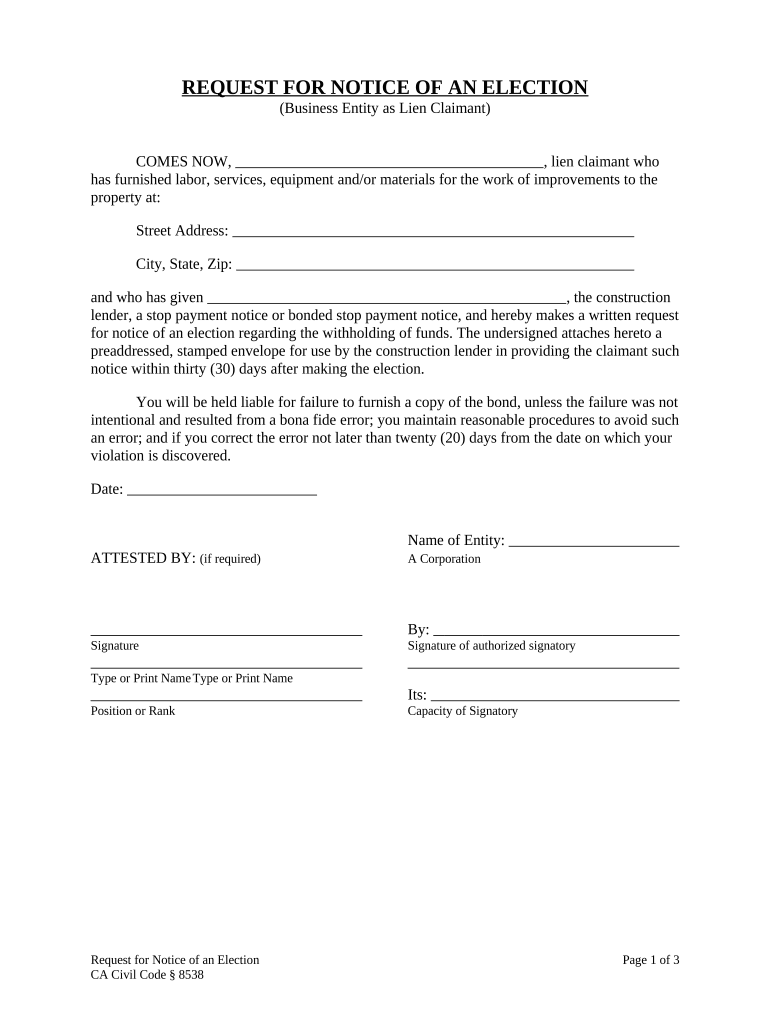
California Request for Notice of Election

This template is fully customizable. Edit the text, fill out the fields, and send it for signature. Give it a try!
California Request for Notice of Election

What the California Request for Notice of Election is and when it’s used

A California Request for Notice of Election is a formal written notice submitted to a counterparty, public office, or trustee to request official notification when a particular election, filing, or event occurs. The form preserves the requester’s right to receive timely alerts about statutory deadlines, triggering events, or opportunities to respond. It is used across real estate, corporate, and administrative processes where advance notice affects legal rights, such as lien enforcement, tax-related elections, or contract options. Proper completion ensures the requester receives the same procedural information the filing party receives.

Why a Request for Notice of Election matters

Filing this request creates a formal record that you want to be notified of specific elections or filings, which helps protect response rights and deadlines. It reduces the risk of missing time-sensitive opportunities and supports traceability when multiple parties are involved.

Why a Request for Notice of Election matters

Who typically files or receives this request

Practitioners and administrators use the request to centralize notification and reduce the risk of missed deadlines across transactions.

  • Property owners and condominium associations needing notice of lien or foreclosure sales
  • Lenders, servicers, and title companies tracking encumbrances and borrower elections
  • Attorneys and claimants preserving statutory notice rights for litigation or administrative response

Core elements to include in a professional Request for Notice of Election

A complete request combines clear party identification, a precise description of the election or event to be tracked, delivery instructions, and a valid signature block. Each element reduces ambiguity and supports enforceability under electronic signature rules.

Requester ID

Full legal name and contact details of the party requesting notice, including mailing address and email.
Target Party

Name and contact information for the party or office required to provide notice (trustee, lender, county clerk).

Election Description

Precise description of the election or event to be noticed (e.g., foreclosure sale, tax election, benefit selection).

Service Instructions

How notice should be delivered (email, certified mail, RON, physical address) and any alternative contacts.

Supporting Docs

Attachments that identify the subject matter (deed, account number, contract reference, property address).

Signature & Date

Signed and dated signature block; include signer authority and, if required, notarization details.

Step-by-step: completing and sending the request

Follow these steps to prepare, verify, and submit a Request for Notice of Election in California.

  • 01
    Prepare: Gather identifiers, supporting documents, and recipient contact details.
  • 02
    Complete Fields: Fill name, address, subject identifier, election type, and delivery preferences accurately.
  • 03
    Authenticate: Sign physically, use RON, or e-sign consistent with ESIGN/UETA rules for intent and attribution.
  • 04
    Send & Confirm: Deliver per instructions, keep proof of delivery, and record the date received by the recipient.

Configuring a digital workflow for the request

When automating delivery, configure upload, authentication, routing, and retention settings to match legal and operational needs.

Field Configuration
Document Upload PDF or DOCX preferred; include attachments.
Authentication Email link, SMS code, or multi-factor as needed.
Routing Order Sequential or parallel signer flow per roles.
Retention Preserve signed copy and audit trail for retention period.

How notice processing typically flows

A standard lifecycle moves from preparation to delivery and confirmation; each step creates records that support enforceability.

  • Draft: Complete the request with identifiers and attachments.
  • Sign: Execute signature (electronic or wet ink) with date and authority.
  • Deliver: Send to designated recipient(s) via chosen method.
  • Record: Keep proof of delivery, signed copy, and audit trail.

Technology and format considerations for electronic submission

Ensure the chosen platform supports ESIGN/UETA compliance, produces an immutable audit trail, and can export signed records for long-term retention.

  • File Types: PDF, DOCX, and searchable scans preferred
  • Authentication: Email link, SMS code, or stronger methods
  • Integrations: CRM and cloud storage integrations supported

Document formats, attachments, and proof you should preserve

Maintain copies and metadata in nonproprietary formats and include proof of delivery and any notarizations; these items support enforceability and later verification.

Preferred Formats

Store signed copies as PDF/A or standard PDF and retain original DOCX or high-quality searchable scans for accessibility.

Attachments

Attach title documents, account statements, or contract excerpts that clearly identify the subject of the election.

Proof of Delivery

Preserve certified mail receipts, email delivery headers, or RON session logs that document transmission and receipt.

Audit Record

Keep audit trails capturing signer identity, timestamps, IP addresses, and any authentication steps used.

Typical timelines and response expectations

Deadlines vary by the type of election and governing statute; use these general timelines as a planning baseline and confirm the specific rule that governs the notice you seek.

Response Window:

Often 10–30 days depending on statute or contract

Service Requirement:

Certified mail or in-person service may have fixed lead times

Filing Deadline:

Some elections require filing before a statutory due date

Waiting Period:

Certain processes impose a mandatory waiting period after notice

Effective Date:

Election becomes effective on the stated effective date in the document

Stepwise timeline for processing a request

A sequential view of milestones helps track when actions must occur and when records should be archived.

01

Prepare Records

Assemble identifiers and supporting documents before submission.

02

Submit Request

File with the designated recipient and document date of delivery.

03

Await Acknowledgment

Recipient may acknowledge receipt; record that acknowledgement.

04

Monitor Events

Track the specified election or filing; act promptly on received notices.

How a Request for Notice of Election differs from related filings

Compare the request against similar documents to avoid confusion and ensure you use the correct procedural form.

Criteria Request for Notice Notice of Default
Purpose preserve notification rights notify of default status
Filed By interested party lienholder or creditor
Notarization varies by state often required
Timing before event after default occurs

eSignature vendor pricing and capability snapshot for delivering notices

Compare common pricing and capability dimensions for eSignature providers when choosing a platform to prepare, sign, and store a Request for Notice of Election. signNow appears first per listing conventions.

signNow DocuSign Adobe Sign PandaDoc HelloSign
Starting Price $8/user/mo $15/user/mo $14/user/mo $19/user/mo $15/user/mo
Free Trial 7-day free trial 30-day trial 7-day trial Yes, limited Yes, limited
Bulk Send Yes Yes Yes Yes No
Audit Trail Yes Yes Yes Yes Yes
HIPAA Compliant Yes Yes Yes No No

Security, compliance, and technical safeguards to look for

Encryption: TLS 1.2/1.3 in transit; AES-256 at rest
Audit Trail: Timestamps, IP, and action log
Certifications: SOC 2 Type II; ISO 27001
Regulatory: ESIGN and UETA compliant
PHI Protection: HIPAA available with BAA
Accessibility: WCAG 2.0 Level AA support

Consequences and risks of incorrect or late requests

Missed Deadline: Loss of response rights
Invalid Signature: Rejection or non-enforceability
Wrong Recipient: Failure to receive notice
Improper Service: Statutory noncompliance
Incorrect Fees: Filing returned or delayed
Record Gaps: Weak evidence in disputes

Common preparation pitfalls to avoid

  • Providing incomplete property or account identifiers causes recipient confusion and may result in missed or misdirected notices.
  • Using informal or abbreviated names for entities can invalidate service; always use legal names as registered or on ID.
  • Failing to specify the delivery method or alternate contacts increases the chance notices are not received within statutory windows.
  • Neglecting to retain proof of delivery, certification, or RON session logs undermines your ability to prove notice in disputes.

Real-world examples of notice requests in practice

These short examples show how organizations used formal requests to track elections and preserve rights.

Optica Ventures LLC

Optica prepared a Request for Notice tied to a liened property to track trustee sale dates

  • The company included parcel number and title reference
  • The preserved delivery receipts and audit trail enabled timely intervention and accurate ledger adjustments during closing.

Martin Properties

A real estate manager filed a request to receive HOA election notices

  • The request named the property and preferred email delivery
  • Having documented notice receipts reduced disputes with tenants and accelerated administrative responses to assessment elections.

Frequently asked questions about Requests for Notice of Election

Answers to common questions on completion, delivery, and legal effect of a Request for Notice of Election.


Need help? Contact support

be ready to get more
Join over 28 million airSlate SignNow users