Establishing secure connection…Loading editor…Preparing document…

California Expungement Form

This template is fully customizable. Edit the text, fill out the fields, and send it for signature. Give it a try!
California Expungement Form

What the California Expungement Form Is and When It Applies

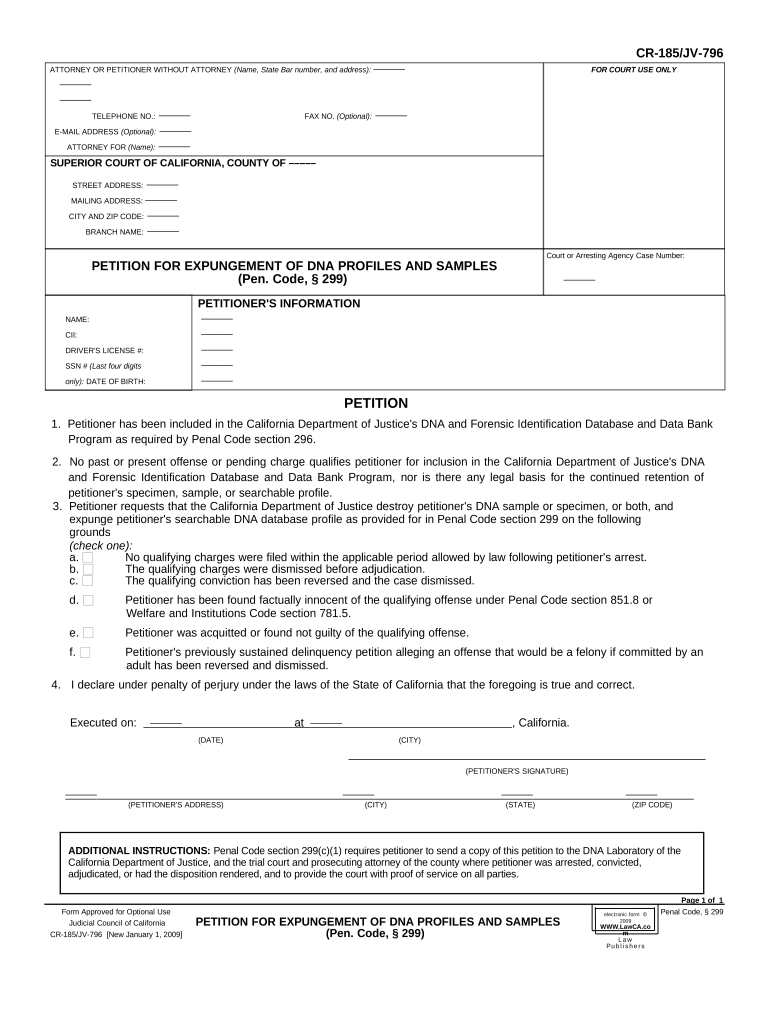
The California Expungement Form is a court petition used to request dismissal or sealing of certain criminal convictions under California law. It collects identifying information, case details, sentencing and completion dates, and the specific relief requested. The form initiates a judicial review of eligibility and may require attachments such as certified dispositions, probation completion proof, and a proposed order. Filing requirements, allowable relief, and eligibility rules differ by offense and local court practice; this guide explains the form’s key parts, how to complete it, and options for electronic submission where permitted.

Why Use the California Expungement Form

Completing the expungement form is the formal step to clear or limit the public impact of eligible convictions and demonstrate rehabilitation. Properly filed petitions can restore certain rights, improve employment prospects, and simplify background checks when the court grants dismissal or sealing under state statutes. Using an accurate, complete form reduces processing delays.

Why Use the California Expungement Form

Who Typically Completes and Relies on the Form

The form is most often completed by individuals seeking dismissal, attorneys representing petitioners, and legal-aid organizations assisting clients with record relief.

  • Individuals seeking dismissal — people who completed probation, paid fines, or otherwise meet eligibility under state rules.
  • Defense attorneys and public defenders — prepare petitions, collect certified records, and represent clients at hearings.
  • Nonprofit legal clinics and reentry specialists — assist with eligibility screening, fee waivers, and paperwork.

Courts and prosecutors also receive the form and may object or request additional documentation; confirm local court rules before filing.

Step-by-step: Completing the California Expungement Form

Follow these sequential steps to prepare a complete petition and reduce the chance of rejection or delay by the court.

  • 01
    Check Eligibility: Confirm conviction type and sentence completion per local statutes and court rules.
  • 02
    Gather Records: Obtain certified disposition, abstract of judgment, and probation completion proof.
  • 03
    Complete Form: Enter accurate personal and case data, request specific relief, and sign where required.
  • 04
    File and Serve: File with the correct superior court and serve the prosecutor as local rules require.

Key components to include on a professional petition

A complete petition organizes identity, case facts, statutory basis, attachments, and proposed orders so the court and prosecutor can review efficiently.

Caption

Court name, county, parties, and case number formatted per local rules so the petition is routed correctly and appears on the correct docket.
Petitioner Details

Legal name, aliases, birth date, current address, and contact information used by the court to identify and notify the petitioner.

Offense Summary

List the offense(s), conviction dates, and sentencing disposition in concise, factual language drawn from certified court records.

Eligibility Statement

Short explanation of why the petitioner meets statutory requirements for dismissal or sealing, including probation completion or other conditions satisfied.

Attachments

Certified disposition, abstract of judgment, probation completion certificate, and any declarations or declarations of indigency supporting fee waivers.

Proposed Order

A drafted order granting the requested relief that the judge can sign, including precise language about dismissal, sealing, and effect on record.

Essential data elements to include

Full Legal Name: As shown on government ID
Date of Birth: MM/DD/YYYY format
Aliases: Any former names used
Case Number: County docket number
Conviction Date: Date of judgment entered
Signature: Signed and dated by petitioner

How to prepare an online filing workflow

When completing the form electronically, configure fields, signer authentication, and attachments to match court and local rules.

Field Configuration
Signature Field Require signer name, signature, and date fields
Authentication Use email verification or stronger ID methods where required
Attachments Allow certified PDFs and scanned dispositions as required
Conditional Fields Show fee waiver fields only if indigency is claimed

Typical filing and review flow for the petition

Understand the submission steps so you can file correctly and track progress through the court system.

  • Prepare Packet: Complete petition, attach certified records and proposed order
  • File With Court: Submit via clerk counter or authorized eFile platform
  • Serve Prosecutor: Provide notice to the district attorney per local rules
  • Court Decision: Judge reviews, may schedule hearing or sign order

Digital filing and eSignature considerations

Courts vary on accepting electronic petitions and e-signatures; confirm local court eFile and signature rules before submitting.

  • Document Formats: PDF and DOCX are commonly accepted
  • Authentication: Email, SMS, or stronger ID depending on court requirements
  • Integrations: Integrates with systems like Salesforce and NetSuite

Where courts accept electronic submissions, ensure the eSignature solution complies with ESIGN (15 U.S.C. ch. 96) and applicable state rules such as UETA; maintain retention and audit trails.

Timing and processing expectations

There is no universal filing deadline for expungement petitions; timing depends on disposition, probation completion, and local court processing.

Eligibility Timing:

Typically filed after sentence or probation completion per local statutes

Court Processing:

Processing time varies by county caseload and may require weeks to months

Service Deadlines:

Follow local rules to serve the prosecutor before judicial review

Hearing Schedule:

Some counties schedule hearings; others decide on paperwork only

Appeal Period:

Prosecutor may object within statutory timeframes provided by local rules

Common mistakes that cause delays or denials

  • Incomplete attachments: failing to include certified dispositions or proofs of completion often results in rejection or requests for supplemental materials.
  • Incorrect case number or court caption: small errors route the petition to the wrong file and significantly slow review and processing.
  • Unsigned or undated petitions: courts commonly reject unsigned forms or those without the petitioner's dated signature, requiring refiling.
  • Improper service: not serving the district attorney or using incorrect service methods can void the filing and restart timelines.

Consequences of errors or misstatements on the petition

Denial: Petition rejected
Delay: Extended processing time
Perjury Risk: False statements may have legal consequences
Fee Loss: Paid filing fees may not be refunded
Jurisdiction Error: Wrong court can dismiss filing
Incomplete Service: Leads to case dismissal

Comparing eSignature providers for form completion and filing

Key plan features and pricing for common eSignature platforms; signNow appears first and provides cost-effective tiers and enterprise options.

signNow DocuSign Adobe Sign PandaDoc HelloSign
Starting Price $8/user/mo $15/user/mo $14/user/mo $19/user/mo $15/user/mo
Free Trial 7-day free trial (no credit card) Varies by vendor Varies by vendor Varies by vendor Varies by vendor
Bulk Send Yes Yes Yes Yes No
Audit Trail Yes Yes Yes Yes Yes
HIPAA Compliant Yes Yes Yes No No

Practical filing scenarios and outcomes

Two illustrative scenarios show typical preparation steps and what courts commonly require when reviewing petitions.

Scenario: Individual Filing

A petitioner completed probation and gathered certified disposition and completion proof

  • The court reviewed attachments and scheduled a brief hearing
  • The judge signed a dismissal order; petitioner retained court-stamped copies and updated background check services.

Scenario: Attorney-assisted Petition

An attorney prepared a proposed order and declaration of indigency

  • The filing included a fee waiver request
  • The clerk accepted electronic submission, prosecutor filed no objection, and the court signed the proposed order on the submitted form.

Frequently asked questions about the California Expungement Form

Answers to common questions about eligibility, documentation, e-signatures, and next steps when a petition is delayed or rejected.


Need help? Contact support

be ready to get more
Join over 28 million airSlate SignNow users