Establishing secure connection…Loading editor…Preparing document…

Illinois Notice of Hearing for Change of Name of a Minor

This template is fully customizable. Edit the text, fill out the fields, and send it for signature. Give it a try!
Illinois Notice of Hearing for Change of Name of a Minor

What this Illinois Notice of Hearing for Change of Name of a Minor is

The Illinois Notice of Hearing for Change of Name of a Minor is a court document used to notify interested parties and the court that a petition has been filed to change a minor child’s legal name. The notice identifies the minor, the petitioner(s), the requested new name, and the hearing date and location set by the court. It ensures due process by giving parents, guardians, and other parties an opportunity to appear or object before an order is entered. Local court rules determine timing and service procedures.

Why this notice matters for minor name changes

A properly completed notice establishes the hearing, preserves parties’ rights, and creates a public record necessary to obtain a court order that changes the child’s legal name.

Why this notice matters for minor name changes

Who typically prepares and receives this notice

Common filers include parents, guardians, and attorneys who represent the minor in family or probate court.

  • Petitioning parent or guardian — files petition and prepares the notice for court and served parties.
  • Noncustodial parent or other legal guardian — receives notice and may appear or file objections.
  • Court clerk and interested parties — receive copies for case record and service verification.

Confirm local circuit court procedures before serving copies; some counties require additional forms or proof of service.

Primary signers and roles

Petitioning Parent

Typically the custodial parent or legal guardian who files the petition and signs the notice; must provide identity details, relationship to child, and contact information for service.

Guardian or Attorney

A court-appointed guardian or retained attorney may sign and file notices on behalf of the minor, ensuring compliance with local rules and representing the minor’s best interests at hearing.

Core components of a professional Illinois notice

A complete notice organizes case metadata, child and petitioner details, hearing logistics, service instructions, and signature blocks to support court processing and service of process.

Caption and Case Number

Court name, county, and case number must match the petition to ensure the notice is filed under the correct matter and is accepted by the clerk.
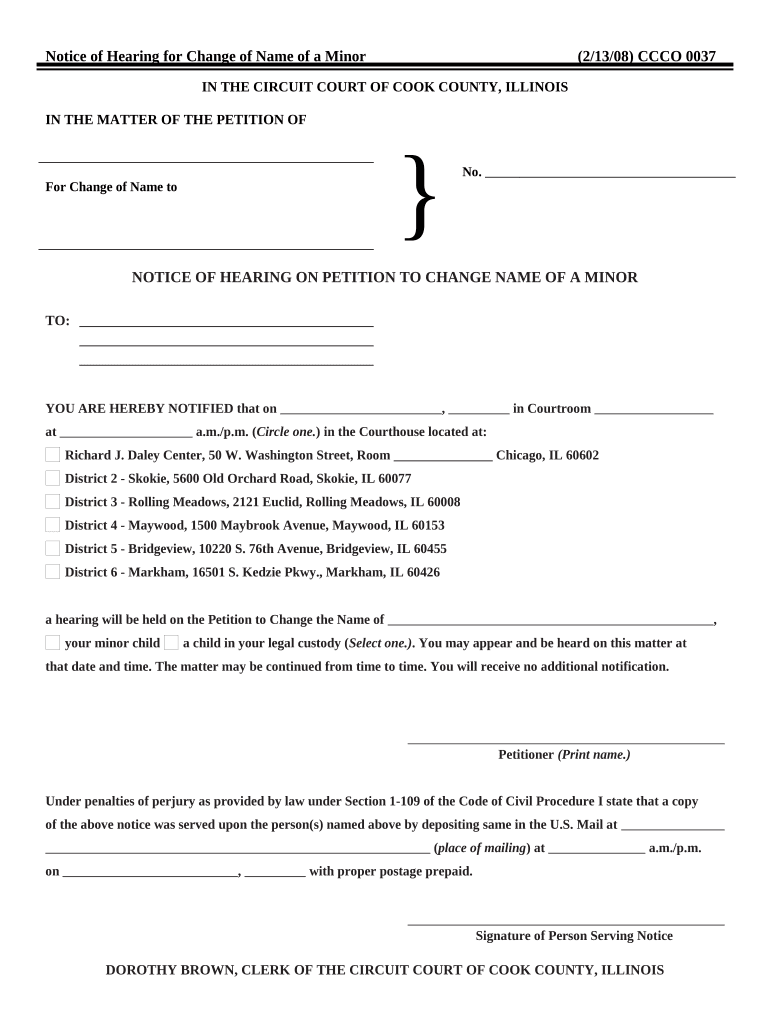
Minor and Petitioner Details

Full legal name, date of birth, current residence, and petitioner relationship to the minor are required to identify parties accurately for the record.

Requested New Name

Clearly state the proposed new legal name exactly as petitioner wants it entered in the court order and future records.

Hearing Date and Location

Insert the date, time, courtroom, and judge assignment provided by the clerk; inaccurate hearing data can delay proceedings.

Service and Filing Instructions

Describe how notice was or will be served, include affidavit of service forms if required, and indicate where to file objections.

Signature and Date

Provide petitioner signature, printed name, address, phone number, and date; include attorney information if represented.

Step-by-step: preparing and filing the notice

Follow a clear sequence from petition filing to serving notice and attending hearing to avoid delays.

  • 01
    File Petition: File the minor name-change petition with the circuit court clerk.
  • 02
    Request Hearing: Ask the clerk to set a hearing date and obtain the hearing details.
  • 03
    Prepare Notice: Complete the Notice of Hearing form with petition and hearing information.
  • 04
    Serve Notice: Serve required parties and file proof of service with the court.

Configuring an online notice workflow

An online workflow maps steps: upload, populate fields, set signer order, and send for signature and service.

Document Upload Upload petition and draft notice as PDF or DOCX
Field Placement Add text, date, and signature fields for each signer
Signer Authentication Choose email, SMS, or stronger ID verification
Proof of Service Attach affidavit or certificate of service field
Final Archive Save signed PDF plus audit trail

Where to file and how the notice moves through the court

Understand filing and routing: clerk acceptance, scheduling, service, and hearing docketing are distinct steps you must follow.

  • Clerk Filing: Submit petition and notice at the county circuit court clerk's office
  • Scheduling: Clerk assigns hearing date and returns notice with hearing details
  • Service to Parties: Serve notice to parents or guardians as required by rule
  • Hearing and Order: Appear at hearing; court may enter written order changing the name

Typical timelines and filing expectations

Timing varies by county; check with the circuit court clerk for exact lead times and local scheduling practices.

Petition Filing to Hearing:

Ranges from a few weeks to several months depending on docket load

Service Deadline Before Hearing:

Many courts expect service at least 14 days before hearing; verify local rule

Proof of Service Filing:

File affidavit of service promptly after serving parties

Order Entry:

Court issues the final order after hearing if there are no objections

Update Records:

Use certified court order to update birth certificate and identity documents

Key milestones from petition to final order

Sequential milestones track progress and help you confirm compliance at each stage of the name-change process.

01

File Petition

Petition filed and case opened with the clerk.

02

Hearing Scheduled

Clerk assigns hearing date and notifies parties.

03

Serve Parties

Serve notice and file affidavit of service.

04

Attend Hearing

Judge hears matter and issues or denies order.

Electronic submission and distribution options

Courts and local clerks may accept filings electronically in some counties; check clerk guidance before e-filing.

  • File Formats: PDF or DOCX are commonly accepted
  • Integrations: Supports Google Drive and Box uploads
  • Audit Trail: Retain timestamp and signer evidence

Essential information fields to include

Minor’s Name: Full current legal name
Date of Birth: MM/DD/YYYY
County of Residence: County where petition is filed
Petitioner Name: Full legal name and relationship
Proposed Name: Exact requested new name
Hearing Details: Date, time, courtroom

Consequences of incorrect or incomplete notices

Hearing Delay: Incorrect service or missing data delays the hearing
Dismissal Risk: Material omissions can result in petition dismissal
Invalid Order: Errors may produce an unenforceable or void order
Additional Costs: Refiling or corrected service increases fees
Privacy Exposure: Publishing unnecessary details may affect confidentiality
Identity Mismatch: Mismatched names complicate vital records updates

Common preparation mistakes to avoid

  • Failing to confirm the hearing date and courtroom with the clerk before completing the notice.
  • Using informal names or nicknames for the minor instead of the legal name on the birth certificate.
  • Skipping affidavit of service or filing it late, which can cause the hearing to be continued.
  • Not attaching required supporting documents such as birth certificate copy or proof of guardianship.

Practical tips for accurate and efficient completion

Use a checklist and confirm county-specific rules to prevent rework and ensure timely hearings.

Verify Clerk Requirements
Contact the local circuit court clerk to confirm filing fees, hearing scheduling, and proof-of-service formats before filing.
Use Exact Legal Names
Match names to the birth certificate and government IDs to simplify later updates to records like Social Security and DMV.
Preserve Proof of Service
File affidavits or certified mail receipts and store digital copies with the signed notice and audit trail.
Consider Limited Attorney Review
A brief attorney review can prevent procedural errors and confirm compliance with local family or probate rules.

How organizations handle form-based processes

Real organizations use electronic workflows to reduce turnaround time and centralize records for family and administrative matters.

Brian Fitzgibbons — Optica Ventures

Their team simplified signature capture for routine filings using digital templates.

  • The process centralized approvals and reduced physical handling.
  • They reported fewer missing fields and faster completion of standard notices across multiple locations while preserving an audit trail for each signed document.

John Butler — Fertility Centers of Illinois

The organization standardized consent and administrative notices across clinics using digital workflows.

  • Templates reduced drafting time and errors.
  • Centralized archives and an electronic certificate of completion made it easier to produce court-ready copies and comply with recordkeeping expectations.

eSignature vendor comparison for preparing and signing notices

Common eSignature providers differ by price, enterprise features, and compliance options; signNow appears first for parity in this comparison.

signNow DocuSign Adobe Sign PandaDoc HelloSign
Starting Price $8/user/mo $15/user/mo $14/user/mo $19/user/mo $15/user/mo
Free Trial 7-day free trial Varies by plan Varies by plan Varies by plan Varies by plan
Bulk Send Yes Yes Yes Yes No
Audit Trail Yes Yes Yes Yes Yes
HIPAA Compliant Yes Yes Yes No No

Frequently asked questions about notices and electronic handling

Answers to common questions about filing, service, digital signatures, and post-order steps for a change-of-name notice.


Need help? Contact support

be ready to get more
Join over 28 million airSlate SignNow users