Establishing secure connection…Loading editor…Preparing document…

Colorado Estoppel Affidavit

This template is fully customizable. Edit the text, fill out the fields, and send it for signature. Give it a try!
Colorado Estoppel Affidavit

What a Colorado Estoppel Affidavit Is and when it matters

A Colorado Estoppel Affidavit is a written, sworn statement used in real estate and property-finance transactions to confirm facts about a specific property at a point in time. Typical uses include confirming outstanding assessments, liens, current mortgage balances, lease or rent status, and whether any defaults or claims exist. Parties such as buyers, sellers, title companies, lenders, or homeowners associations rely on estoppel affidavits during due diligence and closing to reduce post-closing disputes and to provide a clear factual snapshot for title insurance and escrow instructions.

Why a clear estoppel affidavit simplifies closings

A concise Colorado Estoppel Affidavit narrows title exceptions, clarifies monetary obligations, and lowers risk of post-closing disputes, enabling lenders and title companies to underwrite or clear exceptions more quickly.

Why a clear estoppel affidavit simplifies closings

Who commonly prepares or requests an estoppel affidavit

Several parties request or prepare estoppel affidavits during a real estate closing or refinancing to verify the property's obligations and status.

  • Title and escrow companies request affidavits to confirm liens, encumbrances, and payoff figures before issuing title insurance.
  • Homeowners associations or property managers prepare estoppel statements to state dues, special assessments, and covenant compliance status.
  • Lenders and investors use affidavits to verify borrower representations, outstanding mortgage figures, and encumbrance priorities before funding.

Who may sign and attest

Owner/Officer

The property owner or an authorized corporate officer is the typical affiant. The signer must have personal knowledge or corporate authority and must be able to swear to the facts under penalty of perjury; for entities, attach corporate resolution or power of attorney when authority is delegated.

Authorized Agent

Property managers, HOA managers, or closing agents sometimes sign when authority is expressly granted. Attach written authorization and confirm local notary or witness requirements before acceptance by title or lender.

Essential parts of a professional Colorado Estoppel Affidavit

A complete affidavit organizes identity, property detail, factual statements, and authentication so recipients can rely on accuracy for title and lending decisions.

Affiant Details

Full legal name, title, organizational role, contact information, and statement of authority to attest to facts about the property.
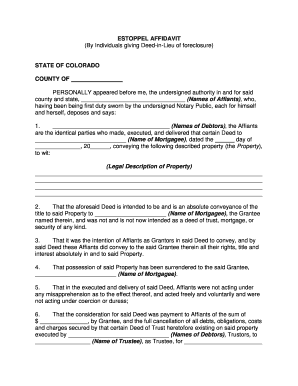
Property Description

Complete legal description, street address, and parcel or assessor ID to avoid ambiguity about which property is referenced.

Encumbrances

List active liens, mortgages, judgments, and recorded easements with docket numbers and recording jurisdictions where possible.

Assessments and Fees

Detail outstanding HOA dues, special assessments, municipal liens, and any collection or late fees as of the affidavit date.

Leases and Rents

Disclose existing leases, security deposits held, current rent roll or tenant defaults if applicable, and lease expiration dates.

Notary Statement

A notary acknowledgement or jurat indicating the affiant swore or affirmed the affidavit, including notary seal, signature, and commission details.

Required factual fields and sensitive data to include

Personal Data: Full legal name and contact
Property ID: Legal description and parcel number
Mortgage Details: Lender name and loan balance
HOA Balances: Current dues and assessments
Signature & Date: Affiant signature with date
Notary Acknowledgement: Notary signature and seal

Step-by-step: Completing a Colorado Estoppel Affidavit

Use a reliable checklist, gather supporting records, and confirm notarization requirements before sending to title, escrow, or lenders.

  • 01
    Gather documents: Collect mortgage statements, HOA ledger, recorded legal description.
  • 02
    Draft affidavit: Complete fields truthfully and attach supporting schedules.
  • 03
    Notarize: Sign before a notary or RON-enabled notary where permitted.
  • 04
    Distribute: Provide to title, escrow, HOA, and lender as instructed.

Configuring an online estoppel affidavit workflow

A consistent digital workflow reduces manual steps: prepare the form, add required fields, authenticate signers, and route to recipients automatically.

Field Configuration
Document Upload Accept PDF and DOCX; lock final version before signature
Field Placement Add signature, date, and checkbox fields for admissions
Authentication Use email plus SMS or ID verification for higher assurance
Delivery Route copies to title, lender, and affiant automatically

Where to send or file the completed affidavit

Estoppel affidavits are normally delivered to parties relying on the facts rather than routinely recorded; know the recipient list before notarizing.

  • Title Company: Send to underwriting and escrow for title clearance
  • Lender: Provide payoff and encumbrance statements for funding
  • HOA/Management: Deliver to HOA to confirm dues and assessment status
  • Affiant Records: Retain a signed original for the affiant's files

Digital signing and eSubmission considerations

Electronic completion is common but must meet authentication and record-retention rules to be relied upon by title and lenders.

  • File formats: PDF and DOCX supported for sign-ready documents
  • Notary / RON: Enable remote notarization where authorized by state law
  • Integrations: Connect with escrow, title, and cloud storage systems

Typical timing and processing expectations

Allow time for third-party verification: estoppel responses and payoff figures can take several business days; plan accordingly to avoid closing delays.

HOA response time:

Commonly 5–15 business days depending on management practices

Payoff demand timing:

Lenders often provide payoff quotes valid for 7–21 days

Expedited fees:

Some providers charge for rush estoppels or immediate payoffs

Closing deadlines:

Obtain estoppel well before scheduled closing to allow cure

Record retention:

Keep executed affidavit copies per institutional policy

Common preparation mistakes to avoid

  • Using an incomplete legal description that mismatches title records, which often stalls underwriting and requires corrected affidavits.
  • Failing to attach supporting payoff or ledger documentation, so recipients cannot verify listed amounts and must request additional evidence.
  • Affiant signs without documented authority when signing for an entity, leading title or lenders to reject the affidavit pending proof of delegation.
  • Missing or incorrect notarization, including expired notary commission or omitted jurat language, causing the affidavit to be noncompliant for closing.

Consequences of an incorrect or incomplete affidavit

Title Delays: Closing postponement or additional underwriting conditions
Funding Risk: Lender may refuse funding pending accurate payoffs
Indemnity Claims: Affiant may face indemnity or contractual liability
Recording Issues: Incorrect documents may be rejected by recorders
Tax Consequences: Misstated figures can complicate tax reporting
Fraud Allegations: Material misstatements can lead to criminal or civil claims

Representative use scenarios for an estoppel affidavit

Practical examples show how estoppels reduce friction during closing or loan underwriting.

Sale Closing Example

A seller provides a dated affidavit confirming no special assessments

  • Buyer’s title insurer requests a payoff schedule
  • The affidavit and ledger allowed escrow to close without additional title exceptions, avoiding a three-day funding delay that would otherwise have required re-clearing documents.

Refinance Example

A lender requests an estoppel to confirm subordinate liens

  • The property manager supplies a current dues statement
  • The lender funds upon receipt because the affidavit matched recorded encumbrances, removing the need for a conditional holdback at closing.

Practical tips to prepare an accurate affidavit

Adopt consistent templates, verify figures immediately before signing, and keep a documented chain of custody for the executed affidavit.

Use a standard template
Adopt a clear, lender- or title-company-approved template that includes standard jurat language and space for attachments to minimize rework and acceptance delays.
Verify amounts immediately
Request current payoff and HOA ledgers within 48–72 hours of the planned signing date to ensure amounts reflect the Effective Date and avoid stale figures.
Document authority
When signing for an entity, attach a corporate resolution or power of attorney; attach written delegation to avoid post-signature challenges to signer authority.
Preserve original
Keep a signed original with notarization for at least the retention period and provide certified copies to title and lender as requested.

eSignature vendor comparison for executing estoppel affidavits

Compare basic plan economics and common capabilities relevant to signing, notarization, and secure delivery; signNow appears first for parity in comparison.

signNow DocuSign Adobe Sign PandaDoc HelloSign
Starting Price $8/user/mo $15/user/mo $14/user/mo $19/user/mo $15/user/mo
Free Trial Yes, 7-day free trial Varies by vendor Varies by vendor Varies by vendor Varies by vendor
Bulk Send Yes Yes Yes Yes No
Audit Trail Yes Yes Yes Yes Yes
HIPAA Compliant Yes Yes Yes No No

Frequently asked questions about estoppel affidavits in Colorado

Answers cover authentication, correcting errors, notarization options, and recordkeeping expectations most commonly raised during transaction workflows.


Need help? Contact support

be ready to get more
Join over 28 million airSlate SignNow users