Establishing secure connection…Loading editor…Preparing document…

Colorado Relinquishment

This template is fully customizable. Edit the text, fill out the fields, and send it for signature. Give it a try!
Colorado Relinquishment

What a Colorado Relinquishment Is and When It Applies

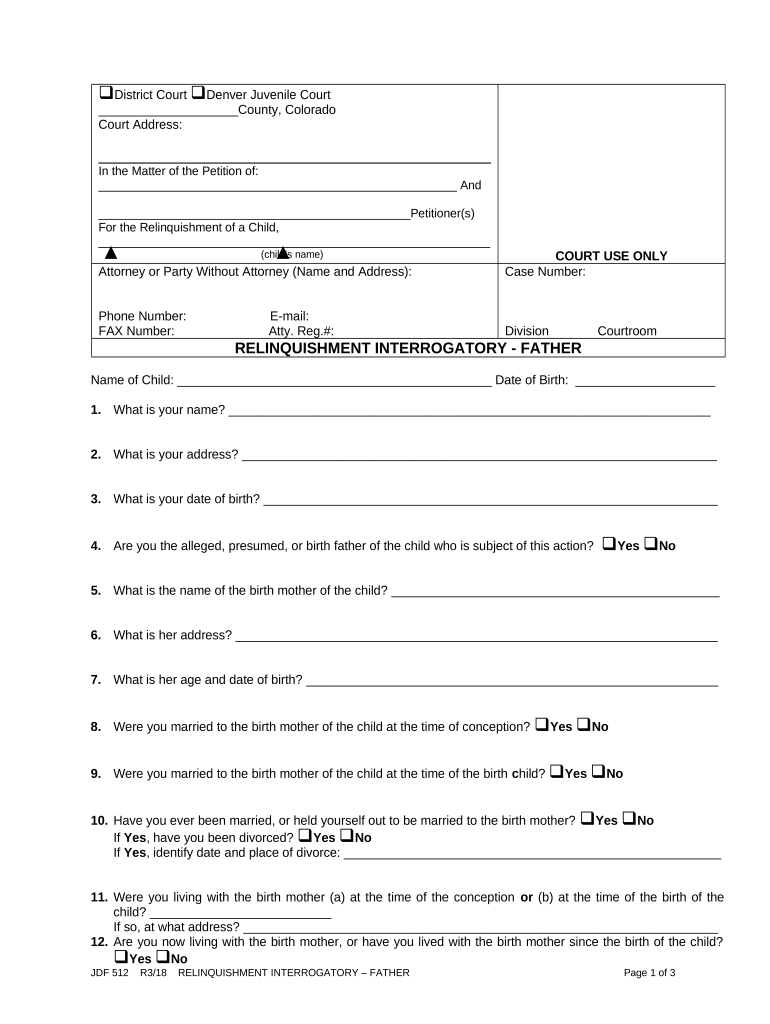
Colorado Relinquishment is a legal document used when a person voluntarily gives up a legal right or interest under Colorado law, most commonly for parental-rights relinquishment in adoption contexts or the formal release of an ownership interest. The form records the declarant, the subject (for example, a child or property), and the specific rights being surrendered. Courts and agencies often require notarization, a clear voluntariness statement, and court filing to make a relinquishment effective. Electronic completion may be allowed when state and court rules accept e-signatures and identity-proofing measures.

Why a Proper Colorado Relinquishment Matters

A clear, signed relinquishment creates an evidentiary record of consent or release, reduces ambiguity, and supports court review and final orders.

Why a Proper Colorado Relinquishment Matters

Who Typically Prepares and Signs a Relinquishment

Typical users include biological parents, attorneys, adoption agencies, and county court clerks who manage relinquishment proceedings in Colorado.

  • Biological parents completing a voluntary parental-rights relinquishment prior to adoption or placement.
  • Legal guardians or agency representatives surrendering custody or releasing rights as authorized by law.
  • Attorneys and adoption agencies preparing court-ready forms and verifying consent and identity prior to filing.

Who Signs and Why

Biological Parent

A parent who knowingly and voluntarily signs to surrender parental rights or custody; the document must show intent, identity, and often be approved by the court to affect parental status.

Adoptive Party / Agency

An adoptive parent, guardian, or agency representative who relies on a valid relinquishment to proceed with adoption or placement; they must ensure the document is properly executed and filed with the appropriate court.

Step-by-Step: Completing and Filing a Colorado Relinquishment

Follow these steps to complete and file a Colorado Relinquishment accurately and in order with the court.

  • 01
    Collect Documents: Gather IDs, birth records, and any prior court orders.
  • 02
    Complete Form: Enter names, dates (MM/DD/YYYY), and declarant statements clearly.
  • 03
    Authenticate: Notarize in-person or use RON if the court accepts it.
  • 04
    File with Court: Submit originals to the clerk and retain certified copies.

How a Relinquishment Moves from Signing to Court Record

This flow summarizes the common journey from document preparation through court review and final disposition.

  • Prepare Document: Draft or generate the Colorado Relinquishment form.
  • Sign & Notarize: Signer authenticates signature; notary completes acknowledgment.
  • File Petition: File with county court and pay any filing fee.
  • Court Review: Judge assesses voluntariness and may schedule a hearing.

Electronic Submission, Authentication and Notary Options

Electronic completion and submission options depend on county court acceptance, identity-proofing standards, and notary rules in Colorado and local clerk practices.

  • Supported Formats: PDF and DOCX are commonly accepted for court filings.
  • Authentication: Email + SMS code or stronger KBA where courts permit.
  • Notary Options: In-person notarization or RON when authorized by the county.

Setting Up a Digital Workflow for a Relinquishment

Configure an e-sign workflow that captures identity, timestamps, and an auditable trail acceptable to Colorado courts.

Field Configuration
Signer Authentication Email plus SMS code or knowledge-based authentication
Signature Field Visible signature, initials, and a signed timestamp
Notary Integration RON support where the county accepts remote notarization
Retention Store signed PDF with complete audit trail and metadata

Essential Elements of a Professional Colorado Relinquishment

A compliant relinquishment combines identity details, a clear voluntariness statement, and authentication spaces so courts can verify and accept the surrender of rights.

Declarant Info

Full legal name, address, and contact details for the person relinquishing rights, plus any alias names used; accuracy is critical for matching records and avoiding later challenges to identity.
Subject Details

Clear identification of the subject (for example, child name and DOB or property description), ensuring the court can identify the exact interest being relinquished without ambiguity or overlap.

Voluntariness Statement

A concise, unambiguous declaration that the signer understands rights being given up, is acting voluntarily, and is not under duress; courts scrutinize this language closely during review.

Consideration / Purpose

If applicable, a statement describing consideration or the purpose of the relinquishment (for example, adoption placement), helping the court and agencies understand the transaction context.

Notary Block

A notary acknowledgment formatted for Colorado requirements; include space for in-person or RON notary details, signature, commission expiration, and any audio-video recording notes if RON is used.

Court Filing Fields

Dedicated lines for case number, filing county, clerk stamp, and judge signature or docket entries, ensuring the document can be entered and tracked in the court record.

Supporting Documents and Attachments You May Need

Include relevant supporting records to speed court review and avoid requests for supplemental information.

Proof of Identity

Government-issued photo ID for the declarant and any other parties signing or consenting, required for notarization and identity verification.

Birth Certificate

Certified birth certificate or agency records to identify the child or subject precisely for court files and matching.

Consent Statements

Written consents from other legal guardians or parents when required, including any prior court orders affecting parental rights.

Adoption/Placement Paperwork

Agency forms, placement agreements, or adoption petitions that explain how the relinquishment fits into the broader case.

Practical Tips to Reduce Rejection Risk

Follow these practices to make acceptance and court processing more reliable.

Verify Identities Early
Confirm government ID details and contact information before signing. Pre-verify identity to avoid last-minute delays or rejected notary actions.
Use Exact Legal Names
Enter full legal names without nicknames or abbreviations. Mismatched names may force corrective filings and slow proceedings.
Complete Notary Requirements
If the court requires notarization, complete either in-person or authorized RON with retained records and a notarized journal entry.
Retain Certified Copies
Keep certified filed copies and a signed PDF with audit trail for future reference and to satisfy agency or placement requirements.

Common Errors That Cause Delays or Rejection

  • Missing notarization or incorrect notary wording that fails county clerk acceptance causes immediate return and refiling.
  • Names that do not match government ID or birth records require corrective affidavits and slow court processing.
  • Incomplete voluntariness language or missing witness statements may trigger a hearing to confirm consent.
  • Failing to include a case number or county court information can result in the document not being docketed.

Legal Risks and Consequences of an Incorrect Relinquishment

Invalid Relinquishment: Document may be set aside.
Loss of Rights: Permanent change if accepted by court.
Perjury Exposure: False statements could lead to charges.
Adoption Delays: Processing stops until issues are resolved.
Financial Liability: Support obligations may persist until court order.
Agency Sanctions: Licensing or placement consequences possible.

Timing Considerations and Typical Deadlines

Timing varies by case type and county; plan ahead for authentication, waiting periods, and court scheduling.

When to File:

File once signatures and notarization are complete to avoid stale or unsigned documents.

Effective Date Rules:

The effective date is the date signed or a later date specified on the form.

Court Hearing Timeline:

If a hearing is required, scheduling depends on docket availability and may take weeks.

Notary/RON Timing:

Complete notarization before filing; if RON is used, ensure recordings are retained.

Document Retention:

Keep originals and electronic copies per retention guidance and court rules.

Key Milestones from Signing to Court Order

A typical milestone sequence helps track progress from initial signing through court disposition.

01

Decision to Relinquish

Declarant chooses to sign and prepares documentation for review.

02

Execution and Notarization

Signer executes the document and completes in-person or remote notarization as required.

03

Filing and Clerk Acceptance

File originals with the county clerk and obtain a stamped copy for records.

04

Court Review and Order

Judge reviews voluntariness and issues an order if the relinquishment meets legal standards.

eSignature Vendor Pricing Snapshot for Document Workflows

This vendor comparison shows entry-level prices and a few core features relevant to high-volume document workflows; signNow is listed first by design.

signNow DocuSign Adobe Sign PandaDoc HelloSign
Starting Price $8/user/mo $15/user/mo $14/user/mo $19/user/mo $15/user/mo
Free Trial 7-day free trial Varies Varies Varies Varies
Bulk Send Yes (Business Premium) Yes Yes Yes Varies
Audit Trail Yes Yes Yes Yes Yes
HIPAA Compliant Yes Yes Yes No No

Frequently Asked Questions About Colorado Relinquishment

Answers to common procedural and legal questions about completing, authenticating, and filing a Colorado Relinquishment.


Need help? Contact support

be ready to get more
Join over 28 million airSlate SignNow users