Establishing secure connection…Loading editor…Preparing document…

Colorado Summons Form

This template is fully customizable. Edit the text, fill out the fields, and send it for signature. Give it a try!
Colorado Summons Form

What the Colorado Summons Form Is and when it’s used

The Colorado Summons Form is an official court document that notifies a defendant that a civil action has been filed and directs the defendant to appear or file a written response. The summons contains the court caption, case number, plaintiff and defendant names, and instructions for responding. Plaintiffs file the summons with the clerk and arrange service of process under the Colorado Rules of Civil Procedure. The document is often accompanied by a complaint and a proof of service once a defendant has been served.

Why the summons is essential in Colorado civil cases

A properly completed summons begins the court’s jurisdiction over a defendant and creates enforceable response deadlines; inadequate or improper service can delay or forfeit relief.

Why the summons is essential in Colorado civil cases

Who prepares and handles the Colorado Summons Form

Typical users include plaintiffs, their attorneys, process servers, and court clerks who manage filings and service records.

  • Plaintiffs and counsel prepare and file the summons and complaint with the appropriate county court or district court clerk.
  • Professional process servers or sheriff’s deputies arrange personal service and complete proofs or affidavits of service.
  • Court clerks accept filing, docket the case number, and record the filed summons and any returned proof of service.

Parties and agents must coordinate filing, service, and proof-of-service steps precisely to preserve claims and avoid default.

Core parts of a professional Colorado Summons Form

A complete summons follows court formatting and clearly identifies parties, filing information, the court’s instructions, and where proofs must be returned.

Caption

Court name, county, and case caption must match the complaint exactly; mismatches can cause filing rejection or delays.
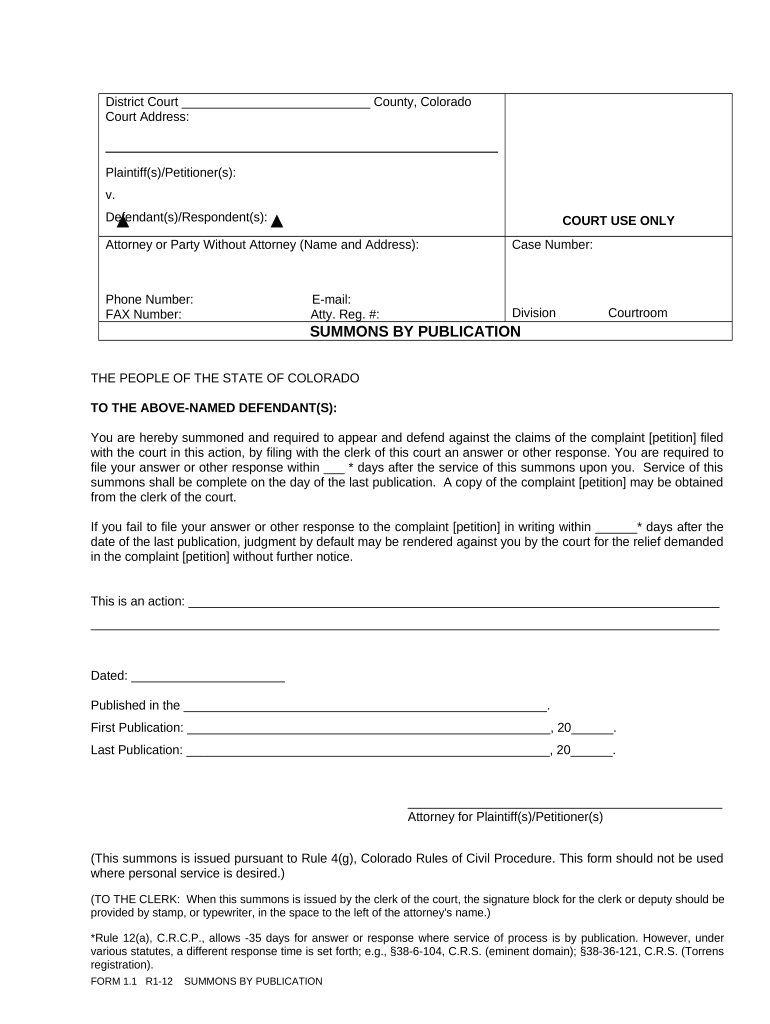
Case Number

Leave this blank if filing is simultaneous; the clerk assigns the number on filing and it must be used on all subsequent documents.

Defendant Details

Use the defendant’s full legal name and business entity form; errors in the name can invalidate service attempts.

Service Instructions

State the methods used or authorized (personal, mail, substituted) and where to file proof of service with the clerk.

Clerk Block

Space for the clerk’s file stamp, filing fee entry, and signature or electronic filing acknowledgement if e-filed.

Proof of Service

A separate affidavit or return of service documents when, how, and by whom service was made; it becomes part of the court record.

Step-by-step: complete, file, and serve a Colorado summons

Follow these four practical steps to prepare and process a typical Colorado summons and complaint.

  • 01
    Prepare documents: Draft complaint and summon; verify names and caption.
  • 02
    File with clerk: Submit complaint and summons to the county or district court clerk.
  • 03
    Serve defendant: Use authorized methods and obtain proof of service.
  • 04
    File proof: Return the proof of service to the clerk and docket it.

How filing and service typically flow in practice

A clear routing sequence reduces errors: file, serve, document, and preserve evidence of service for the court record.

  • Clerk files: Clerk assigns case number and stamps documents.
  • Process server acts: Server effects service per authorized method and completes affidavit.
  • Defendant notified: Defendant receives summons and complaint; response deadline begins to run.
  • Proof recorded: Affidavit of service is filed and the case proceeds.

Setting up a digital workflow for Colorado summons and proof of service

When using e-filing or e-sign tools, configure fields and authentication to preserve the court record and signatory attribution.

Field Configuration
Document Upload PDF/A preferred; include complaint and summons in one package.
Signature Field Place signature and date fields for counsel or authorized filer.
Authentication Use email or stronger methods as required by local e-filing rules.
Audit Trail Capture timestamps, IP addresses, and signer identity metadata.

Technical considerations for e-signing and e-filing a summons

Confirm the court accepts electronic filings and that your e-sign platform produces auditable, tamper-evident records before relying on e-signatures.

  • File formats: PDF, DOCX accepted by many e-filing systems.
  • Integrations: Connectors: MS 365, Google Workspace, and court e-file portals.
  • Authentication: Email, SMS, or stronger signer verification.

Choose a platform that supports durable audit trails, preserves signed documents in PDF/A where required, and integrates with your e-filing provider for streamlined submission.

Penalties and risks if a summons is incorrect or improperly served

Default Judgment Risk: Judgment entered if defendant fails to respond.
Dismissal Delay: Case may be dismissed for defective service.
Sanctions Exposure: Court may impose monetary sanctions.
Re‑service Costs: Additional fees and delay for re-serving.
Perjury Risk: False affidavits of service can trigger penalties.
Attorney Fees: Possible fee awards to prevailing party.

Common mistakes that cause file or service problems

  • Using an incorrect defendant name or an outdated business designation that prevents effective service and leads to later motions to quash or re-service.
  • Failing to follow the court’s required method of service or to include required forms such as the complaint, leading to incomplete service notices.
  • Missing to file the proof or affidavit of service promptly with the clerk, which can create disputes about whether the defendant was actually notified.
  • Relying on an unsigned or incomplete proof of service or an affidavit that lacks the server’s details and signature, making the proof inadmissible.

eSignature vendor comparison for executing and filing summons forms (signNow listed first)

Key vendor differences for e-signing and document workflows relevant to filing summons and proof-of-service documents; signNow is listed first per vendor comparison rules.

signNow DocuSign Adobe Sign PandaDoc HelloSign
Starting Price $8/user/mo $15/user/mo $14/user/mo $19/user/mo $15/user/mo
Free Trial 7-day free trial Varies Varies Varies Varies
Bulk Send Yes Yes Yes Yes No
Audit Trail Yes Yes Yes Yes Yes
HIPAA Compliant Yes Yes Yes No No
Envelope Cap No cap 100 envelopes/user/year Varies Varies Varies

Frequently asked questions about the Colorado Summons Form

Answers to common procedural and technical questions when preparing, serving, or filing a summons in Colorado.


Need help? Contact support

be ready to get more
Join over 28 million airSlate SignNow users