Establishing secure connection…Loading editor…Preparing document…

Complaint for Divorce with Children

This template is fully customizable. Edit the text, fill out the fields, and send it for signature. Give it a try!
Complaint for Divorce with Children

What the Complaint for Divorce with Children Is and when it’s used

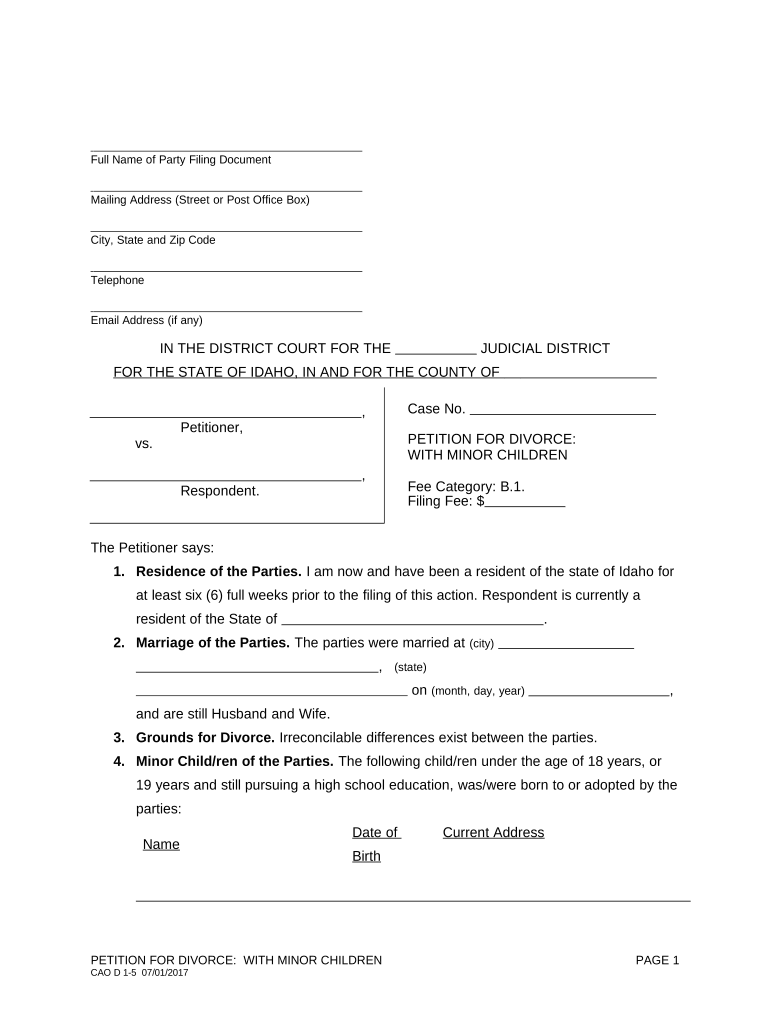
A Complaint for Divorce with Children is the initiating court document filed by one spouse to begin a dissolution action when minor children are involved. It sets out the parties, the marriage date, grounds for divorce (fault-based or no-fault depending on jurisdiction), and initial requests about custody, visitation, child support, temporary orders, and property division. The complaint frames the court’s jurisdictional facts and asks the court to enter orders addressing parental responsibility, parenting time, child support, and any temporary relief needed until a final judgment is entered.

Why a well-prepared Complaint matters in family cases

A clear, accurate complaint creates the legal framework for custody and support determinations, preserves issues for hearing or settlement, and triggers required procedural protections such as service and temporary relief. Properly stating facts, residences, and relief sought reduces risk of delays, informal dismissals, and jurisdictional challenges under state family law and civil procedure rules.

Why a well-prepared Complaint matters in family cases

Who prepares and receives this Complaint

Each participant has specific responsibilities: the petitioner drafts and signs, the court enforces filing rules, and the respondent answers. Accurate forms streamline service, temporary orders, and eventual disposition.

  • Self-represented petitioners seeking custody and child support without an attorney
  • Family law attorneys preparing pleadings and temporary relief requests
  • Court staff processing filings and issuing summons or service instructions

Who can sign and act on the Complaint

Petitioner

The spouse who files. The petitioner signs the complaint under penalty of perjury and certifies the facts in the pleading; counsel may sign on behalf of the petitioner as permitted by court rules.

Attorney

An attorney of record may sign and file the complaint, certify service, and appear for initial hearings; some jurisdictions require attorneys to include bar number and contact details on pleadings.

Core sections included in a strong Complaint for Divorce with Children

A complete complaint organizes essential case facts and requests so the court can issue temporary and final orders; include each of the following components in sequence and with clear factual support.

Caption and Parties

Court name, case number placeholder, petitioner and respondent full legal names, addresses, and relationship to the children to establish venue and parties' identities.
Jurisdictional Facts

Residency dates and state requirements showing the court has jurisdiction; this prevents venue or subject matter objections if statutory residency thresholds are not met.

Children and Custody Requests

Full names and birthdates of minor children plus specific relief requested for legal custody, physical custody, parenting time, and proposed temporary arrangements.

Support and Financial Relief

Requests for temporary child support, spousal support where appropriate, and any proposed calculation basis or need for income disclosure and wage withholding orders.

Property and Debt Allocation

Summary of marital assets and debts and the relief sought regarding division, exclusive use of residence, or temporary possession of personal property.

Temporary Orders and Prayer

Specific temporary relief requested (custody, support, exclusive use), signature block, and the formal prayer for final orders dissolving the marriage and resolving children’s issues.

Required data fields at a glance

Names: Full legal names
Addresses: Street, city, state, ZIP
Children: Names and DOBs
Marriage Date: MM/DD/YYYY
Relief Requested: Custody, support, property
Signature: Date-signed

Step-by-step: How to complete the Complaint for Divorce with Children

Follow these steps in order to prepare a complaint that meets typical family court requirements and reduces avoidable delays during filing and service.

  • 01
    Gather documents: Collect IDs, children’s birth certificates, marriage certificate, and financial records
  • 02
    Fill caption: Enter court name, county, and party names exactly as required
  • 03
    State jurisdiction: Provide residency facts supporting venue and subject matter jurisdiction
  • 04
    Sign and verify: Sign under penalty of perjury and date the pleading

How to customize and submit the complaint online

Online filing workflows vary by court but typically follow a standard sequence; configure e-filing, service, and temporary order requests before submission.

Step Configuration
Upload PDF/A preferred; include exhibits as separate attachments
Form Fields Map full name, DOB, addresses to searchable fields
Service Method Select sheriff, private process server, or certified mail per local rules
E-Filing Complete court portal metadata and pay filing fee

Where to file, serve, and submit the Complaint

Filing and service follow jurisdiction rules; identify the correct county family court and follow local e-filing and service procedures to avoid dismissal.

  • Filing location: County family or circuit court clerk where petitioner meets residency
  • E-filing portals: Use the statewide e-filing system if available
  • Service: Serve respondent via sheriff, process server, or method allowed by state law
  • Proof of service: File affidavit or certificate of service to establish respondent received papers

Digital signing and e-submission considerations

Confirm local court e-filing and signature rules before relying solely on electronic signing or remote notarization for family-law pleadings.

  • Signature validity: ESIGN and UETA generally validate electronic signatures for pleadings
  • Court rules: Some courts require wet-ink signatures or in-person notarization for certain filings
  • Authentication: Use multi-factor or approved e-filing credentials to meet court security requirements

Key timelines and expected processing steps

Timing matters for temporary relief, service periods, and mandatory case events. Anticipate court scheduling and statutory response windows.

Initial response window:

Typically 20–30 days to file an answer after service

Temporary hearing:

Often scheduled within 14–30 days for emergency relief

Discovery deadlines:

Court may set discovery timelines at first scheduling conference

Final trial:

Scheduled per local docket; can be months after filing

Appeal timeline:

Post-judgment appeal deadlines vary by state rule

Key milestones from filing to final order

Sequential milestones mark a family case lifecycle; expect staggered events for temporary relief, discovery, settlement talks, and final hearing.

01

Filing and Issuance

Complaint filed and summons issued to start formal service process

02

Service and Response

Respondent is served and may file an answer or responsive motions

03

Temporary Relief Hearing

Court decides short-term custody, support, and possession issues

04

Final Hearing or Settlement

Court enters final judgment resolving custody, support, and property

Common mistakes when preparing this complaint

  • Incomplete child details or wrong DOBs causing jurisdictional questions
  • Incorrect service method or missing proof of service filings
  • Vague relief requests without factual support for custody or support
  • Failing to attest residency dates required by state statute

Risks and consequences of errors in family pleadings

Dismissal Risk: Failure to meet filing or service rules can lead to dismissal
Delay: Errors often cause continuances and added attorney fees
Enforcement Issues: Weakly pleaded support details hinder immediate enforcement
Sanctions: False statements risk sanctions under court rules
Custody Impact: Incomplete facts can affect interim custody determinations
Appeal Limitations: Preservation of issues requires clear pleadings for appellate review

Supporting documents commonly filed with the complaint

Including supporting exhibits at filing speeds case management and helps courts issue temporary orders without delay.

Parenting Plan Draft

A proposed parenting plan outlines daily custody schedules, holiday rotation, and decision-making authority to guide temporary orders and settlement talks.

Financial Affidavits

Sworn income and expense affidavits, pay stubs, and tax returns support child support calculations and temporary spousal support requests.

Children’s Birth Certificates

Official birth certificates establish parentage, ages, and are frequently required by courts and child support agencies.

Proof of Service Forms

Affidavits or certificates proving respondent was served are essential to advancing the case and avoiding jurisdictional defects.

Practical tips for accurate and efficient completion

Use these best practices to reduce errors, satisfy court clerks, and protect parental rights during the case.

Double-check identities
Confirm spelling, legal names, and DOBs against IDs and certificates; mismatches slow service and may require amendments.
Be specific in relief requested
Provide concrete parenting time proposals, support calculations or requested formulas, and temporary possession requests to avoid ambiguous orders.
Attach essential exhibits
Include financial affidavits, pay stubs, parenting plans, and birth certificates at filing to speed temporary hearings and settlement evaluation.
Confirm local form requirements
Courts often require local cover sheets, confidentiality forms, or mandatory mediation statements; include them to prevent rejection.

How different parties use the Complaint in practice

Real-world examples show common pathways and how complaints are adapted for varying needs.

Self-Help Filing

A parent files pro se with a basic complaint and parenting plan

  • seeks temporary custody for safety reasons
  • the court schedules a temporary hearing within two weeks and refers parties to mediation when safe.

Attorney-Assisted Case

An attorney files a detailed complaint with financial exhibits

  • requests expedited temporary support and possession
  • the case proceeds to negotiated settlement after discovery narrows disputed issues.

eSignature vendor comparison for filing and serving family pleadings

Comparing common eSignature options can help choose a solution for signing, notarization support, and secure document handling when preparing court filings.

signNow DocuSign Adobe Sign PandaDoc HelloSign
Starting Price $8/user/mo $15/user/mo $14/user/mo $19/user/mo $15/user/mo
Free Trial 7-day free trial Varies Varies Varies Varies
Bulk Send Yes Yes Yes Yes No
Audit Trail Yes Yes Yes Yes Yes
HIPAA Compliant Yes Yes Yes No No

Frequently asked questions about the Complaint for Divorce with Children

Answers to common procedural and practical questions help avoid filing errors and speed case progression.


Need help? Contact support

be ready to get more
Join over 28 million airSlate SignNow users