Establishing secure connection…Loading editor…Preparing document…

Consent Order

This template is fully customizable. Edit the text, fill out the fields, and send it for signature. Give it a try!
Consent Order

What a Consent Order Is and when it’s used

A Consent Order is a legally binding document that records an agreement between parties and is entered by a court as an enforceable order. It resolves disputed issues without a contested trial by converting negotiated terms into a court directive that carries the force of law. Typical uses include civil litigation settlements, regulatory enforcement resolutions, family law arrangements, and supervised compliance plans. Once signed and entered by a judge, a Consent Order establishes deadlines, performance obligations, reporting requirements, and remedies for noncompliance; courts retain authority to enforce, modify, or find parties in contempt for breaches.

Why parties choose a Consent Order

Consent Orders provide finality, reduce litigation costs, and preserve court enforcement powers while avoiding a full trial. They clarify obligations, timelines, and remedies in a single, enforceable instrument.

Why parties choose a Consent Order

Who prepares and signs a Consent Order

Typical users include the parties to a dispute, their attorneys, and court clerks who process filings.

  • Plaintiffs and defendants in civil litigation who want a negotiated resolution without trial.
  • Regulated entities and government agencies resolving enforcement matters or consent decrees.
  • Family law parties using consent orders to document child custody, support, or property arrangements.

Core elements to include in a professional Consent Order

A complete Consent Order combines factual recitals with precise, enforceable obligations and administrative details so courts can implement and enforce the agreement without further clarification.

Title and Caption

Court name, docket number, and case caption that uniquely identify the matter and link the order to the underlying file.
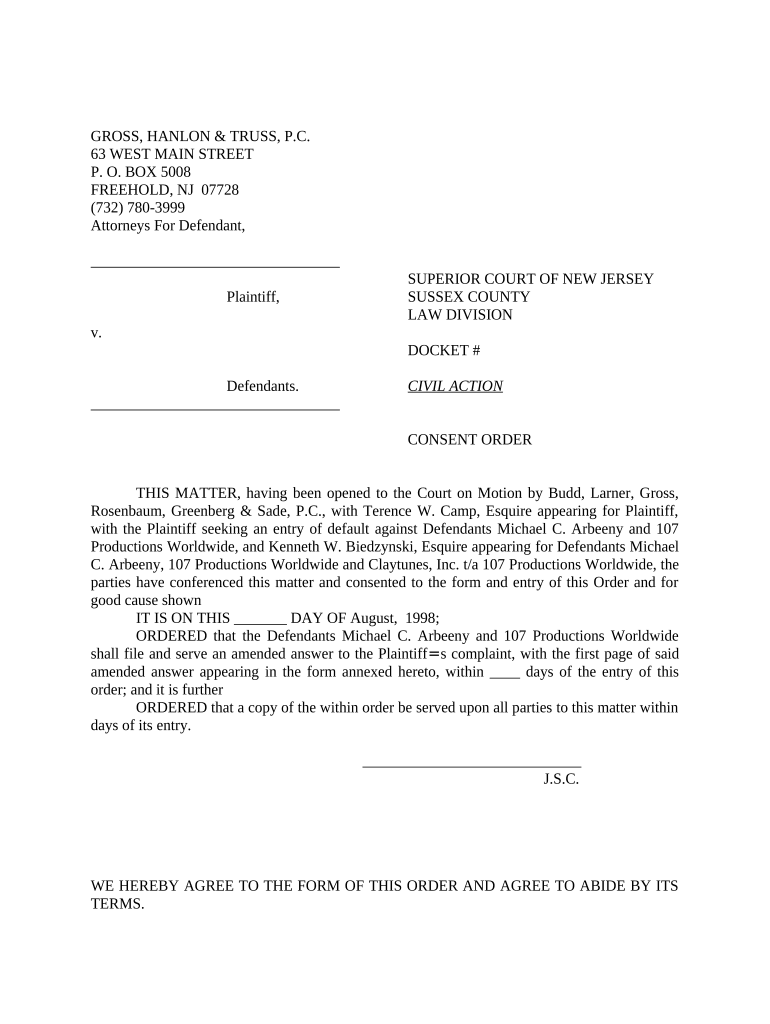
Recitals

Concise background statements summarizing the parties' agreement, the dispute, and the basis on which the court is asked to enter the consent order.

Agreement Terms

Clear, measurable obligations, deadlines, and deliverables that the parties agree to perform, written in present-tense, enforceable language.

Compliance and Reporting

Specific reporting schedules, required filings, or certification steps the parties must follow to demonstrate ongoing compliance.

Remedies and Enforcement

Consequences for noncompliance, including contempt, fines, or specific performance, and the procedure for seeking judicial relief.

Signature Blocks

Signature lines for parties and counsel with printed names, dates, and any required notarization or acknowledgement if the court or jurisdiction demands it.

Required information and fields at a glance

Party Names: Full legal names
Case Identifier: Docket number
Effective Date: MM/DD/YYYY
Material Terms: Obligations summarized
Enforcement Provisions: Remedies listed
Signatures: Signed and dated

Step-by-step: prepare and submit a Consent Order

Follow these sequential actions to draft, obtain approval, and file a Consent Order with the court.

  • 01
    Gather materials: Collect pleadings, settlement terms, and case docket details.
  • 02
    Draft language: Write specific obligations, deadlines, and enforcement language.
  • 03
    Get signatures: Obtain signatures from parties and counsel as required.
  • 04
    File and serve: Submit proposed order to court and serve opposing counsel or parties.

Configure online workflow for a Consent Order

Set up a repeatable eSigning workflow to collect signatures, attach exhibits, and produce a court-ready PDF.

Upload Document PDF or DOCX upload
Add Signers Email addresses and signing order
Authentication Email link, SMS code, or KBA
Attach Exhibits Combine exhibits into single PDF
Export Options Flattened PDF with audit trail

From executed agreement to entered court order

This sequence describes how an executed consent document becomes an enforceable court order.

  • Prepare proposed order: Draft and format language for submission.
  • Submit to judge: File proposed order and notify the court.
  • Judge reviews: Court may approve, modify, or reject the proposal.
  • Order entered: Clerk enters the signed order on the docket.

Technical and format considerations for eSubmission

Courts accept electronic PDFs in many jurisdictions; confirm local e-filing and signature rules before submission.

  • File formats: PDF/A or searchable PDF
  • Audit trail: Timestamp and IP capture
  • Integrations: Works with common e-filing systems

Common deadlines and timing to track

Consent Orders often create specific, binding deadlines that differ from underlying statute-based timelines; track each date precisely.

Hearing Date:

Date for court review and possible approval

Performance Deadline:

When agreed obligations must be completed

Interim Reporting:

Regular compliance reporting intervals

Cure Period:

Time allowed to remedy breaches

Enforcement Filing:

Deadline to seek relief for noncompliance

Key milestones from negotiation to enforcement

Track these milestones in sequence to ensure timely drafting, filing, and court entry of the order.

01

Negotiation Complete

Parties agree on core terms and settlement structure.

02

Drafting Finalized

Parties convert terms into enforceable order language.

03

Court Submission

File the proposed order and supporting documents with the clerk.

04

Entry and Enforcement

Court signs and enters order; remedies available on breach.

Common drafting and filing mistakes to avoid

  • Including vague or aspirational language that fails to create measurable obligations, causing confusion at enforcement time.
  • Mismatched party names or incorrect docket numbers that delay clerical entry or lead to rejection by the court clerk.
  • Failing to specify reporting formats and delivery methods, which creates disputes over whether compliance steps were completed.
  • Omitting signature details such as counsel bar numbers or failing to follow local rules for proposed orders.

Consequences of an improper or breached Consent Order

Contempt: Civil or criminal
Monetary Fines: Court-ordered penalties
Specific Performance: Court compels action
Vacatur Risk: Order may be challenged
Reputational Harm: Public court records
Further Litigation: Enforcement proceedings

How a Consent Order compares with similar instruments

Compare common document types so you can select the appropriate instrument for resolving disputes and memorializing commitments.

Document Type Court Order Binding on Parties
Consent Order
Consent Decree often broad
Settlement Agreement contractual only
Stipulated Judgment

eSignature vendor comparison for Consent Order workflows

Cost and capability vary across eSignature providers; signNow appears first for parity in the table below. Confirm plan details and support for court-ready PDFs and audit trails before purchase.

signNow DocuSign Adobe Sign PandaDoc HelloSign
Starting Price $8/user/mo $15/user/mo $14/user/mo $19/user/mo $15/user/mo
Free Trial 7-day free trial No No Yes, limited Yes, limited
Bulk Send Yes Yes Yes Yes No
Audit Trail Yes Yes Yes Yes Yes
HIPAA Compliant Yes Yes Yes No No

Real-world scenarios illustrating Consent Order use

These examples show common ways parties use a Consent Order to resolve disputes and document obligations without a contested trial.

Employment Settlement

A departing employee and employer agree to severance and confidentiality terms

  • Agreement includes payment schedule
  • The parties submit the drafted Consent Order for court entry, creating an enforceable remedy if payments are missed and removing future litigation risk.

Regulatory Resolution

A regulated company agrees to corrective measures with an agency

  • Terms include reporting and remediation deadlines
  • The consent order records the obligations, sets reporting intervals, and allows the agency to seek enforcement in court if the company fails to comply.

Practical tips for accurate and efficient Consent Order completion

Follow these best practices to reduce entry delays, avoid ambiguity, and improve enforceability of a Consent Order.

Be precise and measurable
Draft obligations with exact deadlines, measurable deliverables, and clear recipients for reports so the court can readily verify compliance without additional interpretive briefing.
Confirm local rules
Review the local court clerk’s requirements for proposed orders, signature blocks, and submission format to prevent administrative rejection or requested revisions.
Use consistent names and identifiers
Ensure party names, corporate designations, and the docket number match existing case filings to avoid clerical errors that delay entry and service.
Include amendment and enforcement procedures
Specify how modifications will be requested and documented, and outline the process for seeking judicial relief for noncompliance to reduce uncertainty if disputes arise.

Frequently asked questions about Consent Orders

Answers to common questions about electronic signing, filing, amendment, and enforcement of Consent Orders in U.S. practice.


Need help? Contact support

be ready to get more
Join over 28 million airSlate SignNow users