Establishing secure connection…Loading editor…Preparing document…

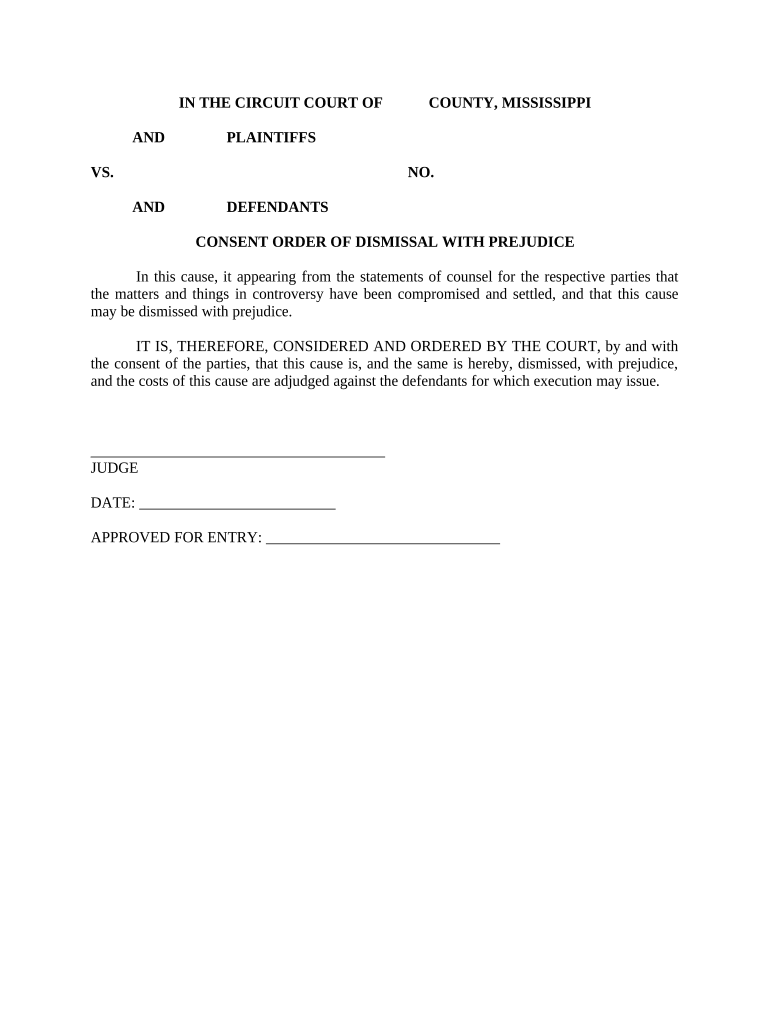
Consent Order

This template is fully customizable. Edit the text, fill out the fields, and send it for signature. Give it a try!
Consent Order

What a Consent Order Is and when it applies

A Consent Order is a court-issued document that records an agreement between parties and enters that agreement as an enforceable court order. It typically resolves litigation, regulatory actions, or settlement negotiations by combining the parties' settlement terms with the court's enforcement authority. Once entered, the Consent Order carries the weight of a judicial directive and can be enforced through contempt proceedings, monetary sanctions, or specific performance remedies. Parties use Consent Orders to avoid protracted trials while ensuring terms are binding, and courts review them for fairness, jurisdiction, and compliance with statutory requirements.

Why a properly drafted Consent Order matters

A clear Consent Order protects parties by making negotiated obligations enforceable in court and reducing the risk of future disputes or inconsistent remedies.

Why a properly drafted Consent Order matters

Who commonly prepares and signs Consent Orders

The court must approve and enter the order before it becomes enforceable; docketing and service typically follow local rules.

  • Plaintiffs and defendants who settle disputes and need a court-enforceable resolution without trial.
  • Regulators and agencies resolving compliance matters that require judicial entry for monitoring and penalties.
  • Attorneys and corporate counsel who draft and submit proposed orders for the judge's signature.

Core elements to include in a professional Consent Order

A complete Consent Order combines factual recitals, agreed terms, enforcement provisions, jurisdictional statements, signatory blocks, and directions to the clerk. Each element must be precise to avoid ambiguity during enforcement.

Recitals

Background facts and procedural posture establishing why the order is presented to the court.
Agreement Terms

Detailed obligations, dates, performance milestones, and any payment schedules agreed by the parties.

Enforcement Clause

Statement that the court retains jurisdiction and sanctions for noncompliance, including contempt remedies.

Jurisdiction

Affirmation that the court has authority to enter and enforce the order under applicable statutes.

Signatures

Signature blocks for counsel, parties, and the judge with dates and printed names.

Filing Directions

Instructions to the clerk for docketing, service, and any redaction or sealing requirements.

Step-by-step: prepare and submit a Consent Order

Follow these sequential steps to prepare a Consent Order that can be entered by the court without procedural delay.

  • 01
    Draft Terms: Document agreed terms in numbered clauses to ensure clarity.
  • 02
    Circulate to Counsel: Share draft with opposing counsel for review and editing.
  • 03
    File Proposed Order: Submit the proposed order per local rules, often via the court's e-filing system.
  • 04
    Obtain Entry: After judicial review, the judge signs and the clerk files the entered order.

Where to file, serve, and obtain an entered Consent Order

A Consent Order follows local filing and service rules; courts typically require proposed orders to be submitted through their electronic filing system and then served on all parties.

  • E-Filing: Upload the proposed order to the court's e-filing portal per clerk instructions.
  • Service: Serve opposing parties with the proposal and any supporting stipulations, following local service rules.
  • Judicial Review: Judge reviews for fairness and legal sufficiency; modifications may be requested.
  • Clerk Entry: Once signed, the clerk files and dockets the entered Consent Order for enforcement.

Configuring an online workflow for Consent Orders

Set up a digital workflow to control versioning, signatures, and submission while meeting court and regulatory requirements.

Field Configuration
Document Template Use a vetted template with numbered clauses and signature blocks
Signature Order Configure signer sequence: counsel, parties, then judge/clerk placeholder
Authentication Set signer authentication (email + SMS or higher) depending on court preference
Audit Trail Enable timestamping, IP capture, and completed-audit export

Digital signing and eSubmission essentials

Use a platform that provides tamper-evident PDF output, exportable certificates of completion, and integration with your e-filing workflow.

  • Document Formats: PDF and DOCX supported
  • Authentication: Email, SMS codes, or advanced methods
  • Audit Trail: Timestamps, IP, and signer attribution

Typical timelines and processing expectations

Timeframes depend on local court procedures, judicial calendars, and whether the order requires hearings; plan for service and entry accordingly.

Drafting Time:

1–7 days depending on negotiation complexity

Counsel Review:

1–5 days for edits and approval

Filing and Service:

Same day with e-filing or 1–3 days via clerk

Judicial Entry:

Same day to several weeks, subject to judge's docket

Effective Date:

Date in order or date of entry by the clerk

Common mistakes to avoid when preparing a Consent Order

  • Vague obligations that leave performance timelines undefined and invite disputes.
  • Missing jurisdictional language that prevents the court from retaining enforcement authority.
  • Incorrect case caption or docket number leading to filing rejections or misdocketing.
  • Leaving judge or clerk signature block improperly filled or pre-signed by parties.

Consequences of an incorrect or unenforceable Consent Order

Nonenforcement: Court may refuse enforcement without clear terms
Contempt Risk: Parties can face contempt proceedings for breach
Sanctions: Court may impose monetary sanctions on counsel or parties
Reopening Orders: Parties may seek to vacate or modify orders on narrow grounds
Compliance Costs: Additional litigation and attorneys' fees
Filing Rejection: Incorrect caption or missing signature can delay entry

Real-world examples of Consent Orders in practice

These case sketches illustrate common Consent Order uses and drafting focus areas.

Regulatory Settlement

A state agency and a provider agreed to corrective actions following an inspection.

  • The order required quarterly compliance reports.
  • The court retained jurisdiction for two years and required electronic submission of reports to the agency.

Civil Litigation

Parties settled a contract dispute and proposed a Consent Order to avoid trial.

  • The order set a payment schedule and injunctive terms.
  • The judge entered the order with a contempt provision for missed payments and directed the clerk to docket the matter.

Key information fields commonly required in a Consent Order

Case Caption: Court name and docket
Party Names: Full legal names
Effective Date: MM/DD/YYYY
Obligation List: Numbered duties
Monetary Terms: Exact amounts
Judge Signature: Left blank for entry

eSignature vendor comparison for Consent Order workflows

Compare common vendor features relevant to signing, audit trails, HIPAA compliance, bulk distribution, and envelope limits for Consent Order processes.

signNow DocuSign Adobe Sign PandaDoc HelloSign
Starting Price $8/user/mo $15/user/mo $14/user/mo $19/user/mo $15/user/mo
Free Trial 7-day free trial Trial varies Trial varies Trial varies Trial varies
Bulk Send Yes Yes Yes Yes No
Audit Trail Yes Yes Yes Yes Yes
Envelope Cap No cap 100 envelopes/user/year Varies by plan Varies by plan Varies by plan

Practical tips for accurate and efficient Consent Order completion

Follow these best practices to reduce delays and improve enforceability when preparing a Consent Order.

Use Numbered Clauses
Number discrete obligations to make reference and enforcement precise and simple.
Confirm Party Names
Use exact legal entity names to avoid ambiguity and service issues.
Specify Dates
Use MM/DD/YYYY for all effective and deadline dates to avoid interpretation disputes.
Preserve Audit Trails
Keep signed PDFs and certificates of completion to document execution and timing.

How to update or revise an entered Consent Order

Amendments typically require joint application or motion and court approval; follow local rules for modification or vacation.

01

Draft Amendment:

Prepare a proposed amendment identifying changed paragraphs.
02

Obtain Agreement:

Secure opposing counsel's written consent to the amendment.
03

File Motion:

File a motion or stipulation to modify with supporting reasons.
04

Hearing if Needed:

Attend any required hearing for judicial approval.
05

Entry of Amendment:

Clerk files the signed amended order.
06

Serve Parties:

Serve the entered amendment on all parties and relevant agencies.

Frequently asked questions about Consent Orders

Answers to common questions about enforceability, signatures, filing, and recordkeeping for Consent Orders.


Need help? Contact support

be ready to get more
Join over 28 million airSlate SignNow users