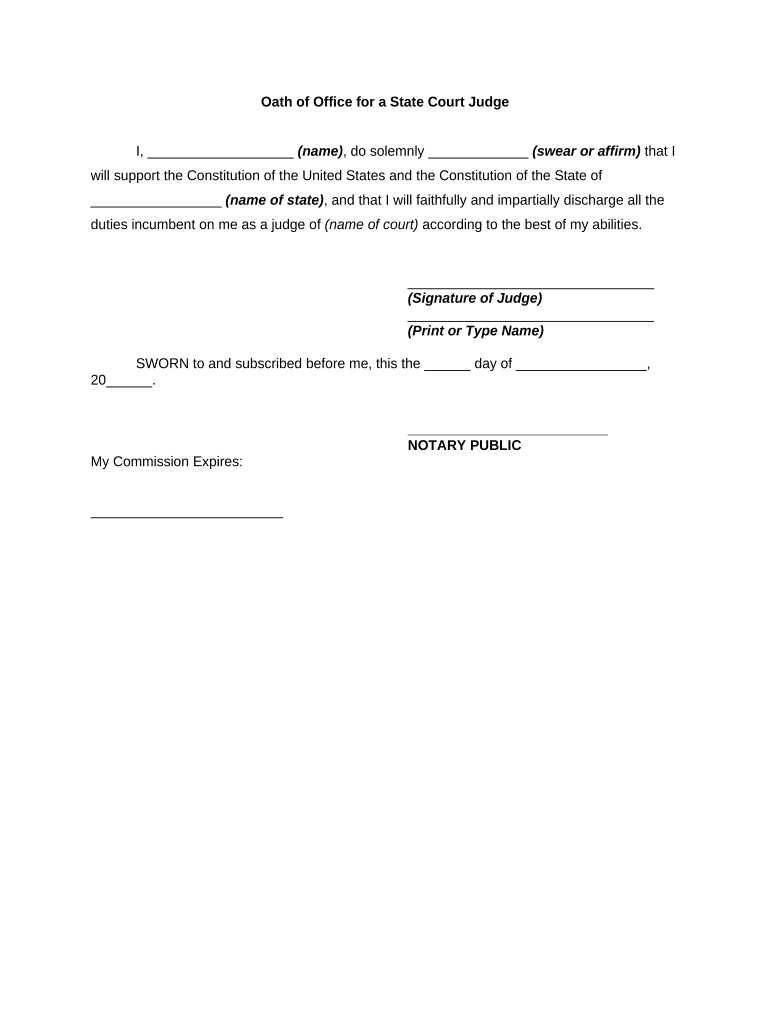
Oath of Office for a State Court Judge
What the Oath of Office for a State Court Judge Is
Why the Judicial Oath Matters
The oath creates a public, legal commitment to impartiality and rule-of-law obligations, establishes the judge’s authority to act, and produces a record for administrative and ethical oversight under state constitutions and statutes.
Who Handles and Relies on the Oath
Typical participants involved before, during, and after oath administration include court staff and the judge-elect.
- Judge-elect: Completes and signs the oath before assuming duties; provides identity and consent.
- Court clerk or administrator: Records the oath, stores the record, notifies agencies as required.
- County recorder or secretary of state: May receive copies for official files or public records.
Primary Signers and Custodians
Presiding Judge
Judge-elect or appointed judge who takes the oath and attests to observing duties. The presiding judge’s signature and date on the oath enable lawful exercise of judicial powers and satisfy statutory prerequisites for swearing in.
Court Clerk
Official responsible for receiving and recording the oath, maintaining the official file, and producing certified copies. The clerk verifies completeness and ensures the oath is retained according to court record retention rules.
Step-by-Step: Completing and Recording the Oath
-
01Prepare the form: Confirm statutory oath language and required fields before presenting to the judge.
-
02Verify identity: Confirm judge-elect identity via government ID or authorized credentialing.
-
03Administer oath: Official administers the oath verbally or in writing and observes the judge’s signature.
-
04Record and file: Court clerk records the document in the official docket or clerk’s records per state rules.
How to Customize an Online Oath Workflow
| Field | Configuration |
|---|---|
| Required Fields | Mark name, court, oath text, signature mandatory to prevent incomplete submissions |
| Signer Order | Set judge first, then attesting official or clerk to preserve sequence |
| Authentication | Require email + SMS or stronger verification for signer identity |
| Retention Rule | Attach automatic retention tag and export to records management system |
Where to File and How the Submission Flows
-
Sign: Judge signs the oath electronically or on paper as provided.
-
Attest: Attesting official or clerk adds signature, title, and date.
-
Record: Clerk files the oath in the court’s official records or docket.
-
Distribute: Certified copies issued to relevant agencies or posted per statute.
Technology and Integration Considerations for eSubmission
Ensure the platform supports secure signing, identity verification, and record export to court systems before use.
- File Formats: PDF and DOCX support for official records and redaction
- Integrations: Connectors to document management, e‑filing, and cloud storage systems
- Authentication: Email, SMS, or advanced signer authentication options
Consequences of Incorrect or Missing Oaths
Common Preparation Errors to Avoid
- Using unofficial or altered oath text rather than the exact statutory wording can invalidate the oath and require re-execution or correction.
- Failing to verify signer identity before attestation increases risk of administrative challenge and may breach local authentication requirements.
- Omitting attestation, witness, or notary blocks when required by state law creates filing defects and potential legal consequences.
- Storing only paper without digital preservation or searchable metadata hinders retrieval and violates recommended records management practices.
Practical Tips for Accurate and Efficient Oath Processing
Comparing eSignature Options for Judicial Oaths
| signNow | DocuSign | Adobe Sign | PandaDoc | HelloSign | |
|---|---|---|---|---|---|
| Starting Price | $8/user/mo | $15/user/mo | $14/user/mo | $19/user/mo | $15/user/mo |
| Free Trial | 7-day free trial | Varies | Varies | Varies | Varies |
| Bulk Send | Yes | Yes | Yes | Yes | Yes |
| Audit Trail | Yes | Yes | Yes | Yes | Yes |
| HIPAA Compliant | Yes | Yes | Yes | No | No |
| Envelope Cap | No cap | 100 envelopes/user/year | Varies | Varies | Varies |
Real-World Scenarios for Oath Execution
County Clerk Workflow
A county clerk prepares the standard oath form and schedules a swearing-in event for a judge-elect.
- Clerk verifies identity and records the signed oath immediately to the official docket.
- The clerk retains the original in the court file and provides certified copies to state agencies and the judge as proof of authority.
Remote Administration
A smaller jurisdiction uses a supervised remote session to administer the oath when in-person attendance is impractical.
- The attesting official records the session and signs the attestation.
- The recorded evidence and signed oath are filed with the clerk to preserve authenticity and comply with state requirements for remote notarization or attestation.
Timing and Filing Expectations
Swearing-In Timing:
Oath must be taken before the judge performs judicial duties; often on or before the appointed start date
Clerk Filing:
File the executed oath with the clerk on the same business day when possible to secure the official record
Certified Copies:
Issue certified copies to licensing bodies or agencies promptly where statutory notification is required
Remote Notarization:
If using RON, follow state identity-proofing and recording requirements before filing
Statutory Deadlines:
Some states impose explicit deadlines for filing or publication; verify the applicable state statute or court rule
Frequently Asked Questions and Troubleshooting
-
Can a judge take the oath electronically?
Yes in many jurisdictions when the platform and process meet ESIGN (15 U.S.C. §7001) and applicable state law or UETA standards; however, verify local statutes because a minority of states or specific court rules may require in-person administration.
-
Is a notary or witness always required?
Requirements vary by state: some statutes or court rules mandate attestation or notarial acknowledgment, while others accept clerk attestation. Check the specific state constitution or enabling statute for the oath.
-
Does ESIGN make all e-signatures valid for oaths?
ESIGN (15 U.S.C. ch. 96) supports legal validity of electronic signatures generally, but exceptions exist for certain documents and some state-specific procedural requirements; consult state law for any carved-out exceptions.
-
What evidence proves a valid electronic oath?
A complete audit trail showing signer identity, timestamp, signature action, and any attestation or notary data helps establish intent and attribution under ESIGN/UETA standards.
-
Can a remote online notarization be used?
Many states permit RON with identity proofing and audio-video recording; confirm the state’s RON rules and retention obligations before relying on remote notarization.
-
How long must oath records be retained?
Retention depends on court records policy and applicable law; retain originals while the judge serves and follow post-term archival rules, typically multiple years, and observe federal or state retention statutes.