Establishing secure connection…Loading editor…Preparing document…

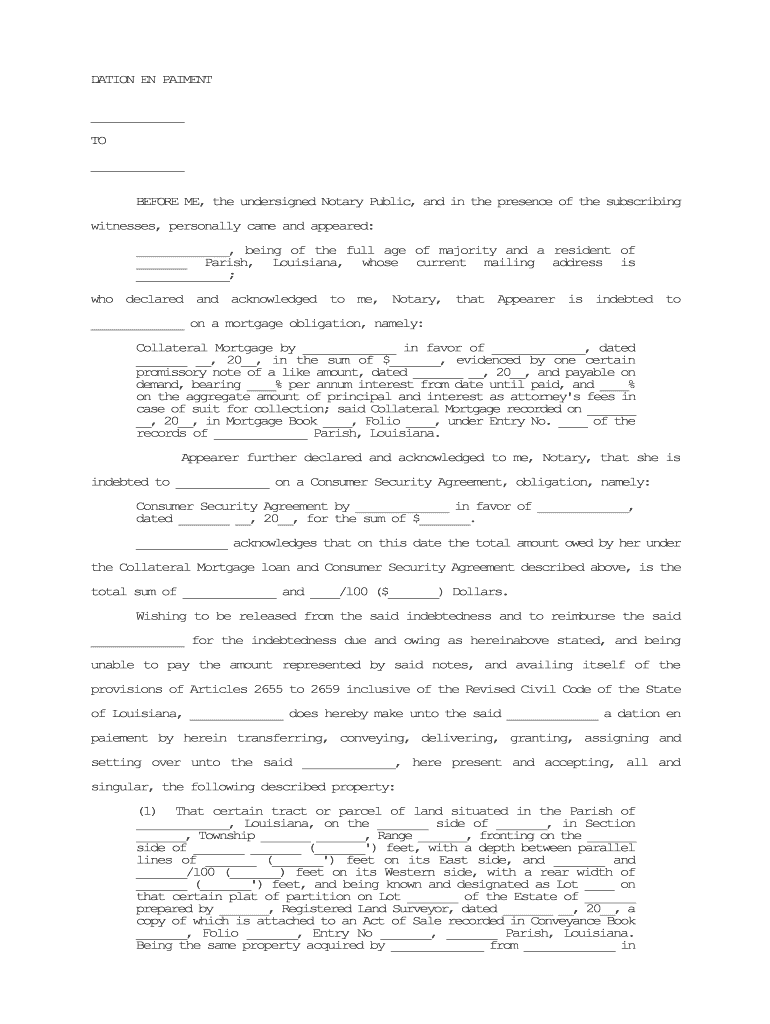
Dation En Paiement

This template is fully customizable. Edit the text, fill out the fields, and send it for signature. Give it a try!
Dation En Paiement

What a Dation En Paiement Is and when it applies

A Dation En Paiement is a transfer of property to a creditor to satisfy a debt or obligation instead of paying cash. Although the term originates in civil-law systems, the concept aligns with U.S. doctrines such as deed-in-lieu of foreclosure, acceptance in satisfaction, and accord and satisfaction. Parties use this mechanism when transferring title, goods, or other assets extinguishes liability. The agreement must clearly describe the asset transferred, the debt extinguished, conditions for transfer, and any retained obligations such as taxes, liens, or costs.

Why a clear Dation En Paiement matters

Using a written Dation En Paiement clarifies what is transferred, which debt is discharged, and who bears residual liabilities; it reduces dispute risk and documents creditor acceptance for tax and recording purposes.

Why a clear Dation En Paiement matters

Who typically prepares or signs this agreement

Several parties commonly encounter a Dation En Paiement or its U.S. equivalents; document clarity is essential for each role.

  • Lenders and creditors who accept an asset instead of cash to close an outstanding obligation.
  • Debtors or obligors transferring title, goods, or other property to extinguish a monetary debt.
  • Attorneys and title professionals who draft transfer language and handle recording, lien release, or escrow.

When multiple stakeholders are involved, confirm authority, recording requirements, and tax reporting obligations before completing the transfer.

Essential elements to include in a professional agreement

A complete Dation En Paiement should be explicit about parties, transferred asset, debt details, effective date, representations and warranties, and post-transfer responsibilities to avoid ambiguity and protect both parties.

Parties

Full legal names and capacities of creditor and debtor.
Asset Description

Precise legal description of property, VIN, parcel, or inventory list.

Debt Specifics

Exact amount, account numbers, and reference to underlying obligation.

Transfer Mechanics

How and where title passes, escrow instructions, and delivery terms.

Liens & Taxes

Who clears existing liens, pays transfer taxes, or indemnifies after transfer.

Acceptance Language

Creditor statement explicitly accepting the asset in full or partial satisfaction.

Step-by-step: completing a Dation En Paiement

Follow these sequential steps to prepare, document, and finalize the transfer with minimal legal exposure.

  • 01
    Draft Agreement: Describe parties, asset, debt, and acceptance terms.
  • 02
    Confirm Authority: Verify signatory power and corporate resolutions if needed.
  • 03
    Address Liens: Resolve or disclose existing liens and encumbrances.
  • 04
    Sign and Record: Execute, notarize if required, and record with appropriate office.

Where to send or file the executed agreement

Different steps require different recipients; route the signed document to recording offices, tax departments, and parties who must acknowledge receipt.

  • County Recorder: Record deeds or real property transfers where the property is located.
  • Creditor Records: Deliver executed agreement for creditor internal files and release processing.
  • Tax Authorities: Provide documentation to local/state tax office if transfer taxes or reassessments apply.
  • IRS Reporting: Retain records for potential reporting; file forms if required by tax rules.

Digital signing and technical considerations

Electronic execution can be valid under U.S. law if it meets ESIGN/UETA criteria and any transaction-specific exceptions are observed.

  • Authentication: Email, SMS codes, or stronger methods per transaction sensitivity.
  • File Formats: Use PDF or Word for reliable archiving and compatibility.
  • Integrations: Connect with CRM, title platforms, or cloud storage for workflow continuity.

Key risks and legal consequences of defective transfers

Tax Reporting: Possible IRS reporting and penalties
Invalid Transfer: Recording defects can void conveyance
Creditor Dispute: Other creditors may contest priority
Lien Exposure: Undisclosed liens survive transfer
Notarial Errors: Improper notarization may nullify act
Intentional Misstatement: Fraud allegations carry civil penalties

Practical examples from document and eSignature users

These case notes illustrate how firms document asset-for-debt transfers and preserve execution evidence.

Optica Ventures LLC

Optica adapted digital execution to simplify customer signings

  • The interface is simple and easy-to-use
  • They use secure audit trails to reduce follow-up and speed asset acceptance while preserving compliance.

Martin Properties

A property manager processed deeds and related documents online

  • I can process and execute all of these documents online with 100% compliance
  • The result was faster closing and consistent recordkeeping across mobile and desktop workflows.

Time-sensitive dates to track during the transfer

Monitor recording, tax reporting, and any statutory notice deadlines to avoid penalties or priority disputes.

Recording Deadline:

Record deed promptly to protect priority and avoid competing claims

Tax Filing Impact:

Report gains or exchanges on the next applicable tax return

Notice to Creditors:

Provide any required notices per creditor agreement or statute

I-9 / Employment:

Retain employment-related documentation per federal retention rules

Contractual Cure Period:

Observe any cure or objection periods specified in the agreement

eSignature vendor comparison for executing and storing transfers

Compare basic pricing and capabilities relevant to secure signing, audit trails, and HIPAA/enterprise compliance when selecting an eSignature provider.

signNow DocuSign Adobe Sign PandaDoc HelloSign
Starting Price $8/user/mo $15/user/mo $14/user/mo $19/user/mo $15/user/mo
Free Trial 7-day free trial Varies by vendor Varies by vendor Varies by vendor Varies by vendor
Bulk Send Yes Yes Yes Yes Varies by plan
Audit Trail Yes Yes Yes Yes Yes
HIPAA Compliant Yes Yes Yes No No
Envelope Cap No envelope cap 100 envelopes/user/year Varies by plan Varies by plan Varies by plan

Common questions about using and validating a Dation En Paiement

Answers to frequent practical and legal questions about execution, e-signatures, notarization, and tax implications.


Need help? Contact support

be ready to get more
Join over 28 million airSlate SignNow users