Establishing secure connection…Loading editor…Preparing document…

Complaint Objecting to Discharge of Debtor

This template is fully customizable. Edit the text, fill out the fields, and send it for signature. Give it a try!
Complaint Objecting to Discharge of Debtor

What the Complaint Objecting to Discharge of Debtor Is

A Complaint Objecting to Discharge of Debtor is a formal adversary complaint filed in a bankruptcy case asking the court to deny the debtor a general or specific discharge under the Bankruptcy Code. It identifies the creditor or party in interest, states the factual and legal basis for objection (for example fraud, false oath, or unlawful transfer), and requests judicial relief. The complaint initiates an adversary proceeding subject to Federal Rules of Bankruptcy Procedure and local court rules, requiring service on the debtor and the bankruptcy trustee.

Why this Complaint Matters

Filing a timely objection preserves a creditor’s right to litigate nondischargeability issues, prevents improper discharge of debt, and creates a court record for potential damages or equitable relief.

Why this Complaint Matters

Who Typically Prepares or Files This Complaint

Creditors, creditors’ counsel, trustees, and occasionally government agencies prepare and file complaints objecting to discharge when statutory grounds exist.

  • Creditor attorneys asserting nondischargeability claims on behalf of clients affected by debtor misconduct or fraud.
  • Chapter 7 trustees pursuing avoidance actions or objections that affect estate administration and creditor distributions.
  • Government entities (IRS, state tax authorities) protecting public claims or enforcement interests in bankruptcy.

The filing party must have standing and should confirm local bankruptcy court procedures for commencement, service, and required filings.

Key Parts of a Professional Complaint Objecting to Discharge of Debtor

A complete complaint contains a clear caption, concise statement of jurisdiction, numbered factual allegations, legal counts citing Bankruptcy Code sections, a specific request for relief, and signature with contact information for the filer.

Caption

Case caption identifying bankruptcy court, debtor, and adversary number when assigned.
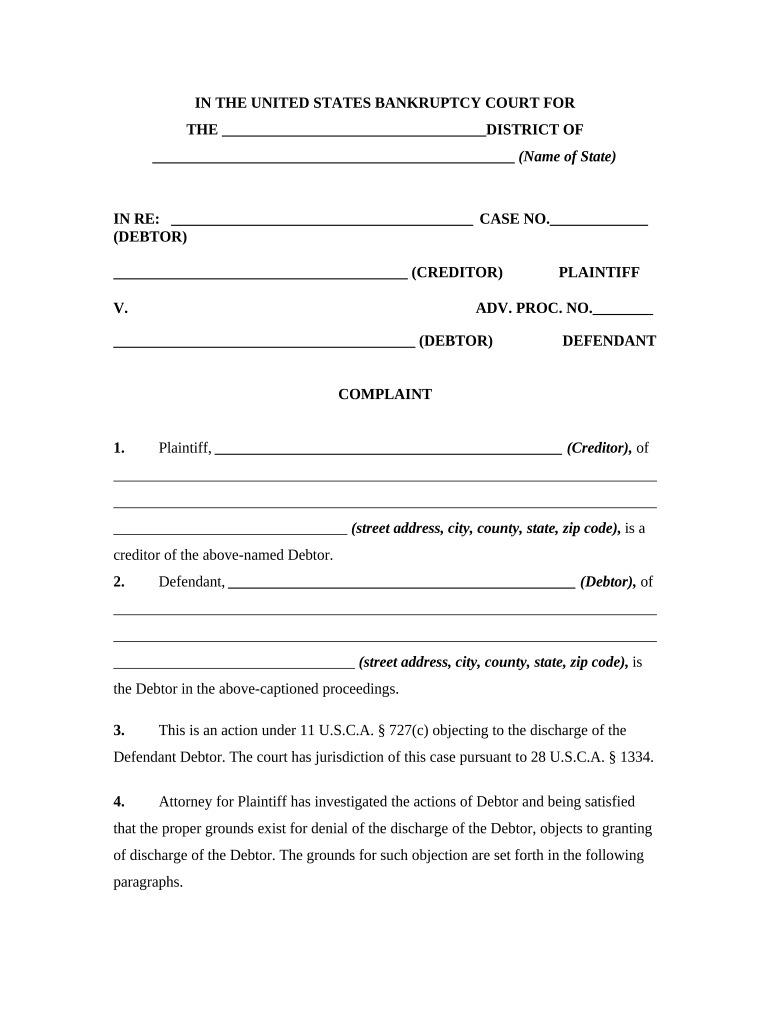
Jurisdiction

Citation to 28 U.S.C. §1334 and related bankruptcy statutes establishing court authority.

Factual Allegations

Chronological, numbered facts supporting nondischargeability or objection grounds.

Legal Counts

Counts tied to specific Code sections (for example 11 U.S.C. §523(a)(2), §523(a)(4), §523(a)(6)).

Relief Requested

Clear prayer for judgment denying discharge of specified debts and any ancillary relief.

Signature Block

Attorney or party signature, address, phone, email, and Bar number where applicable.

Essential Information to Include

Case Caption: Bankruptcy court name and docket number.
Debtor Name: Full legal name of debtor.
Creditor Name: Name of the objecting party.
Trustee Name: Chapter trustee if assigned.
Statutory Basis: Specific Code sections cited.
Relief Sought: Precise remedy requested.

Step-by-Step: Filing a Complaint Objecting to Discharge of Debtor

Follow these sequential steps to prepare, file, and serve the adversary complaint under local and federal rules.

  • 01
    Draft Complaint: Assemble caption, facts, and legal counts; attach supporting exhibits.
  • 02
    Review Local Rules: Check bankruptcy court local rules and form requirements.
  • 03
    File via CM/ECF: Upload complaint to the court’s CM/ECF system or file in paper if required.
  • 04
    Serve Parties: Serve debtor, trustee, and U.S. trustee per FRBP and local rules.

How to Customize and Submit the Complaint Online

Configure electronic templates and e-filing steps to match court requirements and streamline service.

Template Fields Pre-fill caption, parties, and trustee fields for reuse.
Exhibit Upload Attach supporting documents as PDF exhibits.
Signature Capture Collect attorney or party signature and date fields.
E-Filing Settings Export PDF compatible with CM/ECF upload.
Service List Auto-generate required service list and notices.

Where to File and Who Receives the Complaint

The complaint is filed in the bankruptcy court handling the debtor’s case and served on prescribed parties per federal and local rules.

  • Bankruptcy Court: File in the district’s bankruptcy court where the case is pending.
  • Trustee Service: Serve a copy on the chapter trustee.
  • Debtor Service: Serve the debtor at counsel or debtor’s listed address.
  • U.S. Trustee: Serve the U.S. Trustee where required by local rule.

Digital Submission and Authentication Considerations

Confirm that any eSignature or e-submission method satisfies court and local rule requirements, including authentication and retention.

  • Court Acceptance: CM/ECF accepts electronically filed PDFs.
  • Signature Method: Use methods that prove signer attribution.
  • Record Retention: Keep originals and audit logs per rules.

When using electronic signing platforms, retain audit trails, reproduction capabilities, and any consumer disclosure records needed to demonstrate compliance with ESIGN and local court requirements.

Key Timing Rules and Deadlines to Track

Adversary proceedings have specific deadlines tied to the filing date, summons issuance, and applicable local calendar — track all court-set deadlines carefully.

Time to File Objection:

As soon as grounds are discovered; some objections must be filed within bar date.

Summons Return:

Summons served; return per FRBP deadlines.

Answer Deadline:

Debtor typically has 30 days to answer after service.

Discovery Period:

Set by local rules or scheduling order.

Trial / Hearing Dates:

Set by the court after scheduling conference.

Common Mistakes to Avoid When Preparing the Complaint

  • Failing to cite the precise Bankruptcy Code subsection and the factual grounds required for nondischargeability can result in dismissal or amendment deadlines.
  • Using incorrect case caption or docket number leads to misfiling and delayed service; always pull the current docket entry before filing.
  • Not serving all required parties — including the trustee and U.S. Trustee when required — may render the service defective under FRBP.
  • Relying on vague allegations rather than specific dates, amounts, and document references weakens proofs during discovery and at trial.

Consequences of an Incorrect or Late Complaint

Dismissal Risk: Court may dismiss complaint.
Waiver of Claims: Rights to object may be waived.
Sanctions Exposure: Potential sanctions for misconduct.
Costs Liability: Adverse cost awards possible.
Delay in Recovery: Creditor distributions may be delayed.
Loss of Evidence: Statute of limitations or lost proof.

Example Scenarios: How the Complaint Is Used in Practice

These brief scenarios illustrate typical reasons and outcomes when an objection to discharge is filed.

Creditor Fraud Claim

A small-business lender discovers the debtor concealed transfers and files an adversary complaint asserting fraud under 11 U.S.C. §523(a)(2)

  • The complaint lists transfers, dates, and misrepresentations in detail
  • The court schedules discovery, the creditor obtains documents showing intent, and the claim proceeds to trial where the debt is declared nondischargeable, preserving creditor recovery options.

Employee Wage Debt

A former employee files to object to discharge of wages unpaid due to embezzlement allegations

  • The complaint includes payroll records, time sheets, and corporate resolutions
  • After expedited discovery the court denies discharge for the specific wage debt, allowing the employee priority in distributions.

Comparison: eSignature Options for Preparing and Signing Complaints

Basic cost and capability differences among common eSignature vendors to consider when managing complaint templates and secure signatures.

signNow DocuSign Adobe Sign PandaDoc HelloSign
Starting Price $8/user/mo $15/user/mo $14/user/mo $19/user/mo $15/user/mo
Free Trial 7-day free trial Varies by plan Varies by plan Varies by plan Varies by plan
Bulk Send Yes Yes Yes Yes Varies
Audit Trail Yes Yes Yes Yes Yes
Envelope Cap No cap 100 envelopes/user/year Plan-dependent Plan-dependent Plan-dependent

Frequently Asked Questions About Complaints Objecting to Discharge

Answers to common practical and procedural questions when preparing and filing a Complaint Objecting to Discharge of Debtor.


Need help? Contact support

be ready to get more
Join over 28 million airSlate SignNow users