Establishing secure connection…Loading editor…Preparing document…

Washington Response to Petition to Disestablish Paternity

This template is fully customizable. Edit the text, fill out the fields, and send it for signature. Give it a try!
Washington Response to Petition to Disestablish Paternity

What the Washington Response to Petition to Disestablish Paternity Is

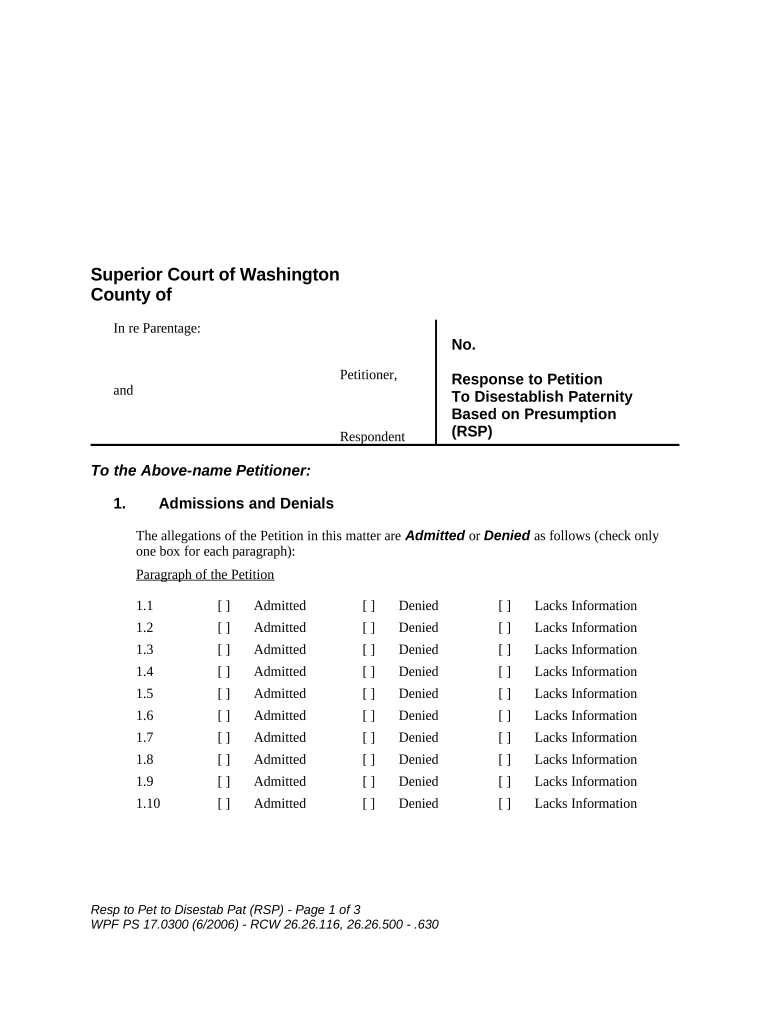
The Washington Response to Petition to Disestablish Paternity is the formal written answer a respondent files in Washington courts after being served with a petition seeking to end legal parentage. The response explains whether the respondent admits, denies, or objects to factual allegations and legal grounds in the petition, and may assert counterclaims (for custody, visitation, or support). It also identifies evidence, requests or objects to relief, and notifies the court and parties if a hearing or trial is requested. Properly filed responses preserve procedural rights and shape the court’s next steps.

Why a Clear Response Matters in Disestablishment Cases

Filing a timely, complete response preserves defenses, prevents default judgment, and ensures your evidence and objections are considered. A well‑structured response clarifies issues for the court and limits surprises at hearing.

Why a Clear Response Matters in Disestablishment Cases

Who Typically Prepares This Response

The response is prepared by the named respondent, typically the alleged parent, or by their attorney when counsel is retained.

  • Self-represented respondents who were served with the petition and must preserve their procedural rights.
  • Defense attorneys representing respondents in family law and parentage matters.
  • Court-appointed guardians or representatives when the respondent lacks capacity.

When multiple respondents are named, each party should file an individual response or a joint response where appropriate.

Step-by-Step: Completing the Washington Response to Petition to Disestablish Paternity

Follow these sequential steps to prepare a compliant response and reduce procedural risk.

  • 01
    Review Petition: Read allegations, relief requested, and named parties carefully.
  • 02
    Answer Each Allegation: Admit, deny, or state lack of sufficient information for each numbered paragraph.
  • 03
    Raise Defenses: Include affirmative defenses and any request for genetic testing.
  • 04
    File and Serve: File with the clerk and serve all parties per court rules.

Required Information and Fields at a Glance

Court Caption: Court name and case number
Party Names: Petitioner and respondent legal names
Paragraph Responses: Admit/Deny/Lack information
Affirmative Defenses: List of defenses asserted
Relief Sought: Specific orders requested
Signature and Date: Typed or handwritten signature

Penalties and Risks of a Deficient Response

Default Judgment: Court may rule for petitioner if no timely response
Lost Defenses: Failure to assert defenses can waive them
Contempt Sanctions: Improper service or false statements risk sanctions
Financial Liability: Support or arrears may persist absent relief
Evidence Exclusion: Late disclosures can limit evidence admissibility
Increased Costs: Attorney fees and court costs can accumulate

Common Preparation Mistakes to Avoid

  • Missing the response deadline because the summons specified a short filing window; check the summons and local rules immediately.
  • Answering generically instead of responding to each numbered allegation individually, which leaves factual points unresolved.
  • Failing to serve copies on all parties or to file a proof of service, which can lead to jurisdictional and scheduling problems.
  • Submitting unsigned or improperly dated documents, causing the clerk to reject or the court to treat the filing as incomplete.

Where to File and How Service Works in Washington

Filing and service rules determine jurisdiction and next steps; follow local superior court procedures for the county where the petition was filed.

  • File with Clerk: Submit response to the Superior Court clerk where petition filed.
  • Proof of Service: Serve petitioner and file a proof of service with the court.
  • Follow Local Rules: Comply with county-specific filing formats and fees.
  • Request Hearing: Include hearing request if you seek a contested hearing.

How to Complete and Route the Response Online

Set up a clear digital workflow to gather signatures, attach exhibits, and deliver the filed packet to the court and parties.

Document Upload Upload final PDF with exhibits
Signature Fields Place signature and date fields for each signer
Recipient List Add petitioner, counsel, and court clerk
Authentication Enable email or SMS signer verification
Proof of Delivery Retain audit trail and delivery receipt

Digital Filing and Distribution Requirements

Electronic completion and distribution must satisfy court filing, authentication, and record-retention rules.

  • Authentication: Email, SMS, or stronger verification
  • Audit Trail: Timestamp, IP, and activity log
  • Supported Formats: PDF/A and searchable PDF preferred

Confirm the court accepts electronic filings and preserve native signed copies and the platform audit trail for the record and appeals.

Typical Deadlines and What to Watch For

Deadlines can vary by county and by how service was executed; always check the summons and local superior court rules for exact deadlines.

Response Period:

Varies by summons; commonly 20–30 days

Request for Genetic Testing:

Raise promptly to incorporate testing schedules

Discovery Windows:

Follow court scheduling orders for document requests

Hearing Scheduling:

Court sets hearing date after initial filings

Appeal Timing:

Post-order appeal deadlines vary by statute

Key Milestones After Filing Your Response

These sequential milestones describe the typical court pathway following a filed response.

01

File Response

Clerk accepts and assigns case tracking number.

02

Serve Parties

Proof of service filed to notify petitioner and counsel.

03

Schedule Hearing

Judge or clerk issues a date for contested matters.

04

Disposition

Court issues order after hearing or by agreement.

eSignature Provider Comparison for Completing and Exchanging the Response

Select an eSignature vendor that supports audit trails, HIPAA or BAA where needed, and integration with your case workflow. Pricing shown is plan-level starting prices.

signNow DocuSign Adobe Sign PandaDoc HelloSign
Starting Price $8/user/mo $15/user/mo $14/user/mo $19/user/mo $15/user/mo
Free Trial 7-day trial No No Yes, limited Yes, limited
Bulk Send Yes Yes Yes Yes No
Audit Trail Yes Yes Yes Yes Yes
HIPAA Compliant Yes Yes Yes No No

Practical Tips for Accurate and Efficient Completion

Follow these best practices to minimize delays and protect your rights during the disestablishment process.

Confirm Case Details
Verify court name, case number, and party names against the petition to avoid filing defects and ensure proper service.
Be Specific When Answering
Respond to each numbered allegation with Admit, Deny, or Lack sufficient information; avoid blanket responses that obscure facts.
Document Evidence Clearly
Attach exhibits with labeled tabs and a separate exhibit index to help the court and opposing counsel locate records quickly.
Preserve Audit Trails
When using eSignature or RON, retain the platform audit trail and proof of filing to support authenticity and admissibility.

Frequently Asked Questions and Troubleshooting

Answers to common procedural and practical questions about responding to a petition to disestablish paternity in Washington.


Need help? Contact support

be ready to get more
Join over 28 million airSlate SignNow users