Establishing secure connection…Loading editor…Preparing document…

Minnesota Notice of Dismissal with Prejudice

This template is fully customizable. Edit the text, fill out the fields, and send it for signature. Give it a try!
Minnesota Notice of Dismissal with Prejudice

What the Minnesota Notice of Dismissal with Prejudice Is

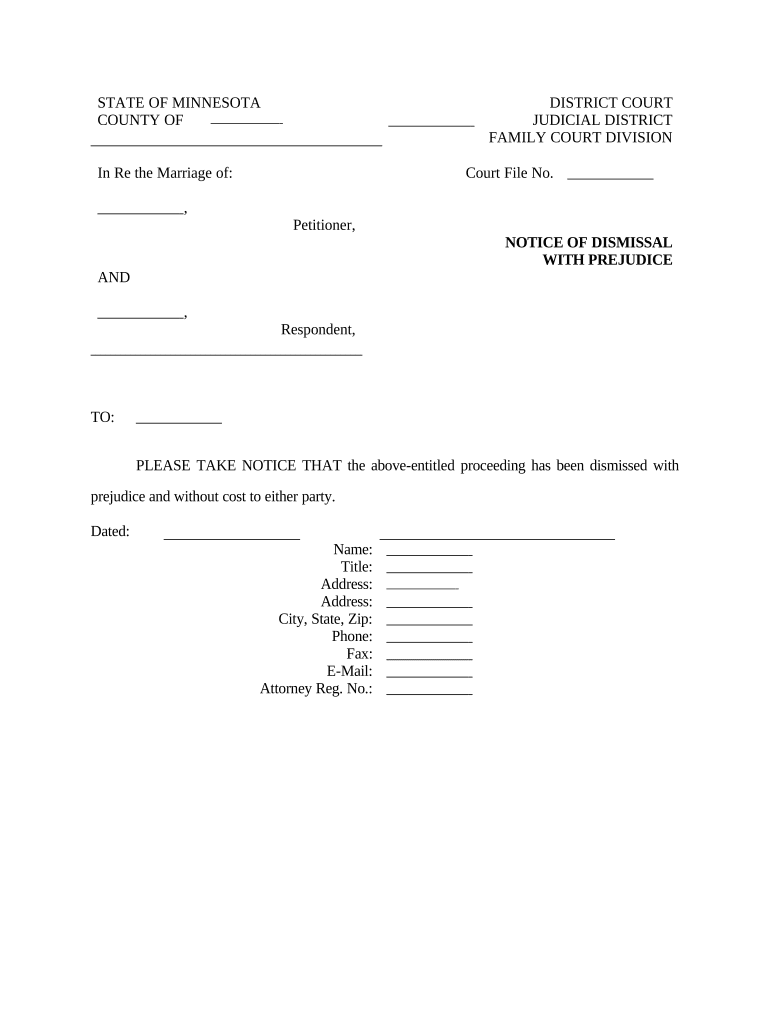
Minnesota Notice of Dismissal with Prejudice is a court filing used to terminate a civil action permanently, preventing refiling of the same claim. In Minnesota civil procedure, a plaintiff or the plaintiff’s attorney files this notice to withdraw the complaint with prejudice after settlement, case resolution, or strategic decision. Filing returns the case to the court docket as dismissed with prejudice, which constitutes an adjudication on the merits. The document must identify the case caption, case number, parties, and signature of the filing attorney or party, and be served per local rules.

Why a Dismissal with Prejudice Matters in Minnesota Cases

Using a Minnesota Notice of Dismissal with Prejudice closes a claim permanently, preserves settlement terms, and prevents future litigation on the same cause of action. It provides legal finality, helps allocate costs and attorney fees, and reduces continuing litigation exposure for parties.

Why a Dismissal with Prejudice Matters in Minnesota Cases

Who Typically Files or Receives This Notice

Typical filers include plaintiffs and their counsel, defendants in companion actions, and court clerks processing the dismissal notice.

  • Plaintiffs and plaintiff attorneys who reached settlement and must formally dismiss claims with prejudice.
  • Defense counsel verifying dismissal language and confirming enforcement of settlement obligations.
  • Court clerks filing, docketing, and serving dismissal notices per local rules.

Core Elements to Include for a Professional Filing

Essential elements to include in a professional Minnesota Notice of Dismissal with Prejudice ensure clarity, enforceability, and correct court processing.

Caption

Present the case caption exactly as on prior pleadings, including party designations and court name. A precise caption prevents clerical errors and ensures the notice links to the existing docket without ambiguity.
Case Number

Display the full court-assigned number in the same format used on the complaint and other filings. Incorrect formatting may cause clerks to reject or misplace the notice, delaying entry of dismissal.

Dismissal Statement

Use clear, unambiguous phrasing stating the plaintiff dismisses all claims with prejudice. If any claims or parties remain, specify exclusions explicitly to avoid future disputes.

Costs and Fees

State whether costs and attorney fees are reserved, taxed, or discharged. Clarity about costs prevents post-dismissal disputes and informs enforcement of settlement terms.

Signatory

Include the printed name, signature, bar number for attorneys, firm name, and contact information. Signatory details allow the court and opposing parties to verify authority and serve documents.

Certificate of Service

Attach a completed certificate listing recipients, service methods, dates, and addresses. A thorough certificate demonstrates compliance with Minnesota service rules and reduces challenges to validity.

Step-by-Step: Prepare, File, and Serve the Notice

Follow these steps to prepare and submit a Minnesota Notice of Dismissal with Prejudice accurately and in compliance with local rules.

  • 01
    Prepare Document: Include caption, case number, parties, dismissal language.
  • 02
    Sign: Signature of plaintiff or counsel and printed name and date.
  • 03
    File: Submit to the appropriate Minnesota district court clerk's office.
  • 04
    Serve: Provide opposing parties and registered agents with a copy per rule.

Filing and Service Workflow Overview

Overview of the filing and service flow for a Minnesota Notice of Dismissal with Prejudice.

  • Upload: Upload completed PDF to e-filing system.
  • Attach: Attach settlement agreement if required by court.
  • Submit: Pay filing fee and submit to clerk.
  • Serve: Email or mail copies per Minnesota rules.

Configuring an Electronic Workflow for the Notice

Configure an electronic workflow for drafting, signing, filing, and service of the dismissal notice to match court and party requirements.

Field Configuration
Template Pre-populate caption and case number.
Signer Plaintiff or attorney with signature field.
Authentication Email link or SMS code verification.
Filing Export PDF/A and include certificate.

Technical Requirements for e-Signing and e-Filing

Ensure your system supports PDF and PDF/A export, a modern browser, and stable internet connection for e-filing and e-signature.

  • Formats: PDF, PDF/A, DOCX accepted
  • Integrations: Works with Google Workspace, NetSuite
  • Auth: Email, SMS, or two-factor options

Security and Compliance Considerations

Encryption: TLS 1.2/1.3 in transit; AES-256 at rest.
ESIGN/UETA: Meets ESIGN and UETA standards.
HIPAA: BAA available for HIPAA compliance.
SOC 2: SOC 2 Type II certified on request.
21 CFR: 21 CFR Part 11 support
Audit Trail: Comprehensive timestamps, IP, and event log.

Key Risks and Legal Consequences to Watch For

Tax Penalties: Penalties under IRC §6721
Service Defect: Dismissal may be set aside
Refile Bar: Claim barred from refiling
Attorney Fees: Fees may be taxed per agreement
Clerical Rejection: Incorrect caption or number causes rejection
Fraud Exception: Fraud may reopen case in rare instances

Common Preparation and Filing Pitfalls

  • Failing to match the case caption and number leads to clerk rejection and processing delays, often requiring re-filing and additional fees.
  • Using ambiguous dismissal language or reserving unspecified claims invites post-dismissal disputes and potential motions to reopen the case.
  • Neglecting to include a certificate of service or inaccurate recipient addresses can void service and prompt opposing counsel to challenge validity.
  • Relying on improper signature authority or unsigned filings risks rejection and may require counsel appearance or corrective filings.

Sample eSignature Pricing and Feature Comparison (signNow listed first)

Compare typical pricing and core features for common eSignature providers; signNow is listed first as the baseline for plan comparisons.

signNow DocuSign Adobe Sign PandaDoc HelloSign
Starting Price $8/user/mo $15/user/mo $14/user/mo $19/user/mo $15/user/mo
Free Trial Yes, 7-day free trial Varies by vendor Varies by vendor Varies by vendor Varies by vendor
Bulk Send Yes — available on select plans Yes Yes Yes No
Audit Trail Yes Yes Yes Yes Yes
HIPAA Compliant Yes Yes Yes No No

Frequently Asked Questions About the Notice

Common questions and answers about completing, filing, and serving a Minnesota Notice of Dismissal with Prejudice are below for reference.


Need help? Contact support

be ready to get more
Join over 28 million airSlate SignNow users